<title>
<![CDATA[ MMM-Pages and MMM-page-indicator, how to select the page? ]]>
</title>
<description>
<![CDATA[ <p dir="auto">Hello,</p>
<p dir="auto">trying to test MMM-Pages and MMM-page-indicator, I have 2 (maybe basic) questions.</p>
<p dir="auto">After installing MMM-Pages and MMM-page-indicator,</p>
<ol>
<li>how is possible to click (mouse) on the dots, as the arrow of the mouse is not appearing on the mirror?</li>
<li>can we switch the pages manually with a touch screen display (e.g with an ipad or a standard touch screen display as iiyama ProLite T2252MSC-B2) ?</li>
</ol>
<p dir="auto">Thank you for your interest and have a great day.</p>
<p dir="auto">Kind regards,</p>
<p dir="auto">Cédric</p>
]]>
</description>
<link>https://forum.magicmirror.builders/topic/19449/mmm-pages-and-mmm-page-indicator-how-to-select-the-page</link>
<generator>RSS for Node</generator>
<lastBuildDate>Mon, 31 Mar 2025 02:41:00 GMT</lastBuildDate>
<atom:link href="https://forum.magicmirror.builders/topic/19449.rss" rel="self" type="application/rss+xml"/>
<pubDate>Mon, 17 Feb 2025 10:11:26 GMT</pubDate>
<ttl>60</ttl>
<item>
<title>
<![CDATA[ Reply to MMM-Pages and MMM-page-indicator, how to select the page? on Mon, 17 Mar 2025 08:32:19 GMT ]]>
</title>
<description>
<![CDATA[ <p dir="auto"><a class="plugin-mentions-user plugin-mentions-a" href="/user/sdetweil">@sdetweil</a></p>
<p dir="auto">Problem solved with the help of this tutorial: <a href="https://www.gechic.com/en/raspberry-pi-touch-monitor-rotate-touch-screen-rotate-settings/" target="_blank" rel="noopener noreferrer nofollow ugc">https://www.gechic.com/en/raspberry-pi-touch-monitor-rotate-touch-screen-rotate-settings/</a></p>
<p dir="auto">wihsing you a great week!</p>
]]>
</description>
<link>https://forum.magicmirror.builders/post/124971</link>
<guid isPermaLink="true">https://forum.magicmirror.builders/post/124971</guid>
<dc:creator>
...</dc:creator>
<pubDate>Mon, 17 Mar 2025 08:32:19 GMT</pubDate>
</item>
<item>
<title>
<![CDATA[ Reply to MMM-Pages and MMM-page-indicator, how to select the page? on Mon, 17 Mar 2025 12:57:06 GMT ]]>
</title>
<description>
<![CDATA[ <p dir="auto"><a class="plugin-mentions-user plugin-mentions-a" href="/user/com1cedric">@com1cedric</a> awesome!</p>
]]>
</description>
<link>https://forum.magicmirror.builders/post/124972</link>
<guid isPermaLink="true">https://forum.magicmirror.builders/post/124972</guid>
<dc:creator>
...</dc:creator>
<pubDate>Mon, 17 Mar 2025 12:57:06 GMT</pubDate>
</item>
<item>
<title>
<![CDATA[ Reply to MMM-Pages and MMM-page-indicator, how to select the page? on Mon, 17 Mar 2025 08:32:19 GMT ]]>
</title>
<description>
<![CDATA[ <p dir="auto"><a class="plugin-mentions-user plugin-mentions-a" href="/user/sdetweil">@sdetweil</a></p>
<p dir="auto">Problem solved with the help of this tutorial: <a href="https://www.gechic.com/en/raspberry-pi-touch-monitor-rotate-touch-screen-rotate-settings/" target="_blank" rel="noopener noreferrer nofollow ugc">https://www.gechic.com/en/raspberry-pi-touch-monitor-rotate-touch-screen-rotate-settings/</a></p>
<p dir="auto">wihsing you a great week!</p>
]]>
</description>
<link>https://forum.magicmirror.builders/post/124971</link>
<guid isPermaLink="true">https://forum.magicmirror.builders/post/124971</guid>
<dc:creator>
...</dc:creator>
<pubDate>Mon, 17 Mar 2025 08:32:19 GMT</pubDate>
</item>
<item>
<title>
<![CDATA[ Reply to MMM-Pages and MMM-page-indicator, how to select the page? on Sun, 16 Mar 2025 15:56:03 GMT ]]>
</title>
<description>
<![CDATA[ <p dir="auto"><a class="plugin-mentions-user plugin-mentions-a" href="/user/sdetweil">@sdetweil</a> OK, thank you Sam. You’re right indeed, it has nothing to do with the Magic Mirror.</p>
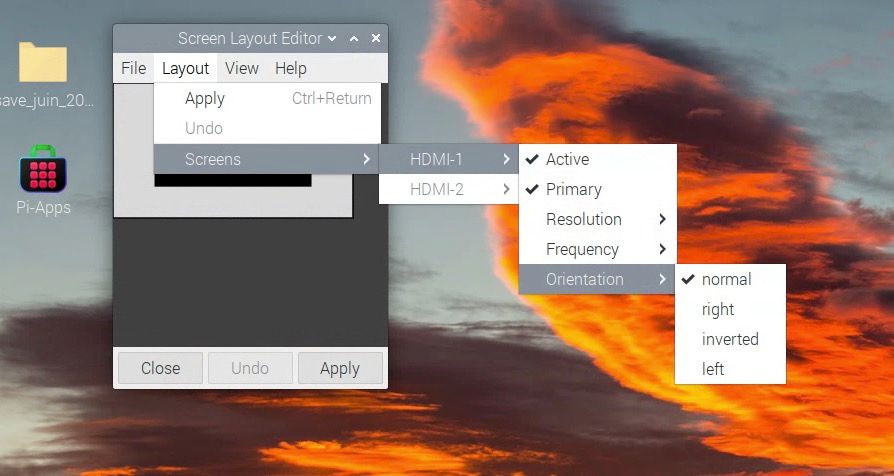
<p dir="auto">In fact, when I turn the layout right or left with the “Screen Layout editor”, then the “touches” are as “mirrored”. Maybe a configuration problem of the display.</p>
<p dir="auto">I will ask the display company about this issue.</p>
]]>
</description>
<link>https://forum.magicmirror.builders/post/124949</link>
<guid isPermaLink="true">https://forum.magicmirror.builders/post/124949</guid>
<dc:creator>
...</dc:creator>
<pubDate>Sun, 16 Mar 2025 15:56:03 GMT</pubDate>
</item>
<item>
<title>
<![CDATA[ Reply to MMM-Pages and MMM-page-indicator, how to select the page? on Sun, 16 Mar 2025 13:40:37 GMT ]]>
</title>
<description>
<![CDATA[ <p dir="auto"><a class="plugin-mentions-user plugin-mentions-a" href="/user/com1cedric">@com1cedric</a> the module does not know anything about page orientation</p>
<p dir="auto">I would install MMM-ViewNotifications module to see if the click is being processed, and maybe change the background color of the region for indicator to see where that section is on the screen. in auto page cycle mode, the different indicator circles will show which page is active. do they change?</p>
<p dir="auto">these are not my modules, I just updated pages for new function. and helped other users change the icons via css for indicator</p>
]]>
</description>
<link>https://forum.magicmirror.builders/post/124933</link>
<guid isPermaLink="true">https://forum.magicmirror.builders/post/124933</guid>
<dc:creator>
...</dc:creator>
<pubDate>Sun, 16 Mar 2025 13:40:37 GMT</pubDate>
</item>
<item>
<title>
<![CDATA[ Reply to MMM-Pages and MMM-page-indicator, how to select the page? on Sun, 16 Mar 2025 13:16:12 GMT ]]>
</title>
<description>
<![CDATA[ <p dir="auto"><a class="plugin-mentions-user plugin-mentions-a" href="/user/com1cedric">@com1cedric</a> hello <a class="plugin-mentions-user plugin-mentions-a" href="/user/sdetweil">@sdetweil</a>, I’ve received the Hannspree HT221PPB -TOUCH screen and could test your module.</p>
<p dir="auto">It work well ! … in the landscape mode, but not in the portait mode, after changing the display position in the parameters.<img src="/assets/uploads/files/1742130918556-capture-d-e-cran-2025-03-16-a-14.15.09.jpg" alt="Capture d’écran 2025-03-16 à 14.15.09.jpg" class=" img-fluid img-markdown" /></p>
<p dir="auto">Did you encounter this issue as well?</p>
]]>
</description>
<link>https://forum.magicmirror.builders/post/124931</link>
<guid isPermaLink="true">https://forum.magicmirror.builders/post/124931</guid>
<dc:creator>
...</dc:creator>
<pubDate>Sun, 16 Mar 2025 13:16:12 GMT</pubDate>
</item>
<item>
<title>
<![CDATA[ Reply to MMM-Pages and MMM-page-indicator, how to select the page? on Thu, 06 Mar 2025 20:42:54 GMT ]]>
</title>
<description>
<![CDATA[ <p dir="auto"><a class="plugin-mentions-user plugin-mentions-a" href="/user/sdetweil">@sdetweil</a> Hello Sam, and thank you for asking.<br />
I encountered a problem with the touch screen iyama ProLite T2252MSC-B2 I recently bought, as it finally was not compatible with Raspberry, what I did not realise before buying it.</p>
<p dir="auto">So, I had to find someting else and with the help of <a class="plugin-mentions-user plugin-mentions-a" href="/user/rkorell">@rkorell</a> (thank you Ralf!) in <a href="https://forum.magicmirror.builders/topic/19486/which-solution-for-touching-screen/8">https://forum.magicmirror.builders/topic/19486/which-solution-for-touching-screen/8</a>, I ordered a other display Hannspree HT221PPB -TOUCH and I hope to receive and test it next week.</p>
<p dir="auto">I will inform you as soon as I get any results.</p>
<p dir="auto">Kind regards, Cédric</p>
]]>
</description>
<link>https://forum.magicmirror.builders/post/124605</link>
<guid isPermaLink="true">https://forum.magicmirror.builders/post/124605</guid>
<dc:creator>
...</dc:creator>
<pubDate>Thu, 06 Mar 2025 20:42:54 GMT</pubDate>
</item>
<item>
<title>
<![CDATA[ Reply to MMM-Pages and MMM-page-indicator, how to select the page? on Wed, 05 Mar 2025 19:37:53 GMT ]]>
</title>
<description>
<![CDATA[ <p dir="auto"><a class="plugin-mentions-user plugin-mentions-a" href="/user/com1cedric">@com1cedric</a> did you get a chance to test this out?</p>
]]>
</description>
<link>https://forum.magicmirror.builders/post/124577</link>
<guid isPermaLink="true">https://forum.magicmirror.builders/post/124577</guid>
<dc:creator>
...</dc:creator>
<pubDate>Wed, 05 Mar 2025 19:37:53 GMT</pubDate>
</item>
<item>
<title>
<![CDATA[ Reply to MMM-Pages and MMM-page-indicator, how to select the page? on Sun, 23 Feb 2025 15:25:49 GMT ]]>
</title>
<description>
<![CDATA[ <p dir="auto"><a class="plugin-mentions-user plugin-mentions-a" href="/user/sdetweil">@sdetweil</a> hello, currently on holiday, will try next week. Thanks for asking and have a good day</p>
]]>
</description>
<link>https://forum.magicmirror.builders/post/124276</link>
<guid isPermaLink="true">https://forum.magicmirror.builders/post/124276</guid>
<dc:creator>
...</dc:creator>
<pubDate>Sun, 23 Feb 2025 15:25:49 GMT</pubDate>
</item>
<item>
<title>
<![CDATA[ Reply to MMM-Pages and MMM-page-indicator, how to select the page? on Sun, 23 Feb 2025 15:01:11 GMT ]]>
</title>
<description>
<![CDATA[ <p dir="auto"><a class="plugin-mentions-user plugin-mentions-a" href="/user/com1cedric">@com1cedric</a> did you resolve these questions?</p>
]]>
</description>
<link>https://forum.magicmirror.builders/post/124272</link>
<guid isPermaLink="true">https://forum.magicmirror.builders/post/124272</guid>
<dc:creator>
...</dc:creator>
<pubDate>Sun, 23 Feb 2025 15:01:11 GMT</pubDate>
</item>
<item>
<title>
<![CDATA[ Reply to MMM-Pages and MMM-page-indicator, how to select the page? on Mon, 17 Feb 2025 13:53:23 GMT ]]>
</title>
<description>
<![CDATA[ <p dir="auto"><a class="plugin-mentions-user plugin-mentions-a" href="/user/sdetweil">@sdetweil</a> Thank you very much, I will try it!<br />
Wishing you a great day,<br />
Cédric</p>
]]>
</description>
<link>https://forum.magicmirror.builders/post/124105</link>
<guid isPermaLink="true">https://forum.magicmirror.builders/post/124105</guid>
<dc:creator>
...</dc:creator>
<pubDate>Mon, 17 Feb 2025 13:53:23 GMT</pubDate>
</item>
<item>
<title>
<![CDATA[ Reply to MMM-Pages and MMM-page-indicator, how to select the page? on Mon, 17 Feb 2025 13:42:53 GMT ]]>
</title>
<description>
<![CDATA[ <p dir="auto"><a class="plugin-mentions-user plugin-mentions-a" href="/user/com1cedric">@com1cedric</a> the mouse arrow is turned off by</p>
<p dir="auto">cursor:none in css/main.css</p>
<p dir="auto">you can enable it in css/custom.css</p>
<pre><code>html {
cursor: default;
}
</code></pre>
<p dir="auto">if you have a working touchscreen you can use whatever the touchscreen supports, finger, stylus ( you wouldn’t need the cursor to be shown)</p>
<p dir="auto">you can change the circles to other icons in custom.css<br />
see here and later posts in this thread<br />
<a href="https://forum.magicmirror.builders/post/118865">https://forum.magicmirror.builders/post/118865</a></p>
<p dir="auto">you can also install unclutter on linux which will hide the cursor until the mouse (if any) moves</p>
]]>
</description>
<link>https://forum.magicmirror.builders/post/124104</link>
<guid isPermaLink="true">https://forum.magicmirror.builders/post/124104</guid>
<dc:creator>
...</dc:creator>
<pubDate>Mon, 17 Feb 2025 13:42:53 GMT</pubDate>
</item>