<?xml version="1.0" encoding="UTF-8"?><rss xmlns:dc="http://purl.org/dc/elements/1.1/" xmlns:content="http://purl.org/rss/1.0/modules/content/" xmlns:atom="http://www.w3.org/2005/Atom" version="2.0"><channel><title><![CDATA[[MMM-SimpleCalendar] Calendar module optimized for an old tablet screen]]></title><description><![CDATA[<h1>Description:</h1>
<p dir="auto">This MMM-SimpleCalendar module was created as a digital replacement for a paper calendar, optimized for displaying on an old tablet screen.<br />
The goal is to provide a simple, highly adjustible, and easy-to-tweek calendar module.</p>
<p dir="auto"><strong>Key features include:</strong></p>
<ul>
<li>Customizable width and height to match the display screen resolution.</li>
<li>Optimized for <code>fullscreen_below</code> or <code>fullscreen_above</code> position with empty space on the left side of the calendar.</li>
<li>Adjustable font sizes for days of the week, day numbers, and events.</li>
<li>Configurable start of the week (Sunday or Monday) to match personal preference.</li>
<li>Two display modes: “monthly” (paper calendar mode) and “6weeks” (rolling 6 weeks).</li>
<li>Touch gesture navigation (swipe left/right for previous/next week).</li>
<li>Keyboard navigation (up/down arrow keys for previous/next week).</li>
<li>Option to show or hide event start times.</li>
</ul>
<p dir="auto">See <a href="#configuration-options">Configuration Options</a> below.</p>
<h1>Screenshots:</h1>
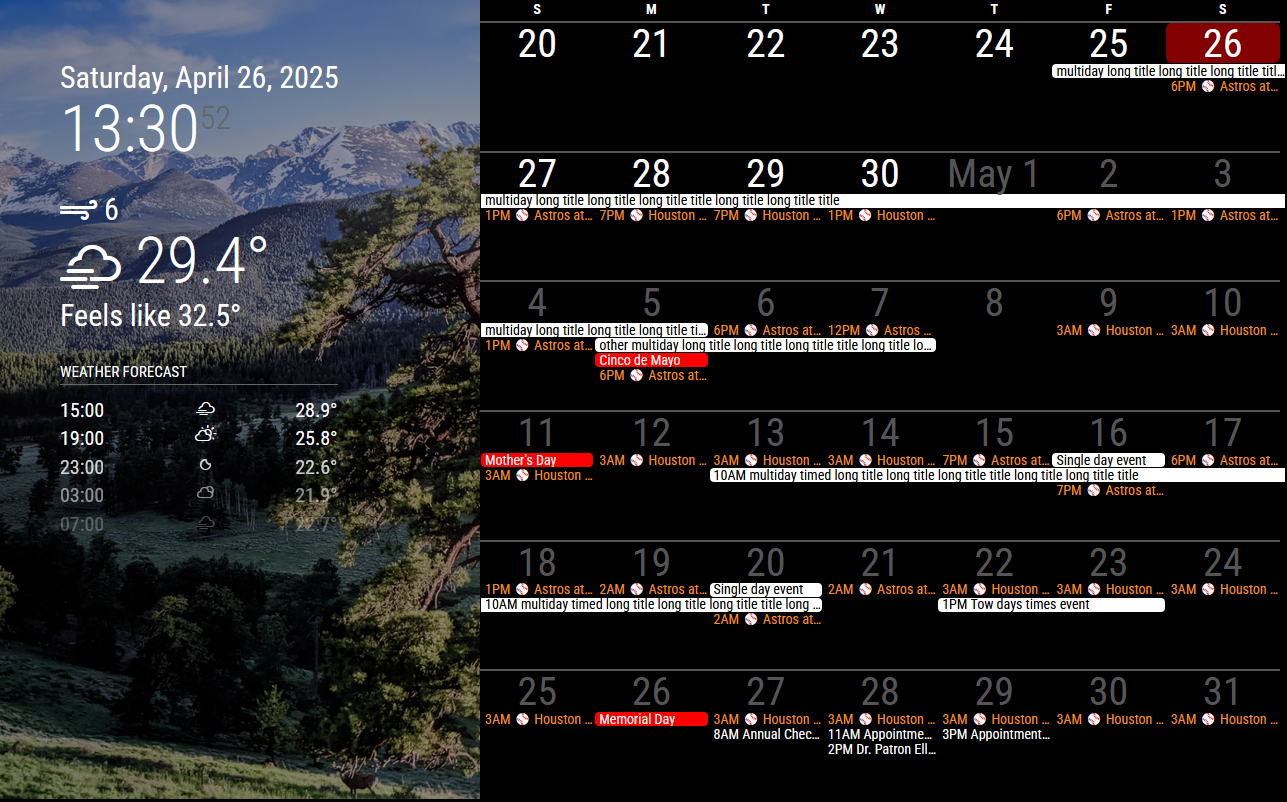
<p dir="auto"><img src="/assets/uploads/files/1745702882584-screenshot.png" alt="screenshot.png" class=" img-fluid img-markdown" /><br />
Screenshot shows <strong>MMM-SimpleCalendar</strong> with <a href="https://docs.magicmirror.builders/modules/introduction.html" target="_blank" rel="noopener noreferrer nofollow ugc">default clock and weather modules</a>, and <a href="https://github.com/darickc/MMM-BackgroundSlideshow" target="_blank" rel="noopener noreferrer nofollow ugc">MMM-BackgroundSlideshow</a>.</p>
<h1>Download:</h1>
<p dir="auto">Download from: <a href="https://github.com/jhjang101/MMM-SimpleCalendar" target="_blank" rel="noopener noreferrer nofollow ugc">https://github.com/jhjang101/MMM-SimpleCalendar</a></p>
<h1>Installation</h1>
<ol>
<li>
<p dir="auto">Navigate to your MagicMirror² <code>modules</code> folder:</p>
<pre><code class="language-sh">cd ~/MagicMirror/modules
</code></pre>
</li>
<li>
<p dir="auto">Clone the repository:</p>
<pre><code class="language-sh">git clone https://github.com/jhjang101/MMM-SimpleCalendar.git
</code></pre>
</li>
</ol>
<h1>Configuration</h1>
<p dir="auto">To use this module, add it to the <code>modules</code> array in your <code>config/config.js</code> file:</p>
<pre><code class="language-js">modules: [
    {
        module: 'MMM-SimpleCalendar',
        position: "fullscreen_above",
        config: {
            width: "1280px",
            height: "800px",
            startOfWeek: 0, // 0 for Sunday, 1 for Monday (default: 0)
            dayOfWeekFontSize: "14px",
            dayNumberFontSize: "40px",
            eventFontSize: "14px",
            mode: "monthly", // "monthly" or "6weeks" (default: "monthly")
            refreshInterval: 10 * 60 * 1000, // Milliseconds interval for refreshing calendar (default: 10 minutes)
            showEventTime: true, // true or false to show the event start time (default: true)
            timeFormat: "HH:mm" // Moment.js time format (default: "HH:mm", 12hr format: "hh:mm A", hour only: "hA")
        }
    },
]
</code></pre>
<p dir="auto">To display events properly, you need to configure the <a href="https://docs.magicmirror.builders/modules/calendar.html" target="_blank" rel="noopener noreferrer nofollow ugc">MagicMirror² default calendar module</a> to fetch calendar events.</p>
<p dir="auto">Here’s a basic example of how you might configure the default calendar module to provide events to MMM-SimpleCalendar:</p>
<pre><code class="language-javascript">modules: [
    // ... other modules ...
    {
        module: 'calendar',
        header: "US Holidays",
        // position: "top_left",    
        config: {
            maximumEntries: 100,
            calendars: [
                {
                    fetchInterval: 10 * 60 * 1000,
                    url: "https://calendar.google.com/calendar/ical/your%40gmail.com/private-efhg/basic.ics",
                    color: "#ffffff"
                },
                {
                    fetchInterval: 10 * 60 * 1000,
                    url: "https://ics.calendarlabs.com/76/mm3137/US_Holidays.ics",
                    color: "#ff0000"
                },
            ]
        }
    },
    {
        module: 'MMM-SimpleCalendar',
        position: "fullscreen_above",
        config: {
            width: "1280px",
            // ... other configs ...
        }
    },
    // ... other modules ...
]
</code></pre>
<h2>Configuration Options:</h2>
<table class="table table-bordered table-striped">
<thead>
<tr>
<th>Option</th>
<th>Description</th>
</tr>
</thead>
<tbody>
<tr>
<td><code>width</code></td>
<td>Sets the width of the calendar container.<br />Example values: <code>"300px"</code>, <code>"50%"</code>.<br />Default value: <code>"1280px"</code> (consider adjusting for your screen resolution, especially for a tablet).</td>
</tr>
<tr>
<td><code>height</code></td>
<td>Sets the height of the calendar container.<br />Example values: <code>"300px"</code>, <code>"50%"</code>.<br />Default value: <code>"800px"</code> (consider adjusting for your screen resolution, especially for a tablet).</td>
</tr>
<tr>
<td><code>startOfWeek</code></td>
<td>Defines the first day of the week.<br />Possible values: <code>0</code> (Sunday), <code>1</code> (Monday).<br />Default value: <code>0</code>.</td>
</tr>
<tr>
<td><code>dayOfWeekFontSize</code></td>
<td>Sets the font size for the weekday names (e.g., “S”, “M”, “T”).<br />Default value: <code>"14px"</code>.</td>
</tr>
<tr>
<td><code>dayNumberFontSize</code></td>
<td>Sets the font size for the day numbers in the calendar grid.<br />Accepts CSS units.<br />Default value: <code>"40px"</code>.</td>
</tr>
<tr>
<td><code>eventFontSize</code></td>
<td>Sets the font size for the event titles.<br />Accepts CSS units.<br />Default value: <code>"14px"</code>.</td>
</tr>
<tr>
<td><code>mode</code></td>
<td>Determines how the calendar weeks are displayed.<br />Possible values: <code>"monthly"</code>, <code>"6weeks"</code>.<br />Default value: <code>"monthly"</code>.</td>
</tr>
<tr>
<td><code>refreshInterval</code></td>
<td>The interval (in milliseconds) at which the module will refresh calendar.<br />Possible values: Number (milliseconds).<br />Default value: <code>10 * 60 * 1000</code> (10 minutes).</td>
</tr>
<tr>
<td><code>showEventTime</code></td>
<td>Controls whether the start time of events is displayed.<br />Possible values: <code>true</code>, <code>false</code>.<br />Default value: <code>true</code>.</td>
</tr>
<tr>
<td><code>timeFormat</code></td>
<td>Specifies the format for displaying event times (using <a href="https://momentjs.com/docs/#/parsing/string-format/" target="_blank" rel="noopener noreferrer nofollow ugc">Moment.js format codes</a>).<br />Possible values: Moment.js format string (e.g., <code>"HH:mm"</code>, <code>"h:mm a"</code>, <code>"hA"</code>, etc.).<br />Default value: <code>"HH:mm"</code>.</td>
</tr>
</tbody>
</table>
<hr />
<h2>Version</h2>
<ul>
<li>1.0.0 - Initial release</li>
</ul>
]]></description><link>https://forum.magicmirror.builders/topic/19636/mmm-simplecalendar-calendar-module-optimized-for-an-old-tablet-screen</link><generator>RSS for Node</generator><lastBuildDate>Tue, 11 Aug 2026 14:38:17 GMT</lastBuildDate><atom:link href="https://forum.magicmirror.builders/topic/19636.rss" rel="self" type="application/rss+xml"/><pubDate>Sat, 26 Apr 2025 21:34:07 GMT</pubDate><ttl>60</ttl><item><title><![CDATA[Reply to [MMM-SimpleCalendar] Calendar module optimized for an old tablet screen on Sat, 26 Apr 2025 21:53:42 GMT]]></title><description><![CDATA[<p dir="auto"><a class="plugin-mentions-user plugin-mentions-a" href="/user/jhjang101" aria-label="Profile: jhjang101">@<bdi>jhjang101</bdi></a> ok…</p>
]]></description><link>https://forum.magicmirror.builders/post/126050</link><guid isPermaLink="true">https://forum.magicmirror.builders/post/126050</guid><dc:creator><![CDATA[sdetweil]]></dc:creator><pubDate>Sat, 26 Apr 2025 21:53:42 GMT</pubDate></item><item><title><![CDATA[Reply to [MMM-SimpleCalendar] Calendar module optimized for an old tablet screen on Sat, 26 Apr 2025 21:47:11 GMT]]></title><description><![CDATA[<p dir="auto"><a class="plugin-mentions-user plugin-mentions-a" href="/user/sdetweil" aria-label="Profile: sdetweil">@<bdi>sdetweil</bdi></a> Well, I am using it on my 6-year-old Android tablet. Chrome browser does not support fullscreen, so I am using another fullscreen-supported browser app.</p>
]]></description><link>https://forum.magicmirror.builders/post/126049</link><guid isPermaLink="true">https://forum.magicmirror.builders/post/126049</guid><dc:creator><![CDATA[jhjang101]]></dc:creator><pubDate>Sat, 26 Apr 2025 21:47:11 GMT</pubDate></item><item><title><![CDATA[Reply to [MMM-SimpleCalendar] Calendar module optimized for an old tablet screen on Sat, 26 Apr 2025 21:38:22 GMT]]></title><description><![CDATA[<p dir="auto"><a class="plugin-mentions-user plugin-mentions-a" href="/user/jhjang101" aria-label="Profile: jhjang101">@<bdi>jhjang101</bdi></a> cool… can you articulate what you mean by old tablet?</p>
<p dir="auto">MM uses the latest  javascript idioms, Ecma6, which many older browsers do not support… on my old ipad, black screen<br />
on my 2018 samsung tv, black screen</p>
<p dir="auto">ok on latest android or iphone.</p>
]]></description><link>https://forum.magicmirror.builders/post/126048</link><guid isPermaLink="true">https://forum.magicmirror.builders/post/126048</guid><dc:creator><![CDATA[sdetweil]]></dc:creator><pubDate>Sat, 26 Apr 2025 21:38:22 GMT</pubDate></item></channel></rss>