Am am giving up!!!
I am just going to buy a screen that conforms to the Raspbian software
Thanks for all the help
Am am giving up!!!
I am just going to buy a screen that conforms to the Raspbian software
Thanks for all the help
Thank you so much.
I will try that tomm,
Thanks for your feers anyway.
@sdetweil said in Set 1280 x 720 resolution RPi Bookworm:
rm -rf .config/Electron
Sorry sdetweil ,
That did not make any difference.
:-(
Thanks sdetwell, but that did not do the trick.
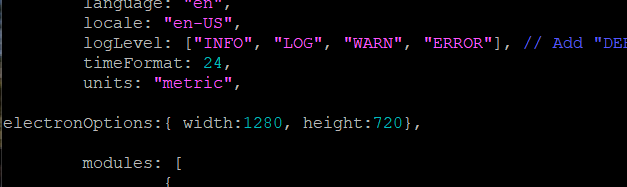
Just want to make sure this is what you suggested I do?
BTW: I have the TV vertical so I tried w1280 h720 and w720h1280 and neither made any difference
:-(
I have an old Sinoteq TV measuring 5780mm x 3250mm screen
The closest resolution I get in the options is 1024 x 728. This causes images to show stretched
I am running MagicMirror on it showing images
How can I set the resolution to 1280 x 720?
VERSION_ID=“12”
VERSION=“12 (bookworm)”
I tried editing the “/boot/firmware/cmdline.txt” file and added
“video=HDMI-A-1:1280x720 vc4.force_hotplug=1” in that file.
When the RPi starts up the TV echoes res = 1280X720 and the splash screen perspective is correct.
As the Magic Mirror starts the same popup from the TV appears with Res = 1024x768 and when my image shows on screen, they are stretched (I am also viewing the screen with VNC and that perspective is correct)
Is there a place in MM2 where I can set the resolution to 1280x720?
Thanking any pointers in advance
Frits