If you want to, send it to me. I can take a look today or tomorrow.
A New Chapter for MagicMirror: The Community Takes the Lead
Read the statement by Michael Teeuw here.
Read the statement by Michael Teeuw here.
 Offline
Posts
-
RE: GasBuddy
-
RE: Translation "After one month" in Calendar Module
Yep, looks like I am right. This is found in moment.js locale settings. In this case it uses the
futurevariable andMfromrelativeTime//! moment.js locale configuration //! locale : Dutch [nl] //! author : Joris Röling : https://github.com/jorisroling //! author : Jacob Middag : https://github.com/middagj var monthsShortWithDots$2 = 'jan._feb._mrt._apr._mei_jun._jul._aug._sep._okt._nov._dec.'.split('_'); var monthsShortWithoutDots$2 = 'jan_feb_mrt_apr_mei_jun_jul_aug_sep_okt_nov_dec'.split('_'); var monthsParse$3 = [/^jan/i, /^feb/i, /^maart|mrt.?$/i, /^apr/i, /^mei$/i, /^jun[i.]?$/i, /^jul[i.]?$/i, /^aug/i, /^sep/i, /^okt/i, /^nov/i, /^dec/i]; var monthsRegex$4 = /^(januari|februari|maart|april|mei|april|ju[nl]i|augustus|september|oktober|november|december|jan\.?|feb\.?|mrt\.?|apr\.?|ju[nl]\.?|aug\.?|sep\.?|okt\.?|nov\.?|dec\.?)/i; hooks.defineLocale('nl', { months : 'januari_februari_maart_april_mei_juni_juli_augustus_september_oktober_november_december'.split('_'), monthsShort : function (m, format) { if (!m) { return monthsShortWithDots$2; } else if (/-MMM-/.test(format)) { return monthsShortWithoutDots$2[m.month()]; } else { return monthsShortWithDots$2[m.month()]; } }, monthsRegex: monthsRegex$4, monthsShortRegex: monthsRegex$4, monthsStrictRegex: /^(januari|februari|maart|mei|ju[nl]i|april|augustus|september|oktober|november|december)/i, monthsShortStrictRegex: /^(jan\.?|feb\.?|mrt\.?|apr\.?|mei|ju[nl]\.?|aug\.?|sep\.?|okt\.?|nov\.?|dec\.?)/i, monthsParse : monthsParse$3, longMonthsParse : monthsParse$3, shortMonthsParse : monthsParse$3, weekdays : 'zondag_maandag_dinsdag_woensdag_donderdag_vrijdag_zaterdag'.split('_'), weekdaysShort : 'zo._ma._di._wo._do._vr._za.'.split('_'), weekdaysMin : 'zo_ma_di_wo_do_vr_za'.split('_'), weekdaysParseExact : true, longDateFormat : { LT : 'HH:mm', LTS : 'HH:mm:ss', L : 'DD-MM-YYYY', LL : 'D MMMM YYYY', LLL : 'D MMMM YYYY HH:mm', LLLL : 'dddd D MMMM YYYY HH:mm' }, calendar : { sameDay: '[vandaag om] LT', nextDay: '[morgen om] LT', nextWeek: 'dddd [om] LT', lastDay: '[gisteren om] LT', lastWeek: '[afgelopen] dddd [om] LT', sameElse: 'L' }, relativeTime : { future : 'over %s', past : '%s geleden', s : 'een paar seconden', ss : '%d seconden', m : 'één minuut', mm : '%d minuten', h : 'één uur', hh : '%d uur', d : 'één dag', dd : '%d dagen', M : 'één maand', MM : '%d maanden', y : 'één jaar', yy : '%d jaar' }, dayOfMonthOrdinalParse: /\d{1,2}(ste|de)/, ordinal : function (number) { return number + ((number === 1 || number === 8 || number >= 20) ? 'ste' : 'de'); }, week : { dow : 1, // Monday is the first day of the week. doy : 4 // The week that contains Jan 4th is the first week of the year. } }); -
RE: Modules to display Stock (Capital Stock)
@qqqqqqqq
You are in the modules base folder, but you need to change into the specific module folder instead -
RE: MagicMirror Servermode on Synology DS
Well, you need node.js on your Synology webserver. Searching the web it seems to be possible, but the node.js addon I found was rather old. Give it a try, you can’t break it ;)
-
RE: Worldclock & Currency
@ryck said in Worldclock & Currency:
@yawns You can always use https://exchangeratesapi.io/ if you don’t want to make people get an apiKey…
Thanks for the heads up. I updated the module to use the new source instead.
-
RE: Translation "After one month" in Calendar Module
Okay MM-Hans. After looking at
vendor.jsI noticed moment.js is loaded from"moment.js" : "node_modules/moment/min/moment-with-locales.js",So if you go ahead, open
"~/MagicMirror/vendor/node_modules/moment/min/moment-with-locales.js",and scroll down to line 10649 (no, I’m not kidding) and changeééntoeenyou are good to go.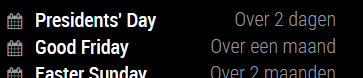
-
RE: How do I edit config, I see every new module starts whit going to config.js
@KMH0
Actually it is always the same thing.- Find yourself a module you like, for example: MMM-IP
- Top right on the github repository you see a green button saying “clone or download”. If you click it you get the url for this repository. In this case it is https://github.com/fewieden/MMM-ip.git
- Open a terminal on your pi (either directly or using SSH) and type
cd ~/MagicMirror/modules - Clone the module to your pi by typing
git clone https://github.com/fewieden/MMM-ip.git. This downloads the repository and extracts it into a new folder. - Enter the new directory
cd MMM-ipand runnpm install(in this case it is not required … the readme should tell you to do so) - Edit your config file and add the code for the new module as the readme instructs to.
- Restart your magic mirror process and check what happened.
Sidenote: If you run into trouble with your config file, you can always paste the content into http://jshint.com/. If everything is fine it will only show this which is fine:
One undefined variable 64 module -
RE: MagicMirror Servermode on Synology DS
according to the synology wiki:
ipkg update; ipkg install nano -
RE: Himself's first Mirror
Interesting, looks very slim. I am not sure if I like the orange/pink color or not :)
-
RE: Calendar Module +1 day Error
It is a bit irritating where to put the config stuff. Some needs to go to config section directly, some need to go to the calendars section.
Please try this:
{
	module: 'calendar',
	classes: 'default everyone',
	// header: 'Termine',
	position: 'top_right',
	config: {
		displayRepeatingCountTitle: true,
		timeFormat: 'absolute',
		dateFormat: 'DD MMM',
		fullDayEventDateFormat:'DD MMM',
		showEnd: false,
		getRelative: 48,
		urgency: 2,
		calendars: [
			{
				url: 'https://calendar.google.com/calendar/XXX',
				symbol: 'calender',
				colored: true,
				maximumEntries: 5,
				repeatingCountTitle: 'Birthday'
			}
			]
	}
},