Read the statement by Michael Teeuw here.
MMM-Caldav not listening on port 8080
-
Hi,
I have a problem with MMM-CalDAV that it seems it is not listening on port 8080:
sudo lsof -i -P -n | grep 8080does not return anything, however the calender seems to be fetched from my owncloud server:
[13.11.2023 09:39.26.779] [LOG]   [CALDAV] calname(calname.ics) has 13 events
[13.11.2023 09:39.26.786] [LOG]   [CALDAV] calname.ics is refreshed.
The log output shows:
[13.11.2023 09:17.13.712] [ERROR] Calendar Error. Could not fetch calendar:  https://localhost:8080/CALDAV/calname.ics TypeError: fetch failed
    at Object.fetch (node:internal/deps/undici/undici:11372:11)
    at process.processTicksAndRejections (node:internal/process/task_queues:95:5) {
  cause: Error: connect ECONNREFUSED 127.0.0.1:8080
      at TCPConnectWrap.afterConnect [as oncomplete] (node:net:1555:16) {
    errno: -111,
    code: 'ECONNREFUSED',
    syscall: 'connect',
    address: '127.0.0.1',
    port: 8080
  }
}
the ics file is physically present:
ls -al modules/MMM-CalDAV/service/
total 36
drwxr-xr-x 2 peter peter  4096 Nov 13 08:51 .
drwxr-xr-x 6 peter peter 4096 Nov 13 09:11 ..
-rw-r--r-- 1 peter peter 2570 Nov 13 09:39 .calname.ics
The configuration from the MMM-DavCal is
{
   module: "MMM-CalDAV",
	config: {
		timeRangeStart: -30, // Get events from 30 days before
		servers: [
		{
			name: "calname",
			envPrefix: "OCLOUD_",
			serverUrl: "https://myserverurl/remote.php/dav/",
			calendars: ["calname"],
		}
		],
	}
},
The configuration of the calendar module:
{
	module: "calendar",
	header: "My Calendar",
	position: "top_left",
	config: {
		calendars: [
			{
				fetchInterval: 7 * 24 * 60 * 60 * 1000,
				symbol: "calendar-check",
				url: "http://localhost:8080/DAVCAL/calname.ics",
				auth: {
					user: 'user1',
					pass: 'password1',
					method: 'basic'
				}
		   }
		]
	}
},
The content of .env:
CALDAV_SERVICE_USERNAME=user1
CALDAV_SERVICE_PASSWORD=password1

### For Owncloud
OCLOUD_username=oc_user
OCLOUD_password=oc_password
I have tried a lot of things but i guess the main problem is that MMM-CalDav is not listening on port 8080? Running magic mirror as root does not help. MagicMorror runs on a raspberry pi 4 but only the server part
npm run serverIf i use another calendar it works:
https://ics.calendarlabs.com/46/d26011d3/Germany_Holidays.icsCan anyone support here?
Thanks,
Peter -
@MMRIZE , found the issue, you last sentence solved it, i was indeed running the server on port 9090 but I set the url of the calendar to 8080.
After changing the port of the calendar url to 9090, all is fine.
Thanks for your support!
-
@peterpan894 the local calendar should be
http://localhost:8080/CALDAV/calname.icsyou have
https://localhost:8080/CALDAV/calname.icsnote the httpS
-
@peterpan894
You can test whether iCAL is serving or not by yourself.- Execute MM
- In the same client ,
open the browser then navigate to this.
http://localhost:8080/CALDAV/calname.ics -
@sdetweil
He seems to sethttpscheme properly in the config he posted.symbol: "calendar-check", url: "http://localhost:8080/DAVCAL/calname.ics",Maybe a
ipWhitelistsetup could be the issue. -
@MMRIZE but the error says
Could not fetch calendar: https://localhost:8080/CALDAV/calname.icsso at least that config used https
-
the https was a typo. The ipWhitelist looks like
ipWhitelist: []that should be fine. I do not have a desktop on the rpi so checking on the same client is not possible.
Must there not be a listener on port 8080? In my case there is none. I have also no idea how to debug, even with all logs on, there is no aditional information except for:
[13.11.2023 22:19.31.680] [ERROR] Calendar Error. Could not fetch calendar:  http://localhost:8080/CALDAV/wielens.ics TypeError: fetch failed
    at Object.fetch (node:internal/deps/undici/undici:11372:11)
    at process.processTicksAndRejections (node:internal/process/task_queues:95:5) {
  cause: Error: connect ECONNREFUSED 127.0.0.1:8080
      at TCPConnectWrap.afterConnect [as oncomplete] (node:net:1555:16) {
    errno: -111,
    code: 'ECONNREFUSED',
    syscall: 'connect',
    address: '127.0.0.1',
    port: 8080
  }
}
I tried with Curl:
curl -v http://localhost:8080/CALDAV/calname.ics
Trying 127.0.0.1:8080...
connect to 127.0.0.1 port 8080 failed: Connection refused
Failed to connect to localhost port 8080: Connection refused
Closing connection 0
curl: (7) Failed to connect to localhost port 8080: Connection refused
The only thing which can be the cause is that i run
npm run servercan someone check on a working system if there is a listener on port 8080? I can only excecute the server as i have a headless system
Thanks
-
@peterpan894
Could you post this to issue board or discussion of GitHub repository? I should look inside with focus. And maybe needs to talk more closely. -
@peterpan894 said in MMM-Caldav not listening on port 8080:
The only thing which can be the cause is that i run
npm run servercan someone check on a working system if there is a listener on port 8080? I can only excecute the server as i have a headless system
Ah, you may run the server and client on different devices.
“localhost” points a device-self, so “localhost” in client will be different from that of server.
Use IP address of server instead of “localhost” -
I tried 127.0.0.1, 192.168.x.x, same result. The curl was excecuted on the same machine the MM server was running
-
@MMRIZE if the node_helper depends on info sent down from the modulename.js, then it will not happem as that runs in a browser…
so @peterpan894 one thing to try is to open the MM server in a browser
then see if the port is open -
if the node_helper depends on info sent down from the modulename.js, then it will not happem as that runs in a browser…
The part serving iCal is a pure express logic without any configuration value. It just serve URL from static files on start of node_helper. So ideally, it should be served regardless of the front client.
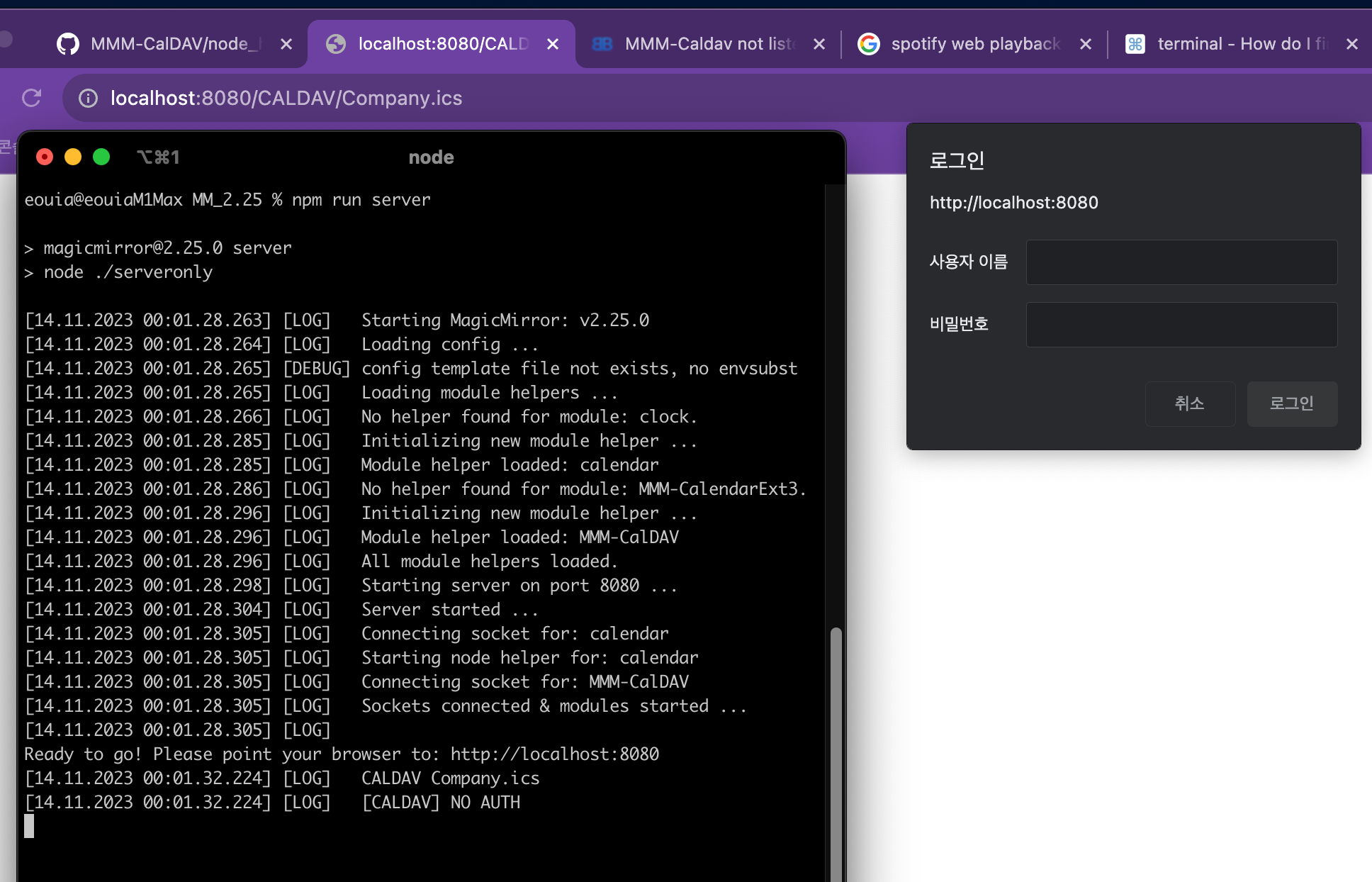
This image shows that I tried serveronly mode, then try to accessCompany.icswhich is not even fetched in this execution before any client is launched. (The iCal file was fetched in the previous execution)
And showing it hit the access but failed due to no auth. (So that’s why the browser show auth dialog box)With
curl(anyway,-voption is not enough to access this served ical. You should use-uoption.) It should have 401 error withou auth info.~ % curl -v http://localhost:8080/CALDAV/Company.ics * Trying 127.0.0.1:8080... * connect to 127.0.0.1 port 8080 failed: Connection refused * Trying [::1]:8080... * Connected to localhost (::1) port 8080 (#0) > GET /CALDAV/Company.ics HTTP/1.1 > Host: localhost:8080 > User-Agent: curl/8.1.2 > Accept: */* > < HTTP/1.1 401 Unauthorized < Access-Control-Allow-Origin: * < Referrer-Policy: no-referrer < Strict-Transport-Security: max-age=15552000; includeSubDomains < X-Content-Type-Options: nosniff < X-DNS-Prefetch-Control: off < X-Download-Options: noopen < X-Frame-Options: SAMEORIGIN < X-Permitted-Cross-Domain-Policies: none < X-XSS-Protection: 0 < WWW-Authenticate: Basic realm="MMM-CalDAV Service" < Date: Mon, 13 Nov 2023 23:07:36 GMT < Connection: keep-alive < Keep-Alive: timeout=5 < Content-Length: 0 < * Connection #0 to host localhost left intactSo with
-uoptions;~ % curl -u "username1:password1" http://localhost:8080/CALDAV/Company.ics BEGIN:VCALENDAR BEGIN:VEVENT DTSTART;TZID=Europe/Berlin:20230919T100000 DTEND;TZID=Europe/Berlin:20230919T110000 DTSTAMP:20230830T065013Z UID:-@google.com CREATED:20230830T065013Z DESCRIPTION: LAST-MODIFIED:20230830T065013Z LOCATION: SEQUENCE:0 STATUS:CONFIRMED SUMMARY:- TRANSP:OPAQUE END:VEVENT BEGIN:VEVENT ...So it works for me.
Ok. Let’s check from the beginning. Is Your MM server served on port 8080? Can you open MM frontend on browser with
http://localhost:8080?
Your symptom is very weird because;
If MM is served normally, this module SHOULD work. It usesexpressdelivered from MM itself, not individually installed. So if this module’s express has a problem, MM should have the same problem. (I found unusedrequirein the source :D. Anyway due to that, I can confirm I’m using MM’s express not individual one.) -
Can you check the output of ?
sudo lsof -i -P -n | grep 8080while running
npm run serverI checked with using the -u option on curl but that does not help. The “connection refused” is also a symptom if the port is closed which seems to be the case on my end.
-
@peterpan894
Send me whole configuration. When describe me which enviroments (for server and for client) are using. (eouia0819@gmail.com) -
~ % lsof -i -P -n | grep 8080 node 7922 eouia 22u IPv6 0x58cc15e911673fb5 0t0 TCP [::1]:8080 (LISTEN) -
@peterpan894
If your 8080 port is blocked, you cannot serve MM either.
As far as I read, you run server-only mode. It means you will run MM client (browser or electron whatever) on some device. Is your MM running on the other port than 8080?% npm run server > magicmirror@2.25.0 server > node ./serveronly [14.11.2023 14:39.52.783] [LOG] Starting MagicMirror: v2.25.0 [14.11.2023 14:39.52.784] [LOG] Loading config ... [14.11.2023 14:39.52.785] [DEBUG] config template file not exists, no envsubst [14.11.2023 14:39.52.785] [LOG] Loading module helpers ... [14.11.2023 14:39.52.785] [LOG] No helper found for module: clock. [14.11.2023 14:39.52.804] [LOG] Initializing new module helper ... [14.11.2023 14:39.52.804] [LOG] Module helper loaded: calendar [14.11.2023 14:39.52.815] [LOG] Initializing new module helper ... [14.11.2023 14:39.52.815] [LOG] Module helper loaded: MMM-CalDAV [14.11.2023 14:39.52.815] [LOG] All module helpers loaded. [14.11.2023 14:39.52.817] [LOG] Starting server on port 8080 ... [14.11.2023 14:39.52.823] [LOG] Server started ... [14.11.2023 14:39.52.823] [LOG] Connecting socket for: calendar [14.11.2023 14:39.52.824] [LOG] Starting node helper for: calendar [14.11.2023 14:39.52.824] [LOG] Connecting socket for: MMM-CalDAV [14.11.2023 14:39.52.824] [LOG] Sockets connected & modules started ... [14.11.2023 14:39.52.824] [LOG] Ready to go! Please point your browser to: http://localhost:8080 -
@MMRIZE , found the issue, you last sentence solved it, i was indeed running the server on port 9090 but I set the url of the calendar to 8080.
After changing the port of the calendar url to 9090, all is fine.
Thanks for your support!
Hello! It looks like you're interested in this conversation, but you don't have an account yet.
Getting fed up of having to scroll through the same posts each visit? When you register for an account, you'll always come back to exactly where you were before, and choose to be notified of new replies (either via email, or push notification). You'll also be able to save bookmarks and upvote posts to show your appreciation to other community members.
With your input, this post could be even better 💗
Register Login