MagicMirror Forum
    • Recent
    • Tags
    • Unsolved
    • Solved
    • MagicMirror² Repository
    • Documentation
    • 3rd-Party-Modules
    • Donate
    • Discord
    • Register
    • Login
    A New Chapter for MagicMirror: The Community Takes the Lead
    Read the statement by Michael Teeuw here.

    MMM-Traffic stuck on loading

    Scheduled Pinned Locked Moved Unsolved Troubleshooting
    9 Posts 2 Posters 32 Views 3 Watching
    Loading More Posts
    • Oldest to Newest
    • Newest to Oldest
    • Most Votes
    Reply
    • Reply as topic
    Log in to reply
    This topic has been deleted. Only users with topic management privileges can see it.
    • K Offline
      Keithj
      last edited by

      I have seen multiple other posts about MMM-Traffic not loading due to conflicts with the similar Google module, but I do not have that loaded. I do not have a space in my lat/long addresses, but still unable to load either of the two modules I have submitted. I do have the correct API Key loaded. Any assistance would be greatly appreciated! Thank you and Happy Holidays

      The two modules appear at the top of my Magic Mirror screen, but just show “Loading”. I have a Pi-Hole proxy, but do not see any calls/queries going out to Mapbox at all

      I launch using npm start and not pm2 but don’t receive any load/unload errors at all (Besides some typical hardware acceleration errors). I have tried this with my Pi-Hole proxy disabled as well with same issue.
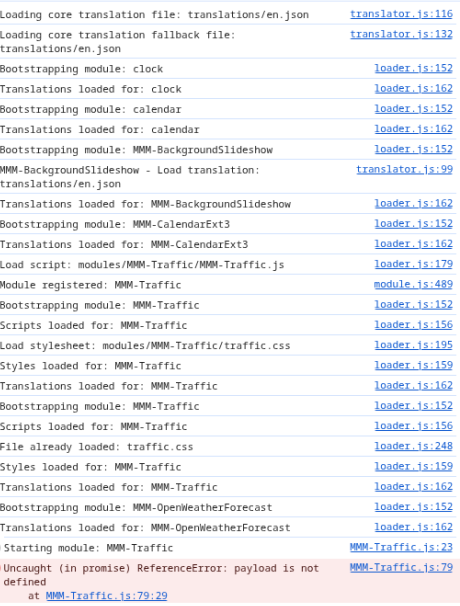
      The only mention in load up is: No helper found for module: MMM-Traffic.
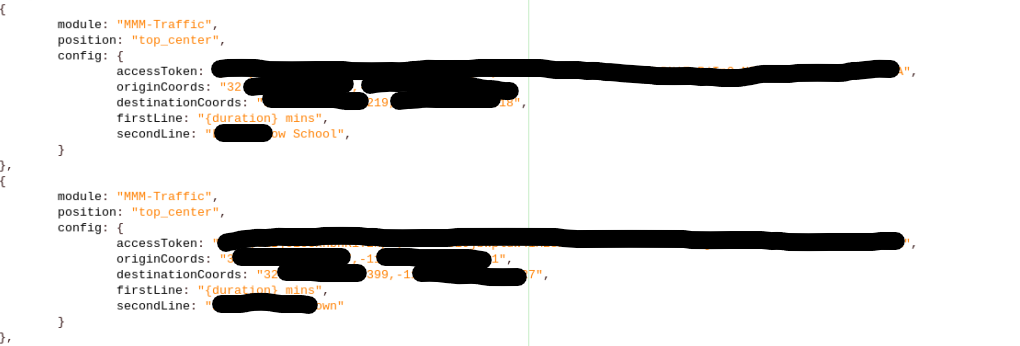
      987b3b22-0e7c-480b-945d-f462bc3b1a45-image.png

      S 1 Reply Last reply Reply Quote 0
      • S Do not disturb
        sdetweil @Keithj
        last edited by

        @Keithj this module is all in browser, so you need to open the browser console

        ctrl-shift-i, then select the console tab, put tra
        In the filter field

        Sam

        How to add modules

        learning how to use browser developers window for css changes

        K 1 Reply Last reply Reply Quote 0
        • K Offline
          Keithj @sdetweil
          last edited by

          @sdetweil 999cc24a-fea3-4ceb-81b7-e81b3b1191ae-image.png

          S 1 Reply Last reply Reply Quote 0
          • S Do not disturb
            sdetweil @Keithj
            last edited by sdetweil

            @Keithj you did not put
            tra <———A unique part of the module name
            in the filter field

            Are you sure you have the right access token?

            The author seems active on the module GitHub repo, you
            Might reach him there with an issue

            Sam

            How to add modules

            learning how to use browser developers window for css changes

            K 1 Reply Last reply Reply Quote 0
            • K Offline
              Keithj @sdetweil
              last edited by

              @sdetweil I did put Tra and everything loaded there had “Tra” in it, including other modules “TRAnslations” “BootsTRApping” etc. But let me go back and take a look. Yes, I have the right access token, removed and inserted possibly a dozen times now…

              I did reach out to him on GitHub, but no response yet. Will continue to wait. But appreciate any and all other input anyone can provide.

              S 1 Reply Last reply Reply Quote 0
              • S Do not disturb
                sdetweil @Keithj
                last edited by

                @Keithj I’m blind! Traf then

                Sam

                How to add modules

                learning how to use browser developers window for css changes

                K 2 Replies Last reply Reply Quote 0
                • K Offline
                  Keithj @sdetweil
                  last edited by

                  @sdetweil No worries :)
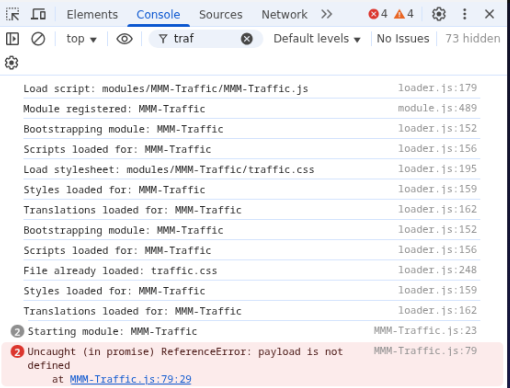
                  Here is just Traf:

                  f956b760-95de-44d6-9fcf-0290e29857af-image.png

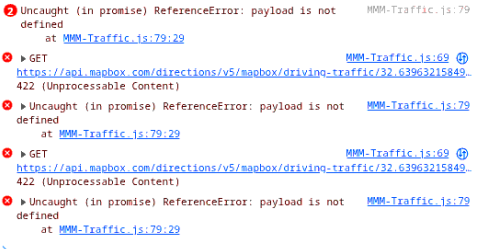
                  After a few more minutes, a few other errors popped up:

                  1 Reply Last reply Reply Quote 0
                  • K Offline
                    Keithj @sdetweil
                    last edited by

                    0b6eafe4-803f-4a9f-ab91-59aa1b610ee1-image.png @sdetweil ![alt text](image url)

                    After a few more minutes, these popped up.

                    S 1 Reply Last reply Reply Quote 0
                    • S Do not disturb
                      sdetweil @Keithj
                      last edited by

                      @Keithj edit MMM-Traffic.js

                      change these lines (79/80)

                              self.errorMessage = payload.error.message;
                              self.errorDescription = payload.error.description;
                      

                      to

                              self.errorMessage = e.message;
                              self.errorDescription = e.description;
                      

                      and restart MM
                      let me know…
                      Sam

                      How to add modules

                      learning how to use browser developers window for css changes

                      1 Reply Last reply Reply Quote 1
                      • 1 / 1
                      • First post
                        Last post
                      Enjoying MagicMirror? Please consider a donation!
                      MagicMirror created by Michael Teeuw.
                      Forum managed by Sam, technical setup by Karsten.
                      This forum is using NodeBB as its core | Contributors
                      Contact | Privacy Policy