Read the statement by Michael Teeuw here.
Cannot find module '#server_functions'
-
Hi,
I’ve updated to the latest Version today using at first the update script. I have some trouble with the calendar display and the newsfeed. I just started a blank Mirror instance. A module#server_functionsis missing. I don’t know how to fix that.What I’ve tried so far is
- getting serverOnly folder from the repo manually
- switched manually again to master branch and reinstalled all node_modules
- uses npm install manually
This is the log:
3|mm3  | [2025-10-04 21:21:14.572] [LOG]   Starting MagicMirror: v2.33.0
3|mm3  | [2025-10-04 21:21:14.600] [LOG]   Loading config ...
3|mm3  | [2025-10-04 21:21:14.628] [LOG]   config template file not exists, no envsubst
3|mm3  | [2025-10-04 21:21:19.738] [INFO]  Checking config file /home/chris/MagicMirror/config/config3.js ...
3|mm3  | [2025-10-04 21:21:20.155] [INFO]  Your configuration file doesn't contain syntax errors :)
3|mm3  | [2025-10-04 21:21:20.157] [INFO]  Checking modules structure configuration ...
3|mm3  | [2025-10-04 21:21:20.596] [INFO]  Your modules structure configuration doesn't contain errors :)
3|mm3  | [2025-10-04 21:21:20.638] [LOG]   Loading module helpers ...
3|mm3  | [2025-10-04 21:21:20.651] [LOG]   No helper found for module: alert.
3|mm3  | [2025-10-04 21:21:20.733] [LOG]   Initializing new module helper ...
3|mm3  | [2025-10-04 21:21:20.734] [LOG]   Module helper loaded: updatenotification
3|mm3  | [2025-10-04 21:21:20.739] [LOG]   No helper found for module: clock.
3|mm3  | [2025-10-04 21:21:21.248] [ERROR] Error when loading calendar: Cannot find module '#server_functions'
3|mm3  | Require stack:
3|mm3  | - /home/chris/MagicMirror/modules/default/calendar/calendarfetcher.js
3|mm3  | - /home/chris/MagicMirror/modules/default/calendar/node_helper.js
3|mm3  | - /home/chris/MagicMirror/js/app.js
3|mm3  | - /home/chris/MagicMirror/serveronly/index.js
3|mm3  | [2025-10-04 21:21:21.259] [LOG]   No helper found for module: compliments.
3|mm3  | [2025-10-04 21:21:21.275] [LOG]   No helper found for module: weather.
3|mm3  | [2025-10-04 21:21:22.220] [ERROR] Error when loading newsfeed: Cannot find module '#server_functions'
3|mm3  | Require stack:
3|mm3  | - /home/chris/MagicMirror/modules/default/newsfeed/newsfeedfetcher.js
3|mm3  | - /home/chris/MagicMirror/modules/default/newsfeed/node_helper.js
3|mm3  | - /home/chris/MagicMirror/js/app.js
3|mm3  | - /home/chris/MagicMirror/serveronly/index.js
3|mm3  | [2025-10-04 21:21:22.221] [LOG]   All module helpers loaded.
3|mm3  | [2025-10-04 21:21:22.318] [LOG]   Starting server on port 8082 ...
3|mm3  | [2025-10-04 21:21:22.455] [LOG]   Server started ...
3|mm3  | [2025-10-04 21:21:22.456] [LOG]   Connecting socket for: updatenotification
3|mm3  | [2025-10-04 21:21:22.457] [LOG]   Starting module helper: updatenotification
3|mm3  | [2025-10-04 21:21:22.468] [LOG]   Sockets connected & modules started ...
3|mm3  | [2025-10-04 21:21:22.470] [INFO]
3|mm3  | >>>   Ready to go! Please point your browser to: http://0.0.0.0:8082   <<<
3|mm3  | [2025-10-04 21:21:28.870] [INFO]  updatenotification: Updater Class Loaded!
3|mm3  | [2025-10-04 21:21:28.876] [INFO]  updatenotification: Checking PM2 using...
3|mm3  | [2025-10-04 21:21:31.736] [INFO]  Checking git for module: MagicMirror
3|mm3  | [2025-10-04 21:21:31.925] [INFO]
3|mm3  | ####  System Information  ####
3|mm3  | - SYSTEM:   manufacturer: Raspberry Pi Foundation; model: Raspberry Pi 4 Model B Rev 1.5; virtual: false; MM: 2.33.0
3|mm3  | - OS:       platform: linux; distro: Debian GNU/Linux; release: 12; arch: arm; kernel: 6.6.70-v7l+
3|mm3  | - VERSIONS: electron: undefined; used node: 22.20.0; installed node: 22.20.0; npm: 10.9.3; pm2: 6.0.13
3|mm3  | - ENV:      XDG_SESSION_TYPE: tty; MM_CONFIG_FILE: config/config3.js
3|mm3  |             WAYLAND_DISPLAY:  undefined; DISPLAY: undefined; ELECTRON_ENABLE_GPU: undefined
3|mm3  | - RAM:      total: 3848.23 MB; free: 2604.24 MB; used: 1243.98 MB
3|mm3  | - OTHERS:   uptime: 132 minutes; timeZone: Europe/Berlin
3|mm3  | [2025-10-04 21:21:32.004] [INFO]  updatenotification: [PM2] You are using pm2 with id: 3 (mm3)
More infos:
chris@MagicPi:~/MagicMirror $ node -v
npm -v
pm2 -v
v22.20.0
10.9.3
6.0.13
chris@MagicPi:~/MagicMirror $ cd ~/MagicMirror git status git branch -a cat package.json | grep version Auf Branch master Ihr Branch ist auf demselben Stand wie 'origin/master'. ?nderungen, die nicht zum Commit vorgemerkt sind: (benutzen Sie "git add <Datei>...", um die ?nderungen zum Commit vorzumerken) (benutzen Sie "git restore <Datei>...", um die ?nderungen im Arbeitsverzeichnis zu verwerfen) ge?ndert: package-lock.json ge?ndert: package.json Unversionierte Dateien: (benutzen Sie "git add <Datei>...", um die ?nderungen zum Commit vorzumerken) installers/ keine ?nderungen zum Commit vorgemerkt (benutzen Sie "git add" und/oder "git commit -a") _fix_clipping main * master remotes/origin/HEAD -> origin/master remotes/origin/dependabot/npm_and_yarn/develop/electron-28.1.0 remotes/origin/dependabot/npm_and_yarn/develop/electron-32.1.2 remotes/origin/dependabot/npm_and_yarn/develop/electron-33.2.1 remotes/origin/dependabot/npm_and_yarn/develop/electron-34.0.2 remotes/origin/dependabot/npm_and_yarn/develop/electron-34.3.0 remotes/origin/dependabot/npm_and_yarn/develop/eslint-9.6.0 remotes/origin/dependabot/npm_and_yarn/develop/eslint-plugin-jsdoc-50.3.1 remotes/origin/dependabot/npm_and_yarn/develop/helmet-8.0.0 remotes/origin/dependabot/npm_and_yarn/develop/node-ical-0.19.0 remotes/origin/dependabot/npm_and_yarn/develop/node-ical-0.20.1 remotes/origin/dependabot/npm_and_yarn/develop/stylelint-16.15.0 remotes/origin/dependabot/npm_and_yarn/develop/stylistic/eslint-plugin-2.3.0 remotes/origin/dependabot/npm_and_yarn/develop/undici-7.4.0 remotes/origin/develop remotes/origin/master remotes/origin/v1.0.0 "version": "2.33.0", chris@MagicPi:~/MagicMirror $Regards, Chris.
-
-
chris@MagicPi:~/MagicMirror $ git diff package.json diff --git a/package.json b/package.json index 5ab033c9..c6889623 100644 --- a/package.json +++ b/package.json @@ -74,6 +74,7 @@ "@fortawesome/fontawesome-free": "^7.0.1", "ajv": "^8.17.1", "animate.css": "^4.1.1", + "axios": "^1.12.2", "console-stamp": "^3.1.2", "croner": "^9.1.0", "envsub": "^4.1.0", chris@MagicPi:~/MagicMirror $ -
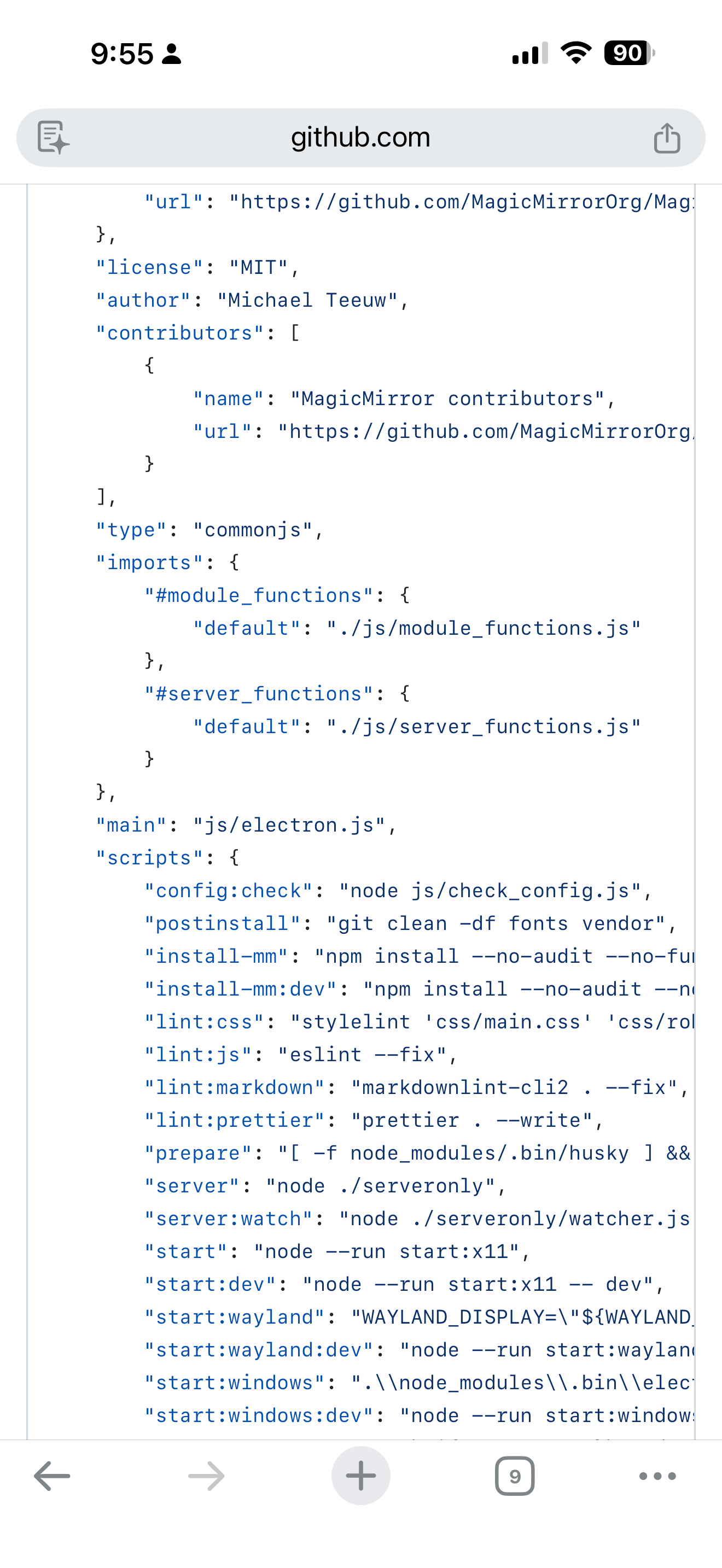
#server_functionsis an alias forjs/server_functions.jswhich is defined inpackage.json:"imports": { "#module_functions": { "default": "./js/module_functions.js" }, "#server_functions": { "default": "./js/server_functions.js" } },Because axios is the only diff your
package.jsonshould contain above lines.I have no idea anymore (maybe corrupt sd card).
-
@chrisfr1976 can you do
Stop MagicMirror
cd -/MagicMirror
rm -rf node_modules
npm install
Start MagicMirror
npm startAlso, can you send me the
~/MagicMirror/installers/upgrade.logMy email is same user id as here, at gmail
-
I don’t see that error in my test of npm run server.
-
@sdetweil and @karsten13, I think I solved my problem.
In the beginning when I used the update script it stopped with the node-version but didn’t update. So I updated manually by using the original code from Node JS. So I installed node v22.20.0. Later I went again down to v22.18.0. Maybe this caused some trouble. But Maybe not.rm -rf node_modulesandnpm installI did already 3 times before.But now I modified the
calendarfetcher.jsandnewsfeedfetcher.js:This was removed:
const { getUserAgent } = require("#server_functions");
const { scheduleTimer } = require("#module_functions");
and replaced by this:
const getUserAgent = () => "MagicMirror v2.33.0";
const scheduleTimer = (timerRef, interval, callback) => {
    clearTimeout(timerRef);
    return setTimeout(callback, interval);
};
No errors and Calendar/Newsfeed is displayed as before. I don’t know exactly if there are any new issues now but so far I’m happy.
-
@chrisfr1976 I’d really like to see the upgrade.log file
~/MagicMirror/installers/upgrade.logEmail to Me , same userid as here at gmail
-
@sdetweil Hey, no problem generally but I‘m out until Thursday. I‘ll send it then.
-
@chrisfr1976 when you have time
-
Hi Sam,
After the update to MagicMirror v2.34.0 I had again thisCannot find module '#server_functionsissue. See above.
I solved it again manually in thecalendarfetcher.jsandnewsfeedfetcher.jswith a relative path.I replaced this:
const { getUserAgent } = require("#server_functions");
const { scheduleTimer } = require("#module_functions"); //only in newsfeed
with
const { getUserAgent } = require("../../../js/server_functions");
const { scheduleTimer } = require("../../../js/module_functions"); //only in newsfeed
This time your update script worked fine without any error.
Maybe I’m alone with this behavior, but now everything works fine again as before the update. If anyone else discovers this problem, the code above might help.
-
…and I’ll remove axios from my modules. This is causing this trouble.
-
@chrisfr1976 but that means you dont have the correct node version or dependencies
Down level npm, see imports in package.json
-
@chrisfr1976 can you send me ~/MagicMirror/installers/upgrade.log
Same userid as here at gmail
-
I have the same. Except my reinstalled Axios library.
upgrade.log will follow.
@MagicPi:~/MagicMirror $ tail --lines=200 package.json { "name": "magicmirror", "version": "2.34.0", "description": "The open source modular smart mirror platform.", "keywords": [ "magic mirror", "magicmirror", "smart mirror", "mirror UI", "modular" ], "homepage": "https://magicmirror.builders", "bugs": { "url": "https://github.com/MagicMirrorOrg/MagicMirror/issues" }, "repository": { "type": "git", "url": "https://github.com/MagicMirrorOrg/MagicMirror" }, "license": "MIT", "author": "Michael Teeuw", "contributors": [ { "name": "MagicMirror contributors", "url": "https://github.com/MagicMirrorOrg/MagicMirror/graphs/contributors" } ], "type": "commonjs", "imports": { "#module_functions": { "default": "./js/module_functions.js" }, "#server_functions": { "default": "./js/server_functions.js" } }, "main": "js/electron.js", "scripts": { "config:check": "node js/check_config.js", "postinstall": "git clean -df fonts vendor", "install-mm": "npm install --no-audit --no-fund --no-update-notifier --only=prod --omit=dev", "install-mm:dev": "npm install --no-audit --no-fund --no-update-notifier && npx playwright install chromium", "lint:css": "stylelint 'css/main.css' 'css/roboto.css' 'css/font-awesome.css' 'modules/default/**/*.css' --fix", "lint:js": "eslint --fix", "lint:markdown": "markdownlint-cli2 . --fix", "lint:prettier": "prettier . --write", "prepare": "[ -f node_modules/.bin/husky ] && husky || echo no husky installed.", "server": "node ./serveronly", "server:watch": "node ./serveronly/watcher.js", "start": "node --run start:x11", "start:dev": "node --run start:x11 -- dev", "start:wayland": "WAYLAND_DISPLAY=\"${WAYLAND_DISPLAY:=wayland-1}\" ./node_modules/.bin/electron js/electron.js --ozone-platform=wayland", "start:wayland:dev": "node --run start:wayland -- dev", "start:windows": ".\\node_modules\\.bin\\electron js\\electron.js", "start:windows:dev": "node --run start:windows -- dev", "start:x11": "DISPLAY=\"${DISPLAY:=:0}\" ./node_modules/.bin/electron js/electron.js", "start:x11:dev": "node --run start:x11 -- dev", "test": "vitest run", "test:calendar": "node ./modules/default/calendar/debug.js", "test:coverage": "vitest run --coverage", "test:css": "stylelint 'css/main.css' 'css/roboto.css' 'css/font-awesome.css' 'modules/default/**/*.css'", "test:e2e": "vitest run tests/e2e", "test:electron": "vitest run tests/electron", "test:js": "eslint", "test:markdown": "markdownlint-cli2 .", "test:prettier": "prettier . --check", "test:spelling": "cspell . --gitignore", "test:ui": "vitest --ui", "test:unit": "vitest run tests/unit", "test:watch": "vitest" }, "lint-staged": { "*": "prettier --ignore-unknown --write", "*.js": "eslint --fix", "*.css": "stylelint --fix" }, "dependencies": { "@electron/rebuild": "^4.0.2", "@fontsource/roboto": "^5.2.9", "@fontsource/roboto-condensed": "^5.2.8", "@fortawesome/fontawesome-free": "^7.1.0", "ajv": "^8.17.1", "animate.css": "^4.1.1", "axios": "^1.13.2", "console-stamp": "^3.1.2", "croner": "^9.1.0", "envsub": "^4.1.0", "eslint": "^9.39.2", "express": "^5.2.1", "feedme": "^2.0.2", "helmet": "^8.1.0", "html-to-text": "^9.0.5", "iconv-lite": "^0.7.1", "ipaddr.js": "^2.3.0", "moment": "^2.30.1", "moment-timezone": "^0.6.0", "node-ical": "^0.22.1", "nunjucks": "^3.2.4", "pm2": "^6.0.14", "socket.io": "^4.8.3", "suncalc": "^1.9.0", "systeminformation": "^5.28.2", "undici": "^7.16.0", "weathericons": "^2.1.0" }, "devDependencies": { "@stylistic/eslint-plugin": "^5.6.1", "@vitest/coverage-v8": "^4.0.16", "@vitest/ui": "^4.0.16", "cspell": "^9.4.0", "eslint-plugin-import-x": "^4.16.1", "eslint-plugin-jsdoc": "^61.5.0", "eslint-plugin-package-json": "^0.85.0", "eslint-plugin-playwright": "^2.4.0", "eslint-plugin-vitest": "^0.5.4", "express-basic-auth": "^1.2.1", "husky": "^9.1.7", "jsdom": "^27.4.0", "lint-staged": "^16.2.7", "markdownlint-cli2": "^0.20.0", "playwright": "^1.57.0", "prettier": "^3.7.4", "prettier-plugin-jinja-template": "^2.1.0", "stylelint": "^16.26.1", "stylelint-config-standard": "^39.0.1", "stylelint-prettier": "^5.0.3", "vitest": "^4.0.16" }, "optionalDependencies": { "electron": "^39.2.7" }, "engines": { "node": ">=22.21.1 <23 || >=24" } } chris@MagicPi:~/MagicMirror $ -
@chrisfr1976 how are you launching MagicMirror?
-
@sdetweil
I use pm2 script:sleep 21s cd ~/MagicMirror DISPLAY=:0 npm run start -
@chrisfr1976 weird
Upgrade log looks great.
Can you change to
DISPLAY=:0 npm startAnd try
Shouldn’t matter, but such is life

Hello! It looks like you're interested in this conversation, but you don't have an account yet.
Getting fed up of having to scroll through the same posts each visit? When you register for an account, you'll always come back to exactly where you were before, and choose to be notified of new replies (either via email, or push notification). You'll also be able to save bookmarks and upvote posts to show your appreciation to other community members.
With your input, this post could be even better 💗
Register Login