Read the statement by Michael Teeuw here.
Getting LED Strip on in conjunction with MMM-Pir
-
Hi folks,
I’ve searched a long while and found several (some of them really old) posts regarding the “easy” question:
“How can I synchronize on/off switching of a LED strip with MMM-Pir’s on/off switching of monitor”?
None of them are “answered” to a final solution - so I currently stuck…I’ve seen that in module MMM-Pir seems to be a notification ‘USER_PRESENCE’.
(on and off, I assume).What I cannot figure out: Where and how I can use this?
I’ve found a LED-strip module (MMM-FrameLight) which can handle notifications but is awaiting notifications in an own format e.g. “FRAMELIGHT_ON”.
How can I fetch the PIR “event” = notification for user presens/absence (from WWW-Pir) and how can I overhand this in changed format to an other module (WWW-FrameLight)?
Or is this simple not possible or do I even make an error in my approach - will this be solved in a completely other manner?I would like to avoid to write own code to do the same work as already given modules.
For sure there is something obvious which I currently cannot see …
(To be honest I’m FAR away from real understanding what happens inside MM and I’m an absolute beginner in JavaScript - so the above mentioned “writing code at my own” would be really hard).
Thanks for any guidance.
Ralf
-
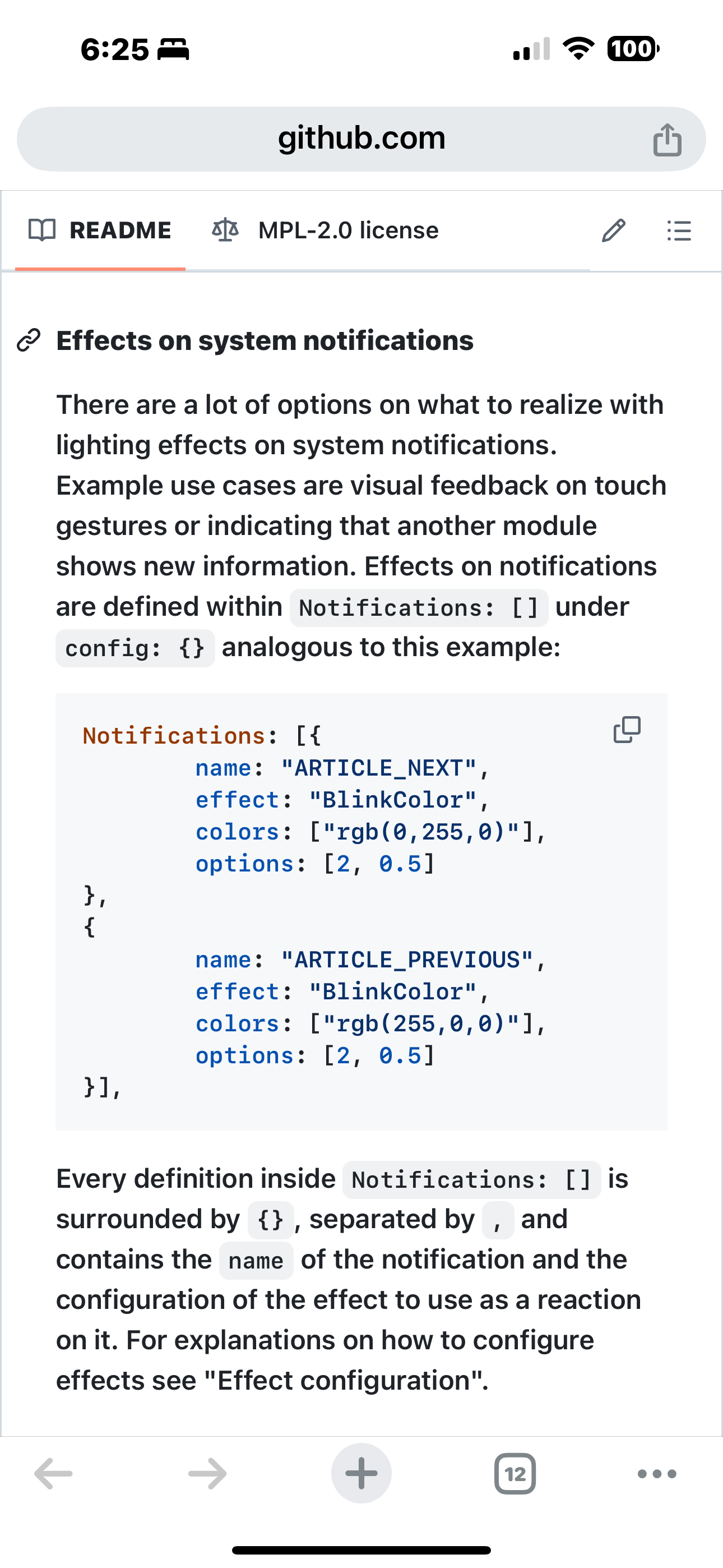
@rkorell i think framelight can also listen and act on other ‘system’ (any) notification
as these two are from another module, not the core ‘system’.
therefore you can setup for ANY notification
-
@rkorell modules receive notifications at the
notificationReceived() function in the modulename.js file
the function takes two parms
notificationReceived( notification_code, data(or payload))a notifcation_code is that “USER_PRESENCE”,
and the data/payload is a notification specific data structure/value
for user_Presence its true and false -
@sdetweil OK, thanks for this.
Any chance that there is a module around that handles “intermodule communication” - like an application broker?If not and I got you right than my way must be to adjust a given source code which leads me in trouble with updates.
Any other idea how I can solve my problem “How can I synchronize on/off switching of a LED strip with MMM-Pir’s on/off switching of monitor”?
Thanks for any suggestion.
Ralf -
@rkorell i think framelight can also listen and act on other ‘system’ (any) notification
as these two are from another module, not the core ‘system’.
therefore you can setup for ANY notification
-
@sdetweil awesome…
I’ve missed that, I’m so sorry!
Thanks for your effort in tutoring!Highly appreciated!
Just another quick question - fiddling with the developer console in Chrome:
I’ve found the Application tab and there is a recorder for “notifications” but there is no notification shown up.
Any chance to debug the notifications in my config (I would like to see “sender” and “payload” …Thanks again for your kind support!
Warmest regards,
Ralf -
R rkorell has marked this topic as solved on
-
@rkorell their idea of notifications is not the same as MagicMirror’s usage
you can use MMM-ViewNotifications. it presents a window( config change to leave them there for awhile, as default clears them too fast during development use)
-
Dear Sam, (@sdetweil ),
as always (!) Great.
this worked - thanks a LOT!With this little “sniffer” I was able to figure out, what happens…
It is just a rumour that MMM-Pir sends a “USER_PRESENCE” notification.
In fact there is one and only one notification “MMM_PIR-SCREEN_POWERSTATUS”.
With a little bit trial & error I was able to identify that the payload is true / false for the events “screen on” / “screen off”.
With further searches today I found @MMRIZE’s module MMM-NotificationTrigger which seems to do what I’m looking for - Tranlating SCREENPOWERSTATUS-true to FRAMELIGHT_ON and opposite.Hopefully I can figure out how to use MMRize’s module in right manner.
Warmest regards,
Ralf
(I have to wait for LED strip - they are shipping currently)
Keep you posted. -
@sdetweil , as expected :-( I’m not able to figure this out…
I’m in the fog of instances and .this / not .this…
Can somebody guid me, please?
I’m trying to configure MMM-NotificationTrigger to send two different notifications depending on the payload.
So my idea is to evaluate payload in given payload filter, store the result in a variable and decide with this variable which fire statement is the correct one.
But I’m stuck in referencing this variable which seems to be unknown outside the trigger-evaluation part.This currently is my (non working) approach in my config.js file:
		{
		  module: 'MMM-NotificationTrigger',
		  disabled: false,
		  config: {
		    useWebhook: false, // If you want to activate webhook as Notification emitter, set true. (eg. IFTTT)
		    triggers:[ // Array of triggers.
		      {
		        trigger: "MMM_PIR-SCREEN_POWERSTATUS", //REQUIRED
		        triggerPayloadFilter: (payload) => { //OPTIONAL should return true or false
		          if (payload.value == 'true' ) {
		            this.ScreenStatus = "on"
		            return true
		          }
		          this.ScreenStatus = "off"
		          return true
		        },
		        fires: [ // Array of fires. You can enable multi-firing with one trigger.
		          {
			         if (ScreenStatus == 'on') {
            			fire: "SCREEN_IS_ON",
          				} else {
            			fire: "SCREEN_IS_OFF",
          			}

		          },
		        ],
		      },
		    ]
		  },
		},
I’ve tried to reference Screenstatus with “payload.ScreenStatus” as well as “triggerPayloadFilter.screenstatus”, but the dot is rejected as config error in both cases.
Any tip is highly appreciated.
Sorry for being this stupid…Warm regards,
Ralf -
@rkorell i haven’t tried this but it should work
anything created IN the filter will die in the filter
so you need something persistent
lets cheatas the config is persistent lets add your variable to the config block, the module wont know its there and wont use it
config: {
		    useWebhook: false, // If you want to activate webhook
as Notification emitter, set true. (eg. IFTTT)
                     ScreenStatus:null,
		    triggers:[
now in your trigger filter and fires use
this.config.ScreenStatususing the browser developers window , sources tab expand left nav to find the modulename.js) you should find the module source where it calls the filter and put a stop there and(f5 to reload the page) step INTO ( down arrow icon above the code in sources view) to see your filter execute
-
@sdetweil , thanks!!!
Sounds plausible but doesn’t work :-(
I can reference this.config.ScreenStatus in the TriggerPayloadFilter.
But when I do this, the fire isn’t working (no notification broadcast appears).
In addition referencing of this.config.ScreenStatus in the fire block causes an error “Cannot read properties of undefined (reading ‘ScreenStatus’)”…
Any direct reference in the fire block in an IF statement creates an "unecpected ‘this’ " error message …you can see my dumb trials commented in this snippet:
		{
		  module: 'MMM-NotificationTrigger',
		  disabled: false,

		  config: {
		    ScreenStatus:"INIT",

		    useWebhook: false, // If you want to activate webhook as Notification emitter, set true. (eg. IFTTT)
		    triggers:[ // Array of triggers.
		      {
		        trigger: "MMM_PIR-SCREEN_POWERSTATUS", //REQUIRED
		        triggerPayloadFilter: (payload) => { //OPTIONAL should return true or false
		          if (payload.value == 'true' ) {
		            //this.config.ScreenStatus = "on"
		            return true
		          }
		          //this.config.ScreenStatus = "off"
		            return true
		        },
		        fires: [ // Array of fires. You can enable multi-firing with one trigger.
		          {
			         /* if (this.config.ScreenStatus == 'on') {
            		  	fire: "SCREEN_IS_ON",
          			  	} else {
            			fire: "SCREEN_IS_OFF",
          			  }*/
          			//fire: this.config.ScreenStatus,
          			fire: "BROADCAST",

		          },
		        ],
		      },
		    ]
		  },
		},
I’m SO sorry…
Ralf -
@rkorell yeh, sorry, didn’t give this enough viewing/thinking time…
the fires section doesn’t support code, its all literals.
I don’t know if you can attach a function (which returns the literal) to itfires: ()=>{ if (this.config.ScreenStatus == 'on') return "BROADCAST"; else return "?????" -
@sdetweil Yes, sounds like a brillant idea.
But if I assign a value to this.config.ScreenStatus within the trigerPayloadFilter section the fire section isn’t working - so your thought is great but I cannot try this …Any idea why the fire section is skipped?
THANKS for your effort!!
Ralf -
@rkorell well, skipped…
because the code it looking for a literal, and the function is not…
the NotificationsTrigger module will have to be changed -
@sdetweil O.K.,
if I have to change modules, I can do this at the “root” - which is the MMM-Pir …
I will at least have a closer look to the MMM-Notification module - maybe a good starting point to develop a completely new (forked) module…Thanks for your engagement anyway!
Warm regards,
Ralf -
@rkorell ok, its a tiny change to Trigger module…
-
@sdetweil from your perspective :-)
Just had a deeper look into code and I didn’t understand that much…
Hello! It looks like you're interested in this conversation, but you don't have an account yet.
Getting fed up of having to scroll through the same posts each visit? When you register for an account, you'll always come back to exactly where you were before, and choose to be notified of new replies (either via email, or push notification). You'll also be able to save bookmarks and upvote posts to show your appreciation to other community members.
With your input, this post could be even better 💗
Register Login