Read the statement by Michael Teeuw here.
MMM-Bambulink: MagicMirror Module for Bambu Lab Printers
-
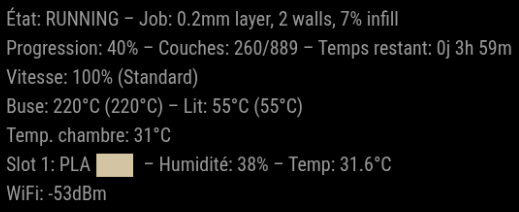
MMM-Bambulink is a third-party module for MagicMirror² designed to display information about your Bambu Lab printer directly on your MagicMirror screen. The module connects to your printer over the local network using Bambu Lab’s LAN credentials and updates information automatically at a configurable interval.
NOT NEED ONLY LAN MODE
Key Requirements
To use this module, you need:-
The IP address of your Bambu Lab printer (for local discovery/communication)
-
The LAN connection code (access code) for your printer
-
The serial number of your printer
These three values are required in the configuration to establish the connection to your printer.
Key Features
Monitor your Bambu Lab printer directly from MagicMirror²Secure LAN connection via MQTT/TLS on port 8883
Configurable refresh interval for real-time updates
Optional thumbnail display for the current print
Simple installation within the standard MagicMirror module structure
Customizable thumbnail path for printer-specific previews
Development Status
The module is functional and ready for use in a standard MagicMirror² environment, with installation steps, Node.js dependencies, and an update procedure clearly documented in the README.The current README is concise and focuses on core setup; detailed feature listings, supported printer states, error handling, and advanced views are not yet fully documented, suggesting the project is still evolving.
Compatibility
MMM-Bambulink is designed for MagicMirror², as installation requires cloning into ~/MagicMirror/modules and adding configuration to config/config.js.The required parameters (ip, accessCode, serial, mqttPort, useTLS) indicate it targets Bambu Lab printers with LAN mode enabled and MQTT access over a secure tunnel.
Installation
Navigate into your MagicMirror’s modules folder:cd ~/MagicMirror/modulesClone the repository:
git clone https://github.com/TAGinside/MMM-BambulinkNavigate into the new MMM-Bambulink folder:
cd MMM-BambulinkInstall the Node dependencies:
npm installConfiguration
Add the module to the modules array in your config/config.js:modules: [ { module: "MMM-Bambulink", position: "top_left", config: { ip: "x.x.x.x", // IP address of the printer accessCode: "xxxxxxxx", // LAN Connection Code serial: "XXXXXXXXXXXXXXX", // Serial number of the printer mqttPort: 8883, useTLS: true, updateInterval: 5000, // Refresh interval in ms showThumbnail: true, thumbnailPath: "modules/MMM-Bambulink/thumbnails/H2S.png", } }, ]How to Use the Module
To use this module, add it to the modules array in your config/config.js file as shown above, then restart MagicMirror.Once running, the module will display Bambu Lab printer information in the chosen position (e.g., top_left) on your MagicMirror.
Update
cd ~/MagicMirror/modules/MMM-Bambulink
git pull
npm ci
After updating, restart MagicMirror.
Use Cases
This module is particularly useful in a workshop, technical office, or home lab where a MagicMirror already serves as a central dashboard.With this display, you can quickly monitor a print in progress, verify that the printer is responsive, or keep a visual overview of the current job without constantly opening Bambu Studio.
About
MMM-Bambulink brings Bambu Lab printer monitoring directly to your smart mirror, allowing you to integrate 3D print status into a broader home automation or workshop dashboard.This module is open source and free to use and modify. For more information, updates, or to contribute, visit the GitHub repository:
https://github.com/TAGinside/MMM-BambulinkIf you try this module, let me know if it works with your printer and MagicMirror setup. Feedback and suggestions are welcome to help shape its future
UX IN CONSTRUCTION
-

Hello! It looks like you're interested in this conversation, but you don't have an account yet.
Getting fed up of having to scroll through the same posts each visit? When you register for an account, you'll always come back to exactly where you were before, and choose to be notified of new replies (either via email, or push notification). You'll also be able to save bookmarks and upvote posts to show your appreciation to other community members.
With your input, this post could be even better 💗
Register Login