MagicMirror Forum
    • Recent
    • Tags
    • Unsolved
    • Solved
    • MagicMirror² Repository
    • Documentation
    • 3rd-Party-Modules
    • Donate
    • Discord
    • Register
    • Login
    A New Chapter for MagicMirror: The Community Takes the Lead
    Read the statement by Michael Teeuw here.

    MMM-CalendarExt3 BST Timezone issue

    Scheduled Pinned Locked Moved Solved Troubleshooting
    26 Posts 4 Posters 7.6k Views 4 Watching
    Loading More Posts
    • Oldest to Newest
    • Newest to Oldest
    • Most Votes
    Reply
    • Reply as topic
    Log in to reply
    This topic has been deleted. Only users with topic management privileges can see it.
    • S Offline
      shall_ @sdetweil
      last edited by

      @sdetweil this is another entry added this week with the issue.

      BEGIN:VEVENT
      DTSTART;VALUE=DATE:20240402
      DTEND;VALUE=DATE:20240403
      DTSTAMP:20240403T224236Z
      UID:70rjap1gXXXXX6oo68db56o@google.com
      CREATED:20240402T105500Z
      LAST-MODIFIED:20240402T105500Z
      SEQUENCE:0
      STATUS:CONFIRMED
      SUMMARY:12 hours 
      TRANSP:OPAQUE
      END:VEVENT
      
      
      S 1 Reply Last reply Reply Quote 0
      • S Offline
        sdetweil @shall_
        last edited by

        @shall_ ok. weird. anyhow

        we dont process anything other than vevents. so the garbage at the top which has the x-wr timezone, we dont see.

        so the calendar will be processed in the current system timezone.

        if you want to see the debug of processing, add the ,“DEBUG” to the end of the logLevel property in config.js

        and then start mm like this

        npm start >somefile.txt 2>&1
        

        wait til the cal is up, then ctrl-q quit mm and examine the somefile.txt

        Sam

        How to add modules

        learning how to use browser developers window for css changes

        1 Reply Last reply Reply Quote 0
        • S Offline
          sdetweil @shall_
          last edited by

          @shall_ because there is no timezone specified on the entry, it will be processed in the current system timezone

          Sam

          How to add modules

          learning how to use browser developers window for css changes

          1 Reply Last reply Reply Quote 0
          • S Offline
            shall_ @shall_
            last edited by

            @sdetweil

            I will have to pick this up again tomorrow. i will run the debug when i get home from work.
            is there anything I am looking for in particular?

            S 1 Reply Last reply Reply Quote 0
            • S Offline
              sdetweil @shall_
              last edited by sdetweil

              @shall_ because there is a rrule
              the string
              dates: …
              documents the dates returned from the rrule.between function… yesterday plus 1 year
              is the window we create to get recurring events

              Sam

              How to add modules

              learning how to use browser developers window for css changes

              1 Reply Last reply Reply Quote 0
              • M Offline
                MMRIZE
                last edited by

                @shall_
                CX3 doesn’t parse ics file directly, so probably the default calendar app (or any event provider) must have responsibility.

                But for an instant solution, you can use preProcessor or event payload to make a hotfix by force.

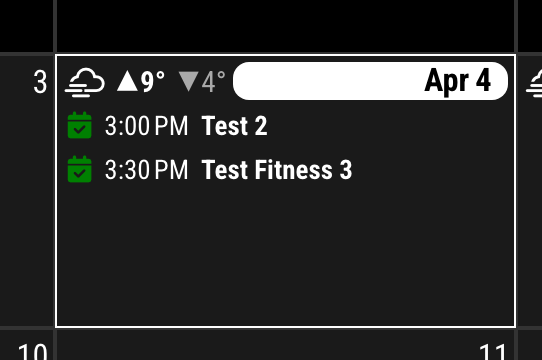
                BEFORE
                f8b31b93-5912-40c9-a64a-a253eb1a0720-image.png

                /* in your CX3 module config */
                preProcessor: (event) => {
                	if (["SomeCalendarName", "AnotherCalendarName"].includes(event.calendarName)) {
                		event.startDate = Number(event.startDate) - 1000 * 60 * 60
                		event.endDate = Number(event.endDate) - 1000 * 60 * 60
                	}
                	return event
                }
                

                AFTER
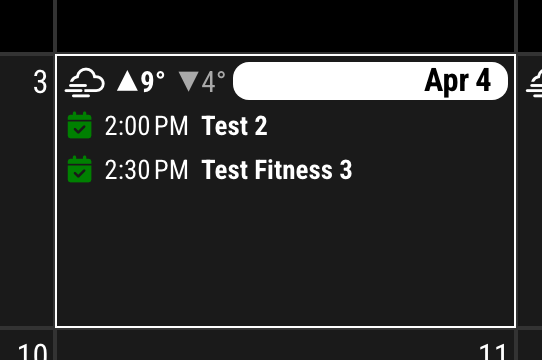
                6d5ddf39-d970-4795-933f-de371889024c-image.png

                If all your calendar has that issue, you can omit if statement.

                preProcessor: (event) => {
                	event.startDate = Number(event.startDate) - 1000 * 60 * 60
                	event.endDate = Number(event.endDate) - 1000 * 60 * 60
                	return event
                }
                
                S 1 Reply Last reply Reply Quote 0
                • S Offline
                  shall_ @MMRIZE
                  last edited by

                  @MMRIZE Thanks for your reply.
                  The timed calendar events with a start/finish time show the correct time with no issue.

                  The issue solely lies with all-day and multi-day events.
                  All of these events during DST showed correctly, as soon as the timezone changed to BST. They now all rollover into the following day, so my 5 day events are now 6 days, 2 days are now 3, single days 2.

                  M 1 Reply Last reply Reply Quote 0
                  • M Offline
                    MMRIZE @shall_
                    last edited by

                    @shall_
                    Can you send me the ics file? (eouia0819@gmail.com)

                    S 1 Reply Last reply Reply Quote 0
                    • S Offline
                      shall_ @MMRIZE
                      last edited by

                      @MMRIZE i have emailed it over

                      1 Reply Last reply Reply Quote 0
                      • A Offline
                        alaric10000
                        last edited by

                        Is MagicMirror installed directly to your Pi, or are you running it inside a Docker or other container? I originally had a similar problem with my MM configs all set properly, and my system time set properly, but for some reason I needed to also force the Docker container to the correct timezone with environment variables in the docker-compose file:

                        environment:
                        - TZ=America/Los Angeles
                        - SET_CONTAINER_TIMEZONE=true
                        - CONTAINER_TIMEZONE=America/Los_Angeles
                        

                        Obviously you’d want a different timezone, and you’re probably running MM on your Pi without using Docker, but maybe it’ll help.

                        1 Reply Last reply Reply Quote 0
                        • M Offline
                          MMRIZE
                          last edited by MMRIZE

                          @shall_ @alaric10000
                          It happens when the event is regarded as FulldayEvent but not to start at 0 O’clock. I updated the module to fix it.
                          https://github.com/MMRIZE/MMM-CalendarExt3/pull/141
                          Update the module and check it.

                          1 Reply Last reply Reply Quote 0
                          • M Offline
                            MMRIZE
                            last edited by

                            Finally I found what was wrong.

                            The issue lies in the wrong parsing logic from the default calendar module about repeated full-day events with TimeZone by RRULE.

                            If you have installed CX3 v1.8.2, Reinstall again or back to 1.8.1 (I rolled back again to 1.8.1)

                            Then see this;
                            https://github.com/MMRIZE/MMM-CalendarExt3/wiki/To-fix-wrong-repeated-fullday-event-displaying-(MM-2.27)

                            S S 2 Replies Last reply Reply Quote 0
                            • S Offline
                              sdetweil @MMRIZE
                              last edited by

                              @MMRIZE but… for full day, you ignore the time… or reset it to 00:00:00

                              Sam

                              How to add modules

                              learning how to use browser developers window for css changes

                              M 1 Reply Last reply Reply Quote 0
                              • M Offline
                                MMRIZE @sdetweil
                                last edited by MMRIZE

                                @sdetweil
                                Of course I can. I have already provided that manual method to my CX3 users. (https://github.com/MMRIZE/MMM-CalendarExt3/wiki/To-fix-wrong-repeated-fullday-event-displaying-(MM-2.27))

                                However, the value of notification should be trustable or consistent. All other kinds of events, like In-A-Day single events, Multiday-but-not-fullday-event, and even Repeated-Not-Fullday-event, could deliver the proper time, but only Repeated-Fullday events delivered the wrong value. That is out of common sense.

                                At least, it should have been guided as an intentional design. (I wasted several hours trying to guess what happened. Who could imagine the notification value was wrong?)

                                PS. Ah, I forgot there was another case; imperial units on broadcasted weather information. :)

                                S 1 Reply Last reply Reply Quote 0
                                • S Offline
                                  sdetweil @MMRIZE
                                  last edited by

                                  @MMRIZE yes, we have had other users making updates.

                                  Sam

                                  How to add modules

                                  learning how to use browser developers window for css changes

                                  1 Reply Last reply Reply Quote 0
                                  • S Offline
                                    shall_ @MMRIZE
                                    last edited by

                                    @MMRIZE Apologies for the delayed reply, i have been busy and then couldn’t log in to the forum.

                                    I have tried updating, installing, and reinstalling. then adding the code into my config file but i still can’t get it to correct. I think i put the code in correctly but i have attached that so you can check. my config file isn’t throwing up any errors?

                                    how do i check what version of CX3 i am running? i did delete the whole folder and redo the git pull/install so i should have whatever is on github?

                                    {
                                    			module: "MMM-CalendarExt3",
                                    			position: "bottom_bar",
                                    			title: "",
                                    			config: {
                                    			mode: "week", //week or month view
                                    			weeksInView: 5,
                                    			weekIndex: 0, //-1 start last week, 0 this week, 1 next week.
                                    			instanceId: "basicCalendar",
                                    			locale: 'en-GB',
                                    			maxEventLines: 4,
                                    			firstDayOfWeek: 1,
                                    			useWeather: true,
                                    			weatherLocationName: 'xxxx',
                                    			
                                    
                                    			eventPayload: (payload) => {
                                    				for (let ev of payload) {
                                    				  if (ev.fullDayEvent) {
                                    					let gap = +ev.endDate - +ev.startDate
                                    					if (gap % (1000 * 60 * 60 * 24) === 0) {
                                    					  ev.startDate = new Date(+ev.startDate).setHours(0, 0, 0, 0)
                                    					  ev.endDate = new Date(+ev.startDate + gap).setMilliseconds(-1)
                                    					}
                                    				  }
                                    				}
                                    				return payload
                                    			  },
                                    
                                    			eventTransformer: (e) => {
                                      e.startDate = new Date(e.start?.date || e.start?.dateTime).valueOf()
                                      e.endDate = new Date(e.end?.date || e.end?.dateTime).valueOf()
                                      e.title = e.summary
                                      e.fullDayEvent = (e.start?.date) ? true : false
                                      //return e
                                    
                                    	if (e.title.search('Lates') > -1) e.color = 'mediumvioletred'
                                    	if (e.title.search('Earlies') > -1) e.color = 'yellow'
                                    	if (e.title.search('12 hours') > -1) e.color = 'blue'
                                    	if (e.title.search('12 Hours') > -1) e.color = 'blue'
                                    	if (e.title.search('12 hrs') > -1) e.color = 'blue'
                                    	if (e.title.search('Vacation') > -1) e.color = 'blue'
                                    	if (e.title.search('vacation') > -1) e.color = 'blue'
                                    	if (e.title.search('Shutdown') > -1) e.color = 'goldenrod'
                                    	if (e.title.search('My weekend') > -1) e.color = 'deepskyblue'


                                      return e


                                    }
                                    
                                    }
                                    		},
                                    
                                    M S 2 Replies Last reply Reply Quote 0
                                    • M Offline
                                      MMRIZE @shall_
                                      last edited by

                                      @shall_
                                      Are you using MMM-GoogleCalendar?

                                      S 1 Reply Last reply Reply Quote 0
                                      • S Offline
                                        shall_ @MMRIZE
                                        last edited by

                                        @MMRIZE i am using the MMM-GoogleCalendar module

                                        1 Reply Last reply Reply Quote 0
                                        • S Offline
                                          shall_ @shall_
                                          last edited by

                                          I have managed to fix my issue, it seems the event transformer I was using (to colour mt events) may have been contradicting the fix.

                                          I removed the following from my event transformer which fixed the issue!

                                            e.startDate = new Date(e.start?.date || e.start?.dateTime).valueOf()
                                            e.endDate = new Date(e.end?.date || e.end?.dateTime).valueOf()
                                          
                                          1 Reply Last reply Reply Quote 0
                                          • S sdetweil has marked this topic as solved on

                                          Hello! It looks like you're interested in this conversation, but you don't have an account yet.

                                          Getting fed up of having to scroll through the same posts each visit? When you register for an account, you'll always come back to exactly where you were before, and choose to be notified of new replies (either via email, or push notification). You'll also be able to save bookmarks and upvote posts to show your appreciation to other community members.

                                          With your input, this post could be even better 💗

                                          Register Login

                                          • 1
                                          • 2
                                          • 1 / 2
                                          • First post
                                            Last post
                                          Enjoying MagicMirror? Please consider a donation!
                                          MagicMirror created by Michael Teeuw.
                                          Forum managed by Sam, technical setup by Karsten.
                                          This forum is using NodeBB as its core | Contributors
                                          Contact | Privacy Policy