MagicMirror Forum
    • Recent
    • Tags
    • Unsolved
    • Solved
    • MagicMirror² Repository
    • Documentation
    • 3rd-Party-Modules
    • Donate
    • Discord
    • Register
    • Login
    A New Chapter for MagicMirror: The Community Takes the Lead
    Read the statement by Michael Teeuw here.

    sqlite - anyone use it?

    Scheduled Pinned Locked Moved Unsolved Feature Requests
    14 Posts 3 Posters 4.9k Views 3 Watching
    Loading More Posts
    • Oldest to Newest
    • Newest to Oldest
    • Most Votes
    Reply
    • Reply as topic
    Log in to reply
    This topic has been deleted. Only users with topic management privileges can see it.
    • S Offline
      sdetweil @bobt
      last edited by

      @bobt it should only run on the node_helper.js side, not in the browser side…

      Sam

      How to add modules

      learning how to use browser developers window for css changes

      1 Reply Last reply Reply Quote 0
      • B Offline
        bobt
        last edited by

        Wow - thanks for the quick reply. The db work is in the helper - the require, connect, select. It gets kicked off with socketNotificationReceived. Sends data back with self.sendSocketNotification(“DATA”,self.data);

        1 Reply Last reply Reply Quote 0
        • B Offline
          bobt
          last edited by

          If I just send back data without using the sqlite3 it works too.

          S 1 Reply Last reply Reply Quote 0
          • S Offline
            sdetweil @bobt
            last edited by

            @bobt so, it works ok?

            Sam

            How to add modules

            learning how to use browser developers window for css changes

            B 1 Reply Last reply Reply Quote 0
            • B Offline
              bobt @sdetweil
              last edited by

              @sdetweil It works with fine serveronly. Gets data from the db and passes it to the script. But without the serveronly it chokes when it sees the var sqlite3 = require(“sqlite3”);
              error-
              [2020-04-01 20:36:15.609] [ERROR] Error: Cannot find module ‘/home/pi/MagicMirror/node_modules/sqlite3/lib/binding/electron-v6.0-linux-arm/node_sqlite3.node’

              The module exists in /home/pi/MagicMirror/node_modules/sqlite3/lib/binding but not in the electron folder.

              No idea. I can’t just copy it in - version numbers don’t match.

              S 1 Reply Last reply Reply Quote 0
              • S Offline
                sdetweil @bobt
                last edited by sdetweil

                @bobt for your module, you added that as a dependency in package.json, then do an npm install in your module folder.

                it should be in

                ‘/home/pi/MagicMirror/modules/modulename/node_modules/sqlite

                Sam

                How to add modules

                learning how to use browser developers window for css changes

                B 1 Reply Last reply Reply Quote 0
                • B Offline
                  bobt @sdetweil
                  last edited by

                  @sdetweil Thank you Sam for all your help. I created that folder and just copied the module in. I get:

                  [2020-04-02 07:42:08.104] [ERROR] WARNING! Could not load config file. Starting with default configuration. Error found: Error: Cannot find module ‘/home/pi/MagicMirror/node_modules/sqlite3/lib/binding/electron-v6.0-linux-arm/node_sqlite3.node’

                  I’m ready to just start over. If I started with a fresh install of MM and wanted to install sqlite how would I go about it? Should I be in the module folder? the MM folder?
                  Thanks again for your help.

                  S 1 Reply Last reply Reply Quote 0
                  • S Offline
                    sdetweil @bobt
                    last edited by

                    @bobt as its used by the module, it should be in the module folder

                    just copy is always bad

                    npm install sqlite --save

                    –save will put it into the package.json in this folder

                    you should have one(package.json), then u can keep track of your dependencies…

                    npm init will create one

                    Sam

                    How to add modules

                    learning how to use browser developers window for css changes

                    1 Reply Last reply Reply Quote 0
                    • B Offline
                      bobt
                      last edited by

                      Thanks - and one (hopefully last) question. If I wanted sqlite to be available for a number of modules where would I put it?

                      S 1 Reply Last reply Reply Quote 0
                      • S Offline
                        sdetweil @bobt
                        last edited by

                        @bobt i don’t know

                        u might be able to put in in the base, and then change your require to include the path to the ~/MagicMirror/node_modules/sqlite version

                        Sam

                        How to add modules

                        learning how to use browser developers window for css changes

                        1 Reply Last reply Reply Quote 0
                        • PerlchampP Offline
                          Perlchamp
                          last edited by

                          @bobt
                          did u find a solution for your problem ?

                          S B 2 Replies Last reply Reply Quote 0
                          • S Offline
                            sdetweil @Perlchamp
                            last edited by

                            @Perlchamp you should create a package.json for the module
                            by doing npm init in the module folder, and answering the setup questins.
                            the questions only add text to the package.json, nothing else

                            and then

                            then install your dependencies

                            npm install --save sqlite3

                            –save means add this to the package.json dependencies section

                            when u are done, you can send the package.json to another person,
                            and they can run npm install in the module folder and get the same
                            supporting code installed for this module

                            and if you asked for a SPECIFIC version of some library,
                            that would be recorded in the package.json too, so the other user would get
                            the same level of the dependency

                            Sam

                            How to add modules

                            learning how to use browser developers window for css changes

                            1 Reply Last reply Reply Quote 0
                            • B Offline
                              bobt @Perlchamp
                              last edited by

                              @Perlchamp
                              Thanks everyone for your help. What I was doing was using MMM-MarineWeather By Grena https://github.com/grenagit
                              as a template to create a MarineTides version. In my simplicity I was loading the tide predictions from NOAA into a table and trying to use sqlite. The problems caused me to do a better job. Now I link to the NOAA website for the info. This allows the module to get the tide info from any (US) location. Works well. I’ll clean it up and try to add it to Git. May need help with that.
                              Thanks again.
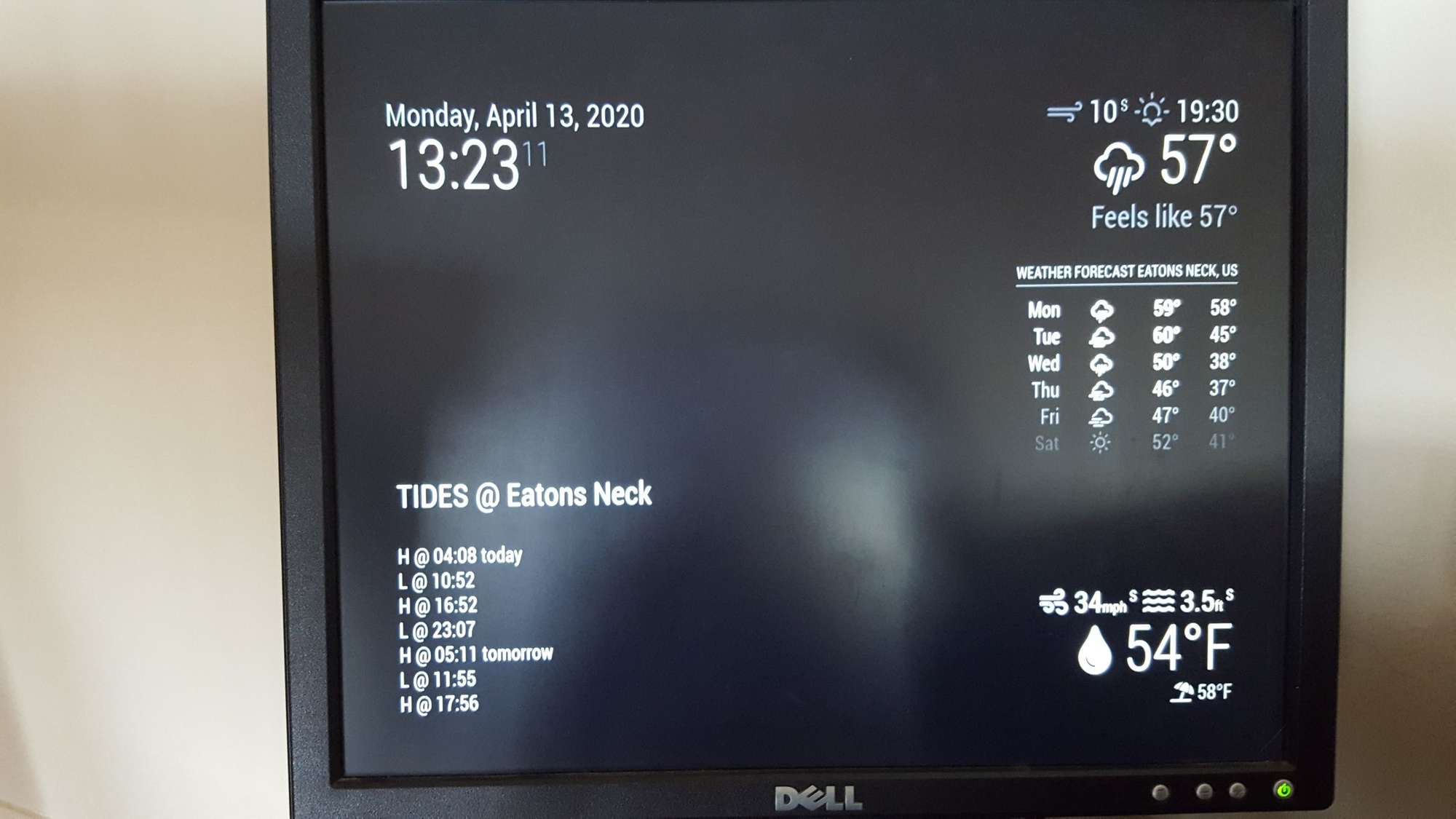
                              20200413_132310_resized.jpg

                              1 Reply Last reply Reply Quote 1

                              Hello! It looks like you're interested in this conversation, but you don't have an account yet.

                              Getting fed up of having to scroll through the same posts each visit? When you register for an account, you'll always come back to exactly where you were before, and choose to be notified of new replies (either via email, or push notification). You'll also be able to save bookmarks and upvote posts to show your appreciation to other community members.

                              With your input, this post could be even better 💗

                              Register Login

                              • 1 / 1
                              • First post
                                Last post
                              Enjoying MagicMirror? Please consider a donation!
                              MagicMirror created by Michael Teeuw.
                              Forum managed by Sam, technical setup by Karsten.
                              This forum is using NodeBB as its core | Contributors
                              Contact | Privacy Policy