Read the statement by Michael Teeuw here.
Force a module refresh - not the entire page
-
Is there any way to command refresh one specific module?
I found an option to refresh the entire page. I would like this way to update the HA module when the sensor changes state, not just temporarily. -
@majdzik84 You can call updatedom method of the target module to refresh that specific module, or if that module have notification refresh then can send notification. Check below documentation for update dom method of modules
https://docs.magicmirror.builders/development/core-module-file.html#this-updatedom-speed -
@ashishtank Thank you for your answer. I am glad that there is such a possibility. Unfortunately, I don’t know where to start to get it. I will write what I mean and maybe I could count on help.
I control the mirror through Home assistant using MMM-Remote-Control (e.g. I send command http://192.168.2.200:8080/api/module/alert/showalert?title=ZAMKNIJ ZAMEK&message=w d door%20frontowych) in the case of alerts.
I have a module for showing sensors (https://github.com/leinich/MMM-homeassistant-sensors) that has the ability to set a time refresh.
I would like to send a command to the mirror from Home assistant to update the module when the sensor changes its state.
Do you know how to achieve it in a simple way for me?
How do I send the updatedom command to this module? -
@majdzik84 If I understood you correctly, you want to send message to Magic Mirror when sensor value change in home assistant and it should refresh the MMM-HomeAssistant-Sensors module, so you see updated value of sensor over there ?
It should be doable with MMM-Remove-control same way as you are sending alert. I have not installed the remote control module and MMM-HomeAssistant-Sensors so can’t test the code my self but you can do below.
- Add below code in MMM-homeassistant-sensors.js
notificationReceived: function (notification, payload, sender) { if (notification === "REFRESHHOMEASSISTANT") { this.getStats(); } },- Do not forget the , after } in last line else it will break the module
- Restart the mirror
- From your browser open http://192.168.2.200:8080/api/module/MMM-homeassistant-sensors or http://192.168.2.200:8080/api/module/homeassistantsensors if first url does not work
- If you see REFRESHHOMEASSISTANT in response then remote control knows new action on HA module
- Now you can send command from HA to refresh the module using http://192.168.2.200:8080/api/module/homeassistantsensors/refreshhomeassistant (url should be in lowercase and also MMM- and - are removed in api path)
As I can not test it and things I have suggested above are based on my code review of both the modules. you might need to adjust one or more things. but in theory it should work.
Let me know how (or if) it works.
-
@ashishtank
When i try http://192.168.2.200:8080/api/module/MMM-homeassistant-sensors i dont see REFRESHHOME ASSISTANT{"success":true,"data":[{"index":"17","identifier":"module_17_MMM-homeassistant-sensors","name":"MMM-homeassistant-sensors","path":"modules/MMM-homeassistant-sensors/","file":"MMM-homeassistant-sensors.js","position":"bottom_left","configDeepMerge":false,"config":{"prettyName":false,"stripName":false,"title":"Home Assistant","host":"192.168.2.98","port":"8123","https":false,"token":"xxxxx","apipassword":"","updateInterval":120000,"displaySymbol":true,"debuglogging":false,"values":[{"sensor":"sensor.natalka_temperature","alertThreshold":26,"icons":[{"default":"thermometer"}]},{"sensor":"sensor.alicja_temperature","alertThreshold":26,"icons":[{"default":"thermometer"}]},{"sensor":"sensor.sypialnia_temperature","alertThreshold":26,"icons":[{"default":"thermometer"}]},{"sensor":"sensor.salon_temperatura","alertThreshold":26,"icons":[{"default":"thermometer"}]},{"sensor":"binary_sensor.zamek_front","icons":[{"state_off":"lock","state_on":"lock-open-variant"}]},{"sensor":"binary_sensor.zamek_tyl","icons":[{"state_off":"lock","state_on":"lock-open-variant"}]},{"sensor":"binary_sensor.brama_wjazdowa","icons":[{"state_off":"gate","state_on":"gate-open"}]},{"sensor":"binary_sensor.brama_lewa","icons":[{"state_off":"garage","state_on":"garage-open"}]},{"sensor":"binary_sensor.brama_prawa","icons":[{"state_off":"garage","state_on":"garage-open"}]}]},"classes":"MMM-homeassistant-sensors","hidden":false,"lockStrings":[]}]}When I try http://192.168.2.200:8080/api/module/homeassistant-sensors/refreshhomeassistant i get
{"success":false,"message":"Module Name or Identifier Not Found!"} -
@majdzik84 said in Force a module refresh - not the entire page:
{“success”:false,“message”:“Module Name or Identifier Not Found!”}
- Did you added the code in MMM-homeassistant-sensors.js ?
- Can you try http://192.168.2.200:8080/api/module/homeassistantsensors/refreshhomeassistant url ? (I have removed the - from home assistant sensors)
for more details about module and it’s action check https://github.com/Jopyth/MMM-Remote-Control/tree/master/API
-
@ashishtank Yes, i added the code in MMM-homeassistant-sensors.js and restart
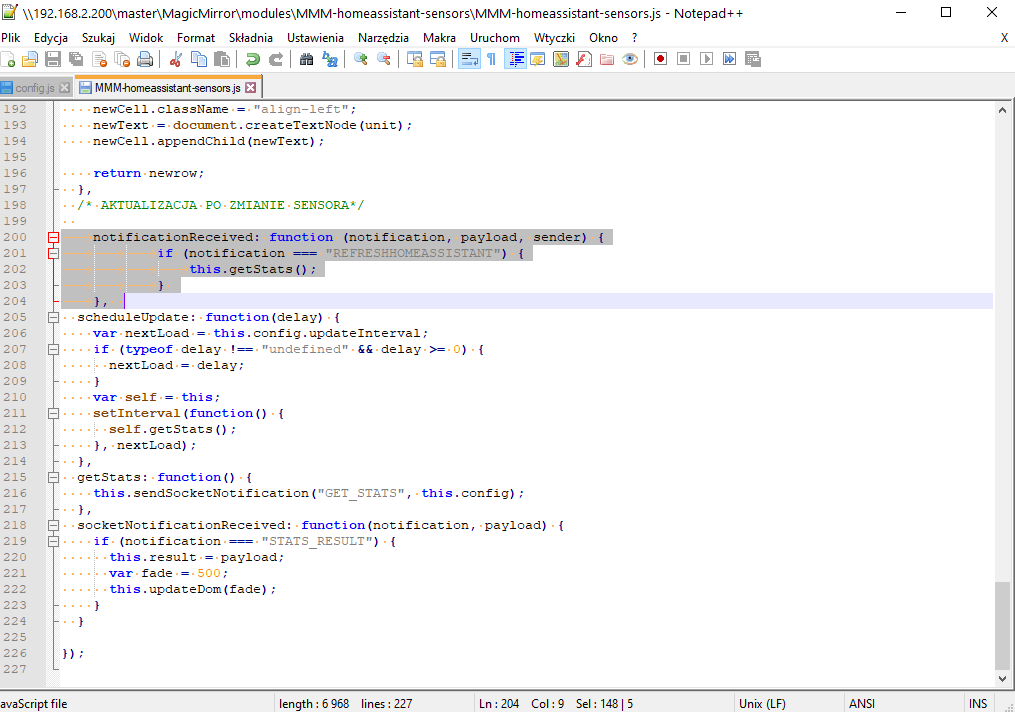
I tried different variations but refreshhomeassistant it is not visible at all.
I try
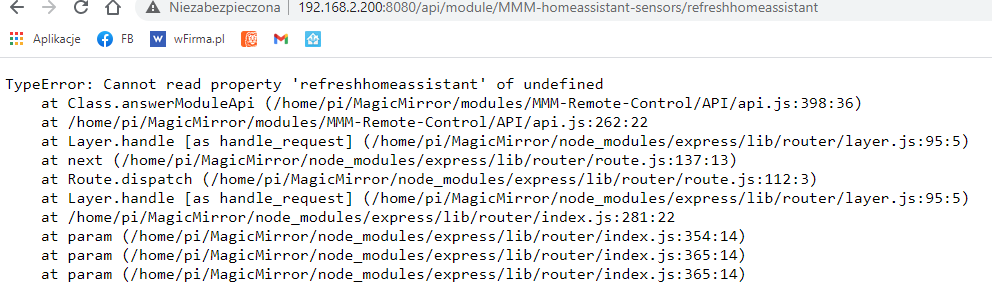
-
@majdzik84 Okay, not sure why it is not listing the action. can you try below once ? it will send notification to all the modules including HA module and it should refresh the module. this is based on Remote control documentation https://github.com/Jopyth/MMM-Remote-Control/blob/master/API/README.md
http://192.168.2.200:8080/api/notification/REFRESHHOMEASSISTANT
-
Yes, it works - thank you :)
-
@majdzik84 Good to know ! :)
-
This post is deleted!
Hello! It looks like you're interested in this conversation, but you don't have an account yet.
Getting fed up of having to scroll through the same posts each visit? When you register for an account, you'll always come back to exactly where you were before, and choose to be notified of new replies (either via email, or push notification). You'll also be able to save bookmarks and upvote posts to show your appreciation to other community members.
With your input, this post could be even better 💗
Register Login