Read the statement by Michael Teeuw here.
Format/Delete Sunset & Sunrise Time
-
Not sure if this is a
custom.cssquestion or aconfig.jsquestion.
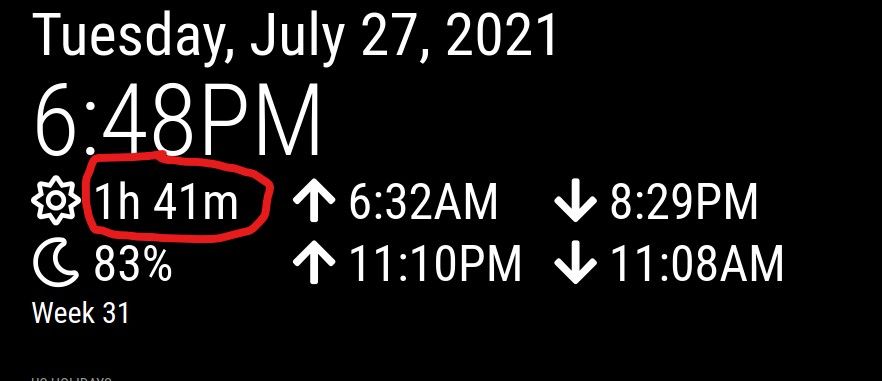
In the default Clock module you have the option to show sun time and moon time. By default they are off but I have set to true.I am scaling up the modules for big TV and had to set
.region.lefta lot wider than however it translates on to the big screen because theshowSunTimesandshowMoonTimeswere starting to text wrap although that might not be quite the term used. I would like to do away with the circled portion of the sunset and I assume sunrise time I have circled in the clock module.
I ran it down to this block in Developer Tools but not sure how to tackle.
I want to keep the sunrise and sunset times but don’t really care about the time UNTIL sunrise or sunset. I would probably get rid of the percent of full moon value too but imagine I just change verbiage similar to how to approach the sun question
On top of that it will allow me to recover some of the middle region I gave up when I widened.region.left.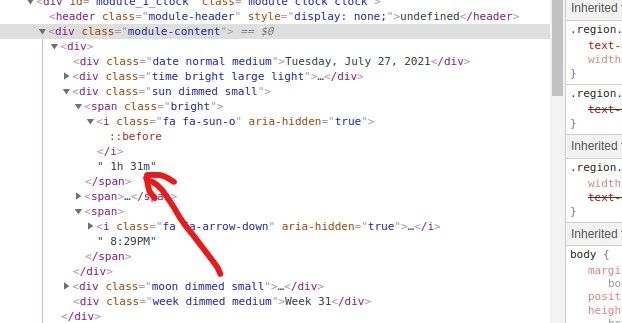
-
@ankonaskiff17 given the way its coded, text in an icon, I don’t know if U can get back the space…
but… css allows you to target/select both classes (starts with . ) and elements (do NOT start with dot)
here is a cheat sheet
https://www.w3schools.com/cssref/css_selectors.asp
but I think u can do this all with classes
.modulename  i.fa-sun-o  {
   /*    i 'think' the only thing u can do is hide the text  */
  color: black;
}
maybe using the ::before
https://www.w3schools.com/cssref/sel_before.asp
I don’t know if this syntax will work…
.modulename  .fa-sun-o i::before {
    content: "";
}
// from my MMM-Config web form css
// and u read the right to left
these are all targeting html elements, no classesa legend, whose parent is a fieldset following a span
targeting the legendspan ~ fieldset >legend { color: #333 !important; }here is a legend, whose parent is a fieldset whose parent is a li, ul, div
targeting the legenddiv > ul > li > fieldset >legend { color: #333 !important; } -
@sdetweil fa is font awesome?
-
@ankonaskiff17 i think so

Hello! It looks like you're interested in this conversation, but you don't have an account yet.
Getting fed up of having to scroll through the same posts each visit? When you register for an account, you'll always come back to exactly where you were before, and choose to be notified of new replies (either via email, or push notification). You'll also be able to save bookmarks and upvote posts to show your appreciation to other community members.
With your input, this post could be even better 💗
Register Login