Read the statement by Michael Teeuw here.
Need help with refactoring charting for a fork of a module.
-
So I wanted to get MMM-BeeStat working, since its out of date and the module has not been updated to the latest api calls. I appear to have gotten the API configured right, but I am unsure if I am actually pulling the data down right and how to parse the data. This is partly due to the fact I am unsure how the data was presented in the past so I cannot really compare before and after json results from the call and partly due to the fact I am a complete NOOB when it comes to javascript.
If I need to reformat this, or add/remove info or provide more context - please let me know
'use strict';


Module.register("MMM-Beestat", {
    hist: [],
    // Default module config.
    defaults: {
        updateInterval: 360 * 60 * 1000, // every 6 hours
        url: 'https://api.beestat.io/?api_key=',
        api_key: "", //request it from beestat
        thermostat_id: 0, //via &resource=ecobee_thermostat&method=read_id
        time_period: "month",
        time_count: 3,
        width: 300,
        height: 200,
        fadeSpeed: 2000,
        chart_title: "Last 3 months runtime"
    },

    getStyles: function() {
        return ["MMM-Beestat.css"];
    },

    getScripts: function() {
        return ["modules/" + this.name + "/node_modules/chart.js/dist/Chart.bundle.min.js"];
    },

    start: function() {
        this.loaded_history = false;
        this.getData();
        this.scheduleUpdate();
    },

    // Override dom generator.
    getDom: function() {
        const outerWrapper = document.createElement("beestat");
        const demandWrapper = document.createElement("div");
        const chartWrapper = document.createElement("div");
        chartWrapper.setAttribute("style", "position: relative; display: inline-block;");

        if (!this.loaded_history) {
            outerWrapper.innerHTML = this.translate("LOADING");
            outerWrapper.className = "dimmed light small";
            return outerWrapper;
        }

        demandWrapper.className = 'medium bright';

        if (this.hist) {
            // Create chart canvas
            const chartCanvas  = document.createElement("canvas");

            var arrHeat = [];
            var arrCool = [];
            var arrLabels = []; //later set to blanks so the graph plots the points

            for (var i = 0; i < this.hist.data.length; i++) {
                var heatRuntime = 0;
                var coolRuntime = 0;

                //heat
                if (this.hist.data[i].auxiliary_heat_1 > 0) {
                    heatRuntime += this.hist.data[i].sum.auxiliary_heat_1 / 3600;
                }
                if (this.hist.data[i].auxiliary_heat_2 > 0) {
                    heatRuntime += this.hist.data[i].sum.auxiliary_heat_2 / 3600;
                }
                if (this.hist.data[i].auxiliary_heat_3 > 0) {
                    heatRuntime += this.hist.data[i].sum.auxiliary_heat_3 / 3600;
                }
                if (this.hist.data[i].compressor_heat_1 > 0) {
                    heatRuntime += this.hist.data[i].sum.compressor_heat_1 / 3600;
                }
                if (this.hist.data[i].compressor_heat_2 > 0) {
                    heatRuntime += this.hist.data[i].sum.compressor_heat_2 / 3600;
                }

                //cool
                if (this.hist.data[i].compressor_cool_1 > 0) {
                    coolRuntime += this.hist.data[i].sum.compressor_cool_1 / 3600;
                }
                if (this.hist.data[i].compressor_cool_2 > 0) {
                    coolRuntime += this.hist.data[i].sum.compressor_cool_2 / 3600;
                }

                if (heatRuntime > 0) {
                    arrHeat.push(heatRuntime);
                } else {
                    arrHeat.push(0);
                }
                if (coolRuntime > 0) {
                    arrCool.push(coolRuntime);
                } else {
                    arrCool.push(0);
                }

                arrLabels.push('');
            }

            var chartconfig = {
                type: 'bar',
                data: {
                    labels: arrLabels,
                    datasets: [{
                        backgroundColor: "#fd9644",
                        data: arrHeat
                    },
                    {
                        backgroundColor: "#45aaf2",
                        data: arrCool
                    }]
                },
                options: {
                    scales: { xAxes: [{ stacked: true }], yAxes: [{ stacked: true }] },
                    elements: { point: { radius: 0 } },
                    legend: { display: false },
                    title: { display: true, text: this.config.chart_title, padding: 5 }
                }
            };

            this.chart = new Chart(chartCanvas.getContext("2d"), chartconfig);
            chartCanvas.width  = this.config.width;
            chartCanvas.height = this.config.height;
            chartCanvas.setAttribute("style", "width: " + this.config.width + "; height: " + this.config.height+";");

            // Append chart
            chartWrapper.appendChild(chartCanvas);

            outerWrapper.appendChild(demandWrapper);
            outerWrapper.appendChild(chartWrapper);
        }

        return outerWrapper;
    },

    scheduleUpdate: function(delay) {
        var nextLoad = this.config.updateInterval;
        if (typeof delay !== "undefined" && delay >= 0) {
            nextLoad = delay;
        }

        var self = this;
        setInterval(function() {
            self.getData();
        }, nextLoad);
    },

    getData: function () {
        var url = this.config.url + this.config.api_key + '&resource=runtime_thermostat_summary&method=read_id&arguments={"attributes":{"thermostat_id":'+this.thermostat_id+',"date":{"value":"-'+this.time_count+''+this.time_period+'","operator":">"}}}';

        this.sendSocketNotification('beestat_runtime', url);
    },

    socketNotificationReceived: function(notification, payload) {
        if (notification === "beestat_runtime") {
            this.hist = payload;
            this.loaded_history = true;
        }

        //display only when data is loaded
        if (this.loaded_history) {
            this.updateDom(this.config.fadeSpeed);
        }
    },
});
Sample results from postman:
"success": true, "data": { "29249277": { "runtime_thermostat_summary_id": 29249277, "user_id": 18261, "thermostat_id": XXXXXX, "date": "2022-03-07", "count": 124, "sum_compressor_cool_1": 0, "sum_compressor_cool_2": 0, "sum_compressor_heat_1": 0, "sum_compressor_heat_2": 0, "sum_auxiliary_heat_1": 3600, "sum_auxiliary_heat_2": 1335, "sum_fan": 8070, "sum_humidifier": 15, "sum_dehumidifier": 0, "sum_ventilator": 0, "sum_economizer": 0, "sum_degree_days": 0, "avg_outdoor_temperature": 33.5, "avg_outdoor_humidity": 83, "min_outdoor_temperature": 31.4, "max_outdoor_temperature": 36.3, "avg_indoor_temperature": 68.4, "avg_indoor_humidity": 38, "deleted": false }, "29249278": { "runtime_thermostat_summary_id": 29249278, "user_id": 18261, "thermostat_id": XXXXXX, "date": "2022-03-08", "count": 287, "sum_compressor_cool_1": 0, "sum_compressor_cool_2": 0, "sum_compressor_heat_1": 0, "sum_compressor_heat_2": 0, "sum_auxiliary_heat_1": 11250, "sum_auxiliary_heat_2": 0, "sum_fan": 18150, "sum_humidifier": 5010, "sum_dehumidifier": 0, "sum_ventilator": 0, "sum_economizer": 0, "sum_degree_days": 0, "avg_outdoor_temperature": 32, "avg_outdoor_humidity": 75, "min_outdoor_temperature": 27.1, "max_outdoor_temperature": 36.5, "avg_indoor_temperature": 68.2, "avg_indoor_humidity": 36, "deleted": false }, -
@jwilson5607 said in Need help with refactoring charting for a fork of a module.:
.auxiliary_heat_1
many of the fields do not exist in the data u showed
sum_auxiliary_heat_1
does exist
simularly
.sum.auxiliary_heat_2
does not existbut
.sum_auxiliary_heat_2does exist
sum. in the posted code implies there was a sub structure for those elements, but that sum .sum. structure isn’t there
-
@sdetweil, thank you. I thought I had copied the right code (it was a late night). Here is what is in my code currently:
 //heat
                if (this.hist.data[i].sum_auxiliary_heat_1 > 0) {
                    heatRuntime += this.hist.data[i].sum_auxiliary_heat_1 / 3600;
                }
                if (this.hist.data[i].sum_auxiliary_heat_2 > 0) {
                    heatRuntime += this.hist.data[i].sum_auxiliary_heat_2 / 3600;
                }
                if (this.hist.data[i].sum_auxiliary_heat_3 > 0) {
                    heatRuntime += this.hist.data[i].sum_auxiliary_heat_3 / 3600;
                }
                if (this.hist.data[i].sum_compressor_heat_1 > 0) {
                    heatRuntime += this.hist.data[i].sum_compressor_heat_1 / 3600;
                }
                if (this.hist.data[i].sum_compressor_heat_2 > 0) {
                    heatRuntime += this.hist.data[i].sum_compressor_heat_2 / 3600;
                }

                //cool
                if (this.hist.data[i].sum_compressor_cool_1 > 0) {
                    coolRuntime += this.hist.data[i].sum_compressor_cool_1 / 3600;
                }
                if (this.hist.data[i].sum_compressor_cool_2 > 0) {
                    coolRuntime += this.hist.data[i].sum_compressor_cool_2 / 3600;
Since I am using the same data set as the results from postman (results via the API call), I SHOULD get something - i THINK. However, I don’t see it loading the screen at all, and nothing showing that it crashed or something similar. My fork is found here if that makes looking at it easier: https://github.com/JWilson5607/MMM-Beestat
-
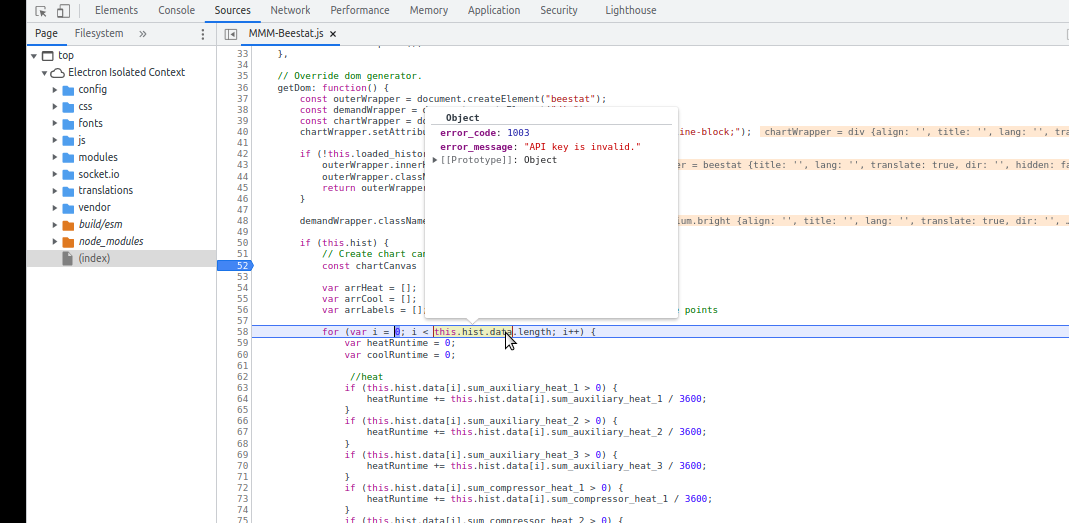
@jwilson5607 open the developer window, ctrl-shift-i, select the sources tab and find your module and filename I the left nav.
put a stop (click line number) on the code you just posted, and Ctrl to reload the page. code will stop there and u can examine the data structures,
just mouse over the words … -
@sdetweil was able to get it tracked down to requesting:https://api.beestat.io/?api_key=0f3499eeb0f984dfdff55f8dd7c23eb4fbdee6b2&resource=runtime_thermostat_summary&method=read_id&arguments={“attributes”:{“thermostat_id”:undefined,“date”:{“value”:“-undefinedundefined”,“operator”:“>”}}}
So I am now diving into that section. This is equal parts frustrating and elating. Thank you for pointing me in the directions you have.
-
@jwilson5607 glad u are making progress
-
@sdetweil I’m packing it in for a day or two, give my brain a moment to relax. I verified I am getting in my URL properly (via output to the logs and that I am getting in a 200 response code via the console logs as well. However, its not parsing the data into the chart, and thats the part I was hoping would work with the sum_xxx_xxxx I added to match the json results from the GET call. If you have any ideas or places to look to understand it better as to why its failing, I would certainly appreciate it, if not - I do appreciate all the suggestions thus far.
-
@jwilson5607 i forked the repo…
so THIS will drive you NUTS…
I don’t have a good api key yetthe api doesn’t return an error if there is an error… it returns 200 (good)
and THEN u have to check the results for the actual status…
sloppyMMM-Beestat: request response error=null statusCode=200 [05.05.2022 08:05.20.470] [LOG] { "statusCode": 200, // my comment see status is 200 (good) // but body.success=false, and body.data .error_message="API key is invalid.", // BUT it 'is' JSON, so the parse is successful... just not any data u are expecting "body": "{\"success\":false,\"data\":{\"error_message\":\"API key is invalid.\",\"error_code\":1003}}", "headers": { "date": "Thu, 05 May 2022 13:05:20 GMT", "server": "Apache/2.4.29 (Ubuntu)", "vary": "Accept-Encoding", "content-length": "82", "connection": "close", "content-type": "application/json; charset=UTF-8" }, "request": { "uri": { "protocol": "https:", "slashes": true, "auth": null, "host": "api.beestat.io", "port": 443, "hostname": "api.beestat.io", "hash": null, "search": "?api_key=12345667&resource=runtime_thermostat_summary&method=read_id&arguments=%7B%22attributes%22:%7B%22thermostat_id%22:0,%22date%22:%7B%22value%22:%22-3%20month%22,%22operator%22:%22%3E%22%7D%7D%7D", "query": "api_key=12345667&resource=runtime_thermostat_summary&method=read_id&arguments=%7B%22attributes%22:%7B%22thermostat_id%22:0,%22date%22:%7B%22value%22:%22-3%20month%22,%22operator%22:%22%3E%22%7D%7D%7D", "pathname": "/", "path": "/?api_key=12345667&resource=runtime_thermostat_summary&method=read_id&arguments=%7B%22attributes%22:%7B%22thermostat_id%22:0,%22date%22:%7B%22value%22:%22-3%20month%22,%22operator%22:%22%3E%22%7D%7D%7D", "href": "https://api.beestat.io/?api_key=12345667&resource=runtime_thermostat_summary&method=read_id&arguments=%7B%22attributes%22:%7B%22thermostat_id%22:0,%22date%22:%7B%22value%22:%22-3%20month%22,%22operator%22:%22%3E%22%7D%7D%7D" }, "method": "GET", "headers": {} } }I changed your request like this in node_helper to get this info on the console
request({ url: url, method: 'GET' }, function (error, response, body) {
        console.log(self.name+": request response error="+JSON.parse(error)+" statusCode="+response.statusCode)
          if (!error && response.statusCode == 200) {
            console.log(JSON.stringify(response,null,2) );
            var result = JSON.parse(body);
              self.sendSocketNotification(notification, result);
          } else {
              console.log("MMM-Beestat : Could not load data. error="+JSON.stringify(error));
          }
      });
and then i looked in the dev console just to see
 i
i -
@jwilson5607 i changed the node_helper like this … I sent a pull request
accept it and this will be added to your instance, then on pi, git pull to get that update locally
restart magic mirrorgetData: function (notification, url) { var self = this; console.log('requesting:' + url); request({ url: url, method: 'GET' }, function (error, response, body) { console.log(self.name+": request response="+JSON.parse(error)+" statusCode="+response.statusCode) if (!error && response.statusCode == 200) { var result = JSON.parse(body); console.log(JSON.stringify(result,null,2) ); if(result.success==='true'){ self.sendSocketNotification(notification, result.data); } else { console.log(self.name +" api request failed =>"+ result.data.error_message) } } else { console.log("MMM-Beestat : Could not load data. error="+JSON.stringify(error)); } }); }, -
@sdetweil I see the data flowing into the logs now (I think it would be ok to comment out the console.log portion of this later on when I start parsing longer stretches of time). Thank you so much for looking at this! However, its now changing the title of the chart to Ecobee Runtime, and just sticking on loading… in the chart area.
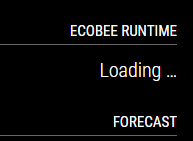
I don’t see any reference in the mmm-beestat.js file that should put this there for the title. I have chart_title defined in the code and called via this snippet here on 118:
title: { display: true, text: this.config.chart_title, padding: 5 }It also never displays the data. I use PowerShell for my day to day scripting work (IAM Systems Engineer) and Javascript is a whole new beast to me (one I am having difficulty adjusting to working with), but I know order of operations can be important. My guess is that it is not in this case, but unsure.
I THINK its related to the getdata function and specifically how its treating the socketNotificationReceived potion of this.
 getData: function () {
        var url = this.config.url + this.config.api_key + '&resource=ecobee_runtime_thermostat&method=get_aggregate_runtime&arguments={"ecobee_thermostat_id":'+this.config.ecobee_thermostat_id+',"time_period":"'+this.config.time_period+'","time_count":'+this.config.time_count+',"group_by":"'+this.config.group_by+'"}';

        this.sendSocketNotification('beestat_runtime', url);
    },

    socketNotificationReceived: function(notification, payload) {
        if (notification === "beestat_runtime") {
            this.hist = payload;
            this.loaded_history = true;
        }
Is this good or should it be different here? I see the original code is referencing in the node_helper file:
self.sendSocketNotification(notification, result)And you updated it to result.data… In the received section it references payload. Would changing this to result be whats needed here?
Let me reiterate again how much I appreciate your patience and assistance.
-
@jwilson5607 1st… you never showed your config.js ( without the apikey) , so I don’t see your title string
console.log()… I usually add a if(this.config.debug) in front so you can turn them on when u need it via config.js
add a debug:false, to the beestat.js to set it to false by default.as for title… did u use the debugger in the dev console… you could stop right there to see if the values are what you think they should be
‘payload’ is just a idea name…
its the data in the notification, ie the payload
doesn’t matter what its called on either side… use whatever term works in your head
payload is just generic
in got this notification, id = 1st parm, and the data/payload of the notification is in the 2nd parm…
you have loading cause the code does this is getdom()
        if (!this.loaded_history) {   // if data not received yet
            outerWrapper.innerHTML = this.translate("LOADING");
            outerWrapper.className = "dimmed light small";
            return outerWrapper;
        }
but here is where this.loaded_history is set to true
socketNotificationReceived: function(notification, payload) {
        if (notification === "beestat_runtime") {
            this.hist = payload;  // yay!!  we got some data from helper, save it
            this.loaded_history = true; // indicate we  got data so getDom() will work
        }
that just says hey, if I get socketnotification events, call here
and if the id string is “beestat_runtime” then
save the data (payload) in the variable this.histon the send of result.data, you only expected the DATA on the beetstat.js,. so that is what I had sent…
using the debugger will REALLY make this a LOT easier… cause u will see the data as u process it…
-
@jwilson5607 I don’t have my apikey yet… so only get error
-
@jwilson5607 also, hist is set to be an array []
but the data comes back as objects
"data": {  //  is an object
               "29249277": {
                    "runtime_thermostat_summary_id": 29249277,
                    "user_id": 18261,
                    "thermostat_id": XXXXXX,
                    "date": "2022-03-07",
                    "count": 124,
                    "sum_compressor_cool_1": 0,
                    "sum_compressor_cool_2": 0,
                    "sum_compressor_heat_1": 0,
                    "sum_compressor_heat_2": 0,
                    "sum_auxiliary_heat_1": 3600,
                    "sum_auxiliary_heat_2": 1335,
                    "sum_fan": 8070,
                    "sum_humidifier": 15,
                    "sum_dehumidifier": 0,
                    "sum_ventilator": 0,
                    "sum_economizer": 0,
                    "sum_degree_days": 0,
                    "avg_outdoor_temperature": 33.5,
                    "avg_outdoor_humidity": 83,
                    "min_outdoor_temperature": 31.4,
                    "max_outdoor_temperature": 36.3,
                    "avg_indoor_temperature": 68.4,
                    "avg_indoor_humidity": 38,
                    "deleted": false
                },
                "29249278": {
                    "runtime_thermostat_summary_id": 29249278,
                    "user_id": 18261,
                    "thermostat_id": XXXXXX,
                    "date": "2022-03-08",
                    "count": 287,
                    "sum_compressor_cool_1": 0,
                    "sum_compressor_cool_2": 0,
                    "sum_compressor_heat_1": 0,
                    "sum_compressor_heat_2": 0,
                    "sum_auxiliary_heat_1": 11250,
                    "sum_auxiliary_heat_2": 0,
                    "sum_fan": 18150,
                    "sum_humidifier": 5010,
                    "sum_dehumidifier": 0,
                    "sum_ventilator": 0,
                    "sum_economizer": 0,
                    "sum_degree_days": 0,
                    "avg_outdoor_temperature": 32,
                    "avg_outdoor_humidity": 75,
                    "min_outdoor_temperature": 27.1,
                    "max_outdoor_temperature": 36.5,
                    "avg_indoor_temperature": 68.2,
                    "avg_indoor_humidity": 36,
                    "deleted": false
                },
}
you can’t process that with a simple for loop… as u don’t have an array, buy you could MAKE an array with the
function Object.keys(objectname)
is will return a list (array) of all the high level object names in the input object, in your case
[ “29249277”, “29249278”]and you could use it like this
 Object.keys(this.hist).forEach(thermostat_id =>{
             let thermostatinfo=this.hist[thermostat_id]
                 xxx=     thermostatinfo.sum_auxiliary_heat_1 / 3600
 })
sent a pull request with this approach
-
@jwilson5607 finally got my beestat apikey
one change
in node_helper, I tested the response for the literal ‘true’, not boolean true
change toif(result.success==true){ -
@sdetweil Sorry for the delay - life got busier than normal for a while. I am extremely thankful for your help as this was beyond my current set of abilities. I’ve updated my code and verified that its working for me as expected. Thank you again, you’re amazing!
-
@jwilson5607 glad u got it working…
if I hadn’t done my own chartjs module, I would have had no clue,
Hello! It looks like you're interested in this conversation, but you don't have an account yet.
Getting fed up of having to scroll through the same posts each visit? When you register for an account, you'll always come back to exactly where you were before, and choose to be notified of new replies (either via email, or push notification). You'll also be able to save bookmarks and upvote posts to show your appreciation to other community members.
With your input, this post could be even better 💗
Register Login