MagicMirror Forum
    • Recent
    • Tags
    • Unsolved
    • Solved
    • MagicMirror² Repository
    • Documentation
    • 3rd-Party-Modules
    • Donate
    • Discord
    • Register
    • Login
    A New Chapter for MagicMirror: The Community Takes the Lead
    Read the statement by Michael Teeuw here.

    Show calendar based on IP Address accessed

    Scheduled Pinned Locked Moved Development
    68 Posts 3 Posters 28.4k Views 3 Watching
    Loading More Posts
    • Oldest to Newest
    • Newest to Oldest
    • Most Votes
    Reply
    • Reply as topic
    Log in to reply
    This topic has been deleted. Only users with topic management privileges can see it.
    • S Offline
      sdetweil @MMRIZE
      last edited by sdetweil

      @MMRIZE and that module calls its own rest call publishes the address in its getDom() result, with id= on div

      and then cal module can use synchronous document.getElementsById()

      to get that value.

      Sam

      How to add modules

      learning how to use browser developers window for css changes

      S 1 Reply Last reply Reply Quote 0
      • S Offline
        sdetweil @sdetweil
        last edited by sdetweil

        @MMRIZE @Spinster

        so the little module is

        https://github.com/sdetweil/getip

        and it does correctly return the ip address of the client… tested from 4 different systems to the same MM…

        see later post for final solution

        Sam

        How to add modules

        learning how to use browser developers window for css changes

        S 2 Replies Last reply Reply Quote 0
        • S Offline
          Spinster @sdetweil
          last edited by

          @sdetweil @MMRIZE

          Wow, you are quick, you have given me some homework. Will use your code and get back with the result.

          Thank you so much for your patience and understanding.

          M 1 Reply Last reply Reply Quote 0
          • S Offline
            Spinster @sdetweil
            last edited by

            @sdetweil

            I tried your code, but find that once I include getip module in config.js, I am not seeing any output for calendar. Is this the expected output. Without getip module, I find that client_ip = document.getElementById("getip is returning null.Please advice

            S M 3 Replies Last reply Reply Quote 0
            • S Offline
              sdetweil @Spinster
              last edited by sdetweil

              @Spinstersee later post

              Sam

              How to add modules

              learning how to use browser developers window for css changes

              S 1 Reply Last reply Reply Quote 0
              • M Offline
                MMRIZE @Spinster
                last edited by

                @Spinster
                By the way, which client are you using? Electron? Or Browser?

                S 1 Reply Last reply Reply Quote 0
                • S Offline
                  Spinster @MMRIZE
                  last edited by

                  @MMRIZE Browser as of now.

                  I also tried using express ipfilter, but the problem is I don’t know how to use it in module.js, it is throwing error saying ipfilter not known etc

                  1 Reply Last reply Reply Quote 0
                  • S Offline
                    sdetweil @Spinster
                    last edited by sdetweil

                    @Spinster well, here is a working example, in addition to the other code already

                    watch out if using address AND MM host system not included. as it won’t show either…
                    one could make the ipaddress in cal a list (of ip addresses) similar to what @MMRIZE does…
                    I don’t like adding the extra block,
                    just add the var to the thing that matters…

                    see later post

                    Sam

                    How to add modules

                    learning how to use browser developers window for css changes

                    1 Reply Last reply Reply Quote 0
                    • M Offline
                      MMRIZE @Spinster
                      last edited by MMRIZE

                      @Spinster
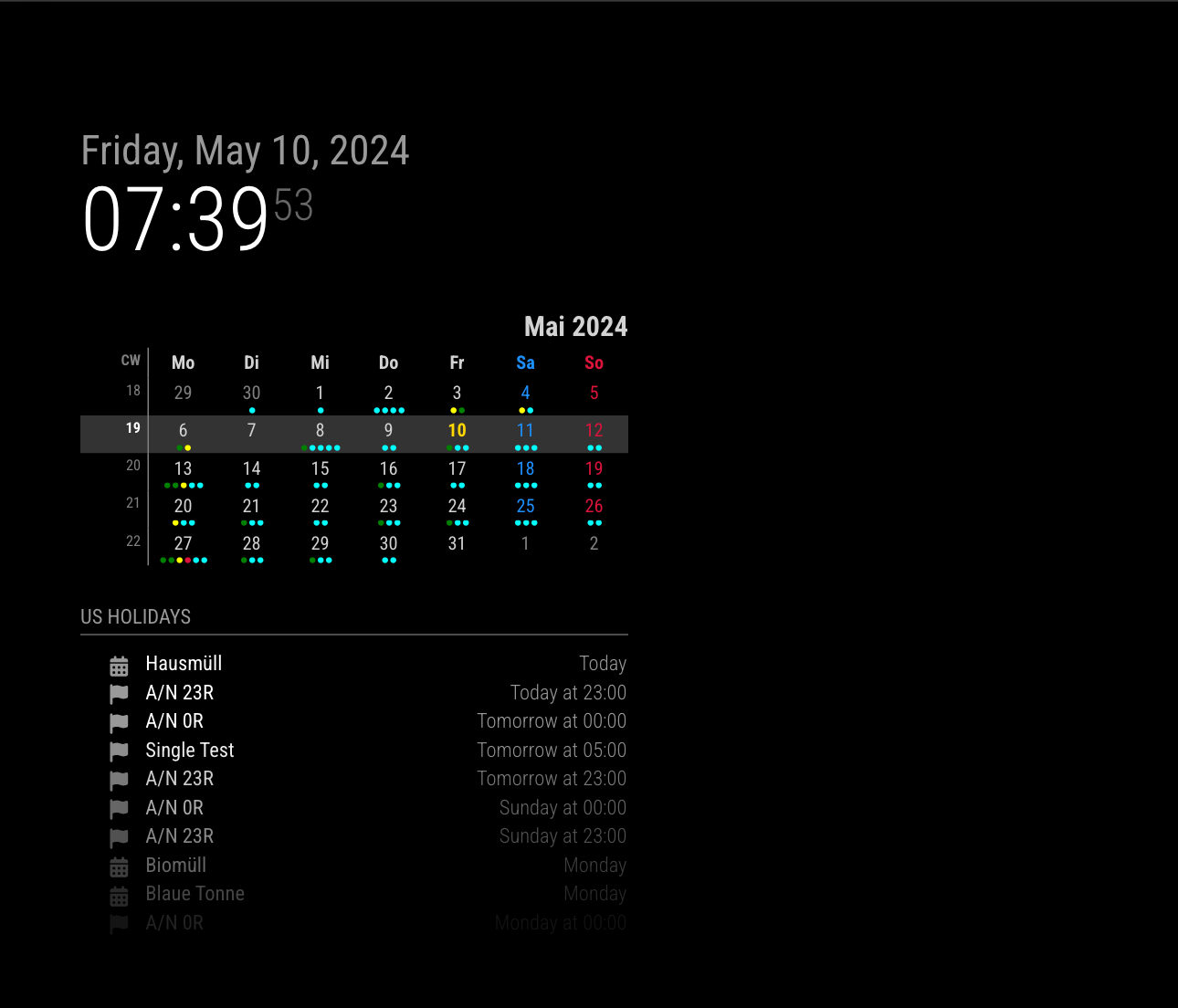
                      With getip of @sdetweil and MMM-ModuleMonkeyPatch, I did it. (You don’t have to modify the original source code for future-proof.)

                      Example.
                      Server is running on 192.168.178.63 and I run 2 clients on 192.168.178.22 and 192.168.178.63.
                      Both 2 clients can show different set of calendars.

                      da786ea9-d7f4-4ad4-89ac-88c5621c03c6-image.png

                      windows.192.168.178.22.png

                      {
                      	module: "MMM-ModuleMonkeyPatch",
                      	config: {
                      		patches: [
                      			{
                      				module: "calendar",
                      				method: "socketNotificationReceived",
                      				patch: async function (original, args) {
                      					const [ notification, payload ] = args
                      					if (notification === "CALENDAR_EVENTS") {
                      						const calendarName = this.config.calendars.find((cal) => cal.url === payload?.url)?.name
                      						const r = await fetch('http://192.168.178.63:8080/modules/getip')
                      						const ip = JSON.parse(await r.text())?.[ 'address' ] ?? null
                      						if (!this.config.clientMap?.[ ip ]?.includes(calendarName)) {
                      							return original(notification, { ...payload, events: [] })
                      						}
                      					}
                      					return original(notification, payload)
                      				}
                      			}
                      		]
                      	}
                      },
                      {
                      	module: "getip",
                      },
                      {
                      	module: "calendar",
                      	header: "US Holidays",
                      	position: "top_left",
                      	config: {
                      		clientMap: {
                      			"192.168.178.63": [ "cal1", "cal2", "cal3" ],
                      			"192.168.178.22": ["cal3", "cal4", "cal5"]
                      		},
                      		calendars: [
                      			{
                      				url: "...",
                      				name: "cal1",
                      			},
                      			{
                      				url: "...",
                      				name: "cal2",
                      			},
                      			{
                      				url: "...",
                      				name: "cal3",
                      			},
                      
                      			{
                      				url: "...",
                      				name: "cal4",
                      			},
                      			{
                      				url: "...",
                      				name: "cal5",
                      			}
                      		]
                      	}
                      },
                      

                      TO Improve
                      Whenever notification CALENDAR_EVENTS coming, getip is called. After first execution, to store IP on the localStorage or cookie would be better.

                      S S 2 Replies Last reply Reply Quote 0
                      • S Offline
                        Spinster @sdetweil
                        last edited by

                        @sdetweil will express ipfilter be useful? Similar to whitelist, can we try something

                        S 1 Reply Last reply Reply Quote 0
                        • S Offline
                          sdetweil @Spinster
                          last edited by

                          @Spinster no… as its in the wrong place… (inside node_helper…) we NEED the ip address to compare with

                          just get it and return . one time

                          Sam

                          How to add modules

                          learning how to use browser developers window for css changes

                          1 Reply Last reply Reply Quote 0
                          • S Offline
                            sdetweil @MMRIZE
                            last edited by sdetweil

                            @MMRIZE said in Show calendar based on IP Address accessed:

                            (You don’t have to modify the original source code for future-proof.)

                            BUT you are fetching cal for system not going to use it… SOME cals are 1000’s of entries especially old
                            that have to be processed… this is a bad waste of resources…

                            and this exposes a cal problem, as if u fetch http://xyz on client 1 and client 2 and client 3, we fetch it 3 times. also bad
                            this could also lead to different clients showing different data between fetchIntervals…

                            Sam

                            How to add modules

                            learning how to use browser developers window for css changes

                            M 2 Replies Last reply Reply Quote 0
                            • M Offline
                              MMRIZE @sdetweil
                              last edited by

                              @sdetweil said in Show calendar based on IP Address accessed:

                              BUT you are fetching cal for system not going to use it… SOME cals are 1000’s of entries especially old
                              that have to be processed… this is a bad waste of resources…

                              I Can’t understand your point.
                              My code is just small injection that does filtering out calendars by condition on socketNotificationReceived. No additional fetching is needed.

                              S 1 Reply Last reply Reply Quote 0
                              • M Offline
                                MMRIZE @sdetweil
                                last edited by MMRIZE

                                @sdetweil said in Show calendar based on IP Address accessed:

                                @MMRIZE said in Show calendar based on IP Address accessed:

                                (You don’t have to modify the original source code for future-proof.)

                                BUT you are fetching cal for system not going to use it… SOME cals are 1000’s of entries especially old
                                that have to be processed… this is a bad waste of resources…

                                and this exposes a cal problem, as if u fetch http://xyz on client 1 and client 2 and client 3, we fetch it 3 times. also bad
                                this could also lead to different clients showing different data between fetchIntervals…

                                Well, if that is the issue, we need a new “calendar” module that can ignore duplicated feed on addCalendar.
                                Regardless of my code, the original calendar module will fetch a same feed multiply on multi clients. It’s MM’s limitation.

                                S 1 Reply Last reply Reply Quote 0
                                • S Offline
                                  sdetweil @MMRIZE
                                  last edited by sdetweil

                                  @MMRIZE yes

                                  @Spinster

                                  see later post

                                  Sam

                                  How to add modules

                                  learning how to use browser developers window for css changes

                                  S 1 Reply Last reply Reply Quote 0
                                  • S Offline
                                    sdetweil @MMRIZE
                                    last edited by

                                    @MMRIZE said in Show calendar based on IP Address accessed:

                                    My code is just small injection that does filtering out calendars by condition on socketNotificationReceived. No additional fetching is needed.

                                    AFTER fetching… so throw away data, which we fetched , knowing we wouldn’t use it…

                                    Sam

                                    How to add modules

                                    learning how to use browser developers window for css changes

                                    M 1 Reply Last reply Reply Quote 0
                                    • S Offline
                                      Spinster @MMRIZE
                                      last edited by

                                      @MMRIZE I tried it, but it is still showing the calendar even if there is no calendar defined for the ip. I edited only the config.js file and added your code. Modified the calendars to suite mine. I could see even if there is no calendar defined for a particular ip. Please advice

                                      M 1 Reply Last reply Reply Quote 0
                                      • S Offline
                                        Spinster @sdetweil
                                        last edited by

                                        @sdetweil Is this working? Should I try it, please advice

                                        S 1 Reply Last reply Reply Quote 0
                                        • M Offline
                                          MMRIZE @sdetweil
                                          last edited by MMRIZE

                                          @sdetweil
                                          Still I can’t catch you.

                                          [2024-05-07 15:03:33.741] [LOG]   Use existing calendarfetcher for url: https://ics.calendarlabs.com/76/mm3137/US_Holidays.ics
                                          

                                          The log shows, duplicated URL would be integrated into existing fetcher, So unlike your words, 3 clients doesn’t make 3 duplicated wasted fetcher.

                                          If clientA needs cal1, cal2, cal3 and clientB needs cal1, cal4, cal5. In this case server should fetch 5 calendars anyway. User may need cal1 ~ cal5 even on 1 screen or 2 screens, ther server’s burden would be the same.

                                          The only aspect that could be considered a waste is the transmission of unusing event data for cal4 and cal5 to clientA, but unless it’s a performance issue with the data parsing algorithm, simply having large data size being transmitted isn’t particularly problematic. Moreover, since the data is dropped in my code as soon as the notification is received, it can’t be deemed a significant memory issue. If the data size itself becomes problematic, it implies there’s already a problem with the original calendar module using cal1, cal2, cal3, cal4, and cal5.

                                          Too skeptic.

                                          1 Reply Last reply Reply Quote 0
                                          • M Offline
                                            MMRIZE @Spinster
                                            last edited by MMRIZE

                                            @Spinster said in Show calendar based on IP Address accessed:

                                            Modified the calendars to suite mine. I could see even if there is no calendar defined for a particular ip. Please advice

                                            in the calendar config, I added clientMap.

                                            {
                                            	module: "calendar",
                                            	header: "US Holidays",
                                            	position: "top_left",
                                            	config: {
                                            		clientMap: {
                                            			"192.168.178.63": [ "cal1", "cal2", "cal3" ],
                                            			"192.168.178.22": [ "cal3", "cal4", "cal5" ]
                                            		},
                                            		calendars: [
                                            			{
                                            				url: "...",
                                            				name: "cal1",
                                            			},
                                            
                                            ...
                                            
                                            S 3 Replies Last reply Reply Quote 0

                                            Hello! It looks like you're interested in this conversation, but you don't have an account yet.

                                            Getting fed up of having to scroll through the same posts each visit? When you register for an account, you'll always come back to exactly where you were before, and choose to be notified of new replies (either via email, or push notification). You'll also be able to save bookmarks and upvote posts to show your appreciation to other community members.

                                            With your input, this post could be even better 💗

                                            Register Login

                                            • 1
                                            • 2
                                            • 3
                                            • 4
                                            • 4 / 4
                                            • First post
                                              Last post
                                            Enjoying MagicMirror? Please consider a donation!
                                            MagicMirror created by Michael Teeuw.
                                            Forum managed by Sam, technical setup by Karsten.
                                            This forum is using NodeBB as its core | Contributors
                                            Contact | Privacy Policy