Read the statement by Michael Teeuw here.
MMM-MyHomeWizard
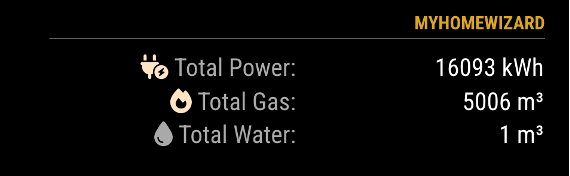
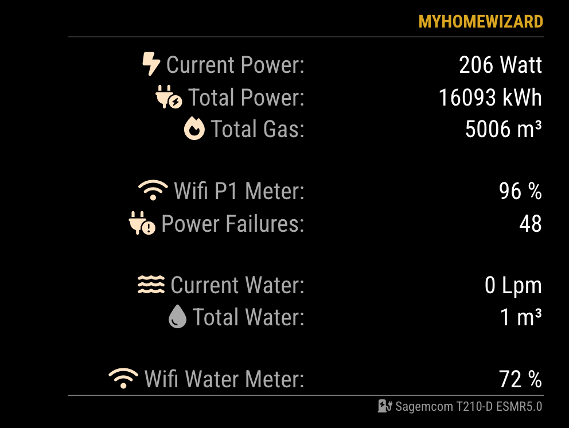
-
@htilburgs Api is working. Actually i am using an older version of mmm.homewizard wich is working. I see that your version can provide more data including the watermeter. When i use config file below is see the data from mmm.homewizard but mmm.myhomewizard gives Header plus Loading…
I changed the position to bottom_right but that doesn’t have effect. For the older version i use only right wich works in my config ., { module: "MMM-HomeWizard", position: "right", header: "Electricity & Gas", config: { url: "http://192.168.178.152/api/v1/data", updateInterval: 2000 } }, { module: 'MMM-MyHomeWizard', position: 'bottom_right', header: 'HomeWizard', disabled: false, config: { P1_IP: "192.168.178.152", // IP Address HomeWizard P1 meter WM_IP: "192.168.101.14", // IP Address HomeWizrd Water meter - Remove when not used extraInfo: true, // Show extra information from P1 meter currentPower: true, // Show the current Power Consumption currentWater: true, // Show the current Water Consumption showGas: true, // Show the Gas option showFooter: true, // Show footer (name Power Meter) updateInterval: 5000, // Update every 5 seconds maxWidth: "500px", // Max Module width showLastUpdate: true, // Show the last update for the History Data in the footer showDeltaPower: true, // Show Delta between History and Current data (Power) showDeltaGas: true, // Show Delta between History and Current data (Gas) showDeltaWater: true // Show Delta between History and Current data (Water) } }, {I tried also 192.168.178.152/api/v1/data but that doesn’t work also.
-
@vansman
In the Homewizard app on your phone, you have to activatie the use of local api. What I think is strange is that when you go tohttp://192.168.178.152/api/v1/datathat you don’t get any data. This mechanisme is the same as in MMM-Homewizard (see the config for your first app)
Activating Local API
Go to Settings > Meters > ‘‘Your meter’’, and enable Local API for the P1 Meter and/or the Water Meter at the botom of the page.The same for the Watermeter. If they are off, they don’t work.
-
@vansman
Did it work? -
@htilburgs Progress! When i remove the line (IP adress) of the watermeter i see the data of the P1 meter.
It looks like Homewizard create its own network in the 192.168.101.-- range. I also have an KWH1 meter wich also has an 192.168.101 adress. What i don’t understand how MagicMirror connects to the other ip network?
And if i get the watermeter to work, is it also easy to add de KW1 meter also? -
@htilburgs I think i found my problem. The Watermeter and the KWh1 meter are connected to the guest network. So that makes sense that they on a different network. I gonna change it and let you know.
-
@vansman
Oké, sounds good. Succes! -
@htilburgs P1 and Water works now. Thanks for your help and making this module.
I’ve also looked for the KWH enerymeter data myself but i get no data when i try to see it in the browser. Manual for the api on Homewizard site talks about V1 and V2. That for later :-)I also add (Ai) current_voltage data on my screen, maybe nice to add native in your code.
-
@vansman said in MMM-MyHomeWizard:
current_voltage data
What do you mean with current_voltage data?
When I look into HomeWizard, I don’t see this.If you mean active_voltage, than I don’t see any use to know that my voltage is 230V, because if I’m right than this never changes (I hope ;-))
-
@htilburgs Sorry i mean active voltage yes.
I look at it to see on a sunny day what’s the voltage.
Above 253V the solar panel inverter shuts down. This can happen when you have a lot of solar power in your neighbourhood. My peak was 247V.

