Read the statement by Michael Teeuw here.
How to turn compliments blue?
-
Hi,
I would like the compliments text of the default compliments module to be in blue instead of white. I think this can be done with custom css but I struggled with the instructions in the pinned post. If someone would please give me a shortcut of how to do it, I would really appreciate your help.
Thanks
-
@raspberrypi9 which pinned post?
the doc
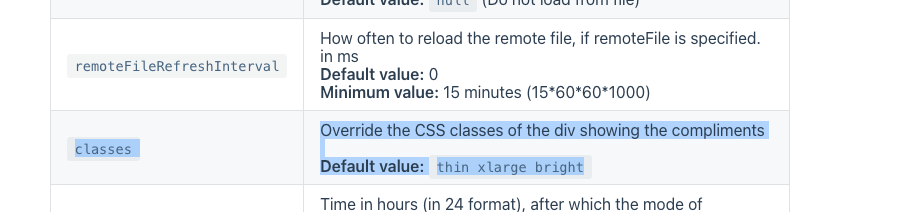
says there is a classes config property
{
   module: "compliments",
   position:"....",
   config:{
       classes:"thin xlarge bright",   // default if not specified
       ...
   }
}
so, you could override one of those
.compliments .xlarge {
     color: xxxxx;
}
or you could add another classname and configure that
{
   module: "compliments",
   position:"....",
   config:{
       classes:"thin xlarge bright foo",   // default if not specified, this replaces entire list
       ...
   }
}
like this
.compliments .foo { color: xxxxx; } -
That worked great! Thank you so much for taking the time to answer my question.
Hello! It looks like you're interested in this conversation, but you don't have an account yet.
Getting fed up of having to scroll through the same posts each visit? When you register for an account, you'll always come back to exactly where you were before, and choose to be notified of new replies (either via email, or push notification). You'll also be able to save bookmarks and upvote posts to show your appreciation to other community members.
With your input, this post could be even better 💗
Register Login