MagicMirror Forum
    • Recent
    • Tags
    • Unsolved
    • Solved
    • MagicMirror² Repository
    • Documentation
    • 3rd-Party-Modules
    • Donate
    • Discord
    • Register
    • Login
    A New Chapter for MagicMirror: The Community Takes the Lead
    Read the statement by Michael Teeuw here.

    Cannot find module '#server_functions'

    Scheduled Pinned Locked Moved Unsolved Troubleshooting
    18 Posts 3 Posters 1.0k Views 3 Watching
    Loading More Posts
    • Oldest to Newest
    • Newest to Oldest
    • Most Votes
    Reply
    • Reply as topic
    Log in to reply
    This topic has been deleted. Only users with topic management privileges can see it.
    • S Do not disturb
      sdetweil @chrisfr1976
      last edited by

      @chrisfr1976 when you have time

      Sam

      How to add modules

      learning how to use browser developers window for css changes

      C 1 Reply Last reply Reply Quote 0
      • C Offline
        chrisfr1976 @sdetweil
        last edited by chrisfr1976

        @sdetweil

        Hi Sam,
        After the update to MagicMirror v2.34.0 I had again this Cannot find module '#server_functions issue. See above.
        I solved it again manually in the calendarfetcher.js and newsfeedfetcher.js with a relative path.

        I replaced this:

        const { getUserAgent } = require("#server_functions");
        const { scheduleTimer } = require("#module_functions"); //only in newsfeed
        

        with

        const { getUserAgent } = require("../../../js/server_functions");
        const { scheduleTimer } = require("../../../js/module_functions"); //only in newsfeed


        This time your update script worked fine without any error.

        Maybe I’m alone with this behavior, but now everything works fine again as before the update. If anyone else discovers this problem, the code above might help.

        Regards, Chris.

        C S 3 Replies Last reply Reply Quote 0
        • C Offline
          chrisfr1976 @chrisfr1976
          last edited by

          …and I’ll remove axios from my modules. This is causing this trouble.

          Regards, Chris.

          1 Reply Last reply Reply Quote 0
          • S Do not disturb
            sdetweil @chrisfr1976
            last edited by sdetweil

            @chrisfr1976 but that means you dont have the correct node version or dependencies

            Down level npm, see imports in package.json
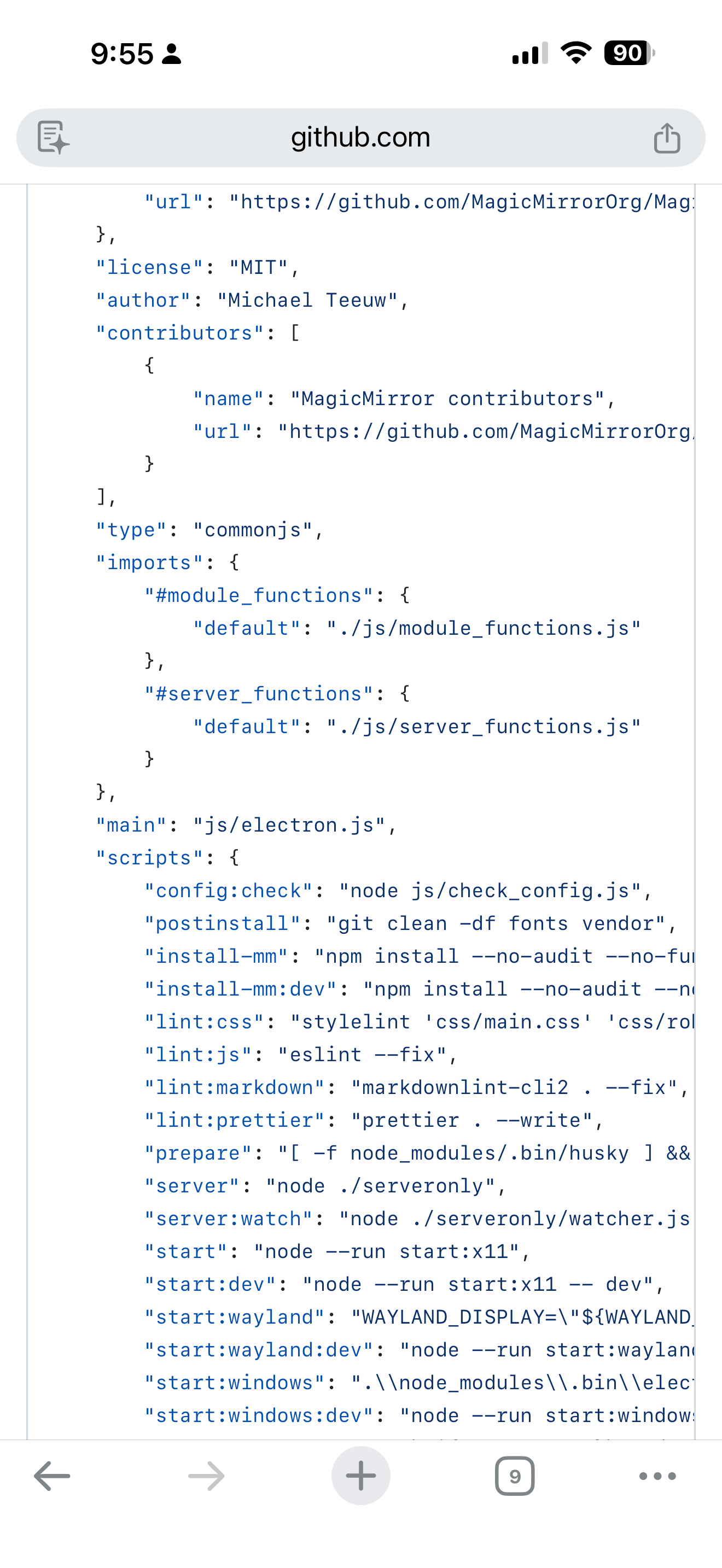
            IMG_4650.png

            Sam

            How to add modules

            learning how to use browser developers window for css changes

            1 Reply Last reply Reply Quote 0
            • S Do not disturb
              sdetweil @chrisfr1976
              last edited by

              @chrisfr1976 can you send me ~/MagicMirror/installers/upgrade.log

              Same userid as here at gmail

              Sam

              How to add modules

              learning how to use browser developers window for css changes

              C 1 Reply Last reply Reply Quote 0
              • C Offline
                chrisfr1976 @sdetweil
                last edited by

                @sdetweil

                I have the same. Except my reinstalled Axios library.

                upgrade.log will follow.

                @MagicPi:~/MagicMirror $ tail --lines=200 package.json
                {
                	"name": "magicmirror",
                	"version": "2.34.0",
                	"description": "The open source modular smart mirror platform.",
                	"keywords": [
                		"magic mirror",
                		"magicmirror",
                		"smart mirror",
                		"mirror UI",
                		"modular"
                	],
                	"homepage": "https://magicmirror.builders",
                	"bugs": {
                		"url": "https://github.com/MagicMirrorOrg/MagicMirror/issues"
                	},
                	"repository": {
                		"type": "git",
                		"url": "https://github.com/MagicMirrorOrg/MagicMirror"
                	},
                	"license": "MIT",
                	"author": "Michael Teeuw",
                	"contributors": [
                		{
                			"name": "MagicMirror contributors",
                			"url": "https://github.com/MagicMirrorOrg/MagicMirror/graphs/contributors"
                		}
                	],
                	"type": "commonjs",
                	"imports": {
                		"#module_functions": {
                			"default": "./js/module_functions.js"
                		},
                		"#server_functions": {
                			"default": "./js/server_functions.js"
                		}
                	},
                	"main": "js/electron.js",
                	"scripts": {
                		"config:check": "node js/check_config.js",
                		"postinstall": "git clean -df fonts vendor",
                		"install-mm": "npm install --no-audit --no-fund --no-update-notifier --only=prod --omit=dev",
                		"install-mm:dev": "npm install --no-audit --no-fund --no-update-notifier && npx playwright install chromium",
                		"lint:css": "stylelint 'css/main.css' 'css/roboto.css' 'css/font-awesome.css' 'modules/default/**/*.css' --fix",
                		"lint:js": "eslint --fix",
                		"lint:markdown": "markdownlint-cli2 . --fix",
                		"lint:prettier": "prettier . --write",
                		"prepare": "[ -f node_modules/.bin/husky ] && husky || echo no husky installed.",
                		"server": "node ./serveronly",
                		"server:watch": "node ./serveronly/watcher.js",
                		"start": "node --run start:x11",
                		"start:dev": "node --run start:x11 -- dev",
                		"start:wayland": "WAYLAND_DISPLAY=\"${WAYLAND_DISPLAY:=wayland-1}\" ./node_modules/.bin/electron js/electron.js --ozone-platform=wayland",
                		"start:wayland:dev": "node --run start:wayland -- dev",
                		"start:windows": ".\\node_modules\\.bin\\electron js\\electron.js",
                		"start:windows:dev": "node --run start:windows -- dev",
                		"start:x11": "DISPLAY=\"${DISPLAY:=:0}\" ./node_modules/.bin/electron js/electron.js",
                		"start:x11:dev": "node --run start:x11 -- dev",
                		"test": "vitest run",
                		"test:calendar": "node ./modules/default/calendar/debug.js",
                		"test:coverage": "vitest run --coverage",
                		"test:css": "stylelint 'css/main.css' 'css/roboto.css' 'css/font-awesome.css' 'modules/default/**/*.css'",
                		"test:e2e": "vitest run tests/e2e",
                		"test:electron": "vitest run tests/electron",
                		"test:js": "eslint",
                		"test:markdown": "markdownlint-cli2 .",
                		"test:prettier": "prettier . --check",
                		"test:spelling": "cspell . --gitignore",
                		"test:ui": "vitest --ui",
                		"test:unit": "vitest run tests/unit",
                		"test:watch": "vitest"
                	},
                	"lint-staged": {
                		"*": "prettier --ignore-unknown --write",
                		"*.js": "eslint --fix",
                		"*.css": "stylelint --fix"
                	},
                	"dependencies": {
                		"@electron/rebuild": "^4.0.2",
                		"@fontsource/roboto": "^5.2.9",
                		"@fontsource/roboto-condensed": "^5.2.8",
                		"@fortawesome/fontawesome-free": "^7.1.0",
                		"ajv": "^8.17.1",
                		"animate.css": "^4.1.1",
                		"axios": "^1.13.2",
                		"console-stamp": "^3.1.2",
                		"croner": "^9.1.0",
                		"envsub": "^4.1.0",
                		"eslint": "^9.39.2",
                		"express": "^5.2.1",
                		"feedme": "^2.0.2",
                		"helmet": "^8.1.0",
                		"html-to-text": "^9.0.5",
                		"iconv-lite": "^0.7.1",
                		"ipaddr.js": "^2.3.0",
                		"moment": "^2.30.1",
                		"moment-timezone": "^0.6.0",
                		"node-ical": "^0.22.1",
                		"nunjucks": "^3.2.4",
                		"pm2": "^6.0.14",
                		"socket.io": "^4.8.3",
                		"suncalc": "^1.9.0",
                		"systeminformation": "^5.28.2",
                		"undici": "^7.16.0",
                		"weathericons": "^2.1.0"
                	},
                	"devDependencies": {
                		"@stylistic/eslint-plugin": "^5.6.1",
                		"@vitest/coverage-v8": "^4.0.16",
                		"@vitest/ui": "^4.0.16",
                		"cspell": "^9.4.0",
                		"eslint-plugin-import-x": "^4.16.1",
                		"eslint-plugin-jsdoc": "^61.5.0",
                		"eslint-plugin-package-json": "^0.85.0",
                		"eslint-plugin-playwright": "^2.4.0",
                		"eslint-plugin-vitest": "^0.5.4",
                		"express-basic-auth": "^1.2.1",
                		"husky": "^9.1.7",
                		"jsdom": "^27.4.0",
                		"lint-staged": "^16.2.7",
                		"markdownlint-cli2": "^0.20.0",
                		"playwright": "^1.57.0",
                		"prettier": "^3.7.4",
                		"prettier-plugin-jinja-template": "^2.1.0",
                		"stylelint": "^16.26.1",
                		"stylelint-config-standard": "^39.0.1",
                		"stylelint-prettier": "^5.0.3",
                		"vitest": "^4.0.16"
                	},
                	"optionalDependencies": {
                		"electron": "^39.2.7"
                	},
                	"engines": {
                		"node": ">=22.21.1 <23 || >=24"
                	}
                }
                chris@MagicPi:~/MagicMirror $ 
                

                Regards, Chris.

                S 1 Reply Last reply Reply Quote 0
                • S Do not disturb
                  sdetweil @chrisfr1976
                  last edited by

                  @chrisfr1976 how are you launching MagicMirror?

                  Sam

                  How to add modules

                  learning how to use browser developers window for css changes

                  C 1 Reply Last reply Reply Quote 0
                  • C Offline
                    chrisfr1976 @sdetweil
                    last edited by

                    @sdetweil
                    I use pm2 script:

                    
                    sleep 21s
                    cd ~/MagicMirror
                    DISPLAY=:0 npm run start


                    Regards, Chris.

                    S 1 Reply Last reply Reply Quote 0
                    • S Do not disturb
                      sdetweil @chrisfr1976
                      last edited by sdetweil

                      @chrisfr1976 weird

                      Upgrade log looks great.

                      Can you change to
                      DISPLAY=:0 npm start

                      And try

                      Shouldn’t matter, but such is life

                      Sam

                      How to add modules

                      learning how to use browser developers window for css changes

                      1 Reply Last reply Reply Quote 0
                      • 1
                      • 2
                      • 1 / 2
                      • First post
                        Last post
                      Enjoying MagicMirror? Please consider a donation!
                      MagicMirror created by Michael Teeuw.
                      Forum managed by Sam, technical setup by Karsten.
                      This forum is using NodeBB as its core | Contributors
                      Contact | Privacy Policy