Read the statement by Michael Teeuw here.
MMM-Universal-PIR - ‘GPIOcommand exited with error!'
-
Hi
With no warning (I haven’t carried out any updates)
MMM-Universal-Piris now failing. It shows under the ‘PIR SENSOR’ heading on the MM screen ‘gpioCommand exited with error!’Config is:
                    module: "MMM-Universal-Pir",
                        position: "bottom_right",
                        config: {
                            gpioCommand: "gpiomon -r -b gpiochip0 23",
                            onCommand: "wlr-randr --output HDMI-A-1 --on --transform 90",
                            offCommand: "wlr-randr --output HDMI-A-1 --off",
                            deactivateDelay: 120 * 1000,
                            }
and in a terminal
gpiomon -r -b gpiochip0 23shows events when the PIR is triggered andwlr-randr --output HDMI-A-1 --on --transform 90andwlr-randr --output HDMI-A-1 --offstill control the screen.gpiomonisv1.6.3What can have changed?
Steve
-
I had no idea about that, but now that you’re using Docker:
The
gpiomoncommand is called inside the container (doesn’t work) and you call it for testing on the host (does work).So I assume you have the newer version of gpiomon running in the container. So update the command in
config.jsto the new syntax described in the module README and try again (the new command will fail on the host but should work from inside the container). -
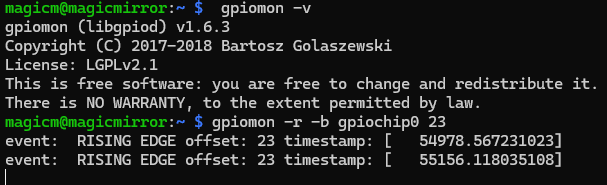
-
The Docker log shows
[2026-02-10 11:30:10.955] [ERROR] [MMM-Universal-Pir] stderr: gpiomon: invalid option -- 'r' gpiomon: try gpiomon --helpbut
gpiomon -r -b gpiochip0 23works in a terminal when pasted from theconfig.jsfile, very strangeIt’s just stopped working!
Steve
-
magicm@magicmirror:/opt/mm/mounts/config $ gpiomon --help Usage: gpiomon [OPTIONS] <chip name/number> <offset 1> <offset 2> ... Wait for events on GPIO lines and print them to standard output Options: -h, --help: display this message and exit -v, --version: display the version and exit -l, --active-low: set the line active state to low -B, --bias=[as-is|disable|pull-down|pull-up] (defaults to 'as-is'): set the line bias -n, --num-events=NUM: exit after processing NUM events -s, --silent: don't print event info -r, --rising-edge: only process rising edge events -f, --falling-edge: only process falling edge events -b, --line-buffered: set standard output as line buffered -F, --format=FMT specify custom output format Biases: as-is: leave bias unchanged disable: disable bias pull-up: enable pull-up pull-down: enable pull-down Format specifiers: %o: GPIO line offset %e: event type (0 - falling edge, 1 rising edge) %s: seconds part of the event timestamp %n: nanoseconds part of the event timestamp magicm@magicmirror:/opt/mm/mounts/config $ gpiomon -v gpiomon (libgpiod) v1.6.3 Copyright (C) 2017-2018 Bartosz Golaszewski License: LGPLv2.1 This is free software: you are free to change and redistribute it. There is NO WARRANTY, to the extent permitted by law.-ris listed in the library help forv1.6.3 -
I had no idea about that, but now that you’re using Docker:
The
gpiomoncommand is called inside the container (doesn’t work) and you call it for testing on the host (does work).So I assume you have the newer version of gpiomon running in the container. So update the command in
config.jsto the new syntax described in the module README and try again (the new command will fail on the host but should work from inside the container). -
@karsten13 perfect, thank you. The Docker container has
gpiomonatv2.2.1. It never occurred to me the container would update things unannounced!Many thanks for your help
Steve
-
S smegbadger has marked this topic as solved on
-
@smegbadger said in MMM-Universal-PIR - ‘GPIOcommand exited with error!':
It never occurred to me the container would update things unannounced!
the container does not update things on your host, but the container itself is running debian and (if you are using
karsten13/magicmirror:latest) the debian version of the container image switched from bookworm to trixie …

Hello! It looks like you're interested in this conversation, but you don't have an account yet.
Getting fed up of having to scroll through the same posts each visit? When you register for an account, you'll always come back to exactly where you were before, and choose to be notified of new replies (either via email, or push notification). You'll also be able to save bookmarks and upvote posts to show your appreciation to other community members.
With your input, this post could be even better 💗
Register Login