MagicMirror Forum
    • Recent
    • Tags
    • Unsolved
    • Solved
    • MagicMirror² Repository
    • Documentation
    • 3rd-Party-Modules
    • Donate
    • Discord
    • Register
    • Login
    1. Home
    2. smegbadger
    A New Chapter for MagicMirror: The Community Takes the Lead
    Read the statement by Michael Teeuw here.
    S
    Offline
    • Profile
    • Following 0
    • Followers 0
    • Topics 4
    • Posts 24
    • Groups 0

    smegbadger

    @smegbadger

    4
    Reputation
    8
    Profile views
    24
    Posts
    0
    Followers
    0
    Following
    Joined
    Last Online

    smegbadger Unfollow Follow

    Best posts made by smegbadger

    • Family Kitchen Calendar

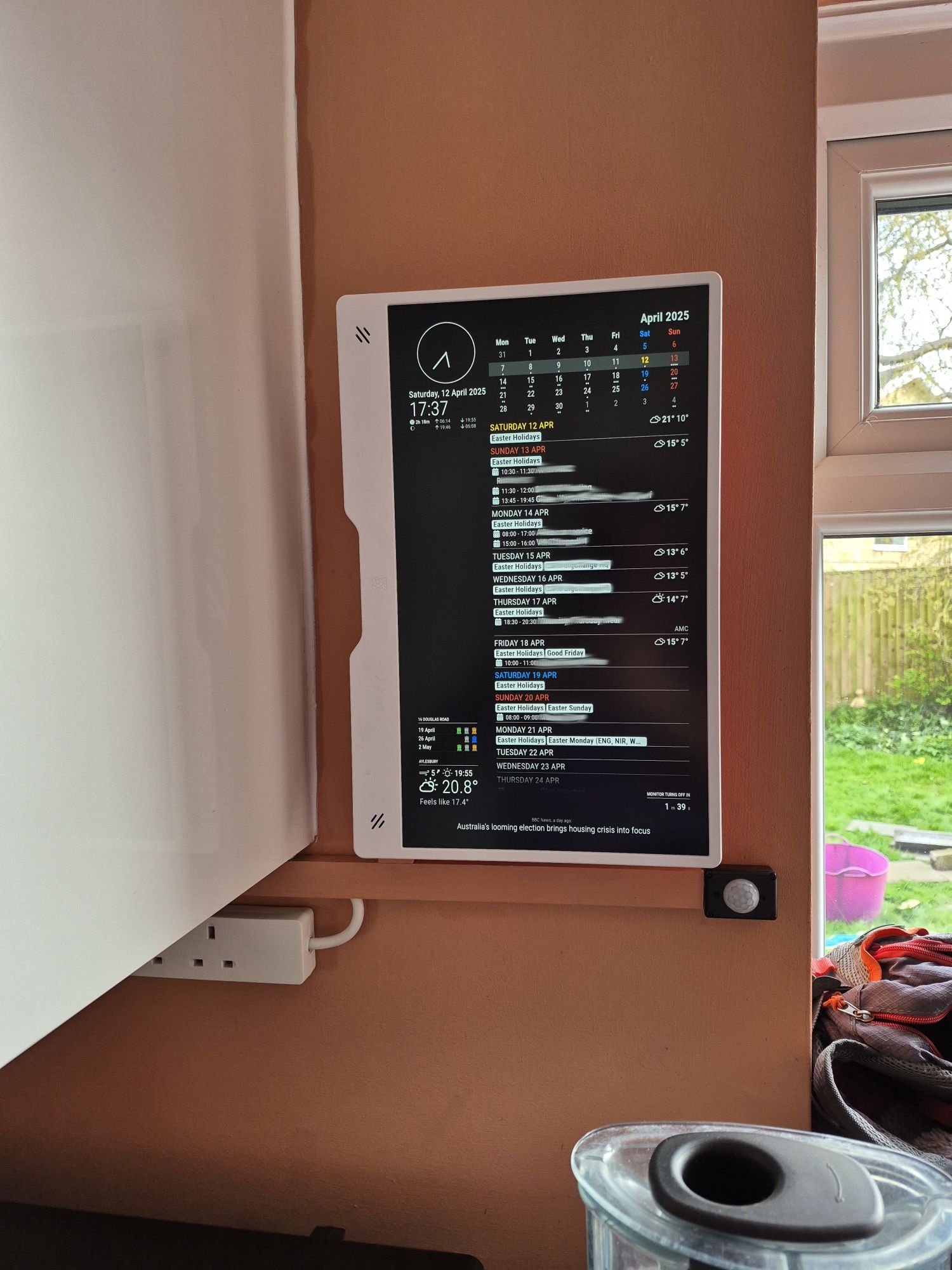
      Got this up and running thanks to @karsten13 's help with screen blanking. Also had start-up issues as detailed here.

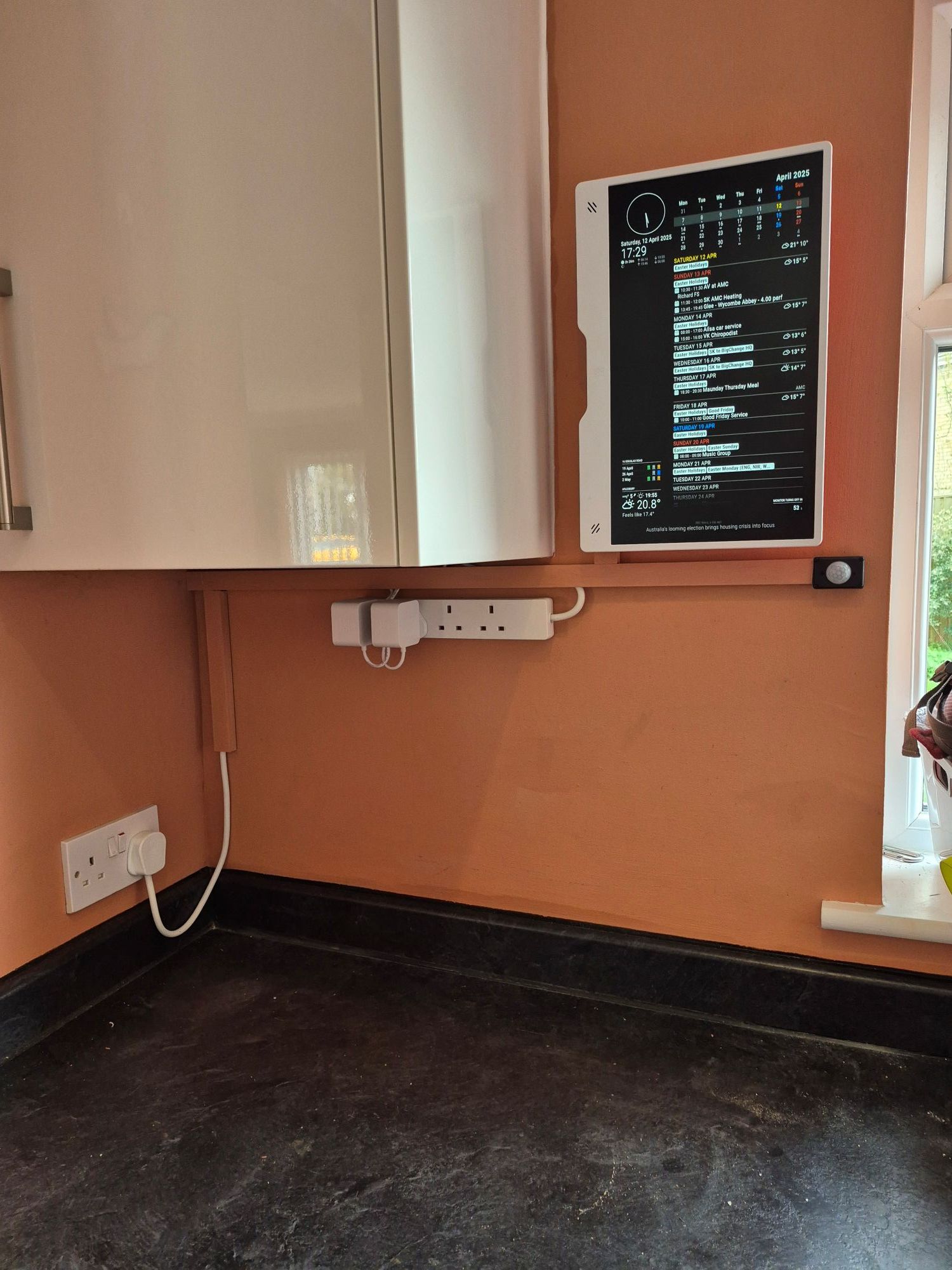
      Runs on a RPi 4B I had lying around with MagicMirrorOS driving the fabulous RPi monitor with a PIR sensor to sense people in the room for screen blanking. Viewing angle on this screen is very impressive, very sharp and crisp display.

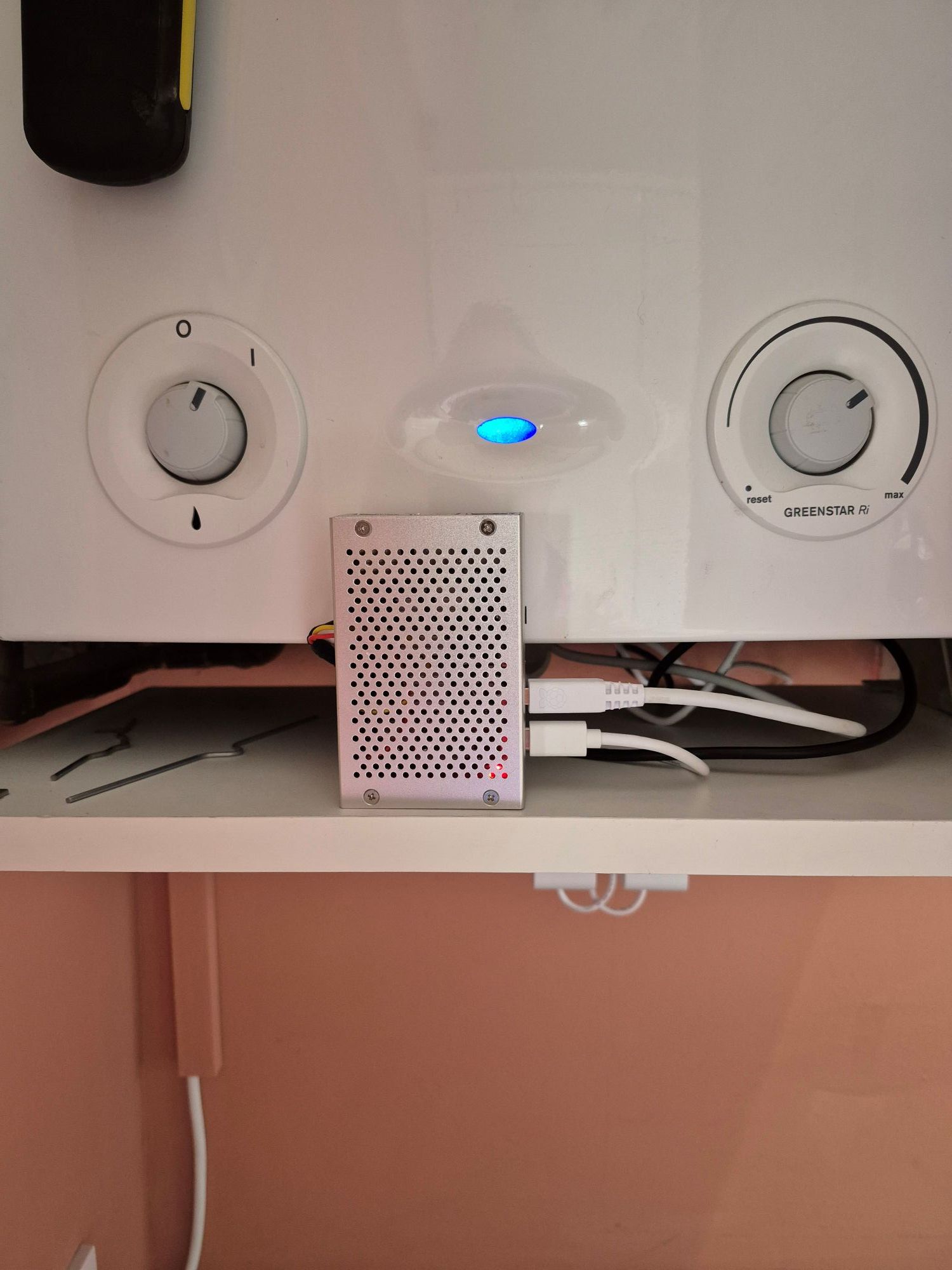
      The Pi is in the boiler cupboard and wiring is hidden in 25x16mm trunking painted to match the wall. PIR sensor is in the tiniest project box I could find. Screen is on a VESA mount.

      MagicMirror modules:

      • MMM-Universal-Pir - controlling HDMI for screen sleep
      • clock
      • calendar - hidden, pulling UK Holidays and Family Google calendar feeding:
      • MMM-CalendarExt3Agenda with CSS mods so it fills most of the screen
      • MMM-MyGarbage
      • weather showing current and forecasts from UK met office
      • newsfeed showing BBC news

      MagicMirror1_1.jpg
      MagicMirror1_2.jpg
      MagicMirror1_3.jpg

      posted in Show your Mirror
      S
      smegbadger

    Latest posts made by smegbadger

    • RE: MMM-Universal-PIR - ‘GPIOcommand exited with error!'

      @karsten13 perfect, thank you. The Docker container has gpiomon at v2.2.1. It never occurred to me the container would update things unannounced!

      Many thanks for your help

      Steve

      posted in Troubleshooting
      S
      smegbadger
    • RE: MMM-Universal-PIR - ‘GPIOcommand exited with error!'
      magicm@magicmirror:/opt/mm/mounts/config $ gpiomon --help
      Usage: gpiomon [OPTIONS] <chip name/number> <offset 1> <offset 2> ...
      
      Wait for events on GPIO lines and print them to standard output
      
      Options:
        -h, --help:           display this message and exit
        -v, --version:        display the version and exit
        -l, --active-low:     set the line active state to low
        -B, --bias=[as-is|disable|pull-down|pull-up] (defaults to 'as-is'):
                      set the line bias
        -n, --num-events=NUM: exit after processing NUM events
        -s, --silent:         don't print event info
        -r, --rising-edge:    only process rising edge events
        -f, --falling-edge:   only process falling edge events
        -b, --line-buffered:  set standard output as line buffered
        -F, --format=FMT      specify custom output format
      
      Biases:
        as-is:        leave bias unchanged
        disable:      disable bias
        pull-up:      enable pull-up
        pull-down:    enable pull-down
      
      Format specifiers:
        %o:  GPIO line offset
        %e:  event type (0 - falling edge, 1 rising edge)
        %s:  seconds part of the event timestamp
        %n:  nanoseconds part of the event timestamp
      magicm@magicmirror:/opt/mm/mounts/config $ gpiomon -v
      gpiomon (libgpiod) v1.6.3
      Copyright (C) 2017-2018 Bartosz Golaszewski
      License: LGPLv2.1
      This is free software: you are free to change and redistribute it.
      There is NO WARRANTY, to the extent permitted by law.
      

      -r is listed in the library help for v1.6.3

      posted in Troubleshooting
      S
      smegbadger
    • RE: MMM-Universal-PIR - ‘GPIOcommand exited with error!'

      The Docker log shows
      [2026-02-10 11:30:10.955] [ERROR] [MMM-Universal-Pir] stderr: gpiomon: invalid option -- 'r' gpiomon: try gpiomon --help

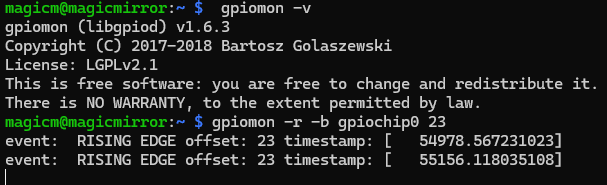
      but gpiomon -r -b gpiochip0 23 works in a terminal when pasted from the config.js file, very strange

      It’s just stopped working!

      Steve

      posted in Troubleshooting
      S
      smegbadger
    • RE: MMM-Universal-PIR - ‘GPIOcommand exited with error!'

      Snag_1ee4e5ea.png

      posted in Troubleshooting
      S
      smegbadger
    • MMM-Universal-PIR - ‘GPIOcommand exited with error!'

      Hi

      With no warning (I haven’t carried out any updates) MMM-Universal-Pir is now failing. It shows under the ‘PIR SENSOR’ heading on the MM screen ‘gpioCommand exited with error!’

      Config is:

                          module: "MMM-Universal-Pir",
                              position: "bottom_right",
                              config: {
                                  gpioCommand: "gpiomon -r -b gpiochip0 23",
                                  onCommand: "wlr-randr --output HDMI-A-1 --on --transform 90",
                                  offCommand: "wlr-randr --output HDMI-A-1 --off",
                                  deactivateDelay: 120 * 1000,
                                  }
      

      and in a terminal gpiomon -r -b gpiochip0 23 shows events when the PIR is triggered and

      wlr-randr --output HDMI-A-1 --on --transform 90 and wlr-randr --output HDMI-A-1 --off still control the screen.

      gpiomon is v1.6.3

      What can have changed?

      Steve

      posted in Troubleshooting
      S
      smegbadger
    • Family Kitchen Calendar

      Got this up and running thanks to @karsten13 's help with screen blanking. Also had start-up issues as detailed here.

      Runs on a RPi 4B I had lying around with MagicMirrorOS driving the fabulous RPi monitor with a PIR sensor to sense people in the room for screen blanking. Viewing angle on this screen is very impressive, very sharp and crisp display.

      The Pi is in the boiler cupboard and wiring is hidden in 25x16mm trunking painted to match the wall. PIR sensor is in the tiniest project box I could find. Screen is on a VESA mount.

      MagicMirror modules:

      • MMM-Universal-Pir - controlling HDMI for screen sleep
      • clock
      • calendar - hidden, pulling UK Holidays and Family Google calendar feeding:
      • MMM-CalendarExt3Agenda with CSS mods so it fills most of the screen
      • MMM-MyGarbage
      • weather showing current and forecasts from UK met office
      • newsfeed showing BBC news

      MagicMirror1_1.jpg
      MagicMirror1_2.jpg
      MagicMirror1_3.jpg

      posted in Show your Mirror
      S
      smegbadger
    • RE: I cannot disable screen blanking with MagicMirrorOS

      @karsten13 thank you for all the effort you are putting into this issue. I agree, let’s go back to the version that will kill and restart the container if the display doesn’t respond to wlr-randr (and then waits for a MMM-Universal-Pir cycle to sleep it again).

      Steve

      posted in Troubleshooting
      S
      smegbadger
    • RE: I cannot disable screen blanking with MagicMirrorOS

      @karsten13 unfortunately that didn’t work.
      In the morning the screen was off and could not be restored with docker rm -f labwc && docker compose up -d or docker compose up -d --force-recreate. In both cases the console briefly came back and then the the monitor slept again. Only when i when into the labwc container and did wlr-randr --output HDMI-A-1 --on --transform 90 did the display return. At that point the MMM-Universal-Pir started counting down too and it works as normal.

      magicm@magicmirror:/opt/mm/run $ docker rm -f labwc && docker compose up -d
      labwc
      [+] Running 2/2
       ✔ Container mm     Running                                                                                        0.0s
       ✔ Container labwc  Started                                                                                        0.5s
      magicm@magicmirror:/opt/mm/run $ docker compose up -d --force-recreate
      [+] Running 2/2
       ✔ Container mm     Started                                                                                        1.7s
       ✔ Container labwc  Started                                                                                        1.8s
      magicm@magicmirror:/opt/mm/run $
           >>> still no screen output <<<
      magicm@magicmirror:/opt/mm/run $ docker exec -it labwc bash
      pi@3f4fb5c07c91:/$ wlr-randr
      HDMI-A-1 "Raspberry PI RPI MON156 81005568472 (HDMI-A-1)"
        Make: Raspberry PI
        Model: RPI MON156
        Serial: 81005568472
        Physical size: 350x190 mm
        Enabled: no
        Modes:
          1920x1080 px, 60.000000 Hz (preferred)
          1920x1080 px, 60.000000 Hz
          1920x1080 px, 59.939999 Hz
          1920x1080 px, 50.000000 Hz
          1920x1080 px, 48.000000 Hz
          1920x1080 px, 47.952000 Hz
          1280x720 px, 60.000000 Hz
          1280x720 px, 60.000000 Hz
          1280x720 px, 59.939999 Hz
          1280x720 px, 50.000000 Hz
          1280x720 px, 48.000000 Hz
          1280x720 px, 47.952000 Hz
          720x576 px, 50.000000 Hz
          720x480 px, 60.000000 Hz
          720x480 px, 59.939999 Hz
          640x480 px, 60.000000 Hz
          640x480 px, 59.939999 Hz
          640x480 px, 59.939999 Hz
      pi@3f4fb5c07c91:/$ wlr-randr --output HDMI-A-1 --on --transform 90
           >>> screen returns <<<
      pi@3f4fb5c07c91:/$
      

      Please check I did the pull etc correctly

      magicm@magicmirror:/opt/mm $ git status
      On branch master
      Your branch is up to date with 'origin/master'.
      
      Changes not staged for commit:
        (use "git add <file>..." to update what will be committed)
        (use "git restore <file>..." to discard changes in working directory)
              modified:   install/install.sh
      
      Untracked files:
        (use "git add <file>..." to include in what will be committed)
              install/install.sh.old
              run/douglas.env
      
      no changes added to commit (use "git add" and/or "git commit -a")
      magicm@magicmirror:/opt/mm $ git switch develop
      M       install/install.sh
      branch 'develop' set up to track 'origin/develop'.
      Switched to a new branch 'develop'
      magicm@magicmirror:/opt/mm $ git pull
      remote: Enumerating objects: 32, done.
      remote: Counting objects: 100% (32/32), done.
      remote: Compressing objects: 100% (22/22), done.
      remote: Total 22 (delta 14), reused 0 (delta 0), pack-reused 0 (from 0)
      Unpacking objects: 100% (22/22), 2.66 KiB | 247.00 KiB/s, done.
      From https://gitlab.com/khassel/magicmirror
         f4542dd..4891458  develop    -> origin/develop
         a4a4748..c4bb59c  master     -> origin/master
       * [new tag]         v2.31.0    -> v2.31.0
      Updating f4542dd..4891458
      Fast-forward
       .gitlab-ci.yml            |  2 +-
       build/labwc/Dockerfile    |  2 +-
       build/labwc/entrypoint.sh | 58 ++++++++++++++++++++++++++++++++++++++++++++++++++--------
       run/includes/labwc.yaml   |  4 +++-
       run/original.env          |  4 ++--
       5 files changed, 57 insertions(+), 13 deletions(-)
      magicm@magicmirror:/opt/mm $ cd /opt/mm/run
      magicm@magicmirror:/opt/mm/run $ docker compose pull
      [+] Pulling 15/15
       ✔ labwc Pulled                                                                                                  107.9s
         ✔ f07a03696dcc Already exists                                                                                   0.0s
         ✔ 98d9f29a8bdf Pull complete                                                                                  106.0s
         ✔ 6c9aae6d02f4 Pull complete                                                                                  106.1s
         ✔ 9d496899b308 Pull complete                                                                                  106.2s
       ✔ magicmirror Pulled                                                                                            171.5s
         ✔ d9b636547744 Already exists                                                                                   0.0s
         ✔ 2fb5eed0caf7 Already exists                                                                                   0.0s
         ✔ f51205ec4ac4 Already exists                                                                                   0.0s
         ✔ d7b57be0135b Already exists                                                                                   0.0s
         ✔ 813d7d6819ab Already exists                                                                                   0.0s
         ✔ 9e1af87e1f78 Pull complete                                                                                    1.1s
         ✔ 27001e96a2b0 Pull complete                                                                                    1.3s
         ✔ deb26dbf1268 Pull complete                                                                                  110.8s
         ✔ 1b7abece8518 Pull complete                                                                                  169.7s
      magicm@magicmirror:/opt/mm/run $ docker compose up -d --force-recreate
      [+] Running 2/2
       ✔ Container labwc  Started                                                                                       24.9s
       ✔ Container mm     Started
      

      Steve

      posted in Troubleshooting
      S
      smegbadger
    • RE: I cannot disable screen blanking with MagicMirrorOS

      @karsten13 I thought that would be the case. I tried changing the initial RANDR_PARAMS="--output HDMI-A-1 --transform 90" in the .env file to RANDR_PARAMS="--output HDMI-A-1 --off" so that the MMM-Universal-Pir module would be responsible for the first switch on of the display but then I got no display on restart at all.

      Steve

      posted in Troubleshooting
      S
      smegbadger
    • RE: I cannot disable screen blanking with MagicMirrorOS

      @karsten13, thank you for this. It worked well overnight last night. One question: when the wlr-randr command fails, the labwc container is then killed and then automatically restarts - will the screen be turned on then until the next PIR activity and subsequent timeout of MMM-Universal-Pir?

      Steve

      posted in Troubleshooting
      S
      smegbadger