is this breaking the update notification? is there something I can do? Or is the lack of suspend/resume methods ultimately a show stopper here for now?
K
Offline
A New Chapter for MagicMirror: The Community Takes the Lead
Read the statement by Michael Teeuw here.
Read the statement by Michael Teeuw here.
Posts
-
RE: MMM-MyStanding not updating within MMM-Carousel
-
RE: MMM-MyStanding not updating within MMM-Carousel
sure…
{ "module": "MMM-Carousel", "position":"bottom_bar", "showPageIndicators":true, "config": { "transitionInterval": 20000, "mode": "positional", "bottom_left": { "enabled": true, "ignoreModules": [] } } }, { module: "MMM-MyScoreboard", position: "bottom_left", classes: "default everyone", config: { showLeagueSeparators: true, colored: true, viewStyle: "smallLogos", rolloverHours: 11, teams: ["BOS"], sports: [ { league: "NHL", }, { league: "MLB", teams: ["BOS"] }, { league: "NFL", teams: ["NE"] } ] } }, { "module":"MMM-MyStandings", "position":"bottom_left", "config":{ "rotateInterval":2 * 60 * 1000, "sports":[ { "league":"MLB", "groups":[ "American League East" ] }, { "league":"NFL", "groups":[ "ACF East" ] } ] } }, -
RE: MMM-MyStanding not updating within MMM-Carousel
without MMM-Carousel and with the manual updates in the referenced item above, MMM-MyStandings updated properly.
MMM-Carousel was swapping MMM-MyStandings and MMM-MyScoreboard. all this time that standings was not updating, MMM-MyScoreboard was. Scores were updated along with the live game action.
Feels like an issue combining MMM-Carousel and MMM-MyStandings, maybe some kind of notification crossup
-
RE: MMM-MyStanding not updating within MMM-Carousel
has not updated since patch and restart. I think ill try without carousel
-
RE: MMM-MyStanding not updating within MMM-Carousel
Update applied, ill know tomorrow if it worked…thanks.
-
MMM-MyStanding not updating within MMM-Carousel
MMM-MyScorboard and MMM-MyStandings configured within MMM-Carousel as ‘positional’ The bottom_left rotates these two modules.
not sure if MMM-Carousel plays into this, just wanted to add
I see in the server output the fetch on regular intervals
[2025-07-22 11:24:18.047] ^[[44m[DEBUG]^[[49m [MMM-MyStandings] https://site.api.espn.com/apis/v2/sports/baseball/mlb/standings?level=3&sort=gamesbehind:asc,winpercent:desc fetched
I have manually pulled the data and it looks correct, however the data on the screen is not updated. If I refresh the screen r, the data is updated.
-
RE: Open Weather not displaying
@sdetweil thanks…I was getting used to “git pull” in the modules.
All is good
-
RE: Open Weather not displaying
I had a backup and restored. everything works again…back to two commits behind
-
RE: Open Weather not displaying
I am similar…undefined in weather, notifications, news
Use --update-env to update environment variables
[PM2] Applying action restartProcessId on app [all](ids: [ 0 ])
[PM2] MagicMirror ✓
┌────┬────────────────┬─────────────┬─────────┬─────────┬──────────┬────────┬──────┬───────────┬──────────┬──────────┬──────────┬──────────┐
│ id │ name │ namespace │ version │ mode │ pid │ uptime │ ↺ │ status │ cpu │ mem │ user │ watching │
├────┼────────────────┼─────────────┼─────────┼─────────┼──────────┼────────┼──────┼───────────┼──────────┼──────────┼──────────┼──────────┤
│ 0 │ MagicMirror │ default │ 2.32.0 │ fork │ 3212 │ 0s │ 3 │ online │ 0% │ 2.7mb │ chris │ enabled │
└────┴────────────────┴─────────────┴─────────┴─────────┴──────────┴────────┴──────┴───────────┴──────────┴──────────┴──────────┴──────────┘
chris@raspberrypi:~/MagicMirror $ npm run install-mmmagicmirror@2.32.0 install-mm
npm install --no-audit --no-fund --no-update-notifier --only=prod --omit=devnpm error code EBADENGINE
npm error engine Unsupported engine
npm error engine Not compatible with your version of node/npm: @jest/console@30.0.2
npm error notsup Not compatible with your version of node/npm: @jest/console@30.0.2
npm error notsup Required: {“node”:“^18.14.0 || ^20.0.0 || ^22.0.0 || >=24.0.0”}
npm error notsup Actual: {“npm”:“10.9.2”,“node”:“v23.11.0”}
npm error A complete log of this run can be found in: /home/chris/.npm/_logs/2025-07-02T14_09_26_052Z-debug-0.log -
RE: iPad 2 IOS 9.3.5 - missing modules
@flucko this is pretty cool!!! I have it running per your steps.
-
RE: Cannot get MMM-Carousel 'positional' to work
OK, I got this to work. there was an error in the console that I chased with some added console logging.
Positional does work as I had initially thought. I have two modules now swapping out in my bottom_left area.
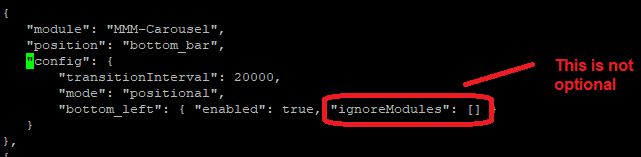
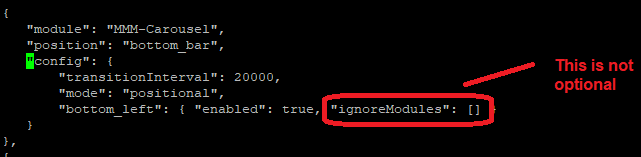
The ignoreModules inside the position config is not optional.
-
Cannot get MMM-Carousel 'positional' to work
I am trying to use MMM-Carousel to swap out two modules located in the same location. Namely MMM-MyStandings and MMM-MyScorboard. I believe I have the configurations correct, however, they just display above each other.
In an attempt to debug and look for possible conflicts, I have created a very minimalist config. these two modules display at the same time. I added “showPageIndicators” to aid in debug, they do not display. it is if Carousel is not running
"modules":[
     {
        "module": "MMM-Carousel",
        "position":"bottom_bar",
        "showPageIndicators":true,
        "config": {
          "transitionInterval": 10000,
          "mode": "positional",
          "top_left": { "enabled": true }
        }
     },
   {
         module: "MMM-Pollen",
         position: "top_left",
         header: "Aiken Pollen",
         config: {
             updateInterval: 3 * 60 * 60 * 1000, // every 3 hours
             zip_code: "29801",
             show_icons: false
         }
     },
 {
        "module":"clock",
        "position":"top_left",
        "config":{
           "displaySeconds":false,
           "displayType":"analog",
           "analogSize":"180px",
           "analogFace":"face-003"
        }
     },
  ]
> magicmirror@2.31.0 start > npm run start:x11 > magicmirror@2.31.0 start:x11 > DISPLAY="${DISPLAY:=:0}" ./node_modules/.bin/electron js/electron.js [2025-05-08 09:24:25.189] [LOG] Starting MagicMirror: v2.31.0 [2025-05-08 09:24:25.203] [LOG] Loading config ... [2025-05-08 09:24:25.204] [LOG] config template file not exists, no envsubst [2025-05-08 09:24:25.402] [INFO] Checking config file /home/chris/MagicMirror/config/config.js ... [2025-05-08 09:24:25.426] [INFO] Your configuration file doesn't contain syntax errors :) [2025-05-08 09:24:25.426] [INFO] Checking modules structure configuration ... [2025-05-08 09:24:25.469] [INFO] Your modules structure configuration doesn't contain errors :) [2025-05-08 09:24:25.470] [LOG] Loading module helpers ... [2025-05-08 09:24:25.471] [LOG] No helper found for module: MMM-Carousel. [2025-05-08 09:24:25.551] [LOG] Initializing new module helper ... [2025-05-08 09:24:25.551] [LOG] Module helper loaded: MMM-Pollen [2025-05-08 09:24:25.552] [LOG] No helper found for module: clock. [2025-05-08 09:24:25.552] [LOG] All module helpers loaded. [2025-05-08 09:24:25.555] [LOG] Starting server on port 8080 ... [2025-05-08 09:24:25.868] [LOG] Server started ... [2025-05-08 09:24:25.869] [LOG] Connecting socket for: MMM-Pollen [2025-05-08 09:24:25.869] [LOG] MMM-Pollen helper started ... [2025-05-08 09:24:25.870] [LOG] Sockets connected & modules started ... [2025-05-08 09:24:26.093] [LOG] Launching application. [2025-05-08 09:24:26.723] [INFO] System information: ### SYSTEM: manufacturer: Raspberry Pi Foundation; model: Raspberry Pi 5 Model B Rev 1.1; virtual: false ### OS: platform: linux; distro: Debian GNU/Linux; release: 12; arch: arm64; kernel: 6.12.20+rpt-rpi-2712 ### VERSIONS: electron: 35.1.5; used node: 23.11.0; installed node: 23.11.0; npm: 10.9.2; pm2: 5.4.3 ### OTHER: timeZone: America/New_York; ELECTRON_ENABLE_GPU: undefined [2025-05-08 09:29:56.800] [LOG] Shutting down server... [2025-05-08 09:29:56.800] [LOG] Stopping module helper: MMM-Pollen [2025-05-08 09:29:56.801] [LOG] Node_helpers stopped ...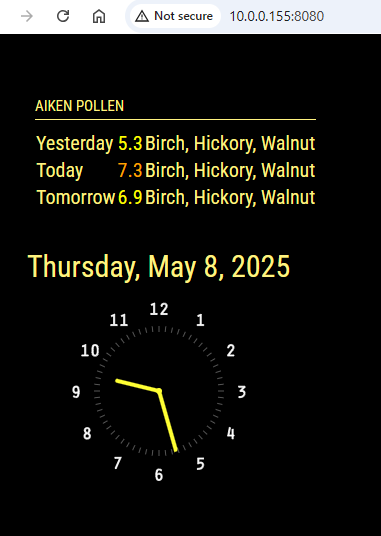
-
RE: Can updatenotification be configured to restart the main MM process?
@sdetweil nice. how do I mark item as ‘Resolved’?
I found it!
-
RE: Can updatenotification be configured to restart the main MM process?
Ok, I read that parameter as ‘restart once one of the modules in the Updates array are updated’
So updateAutorestart is based on general MM updates.
How does it know the name of the app to restart?
does it run
mp2 restart all -
Can updatenotification be configured to restart the main MM process?
I have updatenotification configured with update commands to perform module specific updates.
      "module":"updatenotification",
         "position":"top_center",
         "config":{
              updates:
              [
                {
                   "MMM-MyStandings": "git pull",
                },
                {
                   "MMM-MyScoreboard": "git pull && npm install --omit=dev",
                },
             ],
         },
is there way to configure a MM restart command in response to a “restart required” notification?
pm2 restart MM -
RE: MMM-GoogleCalendar auth expiring after a week
@BKeyport no doubt, not knocking the module, it works great. I just followed along with Auth steps…kind of black0box for me.
I think a cheap wireless keyboard will be good any way.
-
RE: MMM-GoogleCalendar auth expiring after a week
after 7 days…invalid_grant again.
delete token.json and rerun auth again required to get back up. Would all be easy if I had a keyboard already attached…but I dont. maybe I need a wireless keyboard
-
RE: MMM-GoogleCalendar auth expiring after a week
I followed the steps in the attached issue. I will post update after some time