MagicMirror Forum
    • Recent
    • Tags
    • Unsolved
    • Solved
    • MagicMirror² Repository
    • Documentation
    • 3rd-Party-Modules
    • Donate
    • Discord
    • Register
    • Login
    A New Chapter for MagicMirror: The Community Takes the Lead
    Read the statement by Michael Teeuw here.

    install MM2.18 on win10 pc

    Scheduled Pinned Locked Moved Solved Troubleshooting
    22 Posts 2 Posters 9.8k Views 3 Watching
    Loading More Posts
    • Oldest to Newest
    • Newest to Oldest
    • Most Votes
    Reply
    • Reply as topic
    Log in to reply
    This topic has been deleted. Only users with topic management privileges can see it.
    • S Offline
      sdetweil @Johans
      last edited by

      @johans see this issue comment

      https://github.com/MichMich/MagicMirror/issues/2779#issuecomment-1011124060

      Sam

      How to add modules

      learning how to use browser developers window for css changes

      J 1 Reply Last reply Reply Quote 2
      • J Offline
        Johans @sdetweil
        last edited by

        @sdetweil - thanks for the info. now it is working fine .

        1 Reply Last reply Reply Quote 0
        • J Offline
          Johans
          last edited by

          I got MM working under Win10 and most of the apps are working.

          but in the end I prefere more the linux, so I installed debian, git, nodejs, and MM.
          When to start the MM i get following message
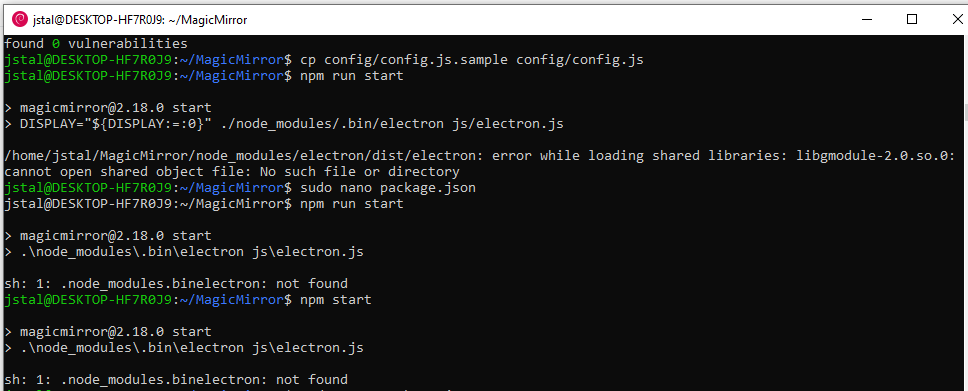
          error MM-install.PNG

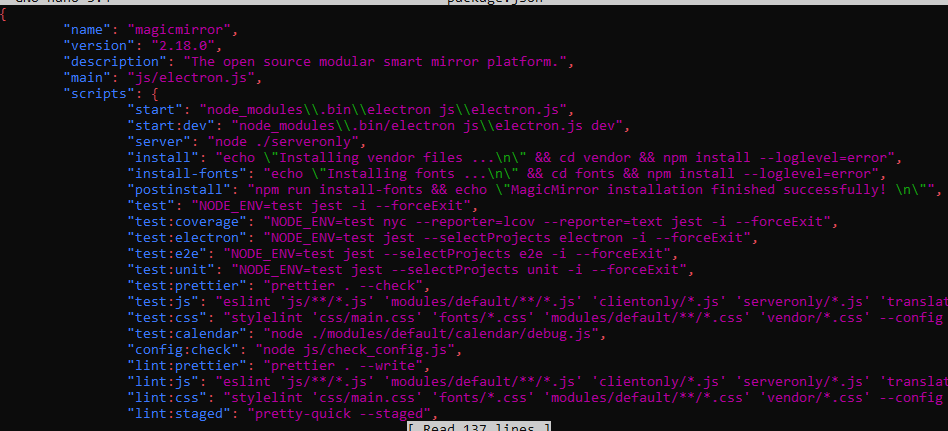
          packagejson.PNG
          Although I updated the package.json file and corrected accoring the instructions, I still get an error message.

          What else is missing?

          S 3 Replies Last reply Reply Quote 0
          • S Offline
            sdetweil @Johans
            last edited by

            @johans

            well, the output says that the \ wasn’t right as it removed all the slashes and made 1 big string…

            because u posted screenshots and not text I can’t show more

            what node/npm versions did u install ??

            npm -v
            node -v

            Sam

            How to add modules

            learning how to use browser developers window for css changes

            J 3 Replies Last reply Reply Quote 0
            • J Offline
              Johans @sdetweil
              last edited by

              @sdetweil

              npm is version 8.5.2
              node = 17.7.2

              1 Reply Last reply Reply Quote 0
              • J Offline
                Johans @sdetweil
                last edited by

                @sdetweil said in install MM2.18 on win10 pc:

                because u posted screenshots and not text I can’t show more

                Do you want the content of the package.json file?

                {
                	"name": "magicmirror",
                	"version": "2.18.0",
                	"description": "The open source modular smart mirror platform.",
                	"main": "js/electron.js",
                	"scripts": {
                		"start": "node_modules\\.bin\\electron js\\electron.js",
                		"start:dev": "DISPLAY=\"${DISPLAY:=:0}\" ./node_modules/.bin/electron js/electron.js dev",
                		"server": "node ./serveronly",
                		"install": "echo \"Installing vendor files ...\n\" && cd vendor && npm install --loglevel=error",
                		"install-fonts": "echo \"Installing fonts ...\n\" && cd fonts && npm install --loglevel=error",
                		"postinstall": "npm run install-fonts && echo \"MagicMirror installation finished successfully! \n\"",
                		"test": "NODE_ENV=test jest -i --forceExit",
                		"test:coverage": "NODE_ENV=test nyc --reporter=lcov --reporter=text jest -i --forceExit",
                		"test:electron": "NODE_ENV=test jest --selectProjects electron -i --forceExit",
                		"test:e2e": "NODE_ENV=test jest --selectProjects e2e -i --forceExit",
                		"test:unit": "NODE_ENV=test jest --selectProjects unit -i --forceExit",
                		"test:prettier": "prettier . --check",
                		"test:js": "eslint 'js/**/*.js' 'modules/default/**/*.js' 'clientonly/*.js' 'serveronly/*.js' 'translations/*.js' 'vendor/*.js' 'tests/**/*.js' 'config/*' --config .eslintrc.json",
                		"test:css": "stylelint 'css/main.css' 'fonts/*.css' 'modules/default/**/*.css' 'vendor/*.css' --config .stylelintrc.json",
                		"test:calendar": "node ./modules/default/calendar/debug.js",
                		"config:check": "node js/check_config.js",
                		"lint:prettier": "prettier . --write",
                		"lint:js": "eslint 'js/**/*.js' 'modules/default/**/*.js' 'clientonly/*.js' 'serveronly/*.js' 'translations/*.js' 'vendor/*.js' 'tests/**/*.js' 'config/*' --config .eslintrc.json --fix",
                		"lint:css": "stylelint 'css/main.css' 'fonts/*.css' 'modules/default/**/*.css' 'vendor/*.css' --config .stylelintrc.json --fix",
                		"lint:staged": "pretty-quick --staged",
                		"prepare": "[ -f node_modules/.bin/husky ] && husky install || echo no husky installed."
                	},
                
                
                1 Reply Last reply Reply Quote 0
                • J Offline
                  Johans @sdetweil
                  last edited by

                  @sdetweil

                  I also installed MM on Ubuntu V20.4 and I have exactly the same message as I get on Debian.

                  S 1 Reply Last reply Reply Quote 0
                  • S Offline
                    sdetweil @Johans
                    last edited by

                    @Johans is it the same node and npm?

                    we havent tested on node 17.

                    only node 14 and 16

                    Sam

                    How to add modules

                    learning how to use browser developers window for css changes

                    J 1 Reply Last reply Reply Quote 0
                    • J Offline
                      Johans @sdetweil
                      last edited by

                      @sdetweil On Ubuntu I used node 16.14.2 and npm 8.5.5 while on Debian I used node 17.7.2 and npm 8.5.2. And both seems to give me the same error message

                      S 1 Reply Last reply Reply Quote 0
                      • S Offline
                        sdetweil @Johans
                        last edited by

                        @Johans on linux, if you use my script, it does everything… installs node, npm … tools (git, …) etc

                        trying to recreate now

                        I use Ubuntu as my desktop and dev environment, so i know it works there…

                        you don’t use sudo, install as normal user, not root.
                        must have the desktop version of OS (as the browsers draws graphics which requires the graphical env)

                        show me the ~/install.log
                        (you can send to my email, same userid at gmail)

                        Sam

                        How to add modules

                        learning how to use browser developers window for css changes

                        J 1 Reply Last reply Reply Quote 0
                        • S Offline
                          sdetweil @Johans
                          last edited by sdetweil

                          @Johans on my windows 11 with 16.9.0 (node version) and package.js start line like this

                          		"start": "node_modules\\.bin\\electron js\\electron.js",
                          

                          I see this is the startup messages

                          > node_modules\.bin\electron js\electron.js
                          

                          I see the same results on node 17.7.2

                          Sam

                          How to add modules

                          learning how to use browser developers window for css changes

                          1 Reply Last reply Reply Quote 0
                          • S Offline
                            sdetweil @Johans
                            last edited by

                            @Johans sorry, I missed this line

                            but in the end I prefere more the linux, so I installed debian, git, nodejs, and MM.
                            

                            so, you do NOT change the package.json for linux… only for windows…

                            Sam

                            How to add modules

                            learning how to use browser developers window for css changes

                            1 Reply Last reply Reply Quote 0
                            • J Offline
                              Johans @sdetweil
                              last edited by

                              @sdetweil Sorry but i’m new on Linux, where to find install log?

                              S 1 Reply Last reply Reply Quote 0
                              • S Offline
                                sdetweil @Johans
                                last edited by sdetweil

                                @Johans the file is saved in the users home folder

                                on linux that is called ~

                                cd ~ will take you to the home folder

                                and u can reference any file there the same way

                                ~/install.log

                                is the same as
                                /home/{username}/install.log

                                using the environment info
                                /home/$USER/install.log

                                unix/linux was born on slow teletype terminals… so there are shortcuts for everything to reduce typing and shorten output…

                                thats why cd is the same as the long name chdir

                                Sam

                                How to add modules

                                learning how to use browser developers window for css changes

                                J 1 Reply Last reply Reply Quote 0
                                • J Offline
                                  Johans @sdetweil
                                  last edited by

                                  @sdetweil I don’t seem to find such a file in the root directory.

                                  S 1 Reply Last reply Reply Quote 0
                                  • S Offline
                                    sdetweil @Johans
                                    last edited by

                                    @Johans said in install MM2.18 on win10 pc:

                                    file in the root directory.

                                    not in the root /

                                    in the users home
                                    ~/

                                    you CANNOT do MM as root…

                                    you MUST logon as a normal user (in my case sam on my ubuntu system)

                                    Sam

                                    How to add modules

                                    learning how to use browser developers window for css changes

                                    J 1 Reply Last reply Reply Quote 0
                                    • J Offline
                                      Johans @sdetweil
                                      last edited by

                                      @sdetweil I have the icon under windows and when I start, Ubuntu it starts with the user I created during installation. ubuntulogin.png
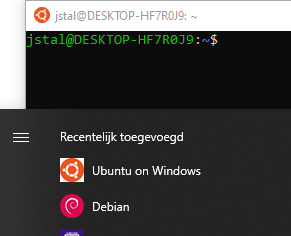
                                      So I guess this is my normal user?

                                      I installed node & MM from jstal@DESKTOP-HF7R0J9 As I think this is correct - or not?

                                      S 1 Reply Last reply Reply Quote 0
                                      • S Offline
                                        sdetweil @Johans
                                        last edited by

                                        @Johans wait. you are running Ubuntu in lsw?

                                        that’s text mode. electron won’t run there

                                        Sam

                                        How to add modules

                                        learning how to use browser developers window for css changes

                                        J 1 Reply Last reply Reply Quote 0
                                        • J Offline
                                          Johans @sdetweil
                                          last edited by

                                          @sdetweil , yes lsw2 that is how I installed it. So that is not good? How do I then make a proper installation on a windows PC? Do you have a link-guide to follow?

                                          S 1 Reply Last reply Reply Quote 0
                                          • S Offline
                                            sdetweil @Johans
                                            last edited by sdetweil

                                            @Johans open a cmd.exe window

                                            and then do the install steps

                                            but you said u did that already…

                                            but wanted linux

                                            for linux desktop on windows you have to use a virtual machine…

                                            now, you might be able to run server mode and use the windows browser to access
                                            in the lsw linux command prompt
                                            cd ~/MagicMirror
                                            npm run server

                                            then go to windows desktop and open browser
                                            http://localhost:8080

                                            Sam

                                            How to add modules

                                            learning how to use browser developers window for css changes

                                            J 1 Reply Last reply Reply Quote 0

                                            Hello! It looks like you're interested in this conversation, but you don't have an account yet.

                                            Getting fed up of having to scroll through the same posts each visit? When you register for an account, you'll always come back to exactly where you were before, and choose to be notified of new replies (either via email, or push notification). You'll also be able to save bookmarks and upvote posts to show your appreciation to other community members.

                                            With your input, this post could be even better 💗

                                            Register Login

                                            • 1
                                            • 2
                                            • 1 / 2
                                            • First post
                                              Last post
                                            Enjoying MagicMirror? Please consider a donation!
                                            MagicMirror created by Michael Teeuw.
                                            Forum managed by Sam, technical setup by Karsten.
                                            This forum is using NodeBB as its core | Contributors
                                            Contact | Privacy Policy