Read the statement by Michael Teeuw here.
MMM-MyDutchWeather
-
I installed the module as mentioned in the instructions.
I created a api key with Weerlive.
When I run the MagicMirror, I get a black screen.
When I delete the code in the config file, the MagicMirror software runs without problems and I see the newsfeed, the calendar and so on.
So I suppose I do something wrong.
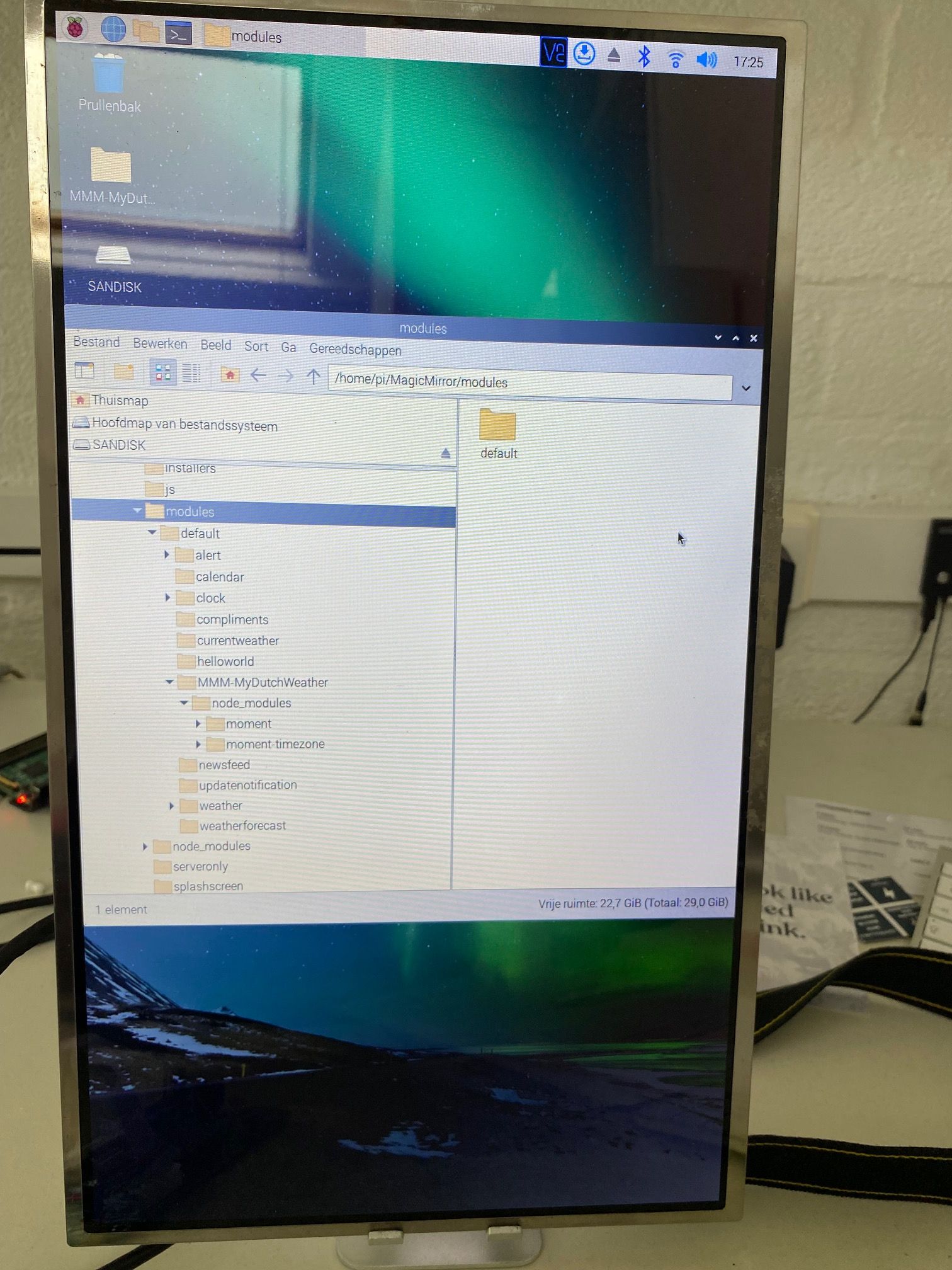
I attach a screenshot from the location on the MMM-MyDutchWeatherThis is the config file (I deleted some modules in the text so make it shorter):
/* MagicMirror² Config Sample
*-
By Michael Teeuw https://michaelteeuw.nl
-
MIT Licensed.
-
For more information on how you can configure this file
-
see https://docs.magicmirror.builders/configuration/introduction.html
-
and https://docs.magicmirror.builders/modules/configuration.html
*/
let config = {
address: “localhost”, // Address to listen on, can be:
// - “localhost”, “127.0.0.1”, “::1” to listen on loopback interface
// - another specific IPv4/6 to listen on a specific interface
// - “0.0.0.0”, “::” to listen on any interface
// Default, when address config is left out or empty, is “localhost”
port: 8080,
basePath: “/”, // The URL path where MagicMirror² is hosted. If you are using a Reverse proxy
// you must set the sub path here. basePath must end with a /
ipWhitelist: [“127.0.0.1”, “::ffff:127.0.0.1”, “::1”], // Set [] to allow all IP addresses
// or add a specific IPv4 of 192.168.1.5 :
// [“127.0.0.1”, “::ffff:127.0.0.1”, “::1”, “::ffff:192.168.1.5”],
// or IPv4 range of 192.168.3.0 --> 192.168.3.15 use CIDR format :
// [“127.0.0.1”, “::ffff:127.0.0.1”, “::1”, “::ffff:192.168.3.0/28”],useHttps: false, // Support HTTPS or not, default “false” will use HTTP
httpsPrivateKey: “”, // HTTPS private key path, only require when useHttps is true
httpsCertificate: “”, // HTTPS Certificate path, only require when useHttps is truelanguage: “nl”,
locale: “en-US”,
logLevel: [“INFO”, “LOG”, “WARN”, “ERROR”], // Add “DEBUG” for even more logging
timeFormat: 24,
units: “metric”,
// serverOnly: true/false/“local” ,
// local for armv6l processors, default
// starts serveronly and then starts chrome browser
// false, default for all NON-armv6l devices
// true, force serveronly mode, because you want to… no UI on this devicemodules: [
{
module: “alert”,
},
{
module: “updatenotification”,
position: “top_bar”
},
{
module: “clock”,
position: “top_left”
},{ module: 'MMM-MyDutchWeather', position: 'top_right', header: "Nederlands weerbericht test", config: { latitude: 52.26583, longitude: 6.79306, apiKey: "c15c476376", showIcons: true, showExtra: false, maxWidth: "500px" } }, { module: "newsfeed", position: "bottom_bar", config: { feeds: [ { title: "NOS Nieuws", url: "http://feeds.nos.nl/nosnieuwsvideo" } ], showSourceTitle: true, showPublishDate: true, broadcastNewsFeeds: true, broadcastNewsUpdates: true } }, { module: "newsfeed", position: "bottom_bar", config: { feeds: [ { title: "Nos Nieuws algemeen", url: "http://feeds.nos.nl/nosnieuwsalgemeen" } ], showSourceTitle: true, showPublishDate: true, broadcastNewsFeeds: true, broadcastNewsUpdates: true } },]
};
/*************** DO NOT EDIT THE LINE BELOW ***************/
if (typeof module !== “undefined”) {module.exports = config;}I hope somebody is able to help me.
Thank you in advance.
Yvonne
-
-
-
@sdetweil I did what you suggested.
I moved the folder to the MagicMirror/modules folder.
In the MagicMirror/config folder I have added the configuration as mentioned before. When I run nom run config: check there are no errors in my config file.
If I delete this module in the config file and I run npm then the Magic Mirror is running fine. With this module I get a black screen.
I have made an image of a part of the message on the screen.
Maybe this is an indication.
I hope you are willing and able to give me some hint.
Thank you again.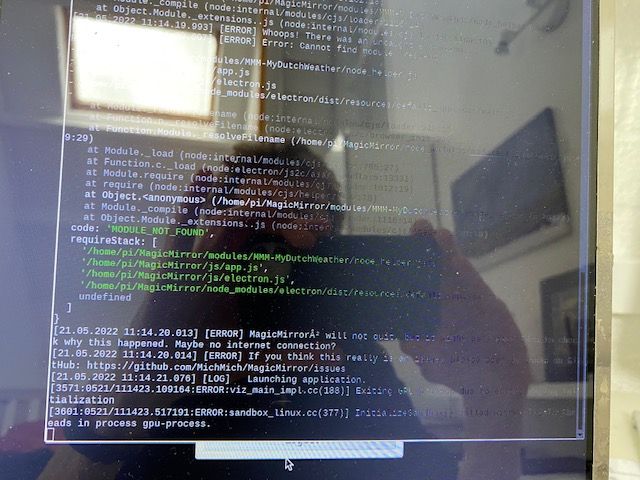
-
Hello! It looks like you're interested in this conversation, but you don't have an account yet.
Getting fed up of having to scroll through the same posts each visit? When you register for an account, you'll always come back to exactly where you were before, and choose to be notified of new replies (either via email, or push notification). You'll also be able to save bookmarks and upvote posts to show your appreciation to other community members.
With your input, this post could be even better 💗
Register Login