Read the statement by Michael Teeuw here.
Notion Integration
-
Hi, I’m trying to make integration between my Notion To-do list to the MM.
I wrote a code using Notion API to get all the data I need from my database but I can’t figure out how to write it as a module and add it to the mirror. I want to display the list like the calendar module work.
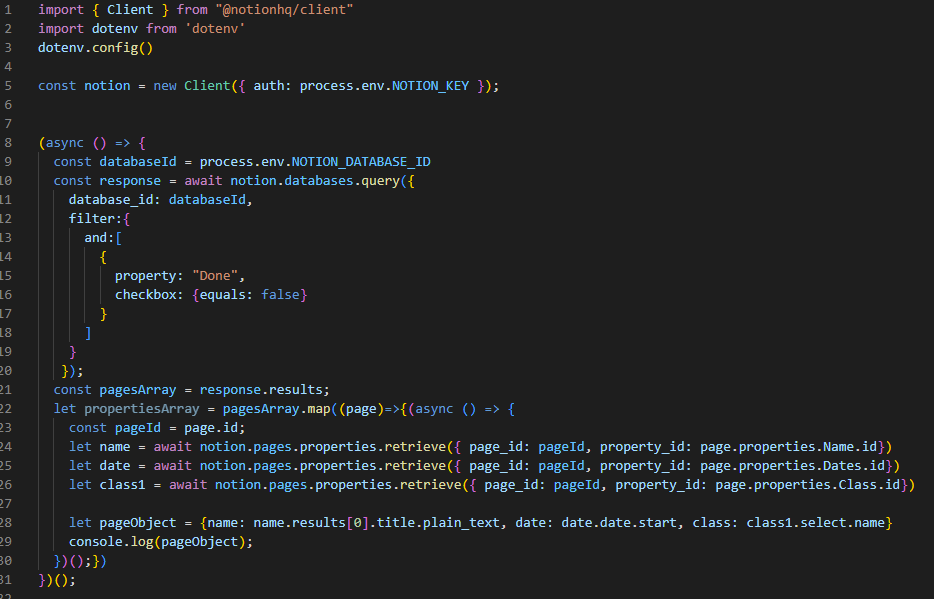
The code I have right now is:
My database is:

Can someone help me write it as a module?
Thanks in advance! -
@Amit5001 so, you will need to write a module.
mm runs inside a browser, electron, chrome, Firefox, … it displays one web page
each module gets data from somewhere and builds a small blob of html, or dom content, and gives that to mm, which places it in the browser DOM in the position you configured
the spec is here
https://docs.magicmirror.builders/development/introduction.htmlyou can use my SampleModule as a starting place, it’s got all the parts
https://github.com/sdetweil/SampleModule
something to do before that, is to figure out how u want it displayed and build the html to do that, it’s just text. you can test that output in any browser.
a module is split into 2 parts.
the part that runs in the browser and does all the display work
I call it modulename.js cause it’s filename matches the module name. it’s the part that interfaces to mmbut a browser cannot read files (incl database) or touch hardware directly. for security. browser cannot import or require to load libraries.
so if u need to do that, you use the helper, called node_helper.js. there is a small communication mechanism between the two parts.
modulename.js sends a message, send socket notification
and the helper receives them, receiveSocketNotificationwhen done the exact same calls are used in the other direction. helper sends module name.js receives. this is a private channel between this module and it’s helper.
Hello! It looks like you're interested in this conversation, but you don't have an account yet.
Getting fed up of having to scroll through the same posts each visit? When you register for an account, you'll always come back to exactly where you were before, and choose to be notified of new replies (either via email, or push notification). You'll also be able to save bookmarks and upvote posts to show your appreciation to other community members.
With your input, this post could be even better 💗
Register Login