Read the statement by Michael Teeuw here.
MagicMirror install on proxmox LXC Container?
-
-
@sdetweil said in MagicMirror install on proxmox LXC Container?:
@kusselin pm2 logs --lines=50
not good to install under rootHello, thank you for the tips…o.k. under root this is nuicht so good…
Again from the beginning…I install ubuntu 22.04 standard in a LXC container. I have also created the container by default. This has also all worked great. After that I started the container.So when I am on the console it is so that I log in with root and pass. But that is not so good.
So I have now created a standard user with pass. Habs then times made as on Rasoian with user “pi” udn the default password for it. To test!So, now I log in with user “pi” and the default password…now I stand on the “prompt”
login as: pi
pi@192.168.200.74's password:
Welcome to Ubuntu 22.04.1 LTS (GNU/Linux 5.15.35-1-pve x86_64)

 * Documentation:  https://help.ubuntu.com
 * Management:     https://landscape.canonical.com
 * Support:        https://ubuntu.com/advantage
Last login: Sat Oct 15 19:06:04 2022 from 192.168.1.236
pi@MagicMirror-live:~$ ^C
pi@MagicMirror-live:~$
Then I take the script from you here:
bash -c "$(curl -sL https://raw.githubusercontent.com/sdetweil/MagicMirror_scripts/master/raspberry.sh)"So and if I then start your script via Console then comes the message “[sudo] password or pi”.
pi@MagicMirror-live:~$ bash -c  "$(curl -sL https://raw.githubusercontent.com/sdetweil/MagicMirror_scripts/master/raspberry.sh)"

$$\      $$\                     $$\           $$\      $$\ $$\                                          $$$$$$\
$$$\    $$$ |                    \__|          $$$\    $$$ |\__|                                        $$  __$$\
$$$$\  $$$$ | $$$$$$\   $$$$$$\  $$\  $$$$$$$\ $$$$\  $$$$ |$$\  $$$$$$\   $$$$$$\   $$$$$$\   $$$$$$\  \__/  $$ |
$$\$$\$$ $$ | \____$$\ $$  __$$\ $$ |$$  _____|$$\$$\$$ $$ |$$ |$$  __$$\ $$  __$$\ $$  __$$\ $$  __$$\  $$$$$$  |
$$ \$$$  $$ | $$$$$$$ |$$ /  $$ |$$ |$$ /      $$ \$$$  $$ |$$ |$$ |  \__|$$ |  \__|$$ /  $$ |$$ |  \__|$$  ____/
$$ |\$  /$$ |$$  __$$ |$$ |  $$ |$$ |$$ |      $$ |\$  /$$ |$$ |$$ |      $$ |      $$ |  $$ |$$ |      $$ |
$$ | \_/ $$ |\$$$$$$$ |\$$$$$$$ |$$ |\$$$$$$$\ $$ | \_/ $$ |$$ |$$ |      $$ |      \$$$$$$  |$$ |      $$$$$$$$\
\__|     \__| \_______| \____$$ |\__| \_______|\__|     \__|\__|\__|      \__|       \______/ \__|      \________|
                       $$\   $$ |
                       \$$$$$$  |
                        \______/

install log being saved to /home/pi/install.log
Installing helper tools ...
[sudo] password for pi:
But you just said that the installation under “root” (sudo) is not good? Yes what is right now? What do I have to do now?
Do I have to insert “su” here then??
I don’t have a “sudo” password for pi - how do I create it?
Do I have to log in again with “pi” and the default pass and then create a “root” pass for pi?
and if I then take the root password from my created LXC container, it always comes “sorry try again”.
[sudo] password for pi:
Sorry, try again.
[sudo] password for pi:
What am I doing wrong here?
This is what I do not understand and do not know. Can you please describe me this in understandable sentences briefly how I have to proceed with the installation?
Thank you
-
so installed again under “pi”…
Commands executed by you here the result:
login as: pi
pi@192.168.200.74's password:
Welcome to Ubuntu 22.04.1 LTS (GNU/Linux 5.15.35-1-pve x86_64)

 * Documentation:  https://help.ubuntu.com
 * Management:     https://landscape.canonical.com
 * Support:        https://ubuntu.com/advantage
Last login: Sun Oct 16 09:53:33 2022 from 192.168.1.236
pi@MagicMirror-live:~$ cd MagicMirror
pi@MagicMirror-live:~/MagicMirror$ pm2 start MagicMirror
[PM2] Applying action restartProcessId on app [MagicMirror](ids: [ 0 ])
[PM2] [MagicMirror](0) ✓
[PM2] Process successfully started
┌────┬────────────────────┬──────────┬──────┬───────────┬──────────┬──────────┐
│ id │ name               │ mode     │ ↺    │ status    │ cpu      │ memory   │
├────┼────────────────────┼──────────┼──────┼───────────┼──────────┼──────────┤
│ 0  │ MagicMirror        │ fork     │ 143  │ online    │ 0%       │ 4.0kb    │
└────┴────────────────────┴──────────┴──────┴───────────┴──────────┴──────────┘
pi@MagicMirror-live:~/MagicMirror$ pm2 status
┌────┬────────────────────┬──────────┬──────┬───────────┬──────────┬──────────┐
│ id │ name               │ mode     │ ↺    │ status    │ cpu      │ memory   │
├────┼────────────────────┼──────────┼──────┼───────────┼──────────┼──────────┤
│ 0  │ MagicMirror        │ fork     │ 308  │ online    │ 0%       │ 3.0mb    │
└────┴────────────────────┴──────────┴──────┴───────────┴──────────┴──────────┘
pi@MagicMirror-live:~/MagicMirror$ pm2 start MagicMirror
[PM2] Applying action restartProcessId on app [MagicMirror](ids: [ 0 ])
[PM2] [MagicMirror](0) ✓
[PM2] Process successfully started
┌────┬────────────────────┬──────────┬──────┬───────────┬──────────┬──────────┐
│ id │ name               │ mode     │ ↺    │ status    │ cpu      │ memory   │
├────┼────────────────────┼──────────┼──────┼───────────┼──────────┼──────────┤
│ 0  │ MagicMirror        │ fork     │ 363  │ online    │ 0%       │ 4.0kb    │
└────┴────────────────────┴──────────┴──────┴───────────┴──────────┴──────────┘
pi@MagicMirror-live:~/MagicMirror$
If I now enter the following in the browser (Mozilla) then comes network overrun :-(
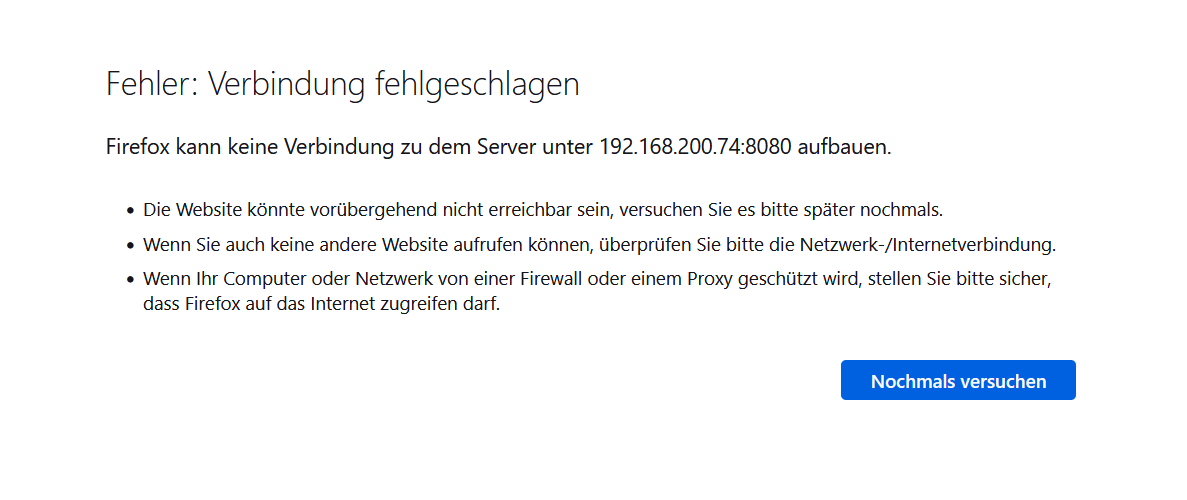
I don´t know whta i can do :-(
her my config
/* MagicMirror² Config Sample
 *
 * By Michael Teeuw https://michaelteeuw.nl
 * MIT Licensed.
 *
 * For more information on how you can configure this file
 * see https://docs.magicmirror.builders/configuration/introduction.html
 * and https://docs.magicmirror.builders/modules/configuration.html
 */
let config = {
	address: "0.0.0.0", 	// Address to listen on, can be:
							// - "localhost", "127.0.0.1", "::1" to listen on loopback interface
							// - another specific IPv4/6 to listen on a specific interface
							// - "0.0.0.0", "::" to listen on any interface
							// Default, when address config is left out or empty, is "localhost"
	port: 8080,
	basePath: "/", 	// The URL path where MagicMirror² is hosted. If you are using a Reverse proxy
					// you must set the sub path here. basePath must end with a /
	ipWhitelist: [], 	// Set [] to allow all IP addresses
															// or add a specific IPv4 of 192.168.1.5 :
															// ["127.0.0.1", "::ffff:127.0.0.1", "::1", "::ffff:192.168.1.5"],
															// or IPv4 range of 192.168.3.0 --> 192.168.3.15 use CIDR format :
															// ["127.0.0.1", "::ffff:127.0.0.1", "::1", "::ffff:192.168.3.0/28"],

	useHttps: false, 		// Support HTTPS or not, default "false" will use HTTP
	httpsPrivateKey: "", 	// HTTPS private key path, only require when useHttps is true
	httpsCertificate: "", 	// HTTPS Certificate path, only require when useHttps is true

	language: "de",
	locale: "de-DE",
	logLevel: ["INFO", "LOG", "WARN", "ERROR"], // Add "DEBUG" for even more logging
	timeFormat: 24,
	units: "metric",
	// serverOnly:  true/false/"local" ,
	// local for armv6l processors, default
	//   starts serveronly and then starts chrome browser
	// false, default for all NON-armv6l devices
	// true, force serveronly mode, because you want to.. no UI on this device

	modules: [
		{
			module: "alert",
		},
		{
			module: "updatenotification",
			position: "top_bar"
		},
		{
			module: "clock",
			position: "top_left"
		},
		{
			module: "calendar",
			header: "US Holidays",
			position: "top_left",
			config: {
				calendars: [
					{
						symbol: "calendar-check",
						url: "webcal://www.calendarlabs.com/ical-calendar/ics/76/US_Holidays.ics"
					}
				]
			}
		},
		{
			module: "compliments",
			position: "lower_third"
		},
		{
			module: "weather",
			position: "top_right",
			config: {
				weatherProvider: "openweathermap",
				type: "current",
				location: "New York",
				locationID: "5128581", //ID from http://bulk.openweathermap.org/sample/city.list.json.gz; unzip the gz file and find your city
				apiKey: "YOUR_OPENWEATHER_API_KEY"
			}
		},
		{
			module: "weather",
			position: "top_right",
			header: "Weather Forecast",
			config: {
				weatherProvider: "openweathermap",
				type: "forecast",
				location: "New York",
				locationID: "5128581", //ID from http://bulk.openweathermap.org/sample/city.list.json.gz; unzip the gz file and find your city
				apiKey: "YOUR_OPENWEATHER_API_KEY"
			}
		},
		{
			module: "newsfeed",
			position: "bottom_bar",
			config: {
				feeds: [
					{
						title: "New York Times",
						url: "https://rss.nytimes.com/services/xml/rss/nyt/HomePage.xml"
					}
				],
				showSourceTitle: true,
				showPublishDate: true,
				broadcastNewsFeeds: true,
				broadcastNewsUpdates: true
			}
		},
	]
};

/*************** DO NOT EDIT THE LINE BELOW ***************/
if (typeof module !== "undefined") {module.exports = config;}
installed now is MagicMirror here
/home/pi/MagicMirror -
When everyone have proxmox…please install it and give me feedback how you installed it.
Thanks a lot -
change the script that starts mm from
npm start
to
npm run servera container has no desktop,
npm start tries to load the graphical UI using electron.npm run server
just starts the server side, for external browsers to access
I can’t tell what that error is, but the internet has moved to https connections by default, and many browsers warn when accessing http sites like MagicMirror is running.
so you either have to accept the warning, or find a way in the browser to disable to message
https setup requires a certificate, which is not free.
-
hi sdetweil, sorry my Linux knowledge is not good.
Can you explain me how to change the script udn where in the script?
Is my basic installation but with user “pi” so correct
-
@kusselin my pm2 setup uses
~/MagicMirror/installers/mm.sh -
@sdetweil said in MagicMirror install on proxmox LXC Container?:
@kusselin my pm2 setup uses
~/MagicMirror/installers/mm.shthis standing in my mm.sh
cd ~/MagicMirror
DISPLAY=:0 npm start
an now i must put this into than looks like this
cd ~/MagicMirror
DISPLAY=:0 npm start
npm run server
so o.k.?
-
@kusselin said in MagicMirror install on proxmox LXC Container?:
cd ~/MagicMirror
DISPLAY=:0 npm start
npm run serverno
cd ~/MagicMirror
npm run server -
o.k…next try to step and hope i can start the MM
look…
pi@MagicMirror-live:~$
curl -sL https://deb.nodesource.com/setup_18.x | sudo -E bash -
[sudo] password for pi:

## Installing the NodeSource Node.js 18.x repo...


## Populating apt-get cache...

+ apt-get update
Hit:1 https://deb.nodesource.com/node_16.x jammy InRelease
Hit:2 http://archive.ubuntu.com/ubuntu jammy InRelease
Get:3 http://archive.ubuntu.com/ubuntu jammy-updates InRelease [114 kB]
Get:4 http://archive.ubuntu.com/ubuntu jammy-security InRelease [110 kB]
Fetched 224 kB in 2s (105 kB/s)
Reading package lists... Done

## Confirming "jammy" is supported...

+ curl -sLf -o /dev/null 'https://deb.nodesource.com/node_18.x/dists/jammy/Release'

## Adding the NodeSource signing key to your keyring...

+ curl -s https://deb.nodesource.com/gpgkey/nodesource.gpg.key | gpg --dearmor | tee /usr/share/keyrings/nodesource.gpg >/dev/null

## Creating apt sources list file for the NodeSource Node.js 18.x repo...

+ echo 'deb [signed-by=/usr/share/keyrings/nodesource.gpg] https://deb.nodesource.com/node_18.x jammy main' > /etc/apt/sources.list.d/nodesource.list
+ echo 'deb-src [signed-by=/usr/share/keyrings/nodesource.gpg] https://deb.nodesource.com/node_18.x jammy main' >> /etc/apt/sources.list.d/nodesource.list

## Running `apt-get update` for you...

+ apt-get update
Get:1 https://deb.nodesource.com/node_18.x jammy InRelease [4563 B]
Hit:2 http://archive.ubuntu.com/ubuntu jammy InRelease
Hit:3 http://archive.ubuntu.com/ubuntu jammy-updates InRelease
Hit:4 http://archive.ubuntu.com/ubuntu jammy-security InRelease
Get:5 https://deb.nodesource.com/node_18.x jammy/main amd64 Packages [775 B]
Fetched 5338 B in 2s (2387 B/s)
Reading package lists... Done

## Run `sudo apt-get install -y nodejs` to install Node.js 18.x and npm
## You may also need development tools to build native addons:
     sudo apt-get install gcc g++ make
## To install the Yarn package manager, run:
     curl -sL https://dl.yarnpkg.com/debian/pubkey.gpg | gpg --dearmor | sudo tee /usr/share/keyrings/yarnkey.gpg >/dev/null
     echo "deb [signed-by=/usr/share/keyrings/yarnkey.gpg] https://dl.yarnpkg.com/debian stable main" | sudo tee /etc/apt/sources.list.d/yarn.list
     sudo apt-get update && sudo apt-get install yarn


pi@MagicMirror-live:~$ sudo apt-get update && sudo apt-get install yarn
Hit:1 https://deb.nodesource.com/node_18.x jammy InRelease
Hit:2 http://archive.ubuntu.com/ubuntu jammy InRelease
Hit:3 http://archive.ubuntu.com/ubuntu jammy-updates InRelease
Hit:4 http://archive.ubuntu.com/ubuntu jammy-security InRelease
Reading package lists... Done
Reading package lists... Done
Building dependency tree... Done
Reading state information... Done
Note, selecting 'cmdtest' instead of 'yarn'
The following additional packages will be installed:
  python3-cliapp python3-importlib-metadata python3-markdown
  python3-more-itertools python3-pygments python3-ttystatus python3-zipp
Suggested packages:
  python3-xdg python-markdown-doc python-pygments-doc ttf-bitstream-vera
The following NEW packages will be installed:
  cmdtest python3-cliapp python3-importlib-metadata python3-markdown
  python3-more-itertools python3-pygments python3-ttystatus python3-zipp
0 upgraded, 8 newly installed, 0 to remove and 1 not upgraded.
Need to get 969 kB of archives.
After this operation, 5201 kB of additional disk space will be used.
Do you want to continue? [Y/n] Y
Get:1 http://archive.ubuntu.com/ubuntu jammy/universe amd64 python3-cliapp all 1.20180812.1-4 [44.5 kB]
Get:2 http://archive.ubuntu.com/ubuntu jammy/main amd64 python3-more-itertools all 8.10.0-2 [47.9 kB]
Get:3 http://archive.ubuntu.com/ubuntu jammy/main amd64 python3-zipp all 1.0.0-3 [5440 B]
Get:4 http://archive.ubuntu.com/ubuntu jammy/main amd64 python3-importlib-metadata all 4.6.4-1 [16.2 kB]
Get:5 http://archive.ubuntu.com/ubuntu jammy/main amd64 python3-markdown all 3.3.6-1 [68.5 kB]
Get:6 http://archive.ubuntu.com/ubuntu jammy/universe amd64 python3-ttystatus all 0.38-4 [14.7 kB]
Get:7 http://archive.ubuntu.com/ubuntu jammy/universe amd64 cmdtest all 0.32.14.gcdfe14e-2 [21.9 kB]
Get:8 http://archive.ubuntu.com/ubuntu jammy/main amd64 python3-pygments all 2.11.2+dfsg-2 [750 kB]
Fetched 969 kB in 1s (911 kB/s)
Selecting previously unselected package python3-cliapp.
(Reading database ... 29455 files and directories currently installed.)
Preparing to unpack .../0-python3-cliapp_1.20180812.1-4_all.deb ...
Unpacking python3-cliapp (1.20180812.1-4) ...
Selecting previously unselected package python3-more-itertools.
Preparing to unpack .../1-python3-more-itertools_8.10.0-2_all.deb ...
Unpacking python3-more-itertools (8.10.0-2) ...
Selecting previously unselected package python3-zipp.
Preparing to unpack .../2-python3-zipp_1.0.0-3_all.deb ...
Unpacking python3-zipp (1.0.0-3) ...
Selecting previously unselected package python3-importlib-metadata.
Preparing to unpack .../3-python3-importlib-metadata_4.6.4-1_all.deb ...
Unpacking python3-importlib-metadata (4.6.4-1) ...
Selecting previously unselected package python3-markdown.
Preparing to unpack .../4-python3-markdown_3.3.6-1_all.deb ...
Unpacking python3-markdown (3.3.6-1) ...
Selecting previously unselected package python3-ttystatus.
Preparing to unpack .../5-python3-ttystatus_0.38-4_all.deb ...
Unpacking python3-ttystatus (0.38-4) ...
Selecting previously unselected package cmdtest.
Preparing to unpack .../6-cmdtest_0.32.14.gcdfe14e-2_all.deb ...
Unpacking cmdtest (0.32.14.gcdfe14e-2) ...
Selecting previously unselected package python3-pygments.
Preparing to unpack .../7-python3-pygments_2.11.2+dfsg-2_all.deb ...
Unpacking python3-pygments (2.11.2+dfsg-2) ...
Setting up python3-ttystatus (0.38-4) ...
Setting up python3-more-itertools (8.10.0-2) ...
Setting up python3-zipp (1.0.0-3) ...
Setting up python3-cliapp (1.20180812.1-4) ...
Setting up python3-pygments (2.11.2+dfsg-2) ...
Setting up python3-importlib-metadata (4.6.4-1) ...
Setting up python3-markdown (3.3.6-1) ...
Setting up cmdtest (0.32.14.gcdfe14e-2) ...
Processing triggers for man-db (2.10.2-1) ...
pi@MagicMirror-live:~$ sudo apt install -y nodejs
Reading package lists... Done
Building dependency tree... Done
Reading state information... Done
The following packages will be upgraded:
  nodejs
1 upgraded, 0 newly installed, 0 to remove and 0 not upgraded.
Need to get 28.5 MB of archives.
After this operation, 52.4 MB of additional disk space will be used.
Get:1 https://deb.nodesource.com/node_18.x jammy/main amd64 nodejs amd64 18.11.0-deb-1nodesource1 [28.5 MB]
Fetched 28.5 MB in 1s (22.4 MB/s)
(Reading database ... 29937 files and directories currently installed.)
Preparing to unpack .../nodejs_18.11.0-deb-1nodesource1_amd64.deb ...
Unpacking nodejs (18.11.0-deb-1nodesource1) over (16.17.1-deb-1nodesource1) ...
Setting up nodejs (18.11.0-deb-1nodesource1) ...
Processing triggers for man-db (2.10.2-1) ...
pi@MagicMirror-live:~$ git clone https://github.com/MichMich/MagicMirror
Cloning into 'MagicMirror'...
remote: Enumerating objects: 23768, done.
remote: Counting objects: 100% (1/1), done.
remote: Total 23768 (delta 0), reused 1 (delta 0), pack-reused 23767
Receiving objects: 100% (23768/23768), 19.76 MiB | 12.35 MiB/s, done.
Resolving deltas: 100% (14649/14649), done.
pi@MagicMirror-live:~$ cd MagicMirror/
pi@MagicMirror-live:~/MagicMirror$ npm run install-mm

> magicmirror@2.21.0 install-mm
> npm install --no-audit --no-fund --no-update-notifier --only=prod --omit=dev

npm WARN config only Use `--omit=dev` to omit dev dependencies from the install.

> magicmirror@2.21.0 postinstall
> npm run install-vendor && npm run install-fonts && echo "MagicMirror² installation finished successfully!
> "


> magicmirror@2.21.0 install-vendor
> echo "Installing vendor files ...
> " && cd vendor && npm install --loglevel=error --no-audit --no-fund --no-update-notifier

Installing vendor files ...


added 9 packages in 5s

> magicmirror@2.21.0 install-fonts
> echo "Installing fonts ...
> " && cd fonts && npm install --loglevel=error --no-audit --no-fund --no-update-notifier

Installing fonts ...


added 2 packages in 1s
MagicMirror² installation finished successfully!


> magicmirror@2.21.0 prepare
> [ -f node_modules/.bin/husky ] && husky install || echo no husky installed.

no husky installed.

added 300 packages in 36s
pi@MagicMirror-live:~/MagicMirror$ cp config/config.js.sample config/config.js
pi@MagicMirror-live:~/MagicMirror$ npm run server

> magicmirror@2.21.0 server
> node ./serveronly

[16.10.2022 13:16.02.218] [LOG]   Starting MagicMirror: v2.21.0
[16.10.2022 13:16.02.225] [LOG]   Loading config ...
[16.10.2022 13:16.02.235] [LOG]   Loading module helpers ...
[16.10.2022 13:16.02.236] [LOG]   No helper found for module: alert.
[16.10.2022 13:16.02.252] [LOG]   Initializing new module helper ...
[16.10.2022 13:16.02.254] [LOG]   Module helper loaded: updatenotification
[16.10.2022 13:16.02.254] [LOG]   No helper found for module: clock.
[16.10.2022 13:16.02.513] [LOG]   Initializing new module helper ...
[16.10.2022 13:16.02.514] [LOG]   Module helper loaded: calendar
[16.10.2022 13:16.02.515] [LOG]   No helper found for module: compliments.
[16.10.2022 13:16.02.516] [LOG]   No helper found for module: weather.
[16.10.2022 13:16.02.536] [LOG]   Initializing new module helper ...
[16.10.2022 13:16.02.536] [LOG]   Module helper loaded: newsfeed
[16.10.2022 13:16.02.536] [LOG]   All module helpers loaded.
[16.10.2022 13:16.02.679] [LOG]   Starting server on port 8080 ...
[16.10.2022 13:16.02.695] [LOG]   Server started ...
[16.10.2022 13:16.02.696] [LOG]   Connecting socket for: updatenotification
[16.10.2022 13:16.02.696] [LOG]   Starting module helper: updatenotification
[16.10.2022 13:16.02.697] [LOG]   Connecting socket for: calendar
[16.10.2022 13:16.02.697] [LOG]   Starting node helper for: calendar
[16.10.2022 13:16.02.697] [LOG]   Connecting socket for: newsfeed
[16.10.2022 13:16.02.698] [LOG]   Starting node helper for: newsfeed
[16.10.2022 13:16.02.698] [LOG]   Sockets connected & modules started ...
[16.10.2022 13:16.02.698] [LOG]
Ready to go! Please point your browser to: http://localhost:8080
is this now right abd is the info “no helper module” O.K.?
best regards
P.S. when i put “http://localhost:8080” in the browser linie - it´s not going :-(
-
@kusselin remember, a container is a ‘system’
with its own IP address different than than the container hosting system (typically 172.xx.yy.zz)also, localhost means ONLY apps INSIDE this same ‘system’, can access… so that means a browser running IN the container… oops… not possible
SO, you have to change the MM config.js to allow apps OUTSIDE the container to access the MM app
and THEN on the container setup , map the container MM port to some host port … (so u can access from another pc, phone, tablet, outside the container hosting system )address:“0.0.0.0”.
ipWhitelist:[],you didn’t have to reinstall mm… one install runs three ways
full (ui on same ‘system’), npm start
server (ui on some OTHER system (have to change config) npm run server
client (just the UI part), npm run client -
@sdetweil what a fu…
now its running!!! Ohman!! yeahhhhhhh :-) thanks a lot…
o.k. i understand …in an lxc is not same as a pi with raspbia…because lxc is an container and has no graphic giu…then i have to start server (npm start server" right…
and i mut change the config as this here
address:“0.0.0.0”.
ipWhitelist:[], -
@kusselin yes, to help keep this organized for you
think of a container as a pi/nuc/laptop/extra machine with no display, running in text mode
and the only way to get to it is thru a proxy machine (your container host)and then some other machine, laptop, phone, tablet that wants to display info…
so other machine, phone, tablet connects to proxy, who forwards request to pi, and returns response back.
the proxy doesnt DO anything but transport the info . -
thanks sam…YOU ARE THE BEST :-)
-
one question: Where can i change the position from horizontal to vertical?
In what config can i change that?
-
@kusselin well that becomes much more troublesome…
the container doesn’t have display, so u can’t force it there
also, server mode doesn’t know orientation of display system .so this would typically be done on system w browser. full system in portrait or landscape.
I don’t know how you would do it just for one browser/tab…
-
ahh o.k. with installation on a pi there is the config.txt in boot an there you van change the display_rotate =1
O.K: in Container is difficult. Its ok. then thanks
-
@kusselin if u are running container on pi, AND displaying on pi, then it’s the same. if u are running container on windows, displaying on pi, it’s the same.
if displaying on windows, then have to turn windows portrait mode
-
@sdetweil said in MagicMirror install on proxmox LXC Container?:
if displaying on windows, then have to turn windows portrait mode
how is this going under win 10?
-
but there is a problem…when i started the server in the container with “npm run server” with putty… and i shut down the laptop the server is not reachable anymore :-(
means if I then eb on the ipad the 192.168.200.74:8080 enter the mirror is not accessible :-(
I have to enter again in putty then “npm run server” and then it is there…I shut down the laptop the server is no longer accessible :-(
What can be the reason for this now?
pi@MagicMirror-live:~/MagicMirror$ npm run server

> magicmirror@2.21.0 server
> node ./serveronly

[16.10.2022 15:55.38.561] [LOG]   Starting MagicMirror: v2.21.0
[16.10.2022 15:55.38.563] [LOG]   Loading config ...
[16.10.2022 15:55.38.566] [LOG]   Loading module helpers ...
[16.10.2022 15:55.38.567] [LOG]   No helper found for module: alert.
[16.10.2022 15:55.38.582] [LOG]   Initializing new module helper ...
[16.10.2022 15:55.38.582] [LOG]   Module helper loaded: updatenotification
[16.10.2022 15:55.38.583] [LOG]   No helper found for module: clock.
[16.10.2022 15:55.38.712] [LOG]   Initializing new module helper ...
[16.10.2022 15:55.38.712] [LOG]   Module helper loaded: calendar
[16.10.2022 15:55.38.713] [LOG]   No helper found for module: compliments.
[16.10.2022 15:55.38.713] [LOG]   No helper found for module: MMM-OpenmapWeather.
[16.10.2022 15:55.38.714] [LOG]   No helper found for module: weather.
[16.10.2022 15:55.38.722] [LOG]   Initializing new module helper ...
[16.10.2022 15:55.38.722] [LOG]   Module helper loaded: newsfeed
[16.10.2022 15:55.38.722] [LOG]   No helper found for module: MMM-Traffic.
[16.10.2022 15:55.38.723] [LOG]   Initializing new module helper ...
[16.10.2022 15:55.38.724] [LOG]   Check MagicMirror² version for node helper 'MMM-Fuel' - Minimum version: 2.15.0 - Current version: 2.21.0
[16.10.2022 15:55.38.724] [LOG]   Version is ok!
[16.10.2022 15:55.38.724] [LOG]   Module helper loaded: MMM-Fuel
[16.10.2022 15:55.38.919] [LOG]   Initializing new module helper ...
[16.10.2022 15:55.38.921] [LOG]   Module helper loaded: MMM-RNV
[16.10.2022 15:55.39.141] [LOG]   Initializing new module helper ...
[16.10.2022 15:55.39.158] [LOG]   Module helper loaded: MMM-PublicTransportHafas
[16.10.2022 15:55.39.158] [LOG]   Initializing new module helper ...
[16.10.2022 15:55.39.158] [LOG]   Module helper loaded: MMM-ioBroker
[16.10.2022 15:55.39.209] [LOG]   Initializing new module helper ...
[16.10.2022 15:55.39.209] [LOG]   Module helper loaded: MMM-COVID19-AMPEL
[16.10.2022 15:55.39.211] [LOG]   Initializing new module helper ...
[16.10.2022 15:55.39.211] [LOG]   Module helper loaded: MMM-SoccerLiveScore
[16.10.2022 15:55.39.211] [LOG]   No helper found for module: MMM-Snow.
[16.10.2022 15:55.39.212] [LOG]   No helper found for module: MMM-Carousel.
[16.10.2022 15:55.39.212] [LOG]   All module helpers loaded.
[16.10.2022 15:55.39.277] [LOG]   Starting server on port 8080 ...
[16.10.2022 15:55.39.315] [WARN]  You're using a full whitelist configuration to allow for all IPs
[16.10.2022 15:55.39.321] [LOG]   Server started ...
[16.10.2022 15:55.39.332] [LOG]   Connecting socket for: updatenotification
[16.10.2022 15:55.39.332] [LOG]   Starting module helper: updatenotification
[16.10.2022 15:55.39.333] [LOG]   Connecting socket for: calendar
[16.10.2022 15:55.39.333] [LOG]   Starting node helper for: calendar
[16.10.2022 15:55.39.333] [LOG]   Connecting socket for: newsfeed
[16.10.2022 15:55.39.333] [LOG]   Starting node helper for: newsfeed
[16.10.2022 15:55.39.334] [LOG]   Connecting socket for: MMM-Fuel
[16.10.2022 15:55.39.334] [LOG]   Starting module helper: MMM-Fuel
[16.10.2022 15:55.39.334] [LOG]   Connecting socket for: MMM-RNV
[16.10.2022 15:55.39.449] [LOG]   Connecting socket for: MMM-PublicTransportHafas
[16.10.2022 15:55.39.450] [LOG]   Connecting socket for: MMM-ioBroker
[16.10.2022 15:55.39.451] [LOG]   Connecting socket for: MMM-COVID19-AMPEL
[16.10.2022 15:55.39.452] [LOG]   Starting node helper for: MMM-COVID19-AMPEL
[16.10.2022 15:55.39.452] [LOG]   Connecting socket for: MMM-SoccerLiveScore
[16.10.2022 15:55.39.453] [LOG]   Starting node helper for: MMM-SoccerLiveScore
[16.10.2022 15:55.39.453] [LOG]   Sockets connected & modules started ...
[16.10.2022 15:55.39.453] [LOG]
Ready to go! Please point your browser to: http://0.0.0.0:8080
and then this:
Ready to go! Please point your browser to: http://0.0.0.0:8080
^C[16.10.2022 15:55.50.516] [LOG]   [SIGINT] Received. Shutting down server...
[16.10.2022 15:55.50.516] [LOG]   Stopping module helper: updatenotification
[16.10.2022 15:55.50.517] [LOG]   Stopping module helper: calendar
[16.10.2022 15:55.50.517] [LOG]   Stopping module helper: newsfeed
[16.10.2022 15:55.50.517] [LOG]   Stopping module helper: MMM-Fuel
[16.10.2022 15:55.50.517] [LOG]   Stopping module helper: MMM-RNV
[16.10.2022 15:55.50.517] [LOG]   Stopping module helper: MMM-PublicTransportHafas
[16.10.2022 15:55.50.517] [LOG]   Stopping module helper: MMM-ioBroker
[16.10.2022 15:55.50.518] [LOG]   Stopping module helper: MMM-COVID19-AMPEL
[16.10.2022 15:55.50.518] [LOG]   Stopping node helper for: MMM-SoccerLiveScore


Hello! It looks like you're interested in this conversation, but you don't have an account yet.
Getting fed up of having to scroll through the same posts each visit? When you register for an account, you'll always come back to exactly where you were before, and choose to be notified of new replies (either via email, or push notification). You'll also be able to save bookmarks and upvote posts to show your appreciation to other community members.
With your input, this post could be even better 💗
Register Login