Read the statement by Michael Teeuw here.
Add another time to display
-
Hello together,
at my config at the MM I see my local timeon the left side
It´s possible to add and display a seccond time, for example new york, singapore or other city´s ?
If yes what is nessessary to do for chnage the config and to display this ? Thanks in advance. -
@aldisachen currently the clock will only use the system time.
in the update coming April 1, you can specify the tinezone as an option.
so then u could do two clock instances
-
@aldisachen Hi aldisachen,
https://www.timeanddate.com/clocks/free.html offers a wide range of designs. You can modify analog and text-based clocks by your own. It can look like here:
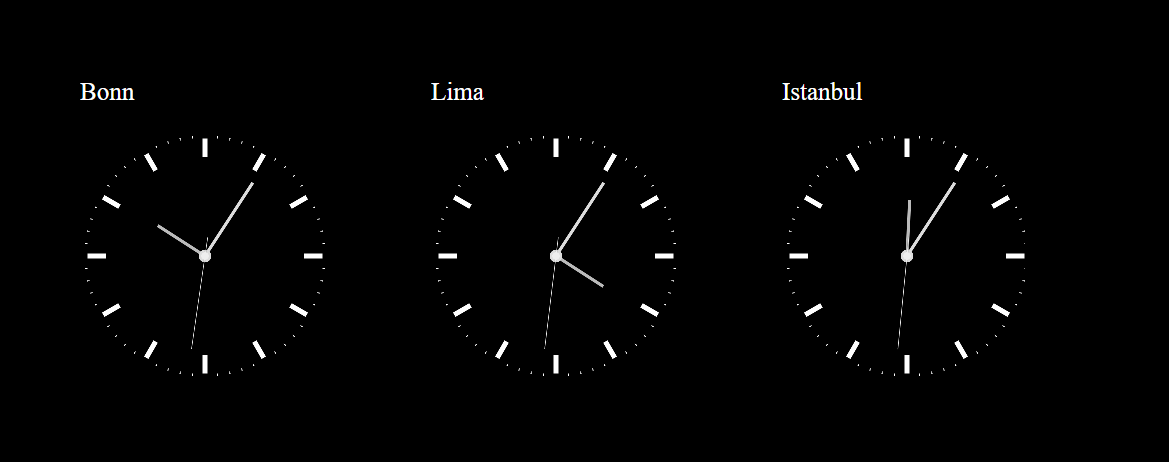
Generate a clock, copy the html-code and create a html-file (for example uhrzeit.html) at the module-folder.
Example with 3 clocks:<html lang="de"> <head> <title>Uhrzeit</title> </head> <body bgcolor=#000000> <font color=white> <table> <tr> <td style="padding: 100px;"> <p style="font-size: 50px; color: white;">Bonn</p> <iframe src="https://free.timeanddate.com/clock/i8olx9pj/n83/szw500/szh500/hbw0/hfc000/cf100/hgr0/fav0/fiv0/mqcfff/mql15/mqw4/mqd94/mhcfff/mhl15/mhw4/mhd94/mmcfff/mms4/mml2/mmw1/hwm2/hhcbbb/hmcddd/hsceee" frameborder="0" width="500" height="500"></iframe> </td> <td style="padding: 100px;"> <p style="font-size: 50px; color: white;">Lima</p> <iframe src="https://free.timeanddate.com/clock/i8olx9pj/n131/szw500/szh500/hbw0/hfc000/cf100/hgr0/fav0/fiv0/mqcfff/mql15/mqw4/mqd94/mhcfff/mhl15/mhw4/mhd94/mmcfff/mms4/mml2/mmw1/hwm2/hhcbbb/hmcddd/hsceee" frameborder="0" width="500" height="500"></iframe> </td> <td style="padding: 100px;"> <p style="font-size: 50px; color: white;">Istanbul</p> <iframe src="https://free.timeanddate.com/clock/i8olx9pj/n107/szw500/szh500/hbw0/hfc000/cf100/hgr0/fav0/fiv0/mqcfff/mql15/mqw4/mqd94/mhcfff/mhl15/mhw4/mhd94/mmcfff/mms4/mml2/mmw1/hwm2/hhcbbb/hmcddd/hsceee" frameborder="0" width="500" height="500"></iframe> </td> </tr> </table> </body> </html>Replace the part beginning with “iframe” with your code and of course the names of the cities.
In the config.js, use MMM-SmartWebDisplay to display the clocks, write as url: [“/modules/uhrzeit.html”].
May be, this can satisfy your needs. -
@aldisachen I use MMM-Worldclock to display clocks for other time zones / parts of the world. That module is available on the 3rd party modules page.
-
Hello together and thanks for the code / html.
But i don´t understadn the things. I´m not a developer. This looks very hard for me.
But I will try to do this … can take lot of time for me. ;-) -
@aldisachen I would try the worldclock module approach mentioned by @earnestrichards
use it instead of the default clockmmodule


Hello! It looks like you're interested in this conversation, but you don't have an account yet.
Getting fed up of having to scroll through the same posts each visit? When you register for an account, you'll always come back to exactly where you were before, and choose to be notified of new replies (either via email, or push notification). You'll also be able to save bookmarks and upvote posts to show your appreciation to other community members.
With your input, this post could be even better 💗
Register Login