Read the statement by Michael Teeuw here.
MMM-CalendarExt3 month header and current date format
-
I am new to MM and I am trying to get things styled the way I want. I am trying to make some changes using custom.css but there are a couple options I cannot seem to track down. I want to change the month name title on month view. Here is what I have right now, however it does not seem to be working.
for the month title in custom.css
.CX3 .title {
color: rgba(255,255,255,1);
font-family: “Verdana”, “sans-serif”;
font-size: 20px;
}I also want to change the way the current day displays the date. I want it to display the same format as the rest of the dates in month view. ie: April 1st is displayed as 4/1/2023. The rest of the days display just 2, 3 ,4, etc.
Can anyone help with this?
-
@jdcpuwiz
Or what you want to display is just numeric day only,
just set configuration like this;cellDateOptions: {day: 'numeric'}, -
@jdcpuwiz
1.
You mean this? (ABRILin the picture)
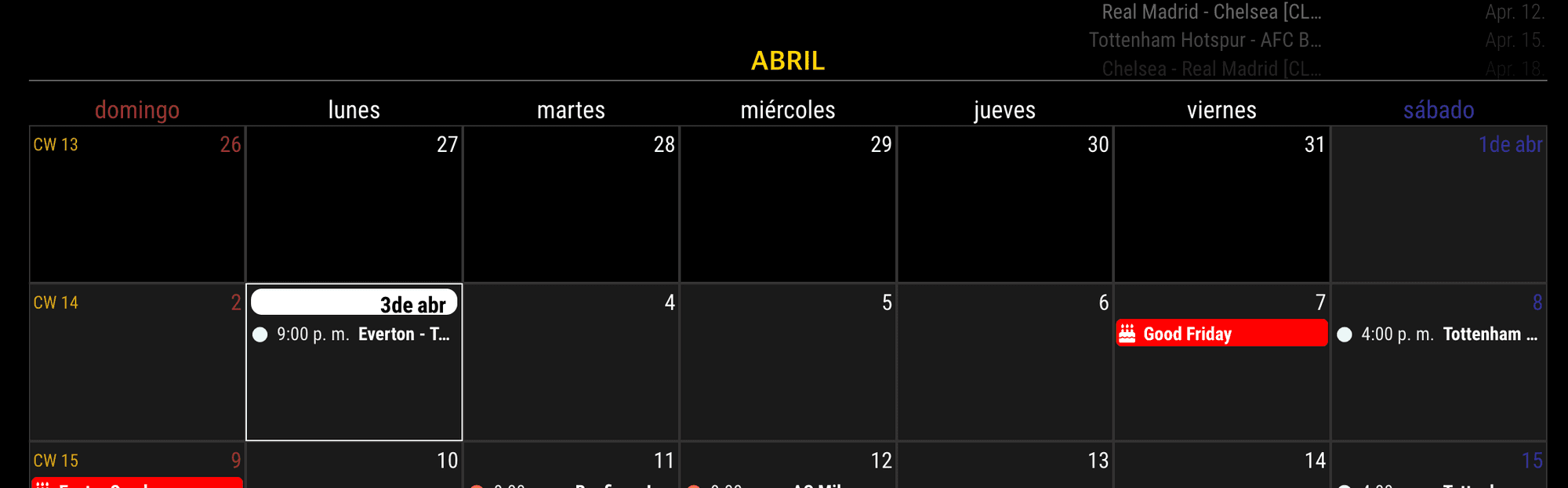
.MMM-CalendarExt3 .module-header { color: gold; font-family: "Verdana", "sans-serif"; font-size: 20px; font-weight: bold; }- For your second question;
What you want is to show same? or different?
Each.cellDatehaspartsto control displaying.
For example;
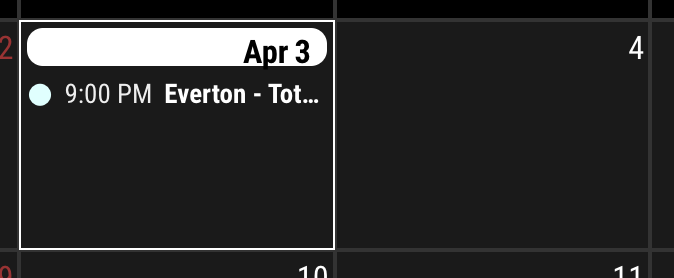
These two days (Apr 3and4) have same HTML structure like this;
<div class="cellDate">
  <span class="dateParts month seq_0">Apr</span>
  <span class="dateParts literal seq_1"> </span>
  <span class="dateParts day seq_2">4</span>
</div>
And then, they are controlled by CSS.
.CX3 .cellDate :not(.day) {
  display: none;
} /* Hide all parts not `.day`... (i.e: `month` or `year` or any `literal` marks)*/

.CX3 .today .cellDate :not(.day) {
  display: inline-block;
} /* But in `.today` cell, show all the parts. */

.CX3 .date_1 .cellDate :not(.day) {
  display: inline-block;
} /* and in `.date_1` (first day) of the month */
So you can override CSS as you want in your
custom.css - For your second question;
-
@jdcpuwiz
Or what you want to display is just numeric day only,
just set configuration like this;cellDateOptions: {day: 'numeric'}, -
@MMRIZE Thanks for the help, I am going to give this a try and get back to you.
-
@MMRIZE That worked perfectly. Thank you so much!
-
@MMRIZE said in MMM-CalendarExt3 month header and current date format:
cellDateOptions: {day: ‘numeric’},
This works great! Is there any way I can keep this bit:
.CX3 .date_1 .cellDate :not(.day) {
display: inline-block;
} /* and in.date_1(first day) of the month */But not show the same information in today?
Or, is there a way to put a red circle around the numeric bit of the date?
-
@reverendz
@MMRIZE
Following I would like to Circle the current date also.
Would make it easier to find todays date for me I tend to loose track of date. -
@plainbroke @reverendz
Instead of.date_xx, use.todayto point today’s cell.And about the circle; https://forum.magicmirror.builders/topic/18324/mmm-calendarext3-show-color/11?_=1736098133616

Hello! It looks like you're interested in this conversation, but you don't have an account yet.
Getting fed up of having to scroll through the same posts each visit? When you register for an account, you'll always come back to exactly where you were before, and choose to be notified of new replies (either via email, or push notification). You'll also be able to save bookmarks and upvote posts to show your appreciation to other community members.
With your input, this post could be even better 💗
Register Login