Read the statement by Michael Teeuw here.
MMM-MonthlyCalendar not showing all events
-
This sort of thing isn’t my strong suit so please be patient! Any help would be greatly appreciated!!!
MonthlyCalendar isn’t showing events more than 5-6 days in advance, and no past events. I created this MM with a RaspPi 3b+ less than 3 months ago.
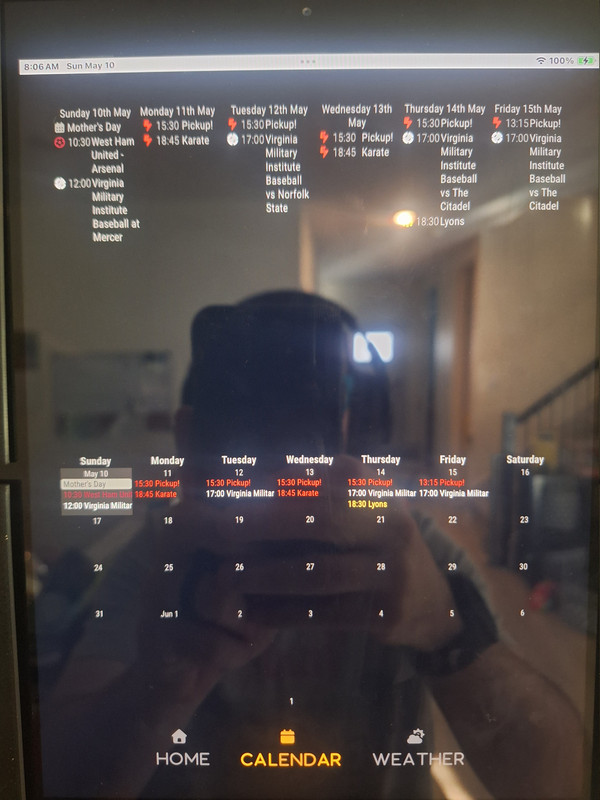
{ module: "MMM-MonthlyCalendar", position: "lower_third", config: { mode: "fourWeeks", maximumNumberOfDays: 365, wrapEvents: true, fetchInterval: 900000, maximumEntries: '10000', broadcastPastEvents: true, coloredText: true, coloredBorder: false, coloredBackground: false, calendars: [ { url: 'https://calendar.google.com/calendar/ical/be2031826a7855c5e317a2ea6ae3ade05aed2e9bd58f7d5cd3849d56215c6be6%40group.calendar.google.com/public/basic.ics', color: '#ffa500' }, { url: 'https://calendar.google.com/calendar/ical/47b238f74068084be290b71f9e9e05746149408c3b0473c712a06ea00b686643%40group.calendar.google.com/public/basic.ics', color: '#cf1e26' }, { url: 'https://calendar.google.com/calendar/ical/9sqcibn7flt9tup1ebb4378a1k%40group.calendar.google.com/public/basic.ics', color: '#7a263a' }, { url: 'https://calendar.google.com/calendar/ical/up10glq48b1ufoni5hgm47sc04%40group.calendar.google.com/public/basic.ics', color: '#132257' }, { url: 'https://calendar.google.com/calendar/ical/up10glq48b1ufoni5hgm47sc04%40group.calendar.google.com/public/basic.ics', color: '#034694' }, { url: redacted color: '#c33332' }, { url: redacted color: '#8a00c2' }, { url: redacted color: '#3b8132' }, { url: redacted color: '#CC5500' }, { url: redacted color: '#fee12b' }, { url: redacted color: '#818380' }, { url: 'https://calendar.google.com/calendar/ical/v3134htvj13o064cjb7tb6m59q9a9ls1%40import.calendar.google.com/public/basic.ics', color: '#ffffff' }, { url: 'http://ics.sync2cal.com/categories/get_ics/8205354e-0333-4e82-a1e3-c64595e2b6ac.ics', color: '#e6ff00' }, ], } }, { module: "MMM-CalendarWeek", position: "top_bar", // This can be any of the regions. Best results in bottom region. config: { maximumNumberOfDays: 6, maximumEntries: 200, allowDuplicate: false, wrapEvents: true, colored: true, coloredSymbolOnly: true, calendars: [ { url: 'https://calendar.google.com/calendar/ical/be2031826a7855c5e317a2ea6ae3ade05aed2e9bd58f7d5cd3849d56215c6be6%40group.calendar.google.com/public/basic.ics', symbol: 'fa-light fa-futbol', color: '#ffa500', }, { url: 'https://calendar.google.com/calendar/ical/47b238f74068084be290b71f9e9e05746149408c3b0473c712a06ea00b686643%40group.calendar.google.com/public/basic.ics', symbol: 'fa-light fa-futbol', color: '#cf1e26' }, { url: 'https://calendar.google.com/calendar/ical/9sqcibn7flt9tup1ebb4378a1k%40group.calendar.google.com/public/basic.ics', symbol: 'fa-ight fa-futbol', color: '#7a263a' }, { url: 'https://calendar.google.com/calendar/ical/up10glq48b1ufoni5hgm47sc04%40group.calendar.google.com/public/basic.ics', symbol: 'fa-light fa-futbol', color: '#132257' }, { url: 'https://calendar.google.com/calendar/ical/up10glq48b1ufoni5hgm47sc04%40group.calendar.google.com/public/basic.ics', symbol: 'fa-light fa-futbol', color: '#034694' }, { url: redacted symbol: 'fa-solid fa-bolt-lightning', color: '#c33332' }, { url: redacted symbol: 'fa-solid fa-cat', color: '#8a00c2' }, { url: redacted symbol: 'fa-solid fa-frog', color: '#3b8132' }, { url: redacted symbol: 'fa-solid fa-jedi', color: '#CC5500' }, { url: redacted symbol: 'fa-solid fa-people-group', color: '#fee12b' }, { url: redacted symbol: 'fa-light fa-calendar', color: '#818380' }, { url: 'https://calendar.google.com/calendar/ical/v3134htvj13o064cjb7tb6m59q9a9ls1%40import.calendar.google.com/public/basic.ics', symbol: 'fa-light fa-baseball', color: '#ffffff' }, { url: 'http://ics.sync2cal.com/categories/get_ics/8205354e-0333-4e82-a1e3-c64595e2b6ac.ics', symbol: 'fa-solid fa-trophy', color: '#e6ff00' }, ], -
maximumEntries: ‘10000’,
numbers in quotes are strings, and most modules don’t check , so it ends up as a weird value…
same for true/false
‘false’ is true
‘true’ is truetake off the quotes… and 10,000 is a WAY big number for future events in a year
… maximumNumberOfDays: 365 -
@Drunkenkun also, this module provides only THESE parms
    mode: "currentMonth",
    firstDayOfWeek: "sunday",
    showWeekNumber: false,
    displaySymbol: false,
    wrapTitles: false,
    hideCalendars: [],
    luminanceThreshold: 110,
    multiDayEndingTimeSeparator: " until ",
    hideDuplicateEvents: true
and it processes the events from the default calendar module
module:"calendar"that is where all the number of events, calendar list, urls, etc… config goes.
see the module doc with link to default
You will likely also want to set "broadcastPastEvents": true in your calendar module configuration so past events are still displayed. -
@Drunkenkun also, this module provides only THESE parms
    mode: "currentMonth",
    firstDayOfWeek: "sunday",
    showWeekNumber: false,
    displaySymbol: false,
    wrapTitles: false,
    hideCalendars: [],
    luminanceThreshold: 110,
    multiDayEndingTimeSeparator: " until ",
    hideDuplicateEvents: true
and it processes the events from the default calendar module
module:"calendar"that is where all the number of events, calendar list, urls, etc… config goes.
see the module doc with link to default
You will likely also want to set "broadcastPastEvents": true in your calendar module configuration so past events are still displayed.Ok, understand the quotes issue andremoved maximumEntries from where it was.
Since I’m using MMM-pages, if I add the default calendar config but not to a page, would that suffice? If so, do I need to add each of the calendars to MMM-MontlyCalendar and MMM-WeeklyCalendar, or will they populate from the default?
-
@Drunkenkun if you remove the position: from the default calendar module it will still work in the background to read and send the events
-
@Drunkenkun if you remove the position: from the default calendar module it will still work in the background to read and send the events
TY TY TY!!!It seems to be working! Added coding for defualt module but did not add it to a page. The MMM-MonthlyCalendar is now fully populated!
Only issue is I had to keep the calendars under the MMM-CalendarWeek config or they wouldn’t show.
-
@Drunkenkun yes, calendarweek does need the config, it fetches the events itself too
-
D Drunkenkun has marked this topic as solved on
Hello! It looks like you're interested in this conversation, but you don't have an account yet.
Getting fed up of having to scroll through the same posts each visit? When you register for an account, you'll always come back to exactly where you were before, and choose to be notified of new replies (either via email, or push notification). You'll also be able to save bookmarks and upvote posts to show your appreciation to other community members.
With your input, this post could be even better 💗
Register Login