Read the statement by Michael Teeuw here.
MMM-iHaveBeenThere : how to adjust zoom
-
Hi,
the default setting of the module does only show europe and a little more.
Well, we traveled from Cuba to Bali and need to see the whole world.
I tried different zoom level, but I don´t get it.Does anyone know how to set these settings to see the world in total?
zoomLevel:
zoomLongitude:
zoomLatitude:Thanks a lot.
-
I tried it again and found my mistake.
The default zoomLevel is 4.5.
I testet small adjustment steps and then jumped to 0.
However 0 is not zero zoom. I am not sure what it is.
But it seems like I skipped the 1 which is no zoom.With zoomLevel 1 it was easy to adjust the zoomLongitude and zoomLatitude.
-
Hi
i have the same problem like @MrCoffee.
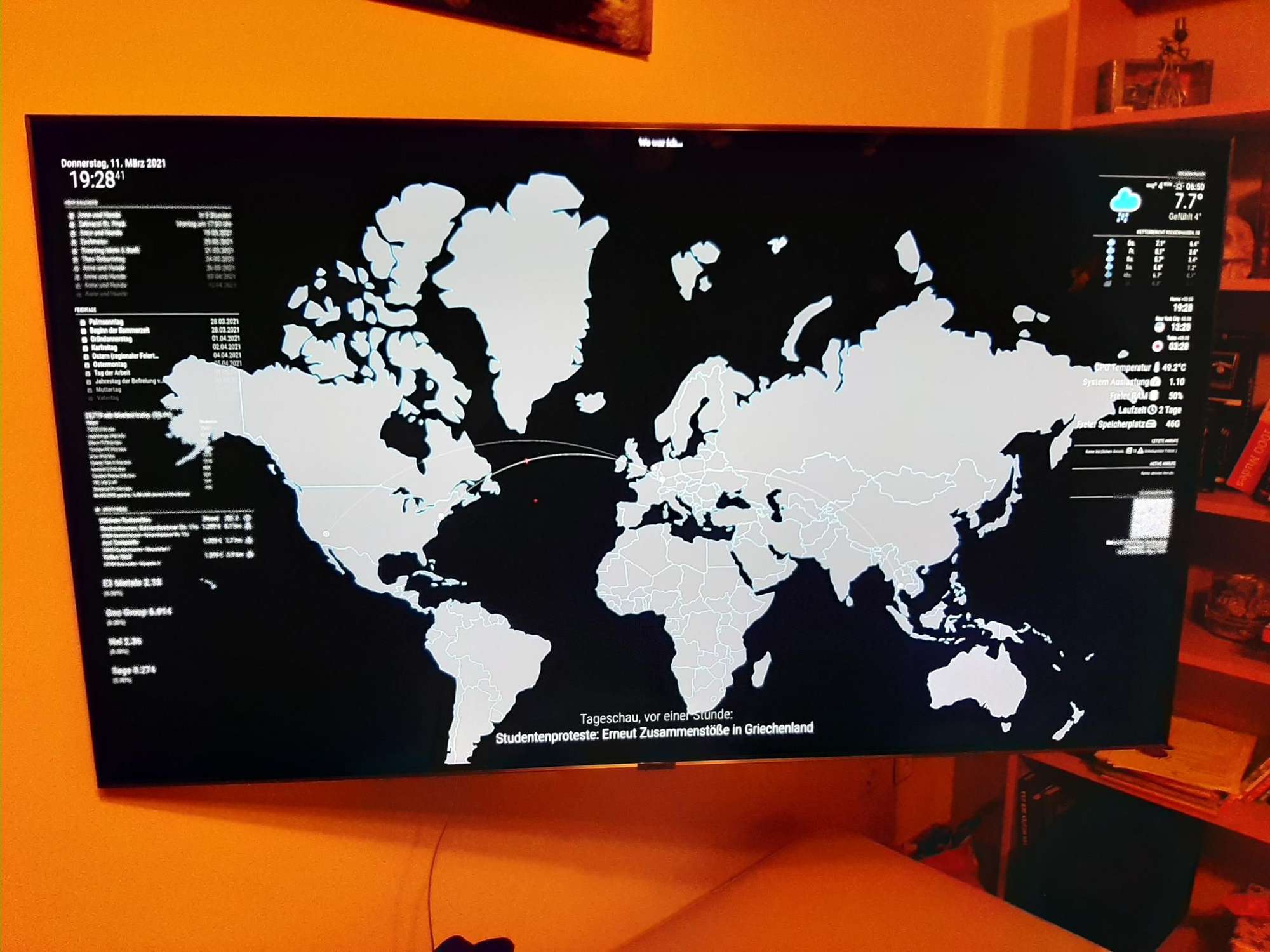
I want do display the whole Map, but i can not figure out how it works:
zoomLevel: “0.8”,
zoomLongitude: “50”,
zoomLatitude: “50”,are the best seetings i figure out.
In the MMMihavebeenthere.js under:
wrapper.style.width = “3840px”;
wrapper.style.height = “2160px”;i set the resoultion of the TV to 4k so the Map fit*s the screen
But it fit’s not 100% right.
I play around more the 1 hour withe the settings in the config.js
and can not finde better seetings.Have anyone a idea to fix this and become a 100% view?
Greetings Foxy
Hello! It looks like you're interested in this conversation, but you don't have an account yet.
Getting fed up of having to scroll through the same posts each visit? When you register for an account, you'll always come back to exactly where you were before, and choose to be notified of new replies (either via email, or push notification). You'll also be able to save bookmarks and upvote posts to show your appreciation to other community members.
With your input, this post could be even better 💗
Register Login