MagicMirror Forum
    • Recent
    • Tags
    • Unsolved
    • Solved
    • MagicMirror² Repository
    • Documentation
    • 3rd-Party-Modules
    • Donate
    • Discord
    • Register
    • Login
    A New Chapter for MagicMirror: The Community Takes the Lead
    Read the statement by Michael Teeuw here.

    MMM-CalendarExt

    Scheduled Pinned Locked Moved Productivity
    198 Posts 45 Posters 232.8k Views 45 Watching
    Loading More Posts
    • Oldest to Newest
    • Newest to Oldest
    • Most Votes
    Reply
    • Reply as topic
    Log in to reply
    This topic has been deleted. Only users with topic management privileges can see it.
    • T Offline
      Tabbe @Guest
      last edited by

      @sean said in MMM-CalendarExt:

      @tabbe
      https://github.com/eouia/MMM-CalendarExt/wiki/Configuration#defaultview

      Use dateFormat

      I did try with that but still it remains unchanged.

              current: {
                              title: "Test",
                              dateFormat: "dddd",
                              titleFormat: "dddd",
                              overTitleFormat : "dddd",
                              position: 'top_left',
                              useRelative: 0,
                              limit:2
                },
      

      I also tried without other formating and with basic M.D format.

      alt text

      ? 1 Reply Last reply Reply Quote 0
      • ? Offline
        A Former User @Tabbe
        last edited by

        @tabbe ‘dddd’ means the weekday name of target date/time. What exactly do you want to display as?

        T 1 Reply Last reply Reply Quote 0
        • T Offline
          Tabbe @Guest
          last edited by

          @sean
          I want to display weekday name, like saturday.

          ? 2 Replies Last reply Reply Quote 0
          • ? Offline
            A Former User @Tabbe
            last edited by A Former User

            @tabbe
            I think you’ve missed useRelative field in your config. the default value of useRelative of current & upcoming is 1 or true.
            Set it as 0.

            upcoming: {
                        position: "top_left",
                        dateFormat: "dddd",
                        timeFormat: "HH:mm",
                        limit: 5,
                        useRelative: 0
                      }
            

            If you want to display only “Saturday” without time, unfortunately it is not supported. (Do you need? e.g. only starting time?)

            1 Reply Last reply Reply Quote 0
            • ? Offline
              A Former User @Tabbe
              last edited by A Former User

              @tabbe
              Now, I’ve updated module to display only starting time.
              You can set like this;

              upcoming: {
                          position: "top_left",
                          dateFormat: "dddd",
                          timeFormat: " ", // don't use `""` instead `" "`
                          limit: 5,
                          useRelative: 0,
                          onlyStartingTime: 1,
                        }
              

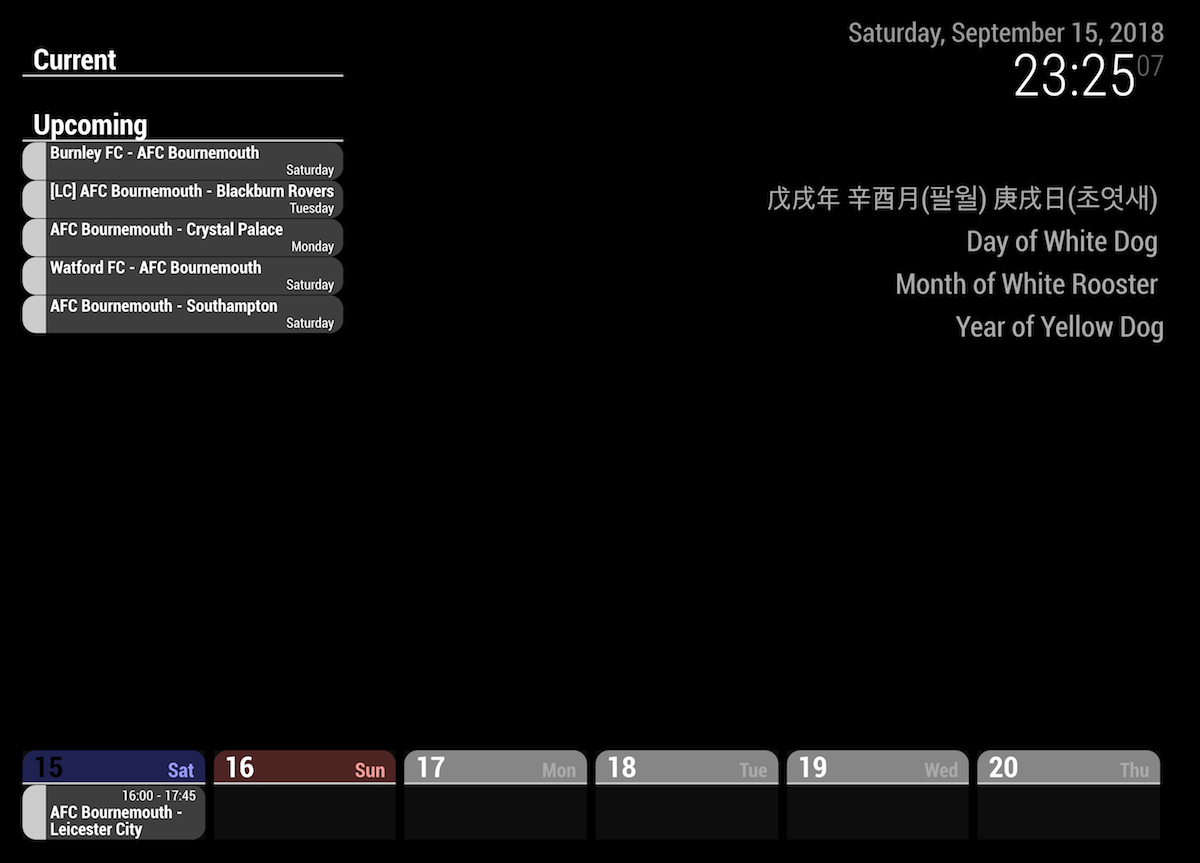
              And you can see like this.
              0_1537047297481_test.png

              T 1 Reply Last reply Reply Quote 0
              • T Offline
                Tabbe @Guest
                last edited by

                @sean
                This is weird. I did update module and still not getting like that.

                :~/MagicMirror/modules/MMM-CalendarExt$ git pull
                Already up-to-date.
                

                Also, I would like it to be on current since it shows current date event. What I am trying to show is birthdays and suchs.

                ? 1 Reply Last reply Reply Quote 0
                • ? Offline
                  A Former User @Tabbe
                  last edited by A Former User

                  @tabbe
                  Hmmm. weird,
                  As you can see on github page, 40mins ago I updated the module.
                  And you can use that config in current view also.(above is just sample)

                  T 1 Reply Last reply Reply Quote 0
                  • T Offline
                    Tabbe @Guest
                    last edited by

                    @sean
                    Ah, somehow it is now working. Thanks!

                    1 Reply Last reply Reply Quote 0
                    • S Offline
                      SK4018
                      last edited by

                      Hi all,
                      I love the ‘daily’ view (as seen in the post just above), as it presents both events for 7 days and times. However, I want them it to stay at a “Monday to Sunday” order. Is this possible with the daily view? Thanks

                      ? 1 Reply Last reply Reply Quote 0
                      • ? Offline
                        A Former User @SK4018
                        last edited by

                        @sk4018
                        I think you can use weeks view instead daily view. But starting weekday depends on which locale are you using.

                        1 Reply Last reply Reply Quote 0
                        • V Offline
                          Vauxdvihl @Guest
                          last edited by

                          @sean
                          Thx a lot
                          It works
                          Greetz

                          1 Reply Last reply Reply Quote 0
                          • R Offline
                            redink
                            last edited by

                            I just updated this module, and it stopped working. I even tried resting to the simple config from the readme, and nothing is coming up. Where can I see the logs for it to try and fix this?

                            ? 1 Reply Last reply Reply Quote 0
                            • ? Offline
                              A Former User @redink
                              last edited by

                              @redink
                              stop pm2 mm then npm start dev in your MM directory root.

                              1 Reply Last reply Reply Quote 0
                              • V Offline
                                Vauxdvihl
                                last edited by

                                @Sean
                                Sorry to ask again
                                Is there any possibility to increase a little bit the size of the letters?
                                I mean the ones showing in the calendar as a “task”?
                                thanks

                                ? 1 Reply Last reply Reply Quote 0
                                • ? Offline
                                  A Former User @Vauxdvihl
                                  last edited by

                                  @vauxdvihl
                                  You can adjust anything in CSS. (It could not be so easy but really funny)
                                  Or tell me which letters to be increased.

                                  1 Reply Last reply Reply Quote 0
                                  • V Offline
                                    Vauxdvihl
                                    last edited by

                                    @Sean
                                    I want to play around with the following values
                                    0_1539330722276_eb6e542c-3052-403d-8076-f2574fa8f059-grafik.png

                                    Increase / Decrease “FINAL: SEA7 - OAK 6”
                                    Increase / Decrease “Time (04:05-07:05)”

                                    I am not a programmer :-)

                                    Thanks a lot

                                    ? 1 Reply Last reply Reply Quote 0
                                    • ? Offline
                                      A Former User @Vauxdvihl
                                      last edited by A Former User

                                      @vauxdvihl
                                      Add this into your MagicMirror/css/custom.css file.

                                      .CALEXT .eventTime {
                                        font-size: 120%;
                                        line-height:110%;
                                      }
                                      
                                      .CALEXT .eventContent {
                                        font-size: 140%;
                                        line-height:110%;
                                      }
                                      

                                      You can adjust these values with relative % or absolute px (Or many other various things)

                                      https://www.w3schools.com/cssref/pr_font_font-size.asp

                                      1 Reply Last reply Reply Quote 0
                                      • V Offline
                                        Vauxdvihl
                                        last edited by

                                        @Sean
                                        Thanks a lot
                                        In custom css file a have the following:

                                        div.CALEXT  .event .symbol {
                                            order:1;
                                            display:block;
                                            flex-basis: 30px; // Modify this 
                                            text-align:center;
                                            min-width: 50px; // Modify this
                                            font-size: 150%; // Add this
                                        							}			
                                        					
                                        							
                                        div.CALEXT .events .symbol.emoji {
                                            font-size: 150%; //Adjust this as your wish. you can use px or %
                                        								}
                                        								
                                        div.CALEXT .events .symbol.font-awesome {
                                            font-size: 250%; //Adjust this as your wish. you can use px or %
                                        										}
                                        div.CALEXT .tableStyle .eventTime {
                                            display:block;	
                                        									}		
                                        .CALEXT .eventTime {
                                          font-size: 80%;
                                          line-height:110%;
                                        					}
                                        
                                        .CALEXT .eventContent {
                                          font-size: 250%;
                                          line-height:110%;
                                        					}	
                                        

                                        The adjustment of time works fine.
                                        But not of the initial content.

                                        Sorry
                                        But can you please help again

                                        Thanks a lot

                                        ? 1 Reply Last reply Reply Quote 0
                                        • ? Offline
                                          A Former User @Vauxdvihl
                                          last edited by A Former User

                                          @vauxdvihl
                                          Because your other CSS rules might override that rule. (Simpler rule name might have lower priority). See this. https://developer.mozilla.org/en-US/docs/Web/CSS/Specificity

                                          Anyway, you can use like this;

                                           div.CALEXT div.slot div.eventsBoard div.eventContainer div.eventContent {
                                             font-size: 250%;
                                             line-height:110%;
                                           }
                                          

                                          (For more exact rule specificity, I should know whole CSS of your MM, but I believe above code enough)

                                          1 Reply Last reply Reply Quote 0
                                          • Y Offline
                                            yoey2112
                                            last edited by

                                            Hello @Sean ,
                                            Been playing around with this module for a day now (not very savvy with javascript) and I cannot figure out how to increase the size of my Calendar. I’m using weeks (4 count) and position bottom_bar, but I would like it to take up about a third of the bottom (vertical monitor). I know this must be a change in CSS, but I dont know what to do. Any help would be great!
                                            -Yoey

                                            ? 1 Reply Last reply Reply Quote 0

                                            Hello! It looks like you're interested in this conversation, but you don't have an account yet.

                                            Getting fed up of having to scroll through the same posts each visit? When you register for an account, you'll always come back to exactly where you were before, and choose to be notified of new replies (either via email, or push notification). You'll also be able to save bookmarks and upvote posts to show your appreciation to other community members.

                                            With your input, this post could be even better 💗

                                            Register Login

                                            • 1
                                            • 2
                                            • 3
                                            • 4
                                            • 5
                                            • 6
                                            • 7
                                            • 8
                                            • 9
                                            • 10
                                            • 5 / 10
                                            • First post
                                              Last post
                                            Enjoying MagicMirror? Please consider a donation!
                                            MagicMirror created by Michael Teeuw.
                                            Forum managed by Sam, technical setup by Karsten.
                                            This forum is using NodeBB as its core | Contributors
                                            Contact | Privacy Policy