Read the statement by Michael Teeuw here.
Region/module positioning on Servermode (on docker, Synology) and client (web-browser)
-
Hi MagicMirror Builders!
I’ve got stuck with the positioning of modules/regions. My setup:
MagicMirror2 running in servermode in a docker container on a Synology.
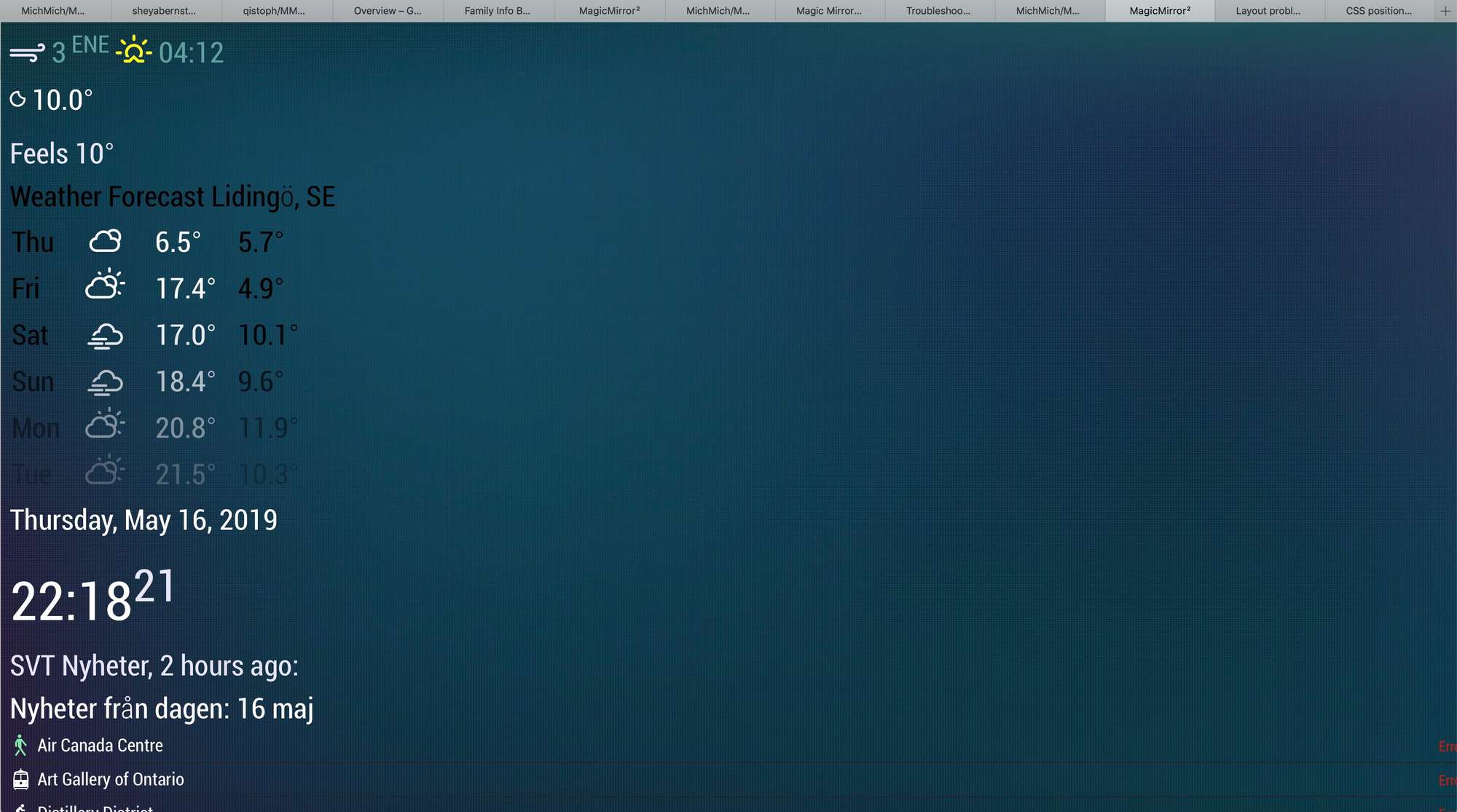
The client would be a tablet (untill I fix a monitor and a PI), I am planning to show the info board in a browser.Setup is finished, I am able to install/config modules, apply css. The problem is that when I open the ip of the mirror in a browser, the alignment of the regions is not ok. It seems like the _left and _right regions are just on top each other. I tried to modify the “body” in the custom.css, it works (the modules become wider), but the alignment is the same, I can not place the top_left and top_right regions nex to each other.
I have no experience in css or js, but tried to find a solution on the forum, without luck. Can you please point me in the right direction? How could I set the window size for the MM?
My modules config:
modules: [

		{
			module: "clock",
			position: "top_right"
		},

		{
			module: "currentweather",
			position: "top_left",
			config: {
				location: "Lidingö",
				locationID: "",  //ID from http://bulk.openweathermap.org/sample/; unzip the gz file and find your city
				appid: ""
			}
		},
		{
			module: "weatherforecast",
			position: "top_left",
			header: "Weather Forecast",
			config: {
				location: "Lidingö",
				locationID: "",  //ID from https://openweathermap.org/city
				appid: ""
			}
		},
		{
Thanks in advance!
Balint -
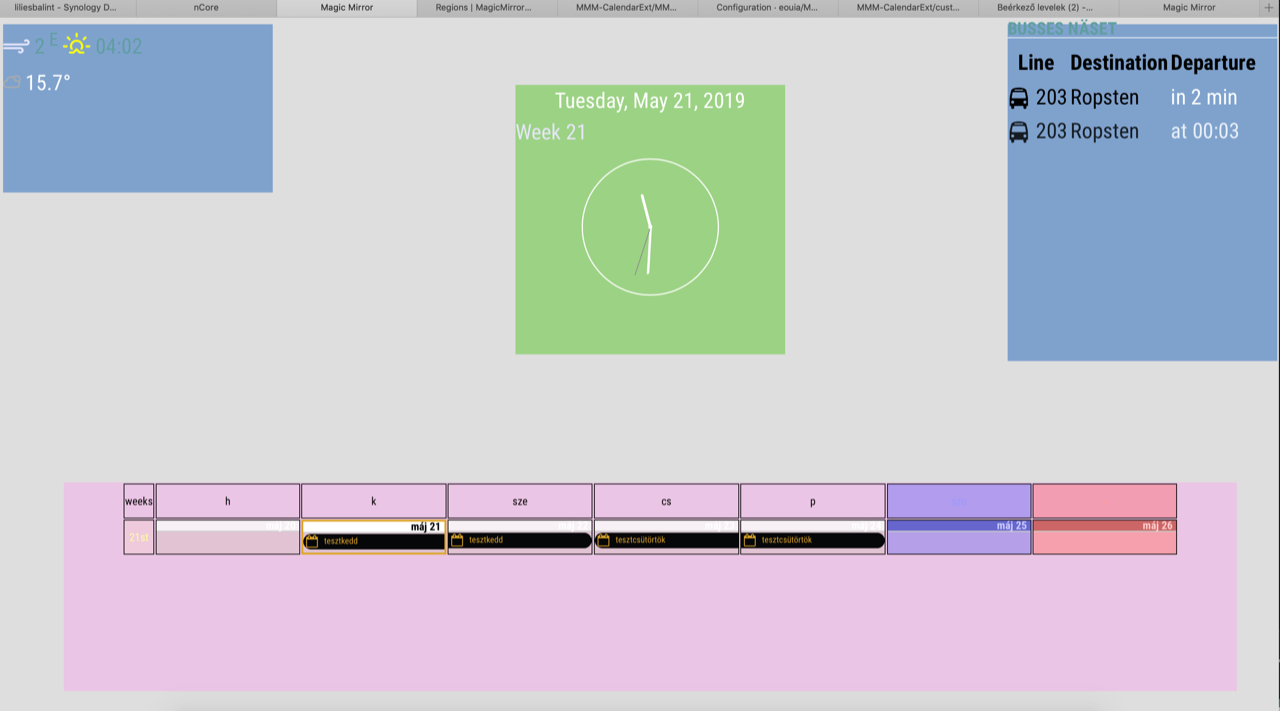
A short update: I was able to move the modules manually using css. It seems to work but it’s not an elegant solution. Any ideas/suggestions how to do it right?
tml {
	height: 1080px;
	width: 1920px;
}

header {
	text-transform: uppercase;
	font-size: 26px;
	font-family: "Roboto Condensed";
	font-weight: 600;
	border-bottom: 1px solid white;
	line-height: 15px;
	padding-bottom: 5px;
	margin-bottom: 10px;
	color: cadetblue;
}

body {
	margin: 10px;
	position: absolute;
	height: 1080;
	width: 1920px;
	background-color: rgba(214, 214, 214, 0.8);
	background-repeat: no-repeat;
	/*background-size: 1920;*/
	font-family: "Roboto Condensed", sans-serif;
	font-weight: 400;
	font-size: 2em;
	line-height: 1.5em;
	-webkit-font-smoothing: antialiased;
}

.region.top.left .container .module.currentweather {
width: 400px;
height: 250px;
position: absolute;
left: 90px;
top: 90px;
background-color: rgba(20, 102, 186, 0.5); /*kek*/
}


.module.clock {
width: 400px;
height: 400px;
position: absolute;
left: 760px;
top: 90px;
background-color: rgba(80, 196, 0, 0.5); /*zold*/
}

.region.top.right .container .module.MMM-SL-PublicTransport {
width: 400px;
height: 500px;
position: absolute;
left: 1490px;
top: -00px;
background-color: rgba(20, 102, 186, 0.5);
}

.region.bottom.bar .container {
width: 1740px;
height: 310px;
position: absolute;
left: 90px;
top: 680px;
background-color: rgba(247, 173, 236, 0.5); /*magente*/
}
Hello! It looks like you're interested in this conversation, but you don't have an account yet.
Getting fed up of having to scroll through the same posts each visit? When you register for an account, you'll always come back to exactly where you were before, and choose to be notified of new replies (either via email, or push notification). You'll also be able to save bookmarks and upvote posts to show your appreciation to other community members.
With your input, this post could be even better 💗
Register Login