MagicMirror Forum
    • Recent
    • Tags
    • Unsolved
    • Solved
    • MagicMirror² Repository
    • Documentation
    • 3rd-Party-Modules
    • Donate
    • Discord
    • Register
    • Login
    A New Chapter for MagicMirror: The Community Takes the Lead
    Read the statement by Michael Teeuw here.

    How to call my cloud base magic mirror from raspberry pi 4

    Scheduled Pinned Locked Moved Troubleshooting
    7 Posts 2 Posters 1.6k Views 2 Watching
    Loading More Posts
    • Oldest to Newest
    • Newest to Oldest
    • Most Votes
    Reply
    • Reply as topic
    Log in to reply
    This topic has been deleted. Only users with topic management privileges can see it.
    • E Offline
      emrah_asl
      last edited by

      Hi Guys, Finally I have created my alpha version of magic mirror and ready for run.

      I uploaded all my files into my private server (like amazon) and I have web link to run this.

      For Instances my magic mirror link will be: https://emrahaslan.magicmirror.com

      I don’t want to put my code on raspbbery sd disk, the only thing I want to call this link Inside electron.js web view via raspberry side, But It should run original magic mirror software (autorun when restart vs)

      do I need install magic mirror again for client side ? thanks for help for assisting me step by step.

      S 1 Reply Last reply Reply Quote 0
      • S Offline
        sdetweil @emrah_asl
        last edited by

        @emrah_asl just open chromium browser to your server.

        see the last few lines of the script I built for pi0 which needs to use chromium. see
        https://raw.githubusercontent.com/sdetweil/MagicMirror_scripts/master/run-start.sh

        line 76

        Sam

        How to add modules

        learning how to use browser developers window for css changes

        1 Reply Last reply Reply Quote 0
        • E Offline
          emrah_asl
          last edited by

          I see the file but I’m not familiar to use it. Coudl you please help me ?

          I did these steps :

          I am trying to do a client only build on a Pi. I want to request the basic instructions please.

          Does this sound right my steps.

          1 - Install Raspbian from web site and write in sd disk
          2 - open raspberry
          3- open terminal
          git clone https://github.com/MichMich/MagicMirror

          4- cd ~/MagicMirror

          npm install

          5- (NOT NPM START)

          node clientonly --address https://emrahaslan.magicmirror.com --port 8080

          It’s works but,

          Will this do anything to prevent screensaver or powersaver mode etc?

          when restart rpi , default local magic mirror is starting :(

          S 1 Reply Last reply Reply Quote 0
          • S Offline
            sdetweil @emrah_asl
            last edited by

            @emrah_asl again, u don’t need all that

            one bash file with the one command, line 76 of my script,
            started by pm2 on boot

            pm2 start your_scriptname
            pm2 save

            and use the screensaver script from my site to turn off screen saver

            https://github.com/sdetweil/MagicMirror_scripts

            Sam

            How to add modules

            learning how to use browser developers window for css changes

            1 Reply Last reply Reply Quote 0
            • E Offline
              emrah_asl
              last edited by emrah_asl

              Hi Again,

              1- I uninstalled magic mirror from my spi4.

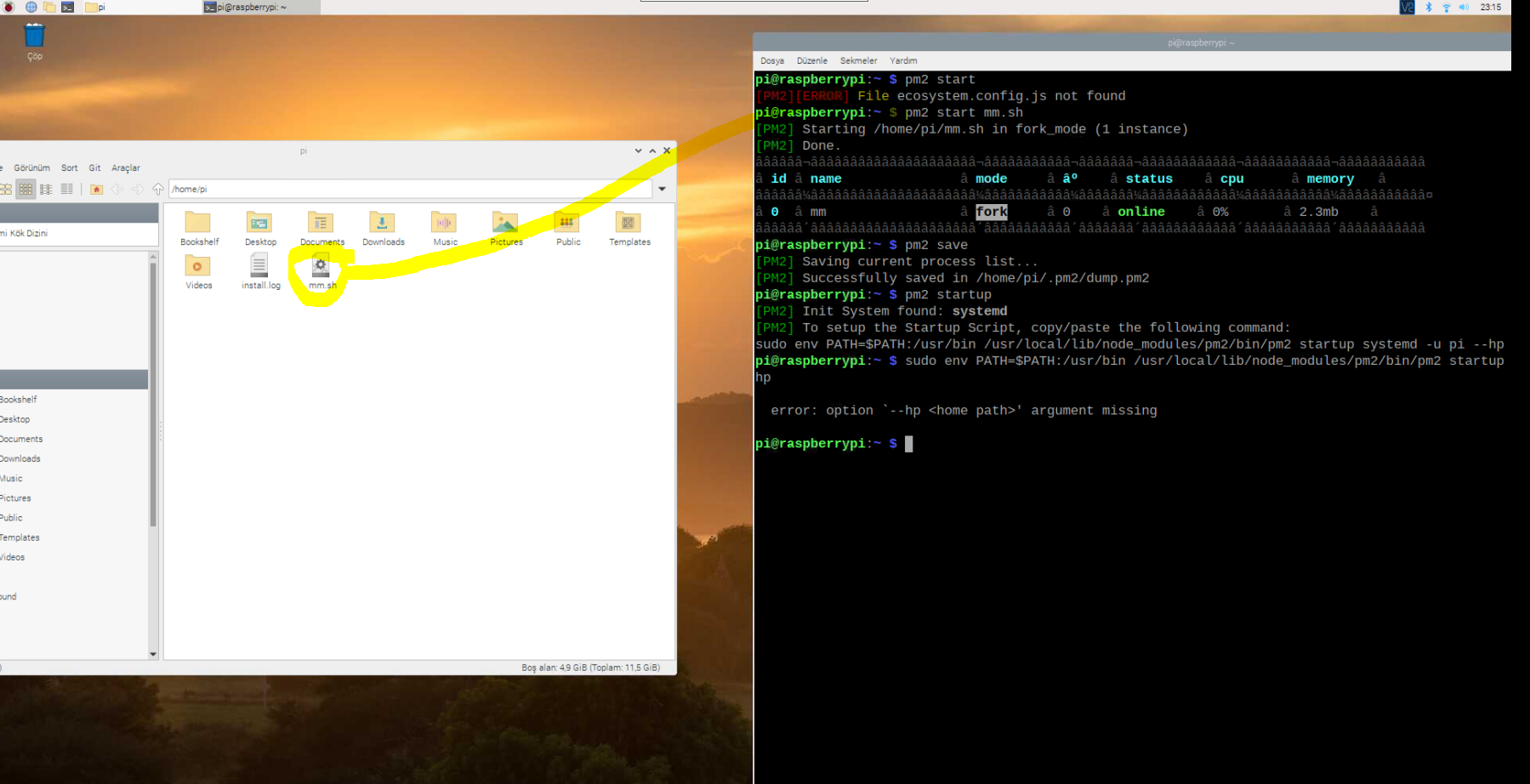
              2- I downloaded run-start.sh all your content and copy paste ( edited 76th line sections acording my URL.

              3- and created startupPega.sh and located it my rpi root folder.

              4- Then I opened terminal and write

              pm2 start mm.sh

              then pm2 save

              Should I see my mirror on page browser ? Nothing happened. what I need for my next steps to run this automatically when restart rpi ?
              e4124a45-5a93-4688-bc35-291e8c617532-image.png

              S 1 Reply Last reply Reply Quote 0
              • S Offline
                sdetweil @emrah_asl
                last edited by

                @emrah_asl see my text messages

                Sam

                How to add modules

                learning how to use browser developers window for css changes

                1 Reply Last reply Reply Quote 0
                • E Offline
                  emrah_asl
                  last edited by

                  Hello thank you ver much for your practive solution.

                  I learned how to batch files runs.

                  1 Reply Last reply Reply Quote 0

                  Hello! It looks like you're interested in this conversation, but you don't have an account yet.

                  Getting fed up of having to scroll through the same posts each visit? When you register for an account, you'll always come back to exactly where you were before, and choose to be notified of new replies (either via email, or push notification). You'll also be able to save bookmarks and upvote posts to show your appreciation to other community members.

                  With your input, this post could be even better 💗

                  Register Login

                  • 1 / 1
                  • First post
                    Last post
                  Enjoying MagicMirror? Please consider a donation!
                  MagicMirror created by Michael Teeuw.
                  Forum managed by Sam, technical setup by Karsten.
                  This forum is using NodeBB as its core | Contributors
                  Contact | Privacy Policy