Read the statement by Michael Teeuw here.
Socket Notifications are just not working
-
Hi!
I am basically trying to show or hide modules by using buttons. Therefore, I installed MMM-Buttons and MMM-Remote-Control and followed the installation guides.
The Buttons are certainly working as they (1) light up a LED and (2) trigger MMM-Buttons.
In the example code for the configuration of MMM-Buttons, it can either turn off the monitor or shut down the Raspberry Pi. After clicking one button, the text “Keep pressed for 3 Seconds to Shut Down” appears as programmed in the example code of MMM-Buttons. However, it won’t send the notification to the MMM-Remote-Control to actually shut it down. In other words, the buttons are working and the module MMM-Buttons is triggered after clicking the Button but it won’t send a socket notification. I also checked the Logs and the module helpers of the individual modules are initialized and loaded. One Log also shows the message “All module helpers loaded.”.
I tried two different Versions of MagicMirror (2.12 and 2.10) and also reinstalled the modules multiple times. I even tried to use different modules to send/receive socket notifications (e.g. MMM-ModuleToggle) and the socket notifications still don’t seem to work.
I am really frustrated right now as I could not find anyone else with a similar issue and I am trying different things for a few days now. I have also read that I do not need to modify node_helper.js for these minor functions like turning off the monitor and it should actually work by default according to the readme of MMM-Buttons.
Unfortunately, I don’t have much experience in nodes. My guess is that a new release of nodejs might be incompatible with MagicMirror. I wonder why nobody else seems to have similar issues.I used following code for the installation nodejs:
curl -sL https://deb.nodesource.com/setup_10.x | sudo -E bash -I hope, someone knows what do to. Thanks!
Edit: I am using a Raspberry Pi 3 Model B
-
@KirC only the modulename.js of a module can sendSocketNotification to its node_helper.js
all other modules must sendNotification to other modulesyou should be able to seen notifications between modules by using the developers window
ctrl-shift-i on the mm keyboard, select the tab labeled console and scroll up… u can filter on messages from modules by adding part of the module name to the filter field button or remote
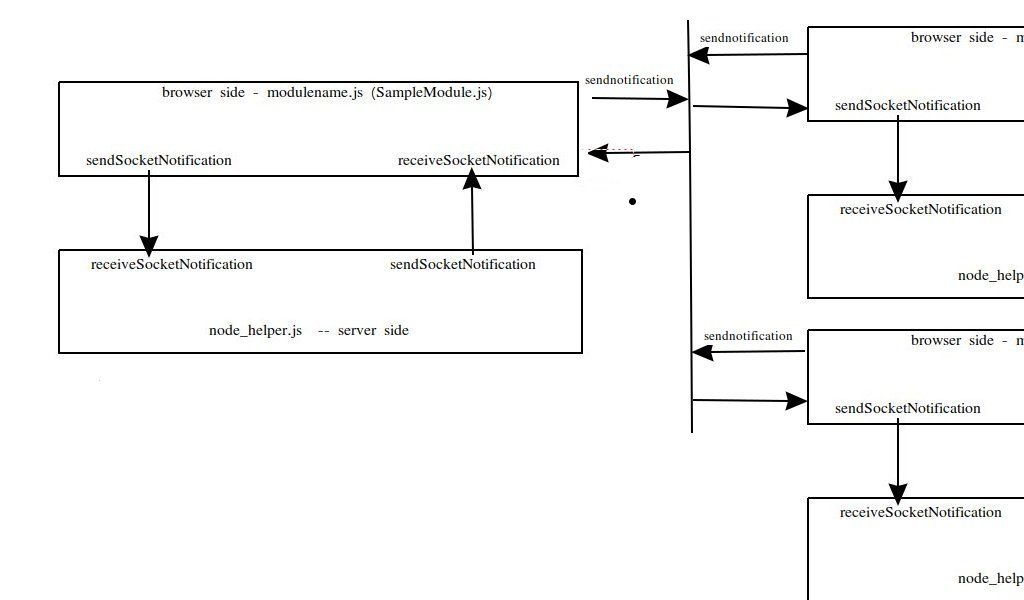
-
Thank you for your answer! The developer’s window shows that some modules received the notification SHOW_ALERT AND HIDE_ALERT after clicking the button and after stopping to click it. The actual notification that should be sent does not appear in the window (to send a command to shut down the Raspberry)
-
@KirC so that means buttons is not configured like u want
Hello! It looks like you're interested in this conversation, but you don't have an account yet.
Getting fed up of having to scroll through the same posts each visit? When you register for an account, you'll always come back to exactly where you were before, and choose to be notified of new replies (either via email, or push notification). You'll also be able to save bookmarks and upvote posts to show your appreciation to other community members.
With your input, this post could be even better 💗
Register Login