Read the statement by Michael Teeuw here.
Default weather module modification in custom.css
-
Hi,
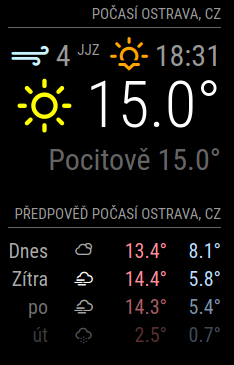
does anyone know how to modify new default weather module in custom.css? I would like to change weather icon colors and size of ‘feels like’ text in custom.css. I was trying something like this:
.weather .day-sunny {
     color: #ffff00;
}
but it doesnt work. Thank you in advance
-
-
I’ve already check this thread. Unfortunatelly this doesn’t work for new weather module. Anyway I finally figure it out:
.weather .weather-icon .wi-day-sunny{
  color: #ffff00;
}
.weather .weather-icon .wi-day-cloudy{
  color: #aaa;
}
.weather .weather-icon .wi-cloudy{
  color: #aaa;
}
.weather .weather-icon .wi-cloudy-windy{
  color: #aaa;
}
.weather .weather-icon .wi-showers{
  color: #55acee;
}
.weather .weather-icon .wi-rain{
  color: #55acee;
}
.weather .weather-icon .wi-thunderstorm{
  color: #ff00ff;
}
.weather .weather-icon .wi-snow{
  color: #fff;
}
.weather .weather-icon .wi-fog{
  color: #999;
}
.weather .weather-icon .wi-night-clear{
  color: #fff;
}
.weather .weather-icon .wi-night-cloudy{
  color: #aaa;
}
.weather .weather-icon .wi-night-showers{
  color: #55acee;
}
.weather .weather-icon .wi-night-rain{
  color: #55acee;
}
.weather .weather-icon .wi-night-thunderstorm{
  color: #ff00ff;
}
.weather .weather-icon .wi-night-snow{
  color: #fff;
}
.weather .weather-icon .wi-night-alt-cloudy-windy{
  color: #aaa;
}

.weather .wi-day-sunny{
  color: #ffff00;
}
.weather .wi-day-cloudy{
  color: #aaa;
}
.weather .wi-cloudy{
  color: #aaa;
}
.weather .wi-cloudy-windy{
  color: #aaa;
}
.weather .wi-showers{
  color: #55acee;
}
.weather .wi-rain{
  color: #55acee;
}
.weather .wi-thunderstorm{
  color: #ff00ff;
}
.weather .wi-snow{
  color: #fff;
}
.weather .wi-fog{
  color: #999;
}
.weather .wi-night-clear{
  color: #fff;
}
.weather .wi-night-cloudy{
  color: #aaa;
}
.weather .wi-night-showers{
  color: #55acee;
}
.weather .wi-night-rain{
  color: #55acee;
}
.weather .wi-night-thunderstorm{
  color: #ff00ff;
}
.weather .wi-night-snow{
  color: #fff;
}
.weather .wi-night-alt-cloudy-windy{
  color: #aaa;
}
.weather .wi-strong-wind {
  color: #e0fbff;
}
.weather .wi-sunset {
  color: #ffa500;
}
.weather .wi-sunrise {
  color: #ffa500;
}
-
@danielantos90 did you manage to change the font size of “feels like” ??

Hello! It looks like you're interested in this conversation, but you don't have an account yet.
Getting fed up of having to scroll through the same posts each visit? When you register for an account, you'll always come back to exactly where you were before, and choose to be notified of new replies (either via email, or push notification). You'll also be able to save bookmarks and upvote posts to show your appreciation to other community members.
With your input, this post could be even better 💗
Register Login