Read the statement by Michael Teeuw here.
adjust text layout module "birthdaylist"
-
I have successfully installed the “birthdaylist” module.
My intention is to make the output layout match the layout of the text in the “bdl.scv” file.
Like:
05-08-1939,Gerda van de Brink-Pijpers
08-08-1939,Fenny van 't Veld-Hakkers
08-08-1946,Jannie Neeleman-van der Linde
13-08-1984, Petra MorrenSince by default the layout is in upper_case, I have set in:
custom.css under .birthdaylist .TD-BODY { text-transform: none
/* ============ birthdaylist ------------ */
.module.birthdaylist {
background-color:#0DBC07; // was 008080
border-radius: 10px;
padding:8px;
color: #FFFFFF;
border: 1px solid #2a313b;
box-shadow: 11px 11px 16px #3e3e3e,
-11px -11px 16px #6a6a6a;
}.birthdaylist .TD-BODY {
border-radius: 10px;
font-size: 18px;
text-transform: none;
color: #FFFFFF;
letter-spacing: 0.1em;
vertical-align: top;
text-align: left;
line-height: 20px;
padding: 0px 0px 8px 12px;
}/* ===========einde module birtgdaylist =====
The output layout is now the same as the text layout in bdl.scv
However, if there is more than one birthday on a given day, the 2nd name will appear in the default upper_cas and color.
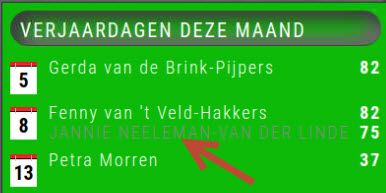
Question:
What do I have to adjust where, so that the 2nd line layout is also the same as that of the others? -
@veldje the class is TD-SAME
or TD-SAME_DIMMED ( if doing past days still shown) -
@sdetweil Thank you for the quick response. I made the changes and it worked.

Hello! It looks like you're interested in this conversation, but you don't have an account yet.
Getting fed up of having to scroll through the same posts each visit? When you register for an account, you'll always come back to exactly where you were before, and choose to be notified of new replies (either via email, or push notification). You'll also be able to save bookmarks and upvote posts to show your appreciation to other community members.
With your input, this post could be even better 💗
Register Login