Read the statement by Michael Teeuw here.
Default weather color change
-
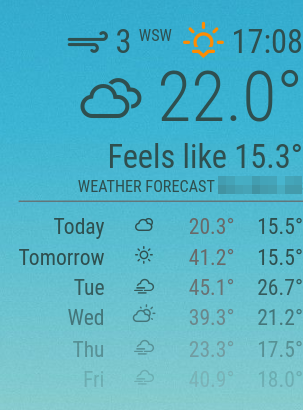
I am posting to hopefully solve the problem and some headache of changing the color or size to all the components for the default weather module. Below are all the sections with a short description of what they are. Make sure to place this code in the custom CSS file. Enjoy!
.dimmed {
color: DarkSlateGrey;  /* Feels like Temp section */
}

.module-header {
color: DarkSlateGrey; /* Waether Forecase City, State section */
}

.dimmed.wi-strong-wind + span {
color: DarkSlateGrey; /* text for the wind symbol */
}

.dimmed.wi-strong-wind {
color: DarkSlateGrey; /* Wind symbol */
}

.weather .wi-sunset + span {
color: DarkSlateGrey; /* sunset time */
}

.weather .wi-sunset {
color: DarkOrange; /* sunset symbol */
}

.weather .wi-sunrise + span
color: DarkSlateGrey; /* sunrise time */
}

.weather. .wi-sunrise {
color: DarkYellow; /* sunrise symbol */
}

.weather .day {
color: DarkSlateGray; /* days list */
}

.weather .weathericon + span {
color: DarkSlateGray; /* current temp */
}

.weather .weathericon {
color: DarkSlateGray; /* icon nect to current temp (sets all icons the same color) */
}

.weather .min-temp {
color: DarkSlateGray; /* minimum temp */
}

.weather .max-temp {
color: DimGray; /* maximum temp */
}
-
Thank you. Really looks cool. Genuinely emotional over how brilliant this looks. Recently started programming and am currently doing a small project.
Hello! It looks like you're interested in this conversation, but you don't have an account yet.
Getting fed up of having to scroll through the same posts each visit? When you register for an account, you'll always come back to exactly where you were before, and choose to be notified of new replies (either via email, or push notification). You'll also be able to save bookmarks and upvote posts to show your appreciation to other community members.
With your input, this post could be even better 💗
Register Login