MagicMirror Forum
    • Recent
    • Tags
    • Unsolved
    • Solved
    • MagicMirror² Repository
    • Documentation
    • 3rd-Party-Modules
    • Donate
    • Discord
    • Register
    • Login
    A New Chapter for MagicMirror: The Community Takes the Lead
    Read the statement by Michael Teeuw here.

    Modify the Gap/Margins

    Scheduled Pinned Locked Moved Development
    6 Posts 5 Posters 10.0k Views 5 Watching
    Loading More Posts
    • Oldest to Newest
    • Newest to Oldest
    • Most Votes
    Reply
    • Reply as topic
    Log in to reply
    This topic has been deleted. Only users with topic management privileges can see it.
    • ALombardiA Offline
      ALombardi
      last edited by

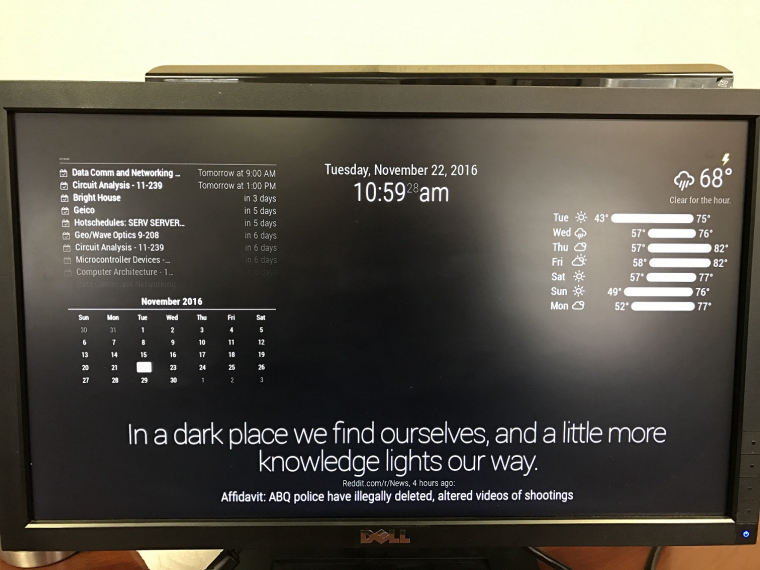
      I have removed overscan so it fits to the entire screen but I still have margins. Anyone know where I can go to removed/change these?

      Pictured below. The top and left margins are the worst.

      Imgur
      0_1479831248460_IMG_1520.JPG

      1 Reply Last reply Reply Quote 0
      • O Offline
        ostfilinchen
        last edited by

        Hi @ALombardi ,

        edit your custom.css and add these Lines. The Body Part should look like this:

        body {
        margin: 30px;
        position: absolute;
        height: calc(100% - 50px);
        width: calc(100% - 50px);
        }

        1 Reply Last reply Reply Quote 1
        • ALombardiA Offline
          ALombardi
          last edited by ALombardi

          Thanks, @ostfilinchen! Someone reached out over chat and took care of it for me. I appreciate your assistance. Hopefully someone else can benefit from this thread though!

          1 Reply Last reply Reply Quote 0
          • H Offline
            hefeteig
            last edited by hefeteig

            For those of us who use this in a real Magic Mirror ;) there’s no need to have any margins (top, left, right, bottom) and it is great to use all pixels of the display. If you’re with me… use the following in ~/MagicMirror/css/custom.css:

            body {
                margin: 0px;
                position: absolute;
                height: 100%;
                width: 100%;
            }
            
            1 Reply Last reply Reply Quote 1
            • A Offline
              aaronaxvig
              last edited by

              Replying to an old post…I know. But it shows up in search engine results.

              One way to easily/cleanly make this adjustment is included in the sample custom.css. Below is an example with the relevant parts only, and adjustments to my preferences (were all 60px values before).

              :root {
                --gap-body-top: 10px;
                --gap-body-right: 20px;
                --gap-body-bottom: 10px;
                --gap-body-left: 20px;
              }
              
              P 1 Reply Last reply Reply Quote 1
              • P Offline
                patrad @aaronaxvig
                last edited by

                @aaronaxvig Thank you! All other search results that had changing the CSS body really messed up other module internal alignment. This resizes correctly and doesn’t mess with other module alignment
                1 Reply Last reply Reply Quote 0

                Hello! It looks like you're interested in this conversation, but you don't have an account yet.

                Getting fed up of having to scroll through the same posts each visit? When you register for an account, you'll always come back to exactly where you were before, and choose to be notified of new replies (either via email, or push notification). You'll also be able to save bookmarks and upvote posts to show your appreciation to other community members.

                With your input, this post could be even better 💗

                Register Login

                • 1 / 1
                • First post
                  Last post
                Enjoying MagicMirror? Please consider a donation!
                MagicMirror created by Michael Teeuw.
                Forum managed by Sam, technical setup by Karsten.
                This forum is using NodeBB as its core | Contributors
                Contact | Privacy Policy