MagicMirror Forum
    • Recent
    • Tags
    • Unsolved
    • Solved
    • MagicMirror² Repository
    • Documentation
    • 3rd-Party-Modules
    • Donate
    • Discord
    • Register
    • Login
    A New Chapter for MagicMirror: The Community Takes the Lead
    Read the statement by Michael Teeuw here.

    Automatic Installation doesn't work.

    Scheduled Pinned Locked Moved Troubleshooting
    installationmagicmirror2raspberry pi 3
    25 Posts 5 Posters 9.6k Views 5 Watching
    Loading More Posts
    • Oldest to Newest
    • Newest to Oldest
    • Most Votes
    Reply
    • Reply as topic
    Log in to reply
    This topic has been deleted. Only users with topic management privileges can see it.
    • D Offline
      doyoun0913 @sdetweil
      last edited by

      @sdetweil This leads to another problem…
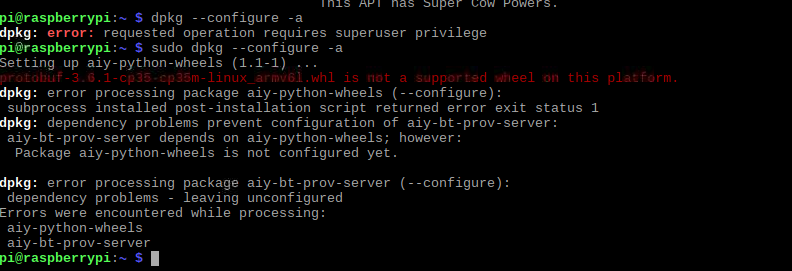
      0_1578185741621_b03e9ae2-5080-49c6-8a93-0c8d5c31f561-image.png
      I already have searched this issue in the past; I think something is wrong with Google itself possibly. This is the source: Setting up aiy-python-wheels: protobuf not supported on armv6.1 #526

      S 1 Reply Last reply Reply Quote 0
      • S Do not disturb
        sdetweil @doyoun0913
        last edited by

        @doyoun0913 sorry. I have no idea

        Sam

        How to add modules

        learning how to use browser developers window for css changes

        D 1 Reply Last reply Reply Quote 0
        • D Offline
          doyoun0913 @sdetweil
          last edited by

          @sdetweil All good! I forgot to post that I figured it out. Thank you for your help :)

          S Mykle1M 2 Replies Last reply Reply Quote 0
          • S Do not disturb
            sdetweil @doyoun0913
            last edited by

            @doyoun0913 what did u end up doing? and then did u redo the script install?

            Sam

            How to add modules

            learning how to use browser developers window for css changes

            1 Reply Last reply Reply Quote 0
            • Mykle1M Offline
              Mykle1 Project Sponsor Module Developer @doyoun0913
              last edited by

              @doyoun0913 said in Automatic Installation doesn't work.:

              I forgot to post that I figured it out. Thank you for your help

              Yes, please post your solution for the benefit of other users that may encounter the same issue. :thumbsup:

              Create a working config
              How to add modules

              K 1 Reply Last reply Reply Quote 0
              • K Offline
                krishnaanivilla @Mykle1
                last edited by

                @Mykle1 Hello bro the same problem im facing but i stuck with first step unable to move forward please help me

                S 1 Reply Last reply Reply Quote 0
                • S Do not disturb
                  sdetweil @krishnaanivilla
                  last edited by

                  @krishnaanivilla what have you done so far?

                  did u use the update script from the MM readme page?

                  have u tried the updated version?
                  see here

                  https://forum.magicmirror.builders/topic/10859/new-update-upgrade-script-ready-for-testing?page=1

                  Sam

                  How to add modules

                  learning how to use browser developers window for css changes

                  1 Reply Last reply Reply Quote 0
                  • K Offline
                    krishnaanivilla
                    last edited by

                    i have run this

                    bash -c “$(curl -sL https://raw.githubusercontent.com/sdetweil/MagicMirror_scripts/master/upgrade-script.sh)” apply

                    after this

                    bash -c “$(curl -sL https://raw.githubusercontent.com/sdetweil/MagicMirror_scripts/master/raspberry.sh)”

                    but still it is showing updating packages and not moving forward

                    S 1 Reply Last reply Reply Quote 0
                    • S Do not disturb
                      sdetweil @krishnaanivilla
                      last edited by

                      @krishnaanivilla send me the ~/MagicMirror/installers/upgrade.log file… same userid as here, at gmail

                      Sam

                      How to add modules

                      learning how to use browser developers window for css changes

                      K 1 Reply Last reply Reply Quote 0
                      • K Offline
                        krishnaanivilla @sdetweil
                        last edited by

                        @sdetweil pi@raspberrypi:~ $ bash -c “$(curl -sL https://raw.githubusercontent.com/sdetweil/MagicMirror_scripts/master/upgrade-script.sh)”
                        the log will be /home/pi/MagicMirror/installers/upgrade.log
                        No LSB modules are available.
                        doing test run = true
                        update log will be in /home/pi/MagicMirror/installers/upgrade.log

                        saving custom.css
                        cp: cannot stat ‘custom.css’: No such file or directory
                        upgrading from version 2.10.0 to 2.10.0
                        fetching latest revisions
                        there are 1 local files that are different than the master repo

                        package-lock.json

                        any *-lock.json files do not need to be saved
                        do you want to save these files for later (Y/n)?y

                        *** Please tell me who you are.

                        Run

                        git config --global user.email “you@example.com”
                        git config --global user.name “Your Name”

                        to set your account’s default identity.
                        Omit --global to set the identity only in this repository.

                        fatal: unable to auto-detect email address (got ‘pi@raspberrypi.(none)’)
                        Cannot save the current index state
                        no modules found needing npm refresh
                        restoring custom.css
                        cp: cannot stat ‘save_custom.css’: No such file or directory
                        rm: cannot remove ‘save_custom.css’: No such file or directory
                        bash: line 339: unalias: git: not found
                        test run, restoring files stashed
                        No stash entries found.
                        pi@raspberrypi:~ $ bash -c “$(curl -sL https://raw.githubusercontent.com/sdetweil/MagicMirror_scripts/master/upgrade-script.sh)”
                        the log will be /home/pi/MagicMirror/installers/upgrade.log
                        No LSB modules are available.
                        doing test run = true
                        update log will be in /home/pi/MagicMirror/installers/upgrade.log

                        saving custom.css
                        cp: cannot stat ‘custom.css’: No such file or directory
                        upgrading from version 2.10.0 to 2.10.0
                        fetching latest revisions
                        there are 1 local files that are different than the master repo

                        package-lock.json

                        any *-lock.json files do not need to be saved
                        do you want to save these files for later (Y/n)?n
                        skipping restore for package-lock.json, doing test run
                        no modules found needing npm refresh
                        restoring custom.css
                        cp: cannot stat ‘save_custom.css’: No such file or directory
                        rm: cannot remove ‘save_custom.css’: No such file or directory
                        bash: line 339: unalias: git: not found
                        pi@raspberrypi:~ $ bash -c “$(curl -sL https://raw.githubusercontent.com/sdetweil/MagicMirror_scripts/master/upgrade-script.sh)”
                        the log will be /home/pi/MagicMirror/installers/upgrade.log
                        No LSB modules are available.
                        doing test run = true
                        update log will be in /home/pi/MagicMirror/installers/upgrade.log

                        saving custom.css
                        cp: cannot stat ‘custom.css’: No such file or directory
                        upgrading from version 2.10.0 to 2.10.0
                        fetching latest revisions
                        there are 1 local files that are different than the master repo

                        package-lock.json

                        any *-lock.json files do not need to be saved
                        do you want to save these files for later (Y/n)?y

                        *** Please tell me who you are.

                        Run

                        git config --global user.email “you@example.com”
                        git config --global user.name “Your Name”

                        to set your account’s default identity.
                        Omit --global to set the identity only in this repository.

                        fatal: unable to auto-detect email address (got ‘pi@raspberrypi.(none)’)
                        Cannot save the current index state
                        no modules found needing npm refresh
                        restoring custom.css
                        cp: cannot stat ‘save_custom.css’: No such file or directory
                        rm: cannot remove ‘save_custom.css’: No such file or directory
                        bash: line 339: unalias: git: not found
                        test run, restoring files stashed
                        No stash entries found.
                        pi@raspberrypi:~ $ bash -c “$(curl -sL https://raw.githubusercontent.com/sdetweil/MagicMirror_scripts/master/raspberry.sh)”

                        $$\ $$\ $$\ $$\ $$\ $$\ $$$$$$
                        $$$\ $$$ | _| $$$\ $$$ |_| $$ $$
                        $$$$\ $$$$ | $$$$$$\ $$$$$$\ $$\ $$$$$$$\ $$$$\ $$$$ |$$\ $$$$$$\ $$$$$$\ $$$$$$\ $$$$$$\ _/ $$ |
                        $$$$$$ $$ | _
                        $$\ $$ $$\ $$ |$$ |$$$$$$ $$ |$$ |$$ $$\ $$ $$\ $$ $$\ $$ $$\ $$$$$$ |
                        $$ $$$ $$ | $$$$$$$ |$$ / $$ |$$ |$$ / $$ $$$ $$ |$$ |$$ | _|$$ | _|$$ / $$ |$$ | _|$$ /
                        $$ |$ /$$ |$$ __$$ |$$ | $$ |$$ |$$ | $$ |$ /$$ |$$ |$$ | $$ | $$ | $$ |$$ | $$ |
                        $$ | _/ $$ |$$$$$$$ |$$$$$$$ |$$ |$$$$$$$\ $$ | _/ $$ |$$ |$$ | $$ | $$$$$$ |$$ | $$$$$$$$
                        _
                        | _
                        | _
                        | _
                        $$ |_| _
                        |_| _|_|_| __| _
                        / _| _______|
                        $$\ $$ |
                        $$$$$$ |
                        _
                        ____/

                        install log being saved to /home/pi/install.log
                        Updating packages …

                        1 Reply Last reply Reply Quote 0
                        • S Do not disturb
                          sdetweil
                          last edited by

                          working on this in chat

                          Sam

                          How to add modules

                          learning how to use browser developers window for css changes

                          K 1 Reply Last reply Reply Quote 0
                          • K Offline
                            krishnaanivilla
                            last edited by

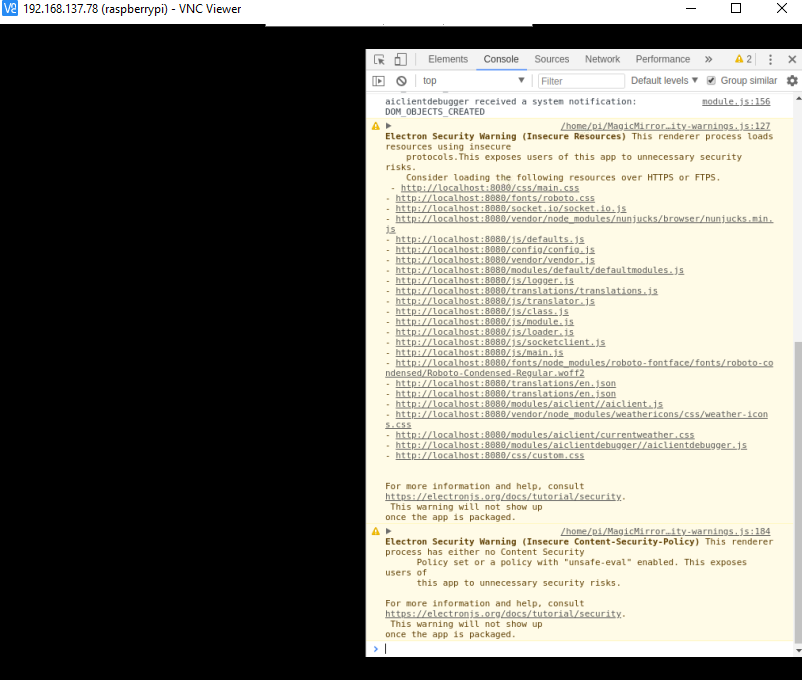
                            0_1578334138381_8e0153b2-6224-477e-a5e4-f77d051007eb-image.png

                            1 Reply Last reply Reply Quote 0
                            • K Offline
                              krishnaanivilla @sdetweil
                              last edited by

                              @sdetweil Initializing MagicMirror.
                              translator.js:202 Loading core translation file: translations/en.json
                              translator.js:225 Loading core translation fallback file: translations/en.json
                              loader.js:179 Load script: modules/aiclient//aiclient.js
                              module.js:476 Module registered: aiclient
                              loader.js:150 Bootstrapping module: aiclient
                              loader.js:155 Scripts loaded for: aiclient
                              loader.js:194 Load stylesheet: vendor/node_modules/weathericons/css/weather-icons.css
                              loader.js:194 Load stylesheet: modules/aiclient/currentweather.css
                              loader.js:157 Styles loaded for: aiclient
                              loader.js:159 Translations loaded for: aiclient
                              loader.js:179 Load script: modules/aiclientdebugger//aiclientdebugger.js
                              module.js:476 Module registered: aiclientdebugger
                              loader.js:150 Bootstrapping module: aiclientdebugger
                              loader.js:155 Scripts loaded for: aiclientdebugger
                              loader.js:157 Styles loaded for: aiclientdebugger
                              loader.js:159 Translations loaded for: aiclientdebugger
                              loader.js:194 Load stylesheet: css/custom.css
                              :8080/modules/aiclient//aiclient.js:39 Starting module: aiclient
                              aiclientdebugger.js:20 Starting module: aiclientdebugger
                              main.js:473 All modules started!
                              module.js:156 aiclient received a system notification: ALL_MODULES_STARTED
                              module.js:156 aiclientdebugger received a system notification: ALL_MODULES_STARTED
                              module.js:156 aiclient received a system notification: MODULE_DOM_CREATED
                              module.js:156 aiclientdebugger received a system notification: MODULE_DOM_CREATED
                              module.js:156 aiclient received a system notification: DOM_OBJECTS_CREATED
                              module.js:156 aiclientdebugger received a system notification: DOM_OBJECTS_CREATED

                              1 Reply Last reply Reply Quote 0
                              • K Offline
                                krishnaanivilla
                                last edited by

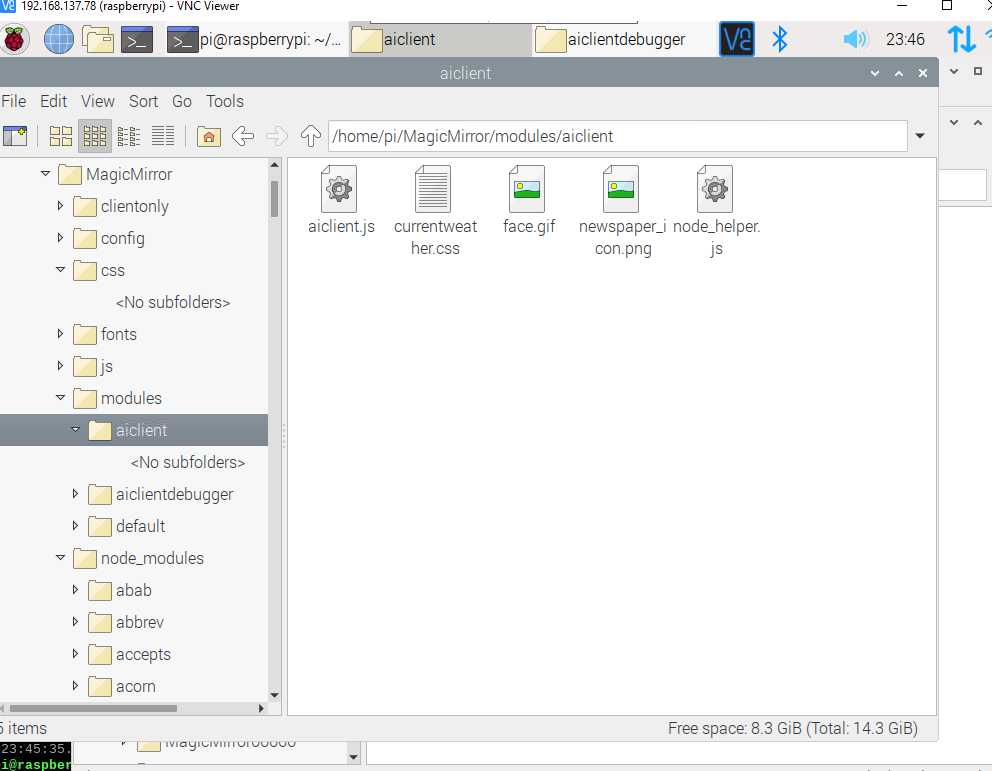
                                0_1578334638324_e52d931b-2d0d-400f-b84b-c642c20ee32c-image.png

                                1 Reply Last reply Reply Quote 0
                                • S Do not disturb
                                  sdetweil
                                  last edited by

                                  with the default config.js the installation ran fine. but with just these two modules, no output

                                  Sam

                                  How to add modules

                                  learning how to use browser developers window for css changes

                                  S 1 Reply Last reply Reply Quote 0
                                  • S Do not disturb
                                    sdetweil @sdetweil
                                    last edited by sdetweil

                                    @krishnaanivilla looking at the code for aiclient.js, it is waiting for a command from the AI front end,
                                    and if there is none
                                    this.current_selection=undefined
                                    then nothing is displayed.

                                    aiclient looks to be part of this
                                    https://github.com/raghavpatnecha/smartmirror

                                    which proposes to add some AI (process notifications) on top of MagicMirror

                                    Sam

                                    How to add modules

                                    learning how to use browser developers window for css changes

                                    1 Reply Last reply Reply Quote 0
                                    • jonspragginsJ Offline
                                      jonspraggins
                                      last edited by

                                      Following up with my error message when attempting the upgrade.sh

                                      pi@Jon-MM:~/MagicMirror $ bash -c "$(curl -sL https://raw.githubusercontent.com/MichMich/MagicMirror/master/installers/upgrade-script.sh)"
                                      the log will be /home/pi/MagicMirror/installers/upgrade.log
                                      No LSB modules are available.
                                      doing test run = true
                                      update log will be in /home/pi/MagicMirror/installers/upgrade.log
                                      
                                      saving custom.css
                                      cp: cannot stat 'custom.css': No such file or directory
                                      upgrading from version 2.10.0 to 2.10.0
                                      fetching latest revisions
                                      there are 1 local files that are different than the master repo
                                      
                                         package-lock.json
                                      
                                      any *-lock.json files do not need to be saved
                                      do you want to save these files for later   (Y/n)?n
                                      skipping restore for package-lock.json, doing test run
                                      no modules found needing npm refresh
                                      restoring custom.css
                                      cp: cannot stat 'save_custom.css': No such file or directory
                                      rm: cannot remove 'save_custom.css': No such file or directory
                                      
                                      S 1 Reply Last reply Reply Quote 0
                                      • S Do not disturb
                                        sdetweil @jonspraggins
                                        last edited by

                                        @jonspraggins please use the upgrade script here

                                        https://forum.magicmirror.builders/topic/10859/new-update-upgrade-script-ready-for-testing

                                        Sam

                                        How to add modules

                                        learning how to use browser developers window for css changes

                                        1 Reply Last reply Reply Quote 0

                                        Hello! It looks like you're interested in this conversation, but you don't have an account yet.

                                        Getting fed up of having to scroll through the same posts each visit? When you register for an account, you'll always come back to exactly where you were before, and choose to be notified of new replies (either via email, or push notification). You'll also be able to save bookmarks and upvote posts to show your appreciation to other community members.

                                        With your input, this post could be even better 💗

                                        Register Login

                                        • 1
                                        • 2
                                        • 2 / 2
                                        • First post
                                          Last post
                                        Enjoying MagicMirror? Please consider a donation!
                                        MagicMirror created by Michael Teeuw.
                                        Forum managed by Sam, technical setup by Karsten.
                                        This forum is using NodeBB as its core | Contributors
                                        Contact | Privacy Policy