Read the statement by Michael Teeuw here.
Getting MMM to open on the second monitor and correctly size
-
@sdetweil said in Getting MMM to open on the second monitor and correctly size:
electronOptions: { x:1920,fullscreen:false , width: 600, height:800},
the first option gives me this error
var config = {
electronOptions: { x:1920,fullscreen:false , width: 600, height:800},WARNING! Could not validate config file. Starting with default configuration. Please correct syntax errors at or above this line: C:\Users\Dell Server\MagicMirror\config\config.js:11
var config = {electronOptions:electronOptions: {x:1920,fullscreen:false , width: 600, height:800},
^SyntaxError: Unexpected token :
at Module._compile (internal/modules/cjs/loader.js:722:23)
at Object.Module._extensions…js (internal/modules/cjs/loader.js:798:10)
at Module.load (internal/modules/cjs/loader.js:645:32)
at Function.Module._load (internal/modules/cjs/loader.js:560:12)
at Module.require (internal/modules/cjs/loader.js:685:19)
at require (internal/modules/cjs/helpers.js:16:16)
at loadConfig (C:\Users\Dell Server\MagicMirror\js\app.js:69:12)
at App.start (C:\Users\Dell Server\MagicMirror\js\app.js:210:3)
at Object. (C:\Users\Dell Server\MagicMirror\js\electron.js:115:7)
at Module._compile (internal/modules/cjs/loader.js:786:30)The second option
var config = {
electronOptions: { x:1920,fullscreen:false },
address: “localhost”,gives me this error
WARNING! Could not validate config file. Starting with default configuration. Please correct syntax errors at or above this line: C:\Users\Dell Server\MagicMirror\config\config.js:11
var config = {electronOptions:electronOptions: {x:1920,fullscreen:false},
^SyntaxError: Unexpected token :
at Module._compile (internal/modules/cjs/loader.js:722:23)
at Object.Module._extensions…js (internal/modules/cjs/loader.js:798:10)
at Module.load (internal/modules/cjs/loader.js:645:32)
at Function.Module._load (internal/modules/cjs/loader.js:560:12)
at Module.require (internal/modules/cjs/loader.js:685:19)
at require (internal/modules/cjs/helpers.js:16:16)
at loadConfig (C:\Users\Dell Server\MagicMirror\js\app.js:69:12)
at App.start (C:\Users\Dell Server\MagicMirror\js\app.js:210:3)
at Object. (C:\Users\Dell Server\MagicMirror\js\electron.js:115:7)
at Module._compile (internal/modules/cjs/loader.js:786:30)the last option
starts MM in a window that can be dragged across to the second monitor but is not sized correctly.
It is the size of the normal full screen -
@Chrisflex u are adding just the electronOptions line
I was just showing where it went
-
Copied from my config js file
var config = {electronOptions:{x:1920 },
address: “localhost”, // Address to listen on, can be:
// - “localhost”, “127.0.0.1”, “::1” to listen on loopback interface
// - another specific IPv4/6 to listen on a specific interface
// - “0.0.0.0”, “::” to listen on any interface
// Default, when address config is left out or empty, is “localhost”Is that correct?
-
-
@Chrisflex posted pics above
-
@Chrisflex - Please use the markdown features of the forum when posting code or logs.
-
@bhepler Thanks I will try
-
@Chrisflex ant progress?
-
Hi apologies I have tried but no luck.
I will try again.
-
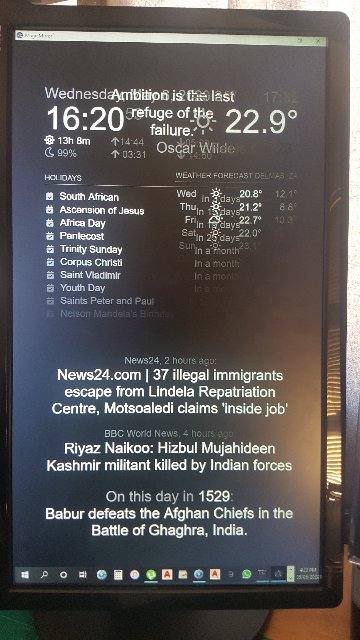
@sdetweil The first two options give me a window that I can drag and drop to the second vertical screen
Unfortunately the scaling is still a problem.
Hello! It looks like you're interested in this conversation, but you don't have an account yet.
Getting fed up of having to scroll through the same posts each visit? When you register for an account, you'll always come back to exactly where you were before, and choose to be notified of new replies (either via email, or push notification). You'll also be able to save bookmarks and upvote posts to show your appreciation to other community members.
With your input, this post could be even better 💗
Register Login
