Read the statement by Michael Teeuw here.
Wallberry Clock - Timezone issue
-
Hi Guys. Sorry I might be stupid but I get how the “other cities” work and I have for example LA as timezone US/Pacific, or New York as US/Eastern. But how the heck do I add other cities like Melbourne? Singapore? What does the module need as timezone? I tried SST for Singapore, AEDT for Melbourne and so on…nothing works. Any Idea?
-
Singapore is SGT
Melborne is AU
https://en.wikipedia.org/wiki/List_of_tz_database_time_zones -
Nope. Doesnt work.
   // WB-clock adds local time (Optional Module)
  {
    module: "WallberryTheme/WB-clock",
    position: "top_bar", // highly suggest using top_bar position
    config: {
      localCityName: "Zurich", // optional
      dateTimeFormat: "dddd, Do MMMM YYYY",
      otherCities: [
      	{name: "New York", timezone: "US/Eastern"}, // optional
      	{name: "Los Angeles", timezone: "US/Pacific"}, // optional
      	{name: "Singapore", timezone: "SGT"}, // optional
      	{name: "Melbourne", timezone: "AU"} // optional
      ]
    }
  },
Output looks like this…
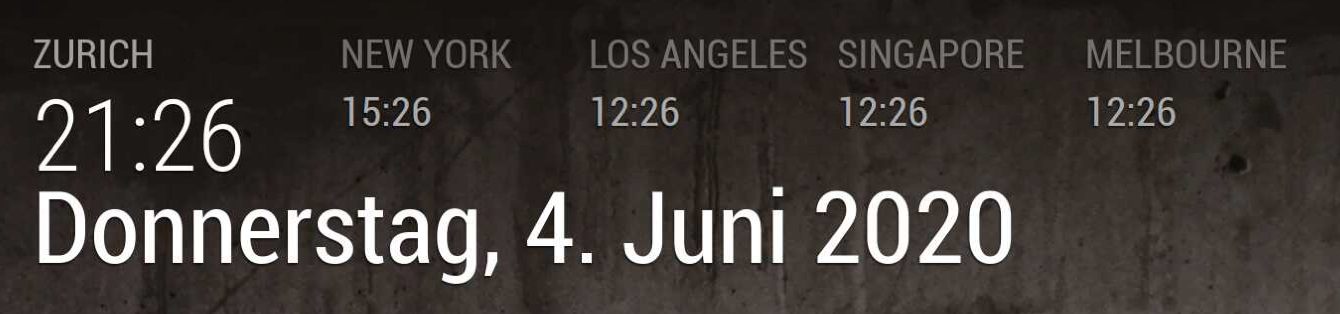
-
the long string is
Australia/Melbourne
Asia/Singapore -
@sdetweil said in Wallberry Clock - Timezone issue:
Australia/Melbourne
Oh lord! really? Thanks mate!!! :call_me_hand_light_skin_tone:
-
@duxnobis well, if the short strings don’t work, try the long ones! (as I noticed the others were long string)
-
No no all good. It worked like a charm! Many thanks!
Hello! It looks like you're interested in this conversation, but you don't have an account yet.
Getting fed up of having to scroll through the same posts each visit? When you register for an account, you'll always come back to exactly where you were before, and choose to be notified of new replies (either via email, or push notification). You'll also be able to save bookmarks and upvote posts to show your appreciation to other community members.
With your input, this post could be even better 💗
Register Login