Read the statement by Michael Teeuw here.
MMM-Calendar always shows 23:59 if showEndTime: True
-
Hello,
I don’t have much experience in software development, but so far I have been quite successful in setting up my MagicMirror.
Nevertheless I am struggling with the calender module with the following two issues:
-
showEnd: true
Although I managed to get the right start time with the help of “Timeshift calendar issue / Recurring Google Calendar events for times when UTC date differ from local date appear at wrong time in MM #1798”, I can only see 23:59 for the end time for recurring events on my iCalendar. (With non recurring events, the end time is correct!)
All the examples and maybe also most testers set the parameter showEnd to ‘false’, then this problem cannot be seen. -
For 3-weekly events (whole day), the timeshift problem seems to be unsolved?! In this case I can see a wrong date. With weekly and biweekly events (whole day) everything works fine!
Can anybody confirm if these issues are still present, or has anybody an idea, what might be wrong with my files?
{ module: "calendar", header: "Familie", position: "top_left", config: { maximumEntries: 25, maximumNumberOfDays: 365, showLocation: false, maxTitleLength: 25, maxLocationTitleLength: 25, wrapEvents: true, wrapLocationEvents: false, maxTitleLines: 3, maxEventTitleLines: 3, fetchInterval: 300000, //default: 300000 animationSpeed: 2000, fade: true, fadePoint: 0.25, displayRepeatingCountTitle: true, dateFormat: "MMM Do", dateEndFormat: "HH:mm", showEnd: true, fullyDayEventDateFormat: "MMM Do", timeFormat: "absolute", getRelative: 6, urgency: 1, broadcastEvents: true, hidePrivate: false, sliceMultiDayEvents: false, nextDaysRelative: true, calendars: [ { symbol: "home", url: "webcal://..." } ] } }, ... Thanks very much for your support! -
-
@SwissChemist see the calendar temp fixes at the top of the troubleshooting section
-
Dear Sam,
I have exactly done what is written in your instructions.
The start date is shown correctly, but there are two issues left:- with ‘showEnd: True’ I can see 23:59 for recurring events (not whole day) on my calendar. (With non recurring events, the end time is correct!)
- some dates for recurring events (whole day) are wrong.
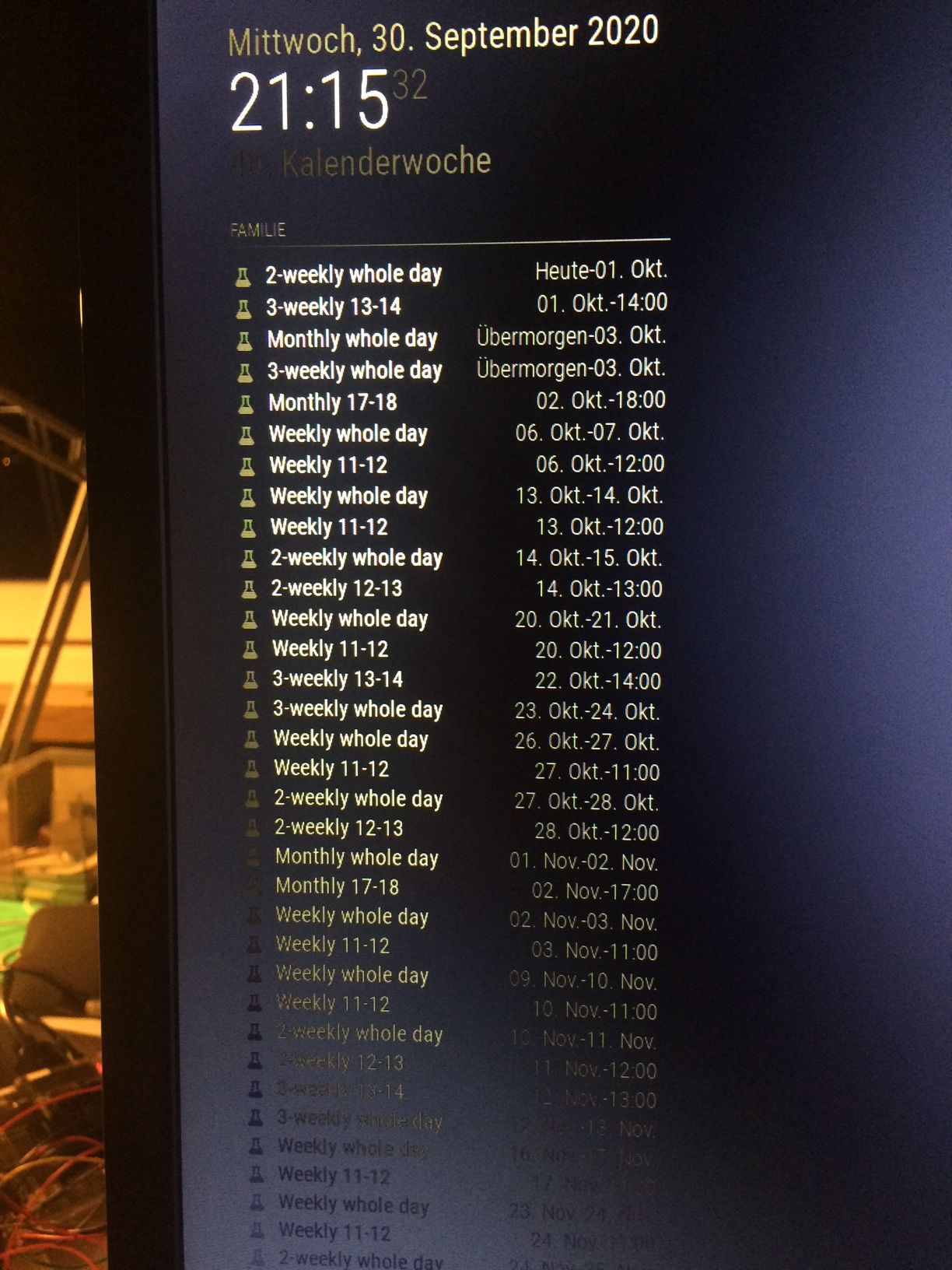
I have prepared an ics-file and a screenshot of my MagicMirror Monitor for comparison.
The following dates are wrong:
3-weekly whole day - 22.Okt should be: 21.Okt
Weekly whole day - 26.Okt should be: 27.Okt
2-weekly whole day - 27.Okt should be: 28.Okt
Monthly whole day - 1.Nov should be 2.Nov
Weekly whole day - 2.Nov should be 3.Nov
Weekly whole day - 9.Nov should be 10.Nov
2-weekly whole day - 10.Nov should be 11.Nov
…
I have defined a test calendar, ich which all weeklys are planned for the same day, all 2-weeklys are planned for the same day, all 3-weeklys are planned for the same day. So you can easily see if these dates differ, there is a mistake…
Files and a MagicMirror picture are attached.Thanks very much for your support!

[0_1601321084756_myCalendar](Uploading 100%) -
@SwissChemist please see my cat message…
i assume you are gmt+ something…
there is a newly found bug in the repeating rule parser, which I am working on. but it might be a while…
if the normal time of the event is not exceeded by your tz offset then the event date is (in gmt) the prior day.
then the rule calculates, and gets the current day, and the jams the prior to midnight time onto the event, now it is 24 hours later…at the time the calculation and adjustment is done, the rule processor doesn’t know the original effect of the timezone offset
-
You are right, now in summer, we are GMT+1, in winter it’s GMT+2…
-
no the one I am fighting from Australia
meeting at 09/28/20, 08:30
utc is 09/27/20, 22:30rule detemines today is valid DATE
takes todays date 09/28, with yesterdays time 22:30
oops… -
@sdetweil so, your 1st entry is confusing… label is
SUMMARY:Monthly 17-18
but the cal entry says
DTSTART;TZID=Europe/Zurich:20201002T170000, Oct 02, 1700 local, 1500 utz -
also, showEnd is a pain… technically the clock is day:00:00 to day 23:59 as 23:59+1 is 24:00/00:00 which is the next day
so, what do you think we should be showing there…
-
@SwissChemist want to try a fix for me…
edited: changed added line
edit the ~/MagicMirror/modules/default/calendar/calendarfetcher.js
find this (approx line 240) and add the one line listed below// Loop through the set of date entries to see which recurrences should be added to our event list. for (let d in dates) { const date = dates[d]; // ical.js started returning recurrences and exdates as ISOStrings without time information. // .toISOString().substring(0,10) is the method they use to calculate keys, so we'll do the same // (see https://github.com/peterbraden/ical.js/pull/84 ) const dateKey = date.toISOString().substring(0, 10); let curEvent = event; let showRecurrence = true; let duration = 0; startDate = moment(date); duration = parseInt(moment(curEvent.end).format("x")) - parseInt(moment(curEvent.start).format("x")) // --- add this linein your timezone (mine is Sep 28, 17:15)

-
Hello Sam,
thanks very much for your great support.
Good news is that the endTime issue is solved now!Nevertheless with recurring whole day events, the following entries are not correct yet:
3-weekly 13-14 is completely missing (should be 1.Okt)
Starting with the 3-weekly whole day 22.Okt (should be 21.Okt), every following ‘whole day meeting’ is shown one day too late.
You can easily see that even on your picture, as e.g. the 3-weekly whole day and the 3-weekly 13-14 should always take place at the same date.Even on your picture this is not the case… monthly whole day is shown in 3 days, monthly 17-18 is shown in 4 days.
Once more, thanks for your great support so far!
 -
yeh, that whole day thing… the spec says its whole day in the timezone where the computer is.
but the ical converter still adjusts it to UTC. (all parsed events are in UTC)3-weekly 13-14 is completely missing (should be 1.Okt)
can’t be cause u asked for WEdnesdaysBEGIN:VEVENT CREATED:20200928T173050Z DTEND;VALUE=DATE:20201002 DTSTAMP:20200928T182733Z DTSTART;VALUE=DATE:20201001 LAST-MODIFIED:20200928T182732Z RRULE:FREQ=WEEKLY;INTERVAL=3;BYDAY=WE < ---- SEQUENCE:0 SUMMARY:3-weekly whole day UID:E2C82F47-1E0F-4FD0-93C4-746B2D53488B URL;VALUE=URI: END:VEVENTso , this repeating event might start on Oct 1, but thats a thursday, so will not be shown
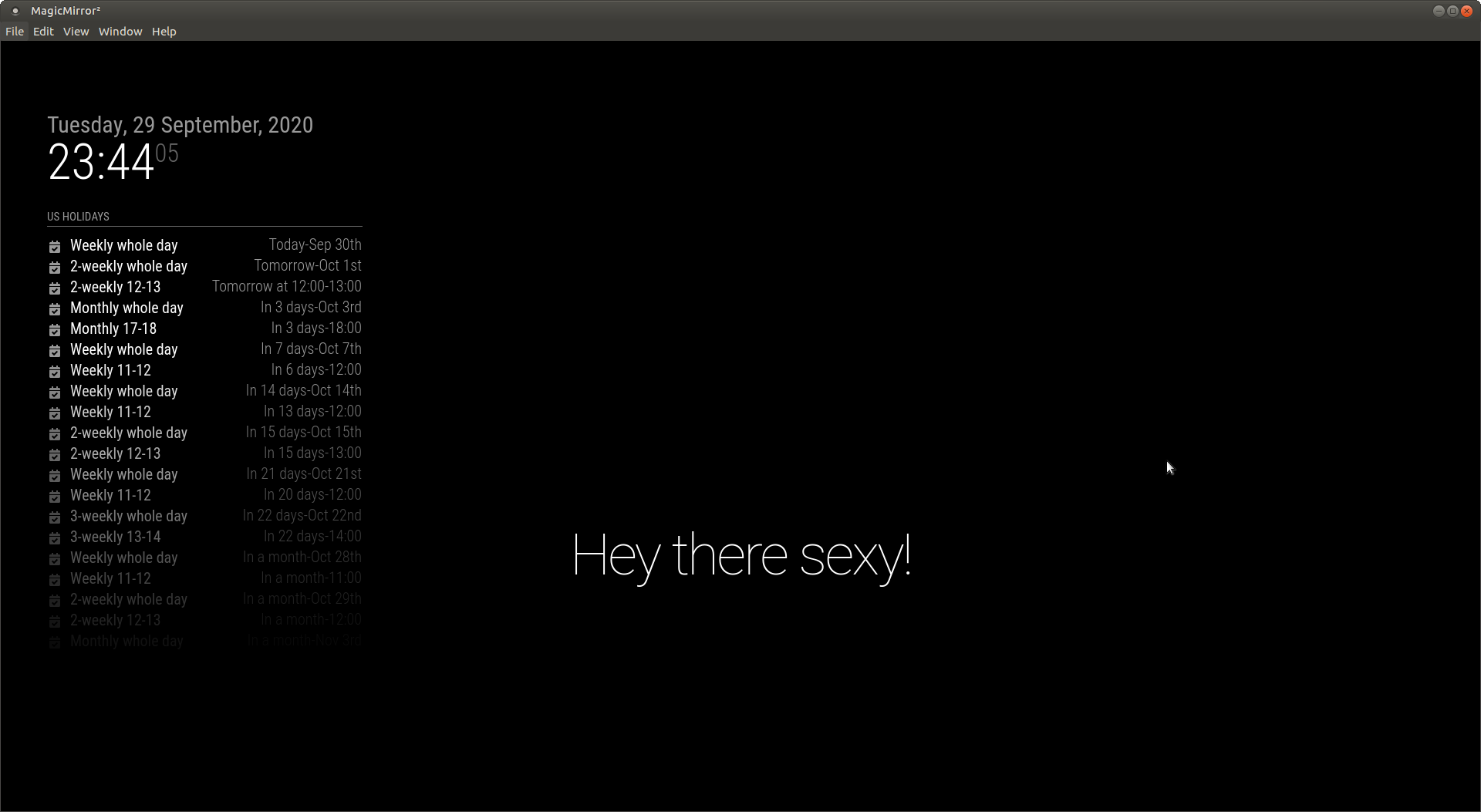
but later, Starting with the 3-weekly whole day 22.Okt (should be 21.Okt),
starts on 21+1 days from today 00:00:00 Oct 21, and ends on Oct 22this is a fix in the ical parser… so, it will take time to get out…
-
can we try another quick fix?
in calendar.js
// Define second, minute, hour, and day variables var oneSecond = 1000; // 1,000 milliseconds var oneMinute = oneSecond * 60; var oneHour = oneMinute * 60; var oneDay = oneHour * 24; if (event.fullDayEvent) { //subtract one second so that fullDayEvents end at 23:59:59, and not at 0:00:00 one the next day //event.endDate -= oneSecond; < ---- comment out this one line -
@sdetweil
maybe you expected already that now the endTime of each whole day event is shown one day too late. Without that fix, it has been correct.Regarding the ‘3-weekly whole day’ you gave me a perfect hint: As it is a user configured interval, you have to take care that begin of the event and day of the week you select as interval correspond. So if you configure it wrong, corresponding event will obviously not be shown, as you explained perfectly from your code analysis…
-
@sdetweil
I would not mind to see 23:59 as end of a whole day event, but it would also be fine for me to see the day where it starts again… -
@SwissChemist finding an acceptable “end” marker for “full day” event is challenging.
it certainly ends when the next day starts.
-
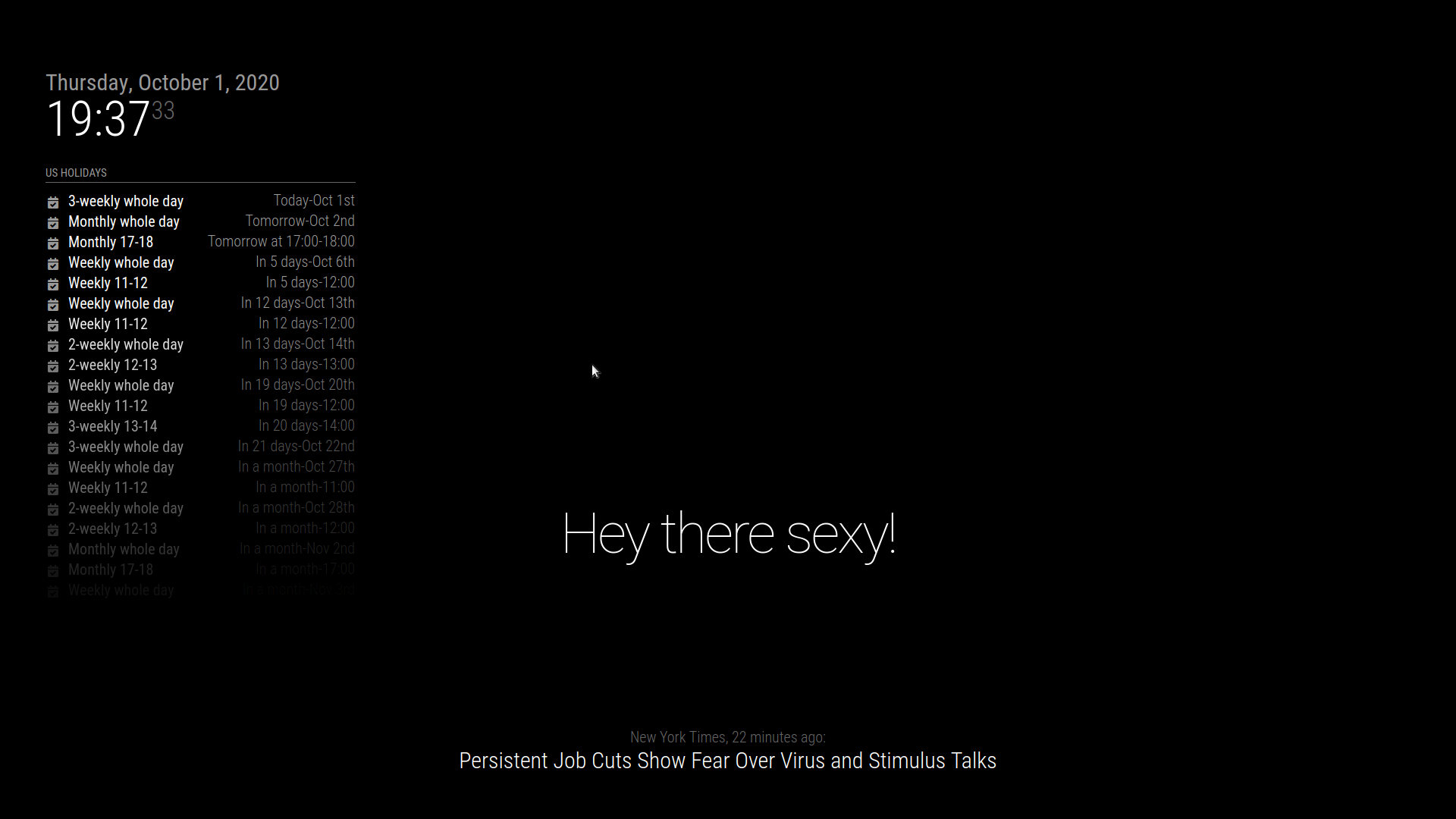
@SwissChemist can u look at this, your cal, in your timezone, 2.13 no modifications
showEnd:true,
maximumEntries:25,
-
@sdetweil
It’s getting better and better, great!The only event, which is not correct yet, ist the 3-weekly 13-14. This should be in 21 days (Oct 22nd), exactly like the 3-weekly whole day. The following ones could be better controlled in an absolute time format…
-
@SwissChemist no… that cal entry says wednesdays, so the 21st, rule wins on exact days, start/end win on time
BEGIN:VEVENT CREATED:20200928T173453Z DTEND;TZID=Europe/Zurich:20201001T140000 DTSTAMP:20200928T182743Z DTSTART;TZID=Europe/Zurich:20201001T130000 LAST-MODIFIED:20200928T182742Z RRULE:FREQ=WEEKLY;INTERVAL=3;BYDAY=WE < ------- SEQUENCE:0 SUMMARY:3-weekly 13-14 UID:A7C8DBD0-0AA9-468B-A3F8-A5F97B797C11 URL;VALUE=URI: END:VEVENT -
Ok, then it’s my error again. In the meantime I have corrected my calendar entry. Would you need a new calenendar export, or would you like to send me your fix to test it here?
-
@SwissChemist install/upgrade to 2.13, should fix it
https://github.com/sdetweil/MagicMirror_scripts
I changed cal entry to TH, now shows 21 days, on the 22nd
Hello! It looks like you're interested in this conversation, but you don't have an account yet.
Getting fed up of having to scroll through the same posts each visit? When you register for an account, you'll always come back to exactly where you were before, and choose to be notified of new replies (either via email, or push notification). You'll also be able to save bookmarks and upvote posts to show your appreciation to other community members.
With your input, this post could be even better 💗
Register Login