MagicMirror Forum
    • Recent
    • Tags
    • Unsolved
    • Solved
    • MagicMirror² Repository
    • Documentation
    • 3rd-Party-Modules
    • Donate
    • Discord
    • Register
    • Login
    A New Chapter for MagicMirror: The Community Takes the Lead
    Read the statement by Michael Teeuw here.

    Are you tired of editing config.js, or have trouble doing it, see my new module

    Scheduled Pinned Locked Moved Utilities
    293 Posts 28 Posters 400.9k Views 31 Watching
    Loading More Posts
    • Oldest to Newest
    • Newest to Oldest
    • Most Votes
    Reply
    • Reply as topic
    Log in to reply
    This topic has been deleted. Only users with topic management privileges can see it.
    • S Do not disturb
      sdetweil @Dinschal
      last edited by

      @dinschal can u show me the generated config.js for clock? (just that module)

      it changes the value in config.js when I change it in the form…

      and send me the debug output again

      Sam

      How to add modules

      learning how to use browser developers window for css changes

      D 2 Replies Last reply Reply Quote 0
      • D Offline
        Dinschal @sdetweil
        last edited by

        @sdetweil oh no not the debug output again :D
        give me just one second ;)

        1 Reply Last reply Reply Quote 0
        • D Offline
          Dinschal @sdetweil
          last edited by Dinschal

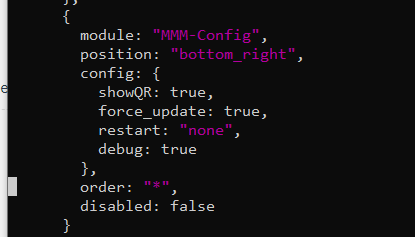
          @sdetweil there is no debug: true in the config anymore :( can i insert it myself?

          i tried it, but it stopped here

          51be229e-e264-4236-af77-d6ec547e75b8-image.png

          S 1 Reply Last reply Reply Quote 0
          • S Do not disturb
            sdetweil @Dinschal
            last edited by

            @dinschal said in Are you tired of editing config.js, or have trouble doing it, see my new module:

            same if i insert UTC+1 into the timezone

            i debugged the clock module

            UTC works

            UTC +1 doesn’t
            UTC -1 doesn’t

            so I am not sure what it wants

            Etc/UTC+1 doesn’t

            Sam

            How to add modules

            learning how to use browser developers window for css changes

            D 1 Reply Last reply Reply Quote 0
            • S Do not disturb
              sdetweil @Dinschal
              last edited by

              @dinschal

              make sure there is a comma on the line before where u added debug:true to my module

              Sam

              How to add modules

              learning how to use browser developers window for css changes

              D 1 Reply Last reply Reply Quote 0
              • D Offline
                Dinschal @sdetweil
                last edited by

                @sdetweil in germany we have summertime and wintertime… so we have utc and utc +1 :D

                S 1 Reply Last reply Reply Quote 0
                • D Offline
                  Dinschal @sdetweil
                  last edited by

                  @sdetweil i did it this way…

                  0c03d8cf-e72e-4b13-96f4-e30394f76d74-image.png

                  S 1 Reply Last reply Reply Quote 0
                  • S Do not disturb
                    sdetweil @Dinschal
                    last edited by sdetweil

                    @dinschal said in Are you tired of editing config.js, or have trouble doing it, see my new module:

                    in germany we have summertime and wintertime… so we have utc and utc +1

                    yes, understand… the clock module should auto adjust…

                    we just changed to std time last sunday and the clock adjusted… actually , the system changed reported time

                    but I was saying I debugged using the timeZone option in config.js for clock, and cannot get any option other than ‘UTC’
                    to work…

                    I don’t understand what string it expects

                    it has a time object and does

                    time_object.tz(config.timeZone)

                    to force the time to a particular timezone… except only UTC works for me.

                    Sam

                    How to add modules

                    learning how to use browser developers window for css changes

                    1 Reply Last reply Reply Quote 0
                    • S Do not disturb
                      sdetweil @Dinschal
                      last edited by sdetweil

                      @dinschal yes, looks good
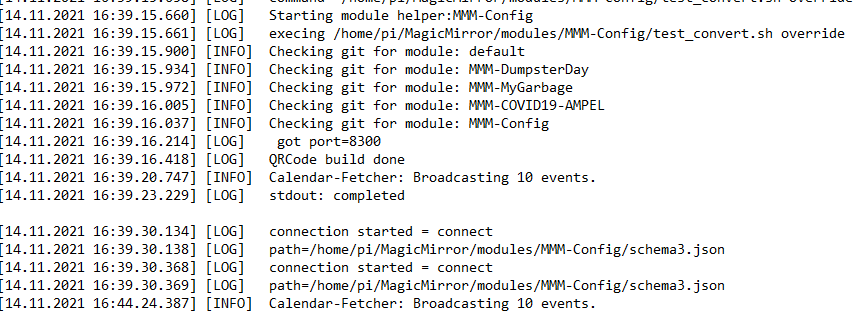
                      what does the debug output say?

                      Sam

                      How to add modules

                      learning how to use browser developers window for css changes

                      D 1 Reply Last reply Reply Quote 0
                      • D Offline
                        Dinschal @sdetweil
                        last edited by

                        @sdetweil the output stopped @calendar-fetcher: Broadcasting 10 events
                        71595619-dc3d-437a-93fe-a3c7679a4f38-image.png

                        S 1 Reply Last reply Reply Quote 0
                        • S Do not disturb
                          sdetweil @Dinschal
                          last edited by

                          @dinschal yes,… then u have to press save on the form…

                          Sam

                          How to add modules

                          learning how to use browser developers window for css changes

                          D 2 Replies Last reply Reply Quote 0
                          • D Offline
                            Dinschal @sdetweil
                            last edited by

                            @sdetweil i send it

                            1 Reply Last reply Reply Quote 0
                            • D Offline
                              Dinschal @sdetweil
                              last edited by

                              @sdetweil hey sam there is a update for your module?

                              S 1 Reply Last reply Reply Quote 0
                              • S Do not disturb
                                sdetweil @Dinschal
                                last edited by

                                @dinschal yes… see my email…

                                Sam

                                How to add modules

                                learning how to use browser developers window for css changes

                                D 1 Reply Last reply Reply Quote 0
                                • D Offline
                                  Dinschal @sdetweil
                                  last edited by

                                  @sdetweil a thanks… yes everything is working now…

                                  S 1 Reply Last reply Reply Quote 0
                                  • S Do not disturb
                                    sdetweil @Dinschal
                                    last edited by

                                    @dinschal thanks for your help!!..

                                    Sam

                                    How to add modules

                                    learning how to use browser developers window for css changes

                                    D 1 Reply Last reply Reply Quote 0
                                    • D Offline
                                      Dinschal @sdetweil
                                      last edited by

                                      @sdetweil thanks for your patience ;)

                                      next step is to try the NewPIR with the PIRSensor ;) and then create a 10 min presentation for students 🤮🤮🤮🤮

                                      1 Reply Last reply Reply Quote 1
                                      • J Offline
                                        josh45631
                                        last edited by

                                        Is there any way you could break down the setup even more for dummies like myself? I can’t seem to access the configuration form in browser. Do I have to use a browser on the raspberry pi? Can it be a computer on my local network? When I try to access http://192.168.2.13:8300/modules/MMM-Config/review from my PC all I get is “Cannot GET /modules/MMM-Config/review”
                                        Same with
                                        http://localhost:8300/modules/MMM-Config/review
                                        from the pi itself
                                        What am I doing wrong?

                                        S 1 Reply Last reply Reply Quote 0
                                        • S Do not disturb
                                          sdetweil @josh45631
                                          last edited by sdetweil

                                          @josh45631 for access from a system other than the machine running mm, the mm config.js has to allow it

                                          address:"0.0.0.0",
                                          ipWhitelist:[],
                                          

                                          by default the config is set to address:“localhost”
                                          which means ONLY apps inside the same machine can connect

                                          do you have showQR:true, in the module config section?
                                          if so does the qr show on the mm screen?
                                          can u show me the module entry from config.js

                                          also when u start mm, the module puts out a couple messages at startup

                                          so look at the messages where u start mm
                                          either by npm start or pm2
                                          if pm2, then the command
                                          pm2 logs --lines=50

                                          also the url to the form is

                                          http://mm_address:mm_port/modules/MMM-Config/review

                                          mm_port is 8080 by default not 8300

                                          Sam

                                          How to add modules

                                          learning how to use browser developers window for css changes

                                          J 1 Reply Last reply Reply Quote 0
                                          • J Offline
                                            josh45631 @sdetweil
                                            last edited by

                                            @sdetweil I did have showQR set to true in the module config, but the QR code wasn’s showing up.

                                            After changing the address in the mm config from localhost to 0.0.0.0 the QR code is now appearing on the magic mirror.

                                            Now when I try to access the form from my pc I get “This device is not allowed to access your mirror.
                                            Please check your config.js or config.js.sample to change this.”
                                            and the terminal on the pi says “Access denied to IP address: 192.168.2.5”

                                            I tried to add it to the ipWhitelist, but I don’t think I have the proper format because it’s not working?

                                            Module entry is:

                                            modules: [
                                                           {
                                                                   module:"MMM-Config",
                                                                   position:"top_right",  // the QR code (if requested) will appear here
                                                                   config:{
                                            
                                                           }
                                                           },
                                                           {
                                                                   module: "alert",
                                                           },
                                                           {
                                                                   module: "updatenotification",
                                                                   position: "top_bar"
                                                           },
                                                           {
                                                                   module: "clock",
                                                                   position: "top_left"
                                                           },
                                                           {
                                                                   module: "calendar",
                                                                   header: "US Holidays",
                                                                   position: "top_left",
                                                                   config: {
                                                                           calendars: [
                                                                                   {
                                                                                           symbol: "calendar-check",
                                                                                           url: "webcal://www.calendarlabs.com/ical-calendar/ics/76/US_Holidays.ics"
                                                                                   }
                                                                           ]
                                                                   }
                                            

                                            etc

                                            This is how I tried to whitelist my computers ip

                                                ipWhitelist: ["127.0.0.1", "::ffff:127.0.0.1", "::1","192.168.2.5"],    // Set [] to allow all IP addresses


                                            I appreciate your help very much!

                                            S 1 Reply Last reply Reply Quote 0

                                            Hello! It looks like you're interested in this conversation, but you don't have an account yet.

                                            Getting fed up of having to scroll through the same posts each visit? When you register for an account, you'll always come back to exactly where you were before, and choose to be notified of new replies (either via email, or push notification). You'll also be able to save bookmarks and upvote posts to show your appreciation to other community members.

                                            With your input, this post could be even better 💗

                                            Register Login

                                            • 1
                                            • 2
                                            • 7
                                            • 8
                                            • 9
                                            • 10
                                            • 11
                                            • 14
                                            • 15
                                            • 9 / 15
                                            • First post
                                              Last post
                                            Enjoying MagicMirror? Please consider a donation!
                                            MagicMirror created by Michael Teeuw.
                                            Forum managed by Sam, technical setup by Karsten.
                                            This forum is using NodeBB as its core | Contributors
                                            Contact | Privacy Policy