Read the statement by Michael Teeuw here.
Running on Pi Zero 2 W?
-
I am interested to know if anyone has successfully run MagicMirror on the new Pi Zero 2?
I know that electron won’t run on the old Pi Zero, which means that it is hard getting MagicMirror to run successfully on that hardware platform.
Presumably being arm64 instead of armel (have I got that right?) electron will now work.Thanks.
-
@undeterred I have one on order, should be here next week
my install script uses server mode with chromium as the browser on pi0w
see
https://github.com/sdetweil/MagicMirror_scriptspi0w is armv6l
pi3/4 are armv7l, in 32 bit mode
and
armv8l in 64 bit modeI don’t expect any issues running on pi0w-2
-
@sdetweil said in Running on Pi Zero 2 W?:
as addition: pi zero 2 is
armv7lnice article: https://blog.alexellis.io/raspberry-pi-zero-2/
-
@sdetweil Be interesting to read about your experience on installing on the pi0w-2.
I have a small 4" magicmirror displaying one module at a time using the pi0w. The animations are sometimes laggy however, hence my interest at upgrading the hardware.
Thanks.
-
@undeterred I am trying to get it working, just got my pi zero w2 today. doesn’t work using the lite version of pi, trying the desktop version now. Not sure I fully understand how chromium is supposed to be installed by the script.
-
@musson chromium is installed on the full desktop (which is required because the browser draws graphics)
but the script only sets up for chromium if the electron install fails(sometimes on x86) , or is not available…(armv6l)
this should be same as pi3…(armv7l)
-
@musson mm never works with lite version
from the doc , under requirements
NOTE To run Electron, you need a desktop environment. Using a Lite Version of Raspbian will not work. -
@sdetweil ok, trying desktop now.
-
@musson mine doesnt come til tuesday
-
At one point I had MagicMirror working on a lite version, I installed X11 and Chromium but when Electron updated and needed a node.js version that didn’t work on the arm6 CPU I gave up and used a pi 4.
I want to free up the pi 4 and am hoping I can use the new pi zero 2w for MagicMirror. -
@musson said in Running on Pi Zero 2 W?:
MagicMirror working on a lite version, I installed X11 and Chromium
well, thats not lite really!..
reports are its 5x faster than pi 0… same as pi 3
don’t remember how much memory on board…make sure to increase the swap space…
and maybe run off a USB SSD (I boot most of mine from sd card, but run from ssd…TGW (Total Gigabytes Written, measure of SSD memory capacity usage) on micro SD is pretty low
-
@sdetweil Its working with the desktop version!!!
Thanks for you help and comments.
-
@undeterred I should receive mine next week and look forward to building a mirror to check performance.
-
@smartreflectons Its quite responsive.
-
great power analysis of pi2w
https://hackaday.com/2021/11/01/the-pi-zero-2-w-is-the-most-efficient-pi/
-
actually PI os 64 bit now shows aarch64, as does ubuntu on pi. (and jetson nano as I recall)…
-
I am running it a Pi Zero 2W and it seems ok
New to the Magic mirror scene so still learning but up and running on an old 19" toshiba TV -
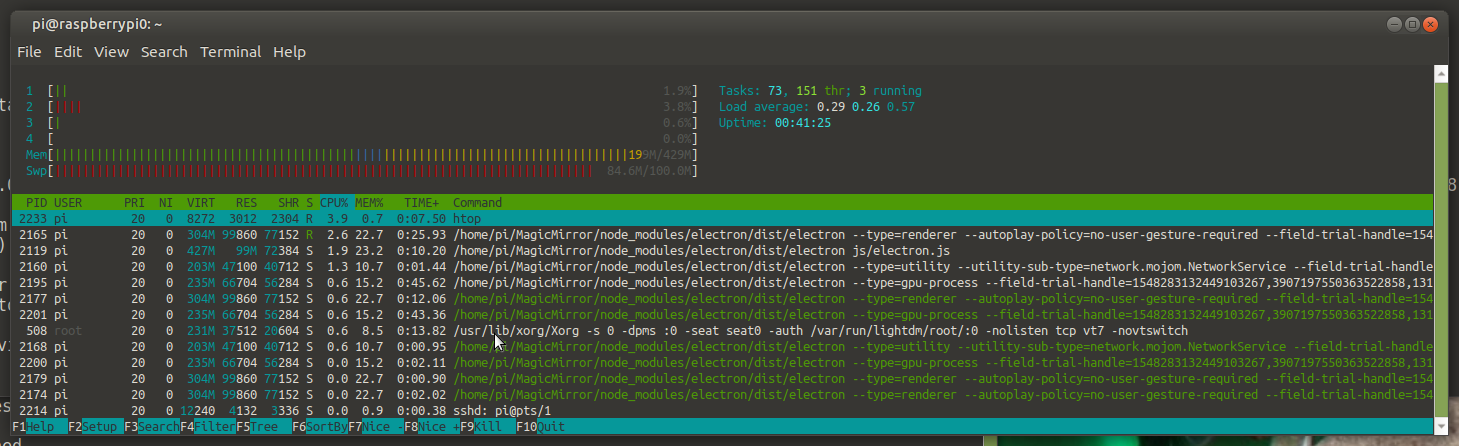
@lofty73 got mine today, unplugged the pi 0w, and moved the sd card over… up we run…
installed electron (cause it wasn’t on the armv6)
and runs nice…
pretty low cpu usage
-
@sdetweil Thank you for the test. I ordered one today after I read your post!
-
@majorc another benchmark report
https://medium.com/@ghalfacree/benchmarking-the-raspberry-pi-zero-2-w-b868accdbb50

Hello! It looks like you're interested in this conversation, but you don't have an account yet.
Getting fed up of having to scroll through the same posts each visit? When you register for an account, you'll always come back to exactly where you were before, and choose to be notified of new replies (either via email, or push notification). You'll also be able to save bookmarks and upvote posts to show your appreciation to other community members.
With your input, this post could be even better 💗
Register Login