MagicMirror Forum
    • Recent
    • Tags
    • Unsolved
    • Solved
    • MagicMirror² Repository
    • Documentation
    • 3rd-Party-Modules
    • Donate
    • Discord
    • Register
    • Login
    A New Chapter for MagicMirror: The Community Takes the Lead
    Read the statement by Michael Teeuw here.

    Calendar events showing on wrong day.

    Scheduled Pinned Locked Moved Unsolved Troubleshooting
    66 Posts 3 Posters 29.1k Views 3 Watching
    Loading More Posts
    • Oldest to Newest
    • Newest to Oldest
    • Most Votes
    Reply
    • Reply as topic
    Log in to reply
    This topic has been deleted. Only users with topic management privileges can see it.
    • S Offline
      sdetweil @Coolie1101
      last edited by

      @coolie1101 said in Calendar events showing on wrong day.:

      Config Change

      you don’t change config, you are changing the module source code, right?

      4 lines in 1 file

      Sam

      How to add modules

      learning how to use browser developers window for css changes

      Coolie1101C 1 Reply Last reply Reply Quote 0
      • Coolie1101C Offline
        Coolie1101 @sdetweil
        last edited by Coolie1101

        @sdetweil Yes, \modules\default\calendar\calendarutils.js

        I forgot to post the event in my previous post, see below.

        BEGIN:VEVENT
        DTSTART:20191113T100000Z
        DTEND:20191113T150000Z
        DTSTAMP:20211119T124216Z
        UID:6h0hrr7t2gr6qopi**********@google.com
        RECURRENCE-ID:20191112T100000Z
        CREATED:20211026T075843Z
        DESCRIPTION:
        LAST-MODIFIED:20211026T080254Z
        LOCATION:
        SEQUENCE:1
        STATUS:CONFIRMED
        SUMMARY:YARD WASTE
        TRANSP:OPAQUE
        END:VEVENT
        
        S 2 Replies Last reply Reply Quote 0
        • S Offline
          sdetweil @Coolie1101
          last edited by sdetweil

          @coolie1101 can us show me the messages where u start MM? (after doing the edit)

          should include stuff like this

          [18.11.2021 15:15.55.588] [LOG]   Connecting socket for: updatenotification
          [18.11.2021 15:15.55.588] [LOG]   Connecting socket for: calendar
          [18.11.2021 15:15.55.588] [LOG]   Starting node helper for: calendar
          [18.11.2021 15:15.55.588] [LOG]   Connecting socket for: newsfeed
          [18.11.2021 15:15.55.588] [LOG]   Starting node helper for: newsfeed
          [18.11.2021 15:15.55.588] [LOG]   Connecting socket for: MMM-Config
          [18.11.2021 15:15.55.588] [LOG]   Starting module helper: MMM-Config
          [18.11.2021 15:15.55.588] [LOG]   Sockets connected & modules started ...
          [18.11.2021 15:15.55.665] [LOG]   Launching application.
          [18.11.2021 15:15.59.955] [LOG]   Create new calendarfetcher for url: http://localhost:8090/modules/default/calendar/canada.ics - Interval: 300000
          [18.11.2021 15:15.59.964] [LOG]   Create new newsfetcher for url: https://rss.nytimes.com/services/xml/rss/nyt/HomePage.xml - Interval: 300000
          

          (if using pm2, stop instance first, pm2 stop all)
          npm start >somefile.txt

          then ctrl-c after MM shows cal info (if any, or error)

          then examine somefile.txt

          Sam

          How to add modules

          learning how to use browser developers window for css changes

          Coolie1101C 1 Reply Last reply Reply Quote 0
          • S Offline
            sdetweil @Coolie1101
            last edited by sdetweil

            @coolie1101 do you have the current version of the vevent? as that one expired in 2019, and has no repeating rule

            but when I adjusted to this year and nov 21

            BEGIN:VEVENT
            DTSTART:20211121T100000Z
            DTEND:20211121T150000Z
            DTSTAMP:20211119T124216Z
            UID:6h0hrr7t2gr6qopifribble@google.com
            RECURRENCE-ID:20191112T100000Z
            CREATED:20211026T075843Z
            DESCRIPTION:
            LAST-MODIFIED:20211026T080254Z
            LOCATION:
            SEQUENCE:1
            STATUS:CONFIRMED
            SUMMARY:YARD WASTE
            TRANSP:OPAQUE
            END:VEVENT
            

            i see the right display

            [19.11.2021 07:40.05.433] [DEBUG] startDate (local): Sun Nov 21 2021 04:00:00 GMT-0600 (Central Standard Time)
            [19.11.2021 07:40.05.433] [DEBUG] endDate (local): Sun Nov 21 2021 09:00:00 GMT-0600 (Central Standard Time)
            

            as there is no timezone associated with that time. and I am CST

            Sam

            How to add modules

            learning how to use browser developers window for css changes

            Coolie1101C 1 Reply Last reply Reply Quote 0
            • Coolie1101C Offline
              Coolie1101 @sdetweil
              last edited by Coolie1101

              @sdetweil Yes, see below.

              BEGIN:VEVENT
              DTSTART;TZID=America/New_York:20210406T050000
              DTEND;TZID=America/New_York:20210406T100000
              RRULE:FREQ=WEEKLY;WKST=SU;UNTIL=20211230T045959Z;BYDAY=TU
              DTSTAMP:20211119T124216Z
              UID:0v89h5cit8nq6m************@google.com
              CREATED:20211026T075843Z
              DESCRIPTION:
              LAST-MODIFIED:20211026T080254Z
              LOCATION:
              SEQUENCE:1
              STATUS:CONFIRMED
              SUMMARY:YARD WASTE
              TRANSP:OPAQUE
              END:VEVENT
              

              I can share that calendar with you if it makes it easier for you to test.

              S 2 Replies Last reply Reply Quote 0
              • S Offline
                sdetweil @Coolie1101
                last edited by

                @coolie1101 said in Calendar events showing on wrong day.:

                I can share that calendar with you if it makes it easier for you to test.

                no, i just create an ics file… easy cut/paste

                Sam

                How to add modules

                learning how to use browser developers window for css changes

                1 Reply Last reply Reply Quote 0
                • Coolie1101C Offline
                  Coolie1101 @sdetweil
                  last edited by

                  @sdetweil said in Calendar events showing on wrong day.:

                  npm start >somefile.txt

                  What is this suppose to do?, seems something is missing from the command.

                  S 1 Reply Last reply Reply Quote 0
                  • S Offline
                    sdetweil @Coolie1101
                    last edited by

                    @coolie1101 it directs the output of the command (npm start) to a file (somefile.txt)

                    this is normal file output redirection, same as on windows

                    the normal MM startup output looks like this

                    
                    > magicmirror@2.17.1 start /home/sam/MagicMirror
                    > DISPLAY="${DISPLAY:=:0}" ./node_modules/.bin/electron js/electron.js
                    
                    [19.11.2021 07:50.19.980] [LOG]   Starting MagicMirror: v2.17.1
                    [19.11.2021 07:50.19.981] [LOG]   Loading config ...
                    [19.11.2021 07:50.19.982] [LOG]   Loading module helpers ...
                    [19.11.2021 07:50.19.982] [LOG]   trying to load module=alert
                    [19.11.2021 07:50.19.982] [LOG]   No helper found for module: alert.
                    [19.11.2021 07:50.19.982] [LOG]   trying to load module=MMM-Tools
                    [19.11.2021 07:50.19.999] [LOG]   Initializing new module helper ...
                    [19.11.2021 07:50.19.999] [LOG]   Module helper loaded: MMM-Tools
                    [19.11.2021 07:50.19.999] [LOG]   trying to load module=updatenotification
                    [19.11.2021 07:50.20.000] [LOG]   Initializing new module helper ...
                    [19.11.2021 07:50.20.000] [LOG]   Module helper loaded: updatenotification
                    [19.11.2021 07:50.20.000] [LOG]   trying to load module=clock
                    

                    etc

                    Sam

                    How to add modules

                    learning how to use browser developers window for css changes

                    1 Reply Last reply Reply Quote 0
                    • S Offline
                      sdetweil @Coolie1101
                      last edited by sdetweil

                      @coolie1101 after copying your new cal entry to ics, and running… it looks good to me…
                      (with the edited calendarutils.js) (I am central US time)

                      this ics with the other persons info in too
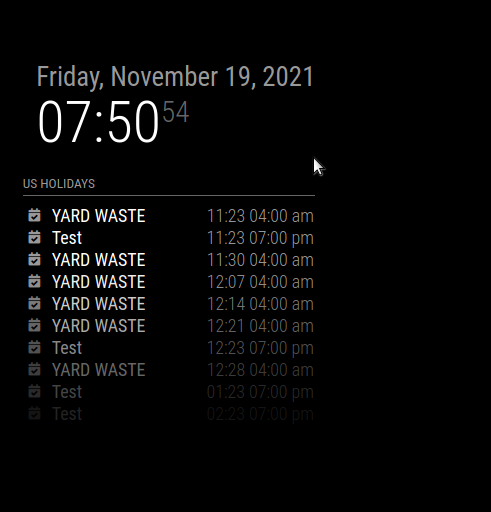
                      Screenshot at 2021-11-19 07-59-58.png

                      Sam

                      How to add modules

                      learning how to use browser developers window for css changes

                      Coolie1101C 2 Replies Last reply Reply Quote 0
                      • Coolie1101C Offline
                        Coolie1101 @sdetweil
                        last edited by Coolie1101

                        @sdetweil Maybe I’m executing it in the wrong order, do i need to “pm2 start mm” and then do “npm start >somefile.txt”? eitherway, there isn’t error log entries for calendar.

                        0|mm  | [19.11.2021 08:55.52.292] [LOG]
                        0|mm  | Create new calendarfetcher for url: http://www.calendarlabs.com/ical-calendar/ics/76/US_Holidays.ics - Interval: 900000
                        0|mm  | [19.11.2021 08:55.52.362] [LOG]
                        0|mm  | Create new calendarfetcher for url: https://calendar.google.com/calendar/ical/p07n98go11onam************%40group.calendar.google.com/public/basic.ics - Interval: 900000
                        0|mm  | [19.11.2021 08:55.52.434] [LOG]
                        0|mm  | Create new calendarfetcher for url: https://calendar.google.com/calendar/ical/olrn3c2sf2k023************%40group.calendar.google.com/private-7d055c9f2a8b6bbfe674************/basic.ics - Interval: 900000
                        0|mm  | [19.11.2021 08:55.52.448] [LOG]
                        0|mm  | Create new calendarfetcher for url: https://calendar.google.com/calendar/ical/mvdgcjroualavv************%40group.calendar.google.com/public/basic.ics - Interval: 900000
                        

                        Calendar Display
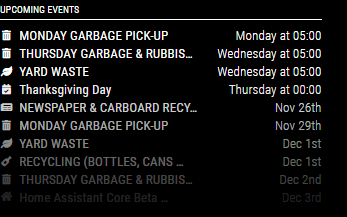
                        f7cd3c06-7999-4e0a-a697-53cdfe2a225a-image.png

                        S 1 Reply Last reply Reply Quote 0
                        • S Offline
                          sdetweil @Coolie1101
                          last edited by

                          @coolie1101 you cant run with pm2 AND with npm start

                          so, thats why I said

                          pm2 stop all
                          

                          THEN (in the MagicMirror folder)

                          npm start
                          

                          Sam

                          How to add modules

                          learning how to use browser developers window for css changes

                          Coolie1101C 1 Reply Last reply Reply Quote 0
                          • Coolie1101C Offline
                            Coolie1101 @sdetweil
                            last edited by

                            @sdetweil said in Calendar events showing on wrong day.:

                            (I am central US time)

                            Don’t sleep much :grinning_face:

                            S 1 Reply Last reply Reply Quote 0
                            • S Offline
                              sdetweil @Coolie1101
                              last edited by

                              @coolie1101 said in Calendar events showing on wrong day.:

                              Don’t sleep much

                              its past 8am… been up since 6 (cat wakes me reliably)

                              Sam

                              How to add modules

                              learning how to use browser developers window for css changes

                              1 Reply Last reply Reply Quote 1
                              • Coolie1101C Offline
                                Coolie1101 @sdetweil
                                last edited by

                                @sdetweil said in Calendar events showing on wrong day.:

                                @coolie1101 you cant run with pm2 AND with npm start

                                so, thats why I said

                                pm2 stop all
                                

                                THEN (in the MagicMirror folder)

                                npm start
                                

                                Got it, I edited the “calendarutils.js” file again and restarted, no error or calendar entries in log, but the display is the same.

                                S 2 Replies Last reply Reply Quote 0
                                • S Offline
                                  sdetweil @Coolie1101
                                  last edited by

                                  @coolie1101 weird

                                  edit config.js and change

                                  	logLevel: ["INFO", "LOG", "WARN", "ERROR"]
                                  

                                  to
                                  this

                                  	logLevel: ["INFO", "LOG", "WARN","ERROR","DEBUG"]
                                  

                                  and run again, then u will see the calendar processing

                                  Sam

                                  How to add modules

                                  learning how to use browser developers window for css changes

                                  Coolie1101C 1 Reply Last reply Reply Quote 0
                                  • S Offline
                                    sdetweil @Coolie1101
                                    last edited by

                                    @coolie1101 and a reminder, there are TWO sections of code u have to comment out

                                    two areas of two lines each

                                    Sam

                                    How to add modules

                                    learning how to use browser developers window for css changes

                                    Coolie1101C 1 Reply Last reply Reply Quote 0
                                    • Coolie1101C Offline
                                      Coolie1101 @sdetweil
                                      last edited by

                                      @sdetweil Yes.

                                      Line 348 & 358

                                      //								if (event.start.tz === moment.tz.guess()) {
                                      									// if the date hour is less than the offset
                                      									if (24 - dh < Math.abs(dateoffset / 60)) {
                                      										// apply the correction to the date/time back to right day
                                      										date = new Date(date.getTime() + Math.abs(24 * 60) * 60000);
                                      										// the duration was calculated way back at the top before we could correct the start time..
                                      										// fix it for this event entry
                                      										//duration = 24 * 60 * 60 * 1000;
                                      										Log.debug("new recurring date2 is " + date);
                                      									}
                                      //								}
                                      

                                      Line 376 & 386

                                      //								if (event.start.tz === moment.tz.guess()) {
                                      									// if the date hour is less than the offset
                                      									if (24 - dh < Math.abs(dateoffset / 60)) {
                                      										// apply the correction to the date/time back to right day
                                      										date = new Date(date.getTime() + Math.abs(24 * 60) * 60000);
                                      										// the duration was calculated way back at the top before we could correct the start time..
                                      										// fix it for this event entry
                                      										//duration = 24 * 60 * 60 * 1000;
                                      										Log.debug("new recurring date2 is " + date);
                                      									}
                                      //								}
                                      
                                      1 Reply Last reply Reply Quote 0
                                      • Coolie1101C Offline
                                        Coolie1101 @sdetweil
                                        last edited by

                                        @sdetweil said in Calendar events showing on wrong day.:

                                        and run again, then u will see the calendar processing

                                        Will it work like this “npm start >cal_test_log.txt | grep calendar”?

                                        S 1 Reply Last reply Reply Quote 0
                                        • S Offline
                                          sdetweil @Coolie1101
                                          last edited by

                                          @coolie1101 said in Calendar events showing on wrong day.:

                                          Will it work like this

                                          no…

                                          something like this (couple debug lines added for my testing)

                                          [19.11.2021 07:50.24.603] [DEBUG] Processing entry...
                                          [19.11.2021 07:50.24.603] [DEBUG] 
                                          Event: {"type":"VEVENT","params":[],"start":"2021-04-06T09:00:00.000Z","datetype":"date-time","end":"2021-04-06T14:00:00.000Z","rrule":{"_cache":{"all":false,"before":[],"after":[],"between":[]},"origOptions":{"dtstart":"2021-04-06T09:00:00.000Z","freq":2,"wkst":{"weekday":6},"until":"2021-12-30T04:59:59.000Z","byweekday":[{"weekday":1}]},"options":{"freq":2,"dtstart":"2021-04-06T09:00:00.000Z","interval":1,"wkst":6,"count":null,"until":"2021-12-30T04:59:59.000Z","bysetpos":null,"bymonth":null,"bymonthday":[],"bynmonthday":[],"byyearday":null,"byweekno":null,"byweekday":[1],"bynweekday":null,"byhour":[9],"byminute":[0],"bysecond":[0],"byeaster":null}},"dtstamp":"2021-11-19T12:42:16.000Z","uid":"0v89h5cit8nq6mfribble@google.com","created":"2021-10-26T07:58:43.000Z","description":"","lastmodified":"2021-10-26T08:02:54.000Z","location":"","sequence":"1","status":"CONFIRMED","summary":"YARD WASTE","transparency":"OPAQUE"}
                                          [19.11.2021 07:50.24.603] [DEBUG] startDate (local): Tue Apr 06 2021 04:00:00 GMT-0500 (Central Daylight Time)
                                          [19.11.2021 07:50.24.603] [DEBUG] endDate (local): Tue Apr 06 2021 09:00:00 GMT-0500 (Central Daylight Time)
                                          [19.11.2021 07:50.24.604] [DEBUG] duration: 18000000
                                          [19.11.2021 07:50.24.604] [DEBUG] title: YARD WASTE
                                          [19.11.2021 07:50.24.604] [DEBUG] Search for recurring events between: Fri Nov 19 2021 07:50:24 GMT-0600 (Central Standard Time) and Fri Nov 18 2022 23:59:59 GMT-0600 (Central Standard Time)
                                          [19.11.2021 07:50.24.605] [DEBUG] Title: YARD WASTE, with dates: ["2021-11-23T09:00:00.000Z","2021-11-30T09:00:00.000Z","2021-12-07T09:00:00.000Z","2021-12-14T09:00:00.000Z","2021-12-21T09:00:00.000Z","2021-12-28T09:00:00.000Z"]
                                          [19.11.2021 07:50.24.605] [DEBUG] event.recurrences: undefined
                                          [19.11.2021 07:50.24.605] [DEBUG]  recurring date is Tue Nov 23 2021 03:00:00 GMT-0600 (Central Standard Time) offset is 360
                                          [19.11.2021 07:50.24.605] [DEBUG]  recurring date is Tue Nov 23 2021 03:00:00 GMT-0600 (Central Standard Time) offset is 6 Hour is 03
                                          [19.11.2021 07:50.24.606] [DEBUG] not full day
                                          [19.11.2021 07:50.24.606] [DEBUG] offset positive
                                          [19.11.2021 07:50.24.606] [DEBUG] Corrected startDate (local): Tue Nov 23 2021 03:00:00 GMT-0600 (Central Standard Time)
                                          [19.11.2021 07:50.24.606] [DEBUG] initial tz=America/New_York
                                          [19.11.2021 07:50.24.606] [DEBUG] corrected tz=America/New_York
                                          [19.11.2021 07:50.24.606] [DEBUG] start date/time=Tue Apr 06 2021 04:00:00 GMT-0500 (Central Daylight Time)
                                          [19.11.2021 07:50.24.606] [DEBUG] start offset=-240
                                          [19.11.2021 07:50.24.606] [DEBUG] start date/time w tz =Tue Apr 06 2021 04:00:00 GMT-0500 (Central Daylight Time)
                                          [19.11.2021 07:50.24.606] [DEBUG] event date=Tue Nov 23 2021 03:00:00 GMT-0600 (Central Standard Time)
                                          [19.11.2021 07:50.24.606] [DEBUG] event offset=-300 hour=4 event date=Tue Nov 23 2021 03:00:00 GMT-0600 (Central Standard Time)
                                          [19.11.2021 07:50.24.606] [DEBUG] offset
                                          [19.11.2021 07:50.24.606] [DEBUG] adjust up 1 hour dst change
                                          [19.11.2021 07:50.24.606] [DEBUG] adjustHours=1
                                          [19.11.2021 07:50.24.606] [DEBUG] duration: 18000000
                                          [19.11.2021 07:50.24.607] [DEBUG] saving event: false
                                          

                                          Sam

                                          How to add modules

                                          learning how to use browser developers window for css changes

                                          Coolie1101C 1 Reply Last reply Reply Quote 0
                                          • Coolie1101C Offline
                                            Coolie1101 @sdetweil
                                            last edited by

                                            @sdetweil It’s running, how long should I wait before checking the output file?, as there is no output in the ssh window.

                                            S 1 Reply Last reply Reply Quote 0

                                            Hello! It looks like you're interested in this conversation, but you don't have an account yet.

                                            Getting fed up of having to scroll through the same posts each visit? When you register for an account, you'll always come back to exactly where you were before, and choose to be notified of new replies (either via email, or push notification). You'll also be able to save bookmarks and upvote posts to show your appreciation to other community members.

                                            With your input, this post could be even better 💗

                                            Register Login

                                            • 1
                                            • 2
                                            • 3
                                            • 4
                                            • 3 / 4
                                            • First post
                                              Last post
                                            Enjoying MagicMirror? Please consider a donation!
                                            MagicMirror created by Michael Teeuw.
                                            Forum managed by Sam, technical setup by Karsten.
                                            This forum is using NodeBB as its core | Contributors
                                            Contact | Privacy Policy