Read the statement by Michael Teeuw here.
Another way of identifying which event is associated with which Calendar
-
I know that I can use icons (https://fontawesome.com/v4.7/icons/) but, to be honest, I don’t want to have to remember that my calendar is associated with a ‘bar-chart’ and my wife’s is associated with a ‘battery-full’.
I would prefer to put in M for me and W for wife. Can I do that … or do I have to wait for Mr Icon Creator to create letter based icons?
-
@ruff-hi
Why don’t you work with different colors{ module: "calendar", header: "Events", position: "top_left", maximumEntries: "3", config: { colored: true, tableClass: "small", calendars: [ { symbol: "fas fa-trash", color: "rgb(185, 62, 38)", maximumEntries: "2", url: "https://calendar.google.com/calendar/ical/xxxxx/public/basic.ics" }, { symbol: "far fa-calendar-alt", color: "rgb(250, 253, 140)", maximumEntries: "2", url: "webcal://p102-caldav.icloud.com/published/2/xxxx" }, { symbol: "fas fa-house-user", maximumEntries: "2", color: "rgb(121, 0, 86)", url: "https://calendar.google.com/calendar/ical/xxx/basic.ics" } ] } },This way you know excatly which calendar you are looking at.
Alternatively you cloud add two different instances of the calendar module
{ module: "calendar", header: "Wife", position: "top_left", maximumEntries: "3", config: { colored: true, tableClass: "small", calendars: [ { symbol: "fas fa-trash", color: "rgb(185, 62, 38)", maximumEntries: "2", url: "https://calendar.google.com/calendar/ical/xxxx/basic.ics" } }, { module: "calendar", header: "You", position: "top_left", maximumEntries: "3", config: { colored: true, tableClass: "small", calendars: [ { symbol: "fas fa-house-user", maximumEntries: "2", color: "rgb(121, 0, 86)", url: "https://calendar.google.com/calendar/ical/xxx/basic.ics" } }, -
@thorn2910 - excellent suggestion … but …
I added various colors to my calendar option a week or two ago. I also like the ability to add some text because then I don’t have to remember what icon mean which calendar … or which color meant which calendar. I can see the different entries … then check the text to know the calendar.
-
@ruff-hi
That is exactly the alternative which I showed
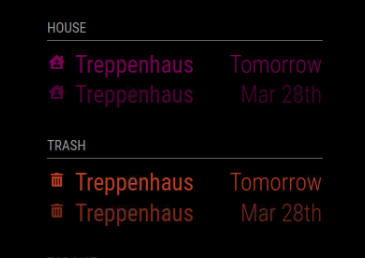
{
			module: "calendar",
			header: "House",
			position: "top_left",
			maximumEntries: "3",
			config: {
				colored: true,
				tableClass: "small",
				calendars: [
					{
                                                symbol: "fas fa-house-user",
                                                maximumEntries: "2",
                                                color: "rgb(121, 0, 86)",
                                                url: "https://calendar.google.com/calendar/ical/xxx/basic.ics"
                                        }
			                    ]
				}
		},
		{
                        module: "calendar",
                        header: "Trash",
                        position: "top_left",
                        maximumEntries: "3",
                        config: {
                                colored: true,
                                tableClass: "small",
                                calendars: [
                                        {
                                                symbol: "fas fa-trash",
                                                color: "rgb(185, 62, 38)",
                                                maximumEntries: "2",
                                                url: "https://calendar.google.com/calendar/ical/xxxxx/basic.ics"
                                        }
                                            ]
                                }
                },
Which will look like this

Hello! It looks like you're interested in this conversation, but you don't have an account yet.
Getting fed up of having to scroll through the same posts each visit? When you register for an account, you'll always come back to exactly where you were before, and choose to be notified of new replies (either via email, or push notification). You'll also be able to save bookmarks and upvote posts to show your appreciation to other community members.
With your input, this post could be even better 💗
Register Login