Read the statement by Michael Teeuw here.
Every few hours I get "ERROR:network_service_instance_impl.cc(916)] Network service crashed, restarting service"
-
63.4 C? Could be less!
I have now added one of these [1] to my RPI 3 and returned it to the enclosure (the “starter kit cabinet”).
The temperature is now 48-49 degrees centigrade after 30 min usage of MM.
So it reduces the temperature with ~14K - thats nice (if you don’t mind listening to a spinning fan which is actually fairly loud in at least 2 meters distance)…!I’ll try passive cooling later…
Oh! - and I had a 14 day uptime before powering off (the original reason for this thread :-)
[1] https://uk.rs-online.com/web/p/raspberry-pi-hats-add-ons/2020449
-
@TvE said in Every few hours I get "ERROR:network_service_instance_impl.cc(916)] Network service crashed, restarting service":
Oh! - and I had a 14 day uptime before powering off (the original reason for this thread
nice!!
-
@sdetweil Yeah - that’s perfect (and expected)
I really have (now stopped) wondering what happened initially :-)@thgmirror
I made a quick test where I have removed the power to the fan to see how much that changes the temperature (aka a passive cooling test).- After ca. one hour the temperature rises to a max of 57-58 degrees centigrades
- For the next hour the temperature is not rising any more
- Thus a reduction of ~6K
NB.: I have now removed the lid to see how big (small) a difference that makes
-
So - without the lid I get another 2K as - after 15 min - the temperature stabilized around 54-55 degrees centigrades
* Passive cooling lid on : 63 -> 58 = -5 * Passive cooling lid off : 63 -> 55 = -8 * Active cooling lid on : 63 -> 49 = -14 * Active cooling lid off : 63 -> 42 = -21 -
@TvE I am in the same spot as you.
Raspberry Pi 3b+
Fresh installed Raspbian Bullseye 11
Fresh install of MM with vanilla config and modules - crashes every minute and restarts itself. Are you saying that the config might be the problem?0|MagicMirror | Launching application. 0|MagicMirror | [18725:0322/102613.376542:ERROR:viz_main_impl.cc(161)] Exiting GPU process due to errors during initialization 0|MagicMirror | [18766:0322/102613.700219:ERROR:sandbox_linux.cc(376)] InitializeSandbox() called with multiple threads in process gpu-process. 0|MagicMirror | [22.03.2022 10:26.16.088] [LOG] 0|MagicMirror | Create new calendarfetcher for url: http://www.calendarlabs.com/ical-calendar/ics/76/US_Holidays.ics - Interval: 300000 0|MagicMirror | [22.03.2022 10:26.16.175] [LOG] 0|MagicMirror | Create new newsfetcher for url: https://rss.nytimes.com/services/xml/rss/nyt/HomePage.xml - Interval: 300000 0|MagicMirror | [22.03.2022 10:26.16.248] [INFO] 0|MagicMirror | Checking git for module: default 0|MagicMirror | [22.03.2022 10:26.17.014] [INFO] 0|MagicMirror | Newsfeed-Fetcher: Broadcasting 61 items. 0|MagicMirror | [22.03.2022 10:26.17.522] [INFO] 0|MagicMirror | Calendar-Fetcher: Broadcasting 10 events. 0|MagicMirror | [22.03.2022 10:27.33.823] [LOG] Shutting down server... 0|MagicMirror | [22.03.2022 10:27.33.833] [LOG] Stopping module helper: updatenotification 0|MagicMirror | [22.03.2022 10:27.33.835] [LOG] Stopping module helper: calendar 0|MagicMirror | [22.03.2022 10:27.33.848] [LOG] Stopping module helper: newsfeed 0|MagicMirror | [18692:0322/102733.909781:ERROR:zygote_communication_linux.cc(276)] Failed to send GetTerminationStatus message to zygote 0|MagicMirror | [18692:0322/102733.942607:ERROR:zygote_communication_linux.cc(276)] Failed to send GetTerminationStatus message to zygote 0|MagicMirror | [18692:0322/102733.958362:ERROR:network_service_instance_impl.cc(916)] Network service crashed, restarting service. 0|MagicMirror | [18692:0322/102733.974458:ERROR:gpu_process_host.cc(962)] GPU process launch failed: error_code=1002 0|MagicMirror | [18692:0322/102733.982862:ERROR:gpu_process_host.cc(962)] GPU process launch failed: error_code=1002 0|MagicMirror | [18692:0322/102733.989821:ERROR:gpu_process_host.cc(962)] GPU process launch failed: error_code=1002 0|MagicMirror | [18692:0322/102733.998527:ERROR:gpu_process_host.cc(962)] GPU process launch failed: error_code=1002 0|MagicMirror | > magicmirror@2.18.0 start 0|MagicMirror | > DISPLAY="${DISPLAY:=:0}" ./node_modules/.bin/electron js/electron.js 0|MagicMirror | [22.03.2022 10:27.42.385] [LOG] 0|MagicMirror | Starting MagicMirror: v2.18.0 0|MagicMirror | [22.03.2022 10:27.42.407] [LOG] 0|MagicMirror | Loading config ... 0|MagicMirror | [22.03.2022 10:27.42.421] [LOG] 0|MagicMirror | Loading module helpers ... 0|MagicMirror | [22.03.2022 10:27.42.427] [LOG] 0|MagicMirror | No helper found for module: alert. 0|MagicMirror | [22.03.2022 10:27.42.463] [LOG] -
@TvE That is my experimental setup:
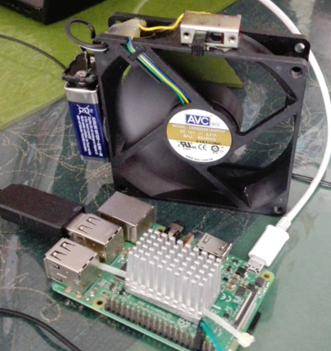
-
@Ivanov_d
Maybe we’re observing the same - currently it’s hard for me to tell.-
You surely have no heat issue (no additional cooling is needed - only to prolong the life of the RPI)
-
OS
As you hopefully have read in this thread I started with the same OS as you, then “downgraded” to the socalled “legacy” version and still saw the issues. then it suddenly stopped.
Thus I need to replace to the latest OS and retest
I have no logical reason to suspect the OS but I need to do the test to be 100% certain…
-
You can follow my test steps (using bisection - remove the handfull of external calls and see which triggers the problem)
-
My guess
So far I can only conclude that something external provoked the network stack to crash.
In the end of my testing () I had returned to my original config and no longer see problems
That something must relate to one of the two services I was using (part of the vanilla config)
UPDATE!!! - I just looked at my test and wow, this morning I had an error again (my test runs with the monitor turned off, thus I did not see this (I’m working on other tasks at the moment…).
Looking in the logs I see calendar related issues a few hours before the service stopped
My error occurred at [21.03.2022 22:39.02.219] in Denmark
Your error occurred at [22.03.2022 10:27.33.823] in US? (guess deduced from your config)
That way too close to just be a coincidence…I don’t know for how long you have been running your system, but I will now start to suspect that the root cause lies in the calendar service and we both are affected by the same root cause
I wonder if we can find another source for those data
(I now regret that I turned of tcpdump for my latest testing…)
stdout
[21.03.2022 22:34.06.084] [INFO]  Newsfeed-Fetcher: Broadcasting 20 items.
[21.03.2022 22:39.02.219] [LOG]   Shutting down server...
[21.03.2022 22:39.02.225] [LOG]   Stopping module helper: updatenotification
[21.03.2022 22:39.02.226] [LOG]   Stopping module helper: calendar
[21.03.2022 22:39.02.227] [LOG]   Stopping module helper: newsfeed
err
[21.03.2022 16:43.52.620] [WARN] ^[[33mYou're using a full whitelist configuration to allow for all IPs^[[39m [1002:0321/164356.019064:ERROR:viz_main_impl.cc(161)] Exiting GPU process due to errors during initialization [1040:0321/164356.860589:ERROR:sandbox_linux.cc(376)] InitializeSandbox() called with multiple threads in process gpu-process. [21.03.2022 17:37.30.487] [ERROR] Calendar Error. Could not fetch calendar: http://calendars.icloud.com/holidays/dk_da.ics FetchError: request to https://calendars.icloud.com/holidays/dk_da.ics failed, reason: connect ETIMEDOUT 17.248.150.146:443 at ClientRequest.<anonymous> (/home/pi/MagicMirror/node_modules/node-fetch/lib/index.js:1483:11) at ClientRequest.emit (node:events:394:28) at TLSSocket.socketErrorListener (node:_http_client:447:9) at TLSSocket.emit (node:events:394:28) at emitErrorNT (node:internal/streams/destroy:157:8) at emitErrorCloseNT (node:internal/streams/destroy:122:3) at processTicksAndRejections (node:internal/process/task_queues:83:21) { type: 'system', errno: 'ETIMEDOUT', code: 'ETIMEDOUT' } [21.03.2022 17:44.40.539] [ERROR] Calendar Error. Could not fetch calendar: http://calendars.icloud.com/holidays/dk_da.ics FetchError: request to https://calendars.icloud.com/holidays/dk_da.ics failed, reason: connect ETIMEDOUT 17.248.150.10:443 at ClientRequest.<anonymous> (/home/pi/MagicMirror/node_modules/node-fetch/lib/index.js:1483:11) at ClientRequest.emit (node:events:394:28) at TLSSocket.socketErrorListener (node:_http_client:447:9) at TLSSocket.emit (node:events:394:28) at emitErrorNT (node:internal/streams/destroy:157:8) at emitErrorCloseNT (node:internal/streams/destroy:122:3) at processTicksAndRejections (node:internal/process/task_queues:83:21) { type: 'system', errno: 'ETIMEDOUT', code: 'ETIMEDOUT' } [958:0321/223902.258167:ERROR:zygote_communication_linux.cc(276)] Failed to send GetTerminationStatus message to zygote [958:0321/223902.279012:ERROR:zygote_communication_linux.cc(276)] Failed to send GetTerminationStatus message to zygote -
-
@TvE it’s been running for 25 hours so far:
pm2 status MagicMirror
┌───────────────┬────┬─────────┬──────┬──────┬────────┬─────────┬────────┬─────┬──────────┬──────┬──────────┐
│ App name      │ id │ version │ mode │ pid  │ status │ restart │ uptime │ cpu │ mem      │ user │ watching │
├───────────────┼────┼─────────┼──────┼──────┼────────┼─────────┼────────┼─────┼──────────┼──────┼──────────┤
│   MagicMirror │ 0  │ 2.18.0  │ fork │ 2911 │ online │ 15      │ 25h    │ 0%  │ 2.7 MB   │ pi   │ disabled │
└───────────────┴────┴─────────┴──────┴──────┴────────┴─────────┴────────┴─────┴──────────┴──────┴──────────┘
I am still tweaking my config, however, my approach was the following:
- I updated from Rapbian Buster to Bullseye
- That broke my Raspberry Pi 3b+'s WiFi connection (seems like a known bug https://forums.raspberrypi.com/viewtopic.php?t=325484), so I removed connman package and installed network-manager and connected to the WiFi. If you install network-manager, you will also want to disable the MAC randomization:
To disable the WiFi MAC randomization, create the following file using the this command:
sudo nano /etc/NetworkManager/conf.d/100-disable-wifi-mac-randomization.confand paste the following content inside:
[connection]
wifi.mac-address-randomization=1
[device]
wifi.scan-rand-mac-address=no
Save the changes and continue.
- I backed up my MM config and modules folder and started with a fresh install of MM 2.18
- I started MM with the default config - no luck, it was crashing every minute
- I started removing the default modules and installing the ones that I had before
- I was observing the same behavior as you did - the default modules that needed network connection, when fetching data were breaking the network stack somehow … I edited the config to enter my calendar and newsfeed URLs and that seemed to fixed the issue. It might be something in the response of the default calendar and/or newsfeed … but that is just my speculation.
I also have pulled all the latest updates for every module that I had installed previously just to make sure that I am all up to date.
Ever since as you can see, my MM has been running steadily. Definitely not an SoC temp issue, since I never had anything than the stock aluminum radiators on the Pi and it has been running for 3-4 years 24/7 already.
I wouldn’t have decided to upgrade to bullseye if it was not a requirement for the new version of MMM-GoogleAssistant.
Anyways, I hope that this helps.
P.S. I am in Sofia, so the date/time in my log is GMT +02:00
-
@TvE I was jumping for joy way too soon. I took out my SD card to make a backup of it and when I put it back in, MagicMirror started restarting every other minute just like before. No changes were made whatsoever. I am now very confused …
-
Today I got a new error message “GPU process isn’t usable. Goodbye.”:
0|MagicMirror | [25.03.2022 16:21.17.187] [INFO] Checking git for module: MMM-homeassistant-sensors 0|MagicMirror | [25.03.2022 16:21.17.354] [INFO] 0|MagicMirror | Checking git for module: default 0|MagicMirror | [25.03.2022 16:22.15.459] [LOG] Shutting down server... 0|MagicMirror | [25.03.2022 16:22.15.464] [LOG] Stopping module helper: updatenotification 0|MagicMirror | [25.03.2022 16:22.15.466] [LOG] Stopping module helper: MMM-MyCalendar 0|MagicMirror | [25.03.2022 16:22.15.468] [LOG] Stopping module helper: MMM-DarkSkyForecast 0|MagicMirror | [25.03.2022 16:22.15.469] [LOG] Stopping module helper: newsfeed 0|MagicMirror | [25.03.2022 16:22.15.470] [LOG] Stopping module helper: MMM-GoogleAssistant 0|MagicMirror | [25.03.2022 16:22.15.472] [LOG] Stopping module helper: Gateway 0|MagicMirror | [25.03.2022 16:22.15.474] [LOG] Stopping module helper: EXT-Alert 0|MagicMirror | [25.03.2022 16:22.15.476] [LOG] Stopping module helper: EXT-Detector 0|MagicMirror | [25.03.2022 16:22.15.477] [LOG] Stopping module helper: MMM-Spotify 0|MagicMirror | [25.03.2022 16:22.15.479] [LOG] Stopping module helper: MMM-MyCommute 0|MagicMirror | [25.03.2022 16:22.15.480] [LOG] MMM-GoogleBirthdaysProvider: Stopping helper 0|MagicMirror | [25.03.2022 16:22.15.482] [LOG] Stopping module helper: MMM-homeassistant-sensors 0|MagicMirror | [16373:0325/162215.558435:ERROR:zygote_communication_linux.cc(276)] Failed to send GetTerminationStatus message to zygote 0|MagicMirror | [16373:0325/162215.603817:ERROR:zygote_communication_linux.cc(276)] Failed to send GetTerminationStatus message to zygote 0|MagicMirror | [16373:0325/162215.612830:ERROR:network_service_instance_impl.cc(916)] Network service crashed, restarting service. 0|MagicMirror | [16373:0325/162215.642076:ERROR:gpu_process_host.cc(962)] GPU process launch failed: error_code=1002 0|MagicMirror | [16373:0325/162215.660312:ERROR:gpu_process_host.cc(962)] GPU process launch failed: error_code=1002 0|MagicMirror | [16373:0325/162215.668549:ERROR:gpu_process_host.cc(962)] GPU process launch failed: error_code=1002 0|MagicMirror | [16373:0325/162215.678393:ERROR:gpu_process_host.cc(962)] GPU process launch failed: error_code=1002 0|MagicMirror | [16373:0325/162215.685640:ERROR:gpu_process_host.cc(962)] GPU process launch failed: error_code=1002 0|MagicMirror | [16373:0325/162215.692769:ERROR:gpu_process_host.cc(962)] GPU process launch failed: error_code=1002 0|MagicMirror | [16373:0325/162215.692890:FATAL:gpu_data_manager_impl_private.cc(417)] GPU process isn't usable. Goodbye. -
@Ivanov_d got no idea, but try this from web search
edit package.json
edit the “start” line
after electron add
--no-sandboxwith a space around it
-
I usually don’t do this and dig to the bottom of the problem, but this time I gave up and reverted back to Raspbian Buster and all my issues were solved. It seems that there are still some issues with RPi3b+ and Bullseye.
-
D dathbe referenced this topic on

Hello! It looks like you're interested in this conversation, but you don't have an account yet.
Getting fed up of having to scroll through the same posts each visit? When you register for an account, you'll always come back to exactly where you were before, and choose to be notified of new replies (either via email, or push notification). You'll also be able to save bookmarks and upvote posts to show your appreciation to other community members.
With your input, this post could be even better 💗
Register Login