MagicMirror Forum
    • Recent
    • Tags
    • Unsolved
    • Solved
    • MagicMirror² Repository
    • Documentation
    • 3rd-Party-Modules
    • Donate
    • Discord
    • Register
    • Login
    A New Chapter for MagicMirror: The Community Takes the Lead
    Read the statement by Michael Teeuw here.

    working module Raspberry Pi 4 and PIR?

    Scheduled Pinned Locked Moved Forum
    13 Posts 8 Posters 5.3k Views 8 Watching
    Loading More Posts
    • Oldest to Newest
    • Newest to Oldest
    • Most Votes
    Reply
    • Reply as topic
    Log in to reply
    This topic has been deleted. Only users with topic management privileges can see it.
    • D Offline
      DariBer
      last edited by

      I’m looking for a way (module) if possible to somehow black the screen and then light it up with a motion sensor (PIR) together with Raspberry Pi 4, if that’s not possible, then is there any module that works with RPi 4 that turn of the HDMI and turns on the HDMI port with motion sensor.

      I have tried some but seems it doesn’t work with RPi4.

      M H pugslyP 3 Replies Last reply Reply Quote 0
      • M Offline
        Murky3057 @DariBer
        last edited by

        @DariBer
        The simplest way to do this is to use a presence sensor that lights up lamps, and connect the sensor to the monitor’s power.
        When someone approaches it turns on, and turns off the monitor when no one is around.
        It can be done in other ways, but it will be much more complex.

        D 1 Reply Last reply Reply Quote 0
        • D Offline
          DariBer @Murky3057
          last edited by

          @Murky3057
          Not sure I understand you here.
          Could you please describe the thing with “connect the sensor to the monitor’s power”? You mean to connect the monitor to a remote witch like a zigbee or z-wave (or wifi) and power on/off that switch? So basic cut the power to the monitor?

          M 1 Reply Last reply Reply Quote 0
          • M Offline
            Murky3057 @DariBer
            last edited by

            @DariBer
            Yes, that’s what I imagined.
            To be as simple as possible.

            Sorry for my english, I’m using a translator.

            D 1 Reply Last reply Reply Quote 0
            • D Offline
              DariBer @Murky3057
              last edited by

              @Murky3057

              OK, I had that in mind, my problem is, when my monitor turnes on, it start some kind of splash screen that is pink/purple with Benq logo before it’s totally tuned on, I find that so annoying to see. That’s the reason I’m not going that path :)

              M 1 Reply Last reply Reply Quote 0
              • M Offline
                Murky3057 @DariBer
                last edited by

                @DariBer
                Another solution is to create a script to run the command “xset dpms force off” to turn off the monitor and “xset dpms force on” to turn it on.
                Use this video as an example to create something similar.

                https://youtu.be/Tw0mG4YtsZk

                bugsounetB 1 Reply Last reply Reply Quote 2
                • bugsounetB Offline
                  bugsounet Banned @Murky3057
                  last edited by

                  I give a lot of courage for find ;)

                  S 1 Reply Last reply Reply Quote 0
                  • S Do not disturb
                    sdetweil @bugsounet
                    last edited by

                    @bugsounet your standalone solution is archived, so not very helpful .

                    Sam

                    How to add modules

                    learning how to use browser developers window for css changes

                    bugsounetB 1 Reply Last reply Reply Quote -1
                    • bugsounetB Offline
                      bugsounet Banned @sdetweil
                      last edited by

                      @sdetweil because I’m kind ;)

                      I purpose to try this

                      Work with rpi 3a -> rpi 4
                      (not tested with rpi < 3a)
                      tested OS : Buster and Bulleyes

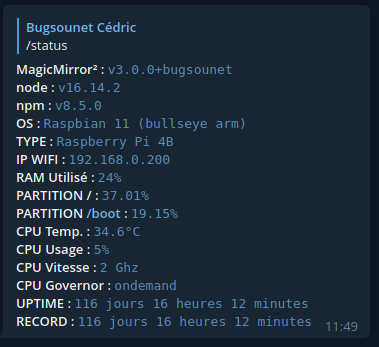
                      My actual config is:
                      ce5e8b4f-7673-489e-8d5c-876dec5e6954-image.png

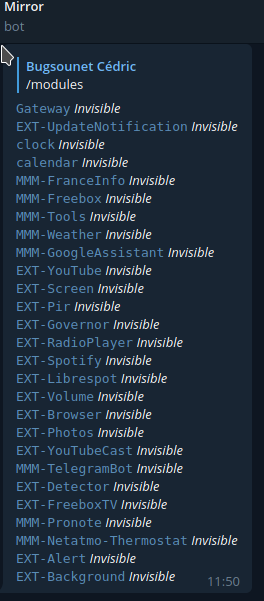
                      My actual modules and plugins are:
                      8037b242-a4ae-43b2-8c2e-89c7af1de8de-image.png

                      And works since 116 days on Bulleyes with an RPI 4 ;)

                      1 Reply Last reply Reply Quote 0
                      • H Offline
                        hpgraphia @DariBer
                        last edited by

                        @DariBer

                        https://github.com/paviro/MMM-PIR-Sensor
                        I’m using it with raspi zero W with sensor and works great

                        D 1 Reply Last reply Reply Quote 0
                        • D Offline
                          DariBer @hpgraphia
                          last edited by

                          @hpgraphia

                          how does your config.js file look like for that module?
                          Would you be kind and show it?

                          1 Reply Last reply Reply Quote 0
                          • E Offline
                            eracerhead
                            last edited by

                            I’ve done this by putting a relay directly in the backlight circuit. Connect the PIR to 5V and a gpio pin, and the relay to 5V and another GPIO pin. Use wiring pi and a simple bash script to get the state of the PIR and energize/de-energize the relay appropriately. It’s really simpler than it sounds and requires little to no knowledge of electronics.

                            You need to first install wiring-pi

                            sudo wget https://project-downloads.drogon.net/wiringpi-latest.deb
                            sudo dpkg -i wiringpi-latest.deb


                            Here’t the script I run at startup to control it - works great.

                            #!/bin/bash
                            #
                            # Runs in the background to switch backlight on or off
                            # depending upon the state of the PIR motion sensor.   
                            #
                            # Usage: nohup backlightd [-r|-f] 0<&- &>/dev/null &
                            # 	-r log on loghost
                            #	-f log locally (default)
                            #
                            # Set as configured
                            PIR=18		# GPIO BCM number of PIR sensor
                            BACKL=15	# GPIO BCM number of backlight relay
                            OFF_DEL=60	# Minimum number of seconds to keep backlight om
                            ON_DEL=2	# Minimum number of seconds to keep backlight off
                            TIMO=3600	# Maximum number of seconds to wait for edge event
                            #
                            # Set for local policies
                            PRIO=local.info 		# if using rsyslog set priority
                            TAG=backlightd			# and tag to use on loghost
                            LOGFILE=/var/log/backlightd.log	# if using local syslog file
                            
                            PATH=/bin:/usr/bin
                            
                            # error handling
                            xit() { rlog "Line $1 Err $2 - $3  - exiting"; exit "$2"; }
                            die() { rlog "Exit signal received - exiting"; exit 0; }
                            
                            # logging
                            case $1 in
                            	-r) rlog() { /usr/bin/logger -p "${PRIO}" -t "${TAG}" "$1"; } ;;
                            	 *) rlog() { /bin/echo "$1" >>"${LOGFILE}" ; } ;;
                            esac
                            
                            cd / || xit $LINENO $? "Cannot cd to / ?!?"
                            
                            reset(){
                            	# reset gpio pins, set initial conditions
                            	gpio edge "$PIR" both \
                            		|| xit $LINENO $? "Cannot set edge GPIO$PIR"
                            	gpio export "$BACKL" out \
                            		|| xit $LINENO $? "Cannot set export GPIO$BACKL"
                            	PIR_STATE=$(gpio -g read "$PIR") \
                            		|| xit $LINENO $? "Cannot read GPIO$PIR"
                            	gpio -g write "$BACKL" "$PIR_STATE" \
                            		|| xit $LINENO $? "Cannot write to GPIO$BACKL"
                            }
                            
                            trap reset SIGUSR1
                            trap die   SIGTERM 
                            
                            reset
                            
                            while true
                            do
                            	timeout "$TIMO" gpio -g wfi "$PIR" both ; STAT=$?
                            	if [ "$STAT" -eq 124 ]; then
                            		rlog "gpio wfi timed out after ${TIMO}s - respawning" 
                            		STAT=0
                            	fi
                            	[ "$STAT" ] || xit $LINENO $STAT "gpio wfi terminated abnormally"
                            	PIR_STATE=$(gpio -g read "$PIR") \
                            		|| xit $LINENO $? "Cannot read GPIO$PIR"
                            	gpio -g write "$BACKL" "$PIR_STATE" \
                            		|| xit $LINENO $? "Cannot write GPIO$PIR"
                            	if [ "$PIR_STATE"  ]
                            		then sleep "$ON_DEL" 
                            		else sleep "$OFF_DEL"
                            	fi
                            done
                            
                            
                            1 Reply Last reply Reply Quote 0
                            • pugslyP Offline
                              pugsly @DariBer
                              last edited by

                              @DariBer Please see this document… this is how I use my PIR to turn off the screen when no one is in front of it.

                              https://www.thedigitalpictureframe.com/pir-motion-sensor-raspberry-pi-digital-picture-frame/

                              1 Reply Last reply Reply Quote 0

                              Hello! It looks like you're interested in this conversation, but you don't have an account yet.

                              Getting fed up of having to scroll through the same posts each visit? When you register for an account, you'll always come back to exactly where you were before, and choose to be notified of new replies (either via email, or push notification). You'll also be able to save bookmarks and upvote posts to show your appreciation to other community members.

                              With your input, this post could be even better 💗

                              Register Login

                              • 1 / 1
                              • First post
                                Last post
                              Enjoying MagicMirror? Please consider a donation!
                              MagicMirror created by Michael Teeuw.
                              Forum managed by Sam, technical setup by Karsten.
                              This forum is using NodeBB as its core | Contributors
                              Contact | Privacy Policy