MagicMirror Forum
    • Recent
    • Tags
    • Unsolved
    • Solved
    • MagicMirror² Repository
    • Documentation
    • 3rd-Party-Modules
    • Donate
    • Discord
    • Register
    • Login
    A New Chapter for MagicMirror: The Community Takes the Lead
    Read the statement by Michael Teeuw here.

    Standard module Calendar hangs on events

    Scheduled Pinned Locked Moved Unsolved Troubleshooting
    30 Posts 2 Posters 11.1k Views 2 Watching
    Loading More Posts
    • Oldest to Newest
    • Newest to Oldest
    • Most Votes
    Reply
    • Reply as topic
    Log in to reply
    This topic has been deleted. Only users with topic management privileges can see it.
    • L Offline
      Laz @sdetweil
      last edited by

      @sdetweil My mirror starts automatically when the raspberry is turned on. If you write in more detail what needs to be done, I will try to follow your advice.

      S 1 Reply Last reply Reply Quote 0
      • S Offline
        sdetweil @Laz
        last edited by sdetweil

        @Laz what makes it autostart?

        pm2 or did u create a sustem service?

        if using pm2

        then
        pm2 logs --lines=100

        might work

        otherwise, probably better to do it manually

        stop mm however you would do it
        ctrl-alt-t to open a terminal window
        cd ~/MagicMirror
        npm start >somefile.txt 2>&1

        wait til you think mm should have refreshed the calendar

        press ctrl-q on the mm screen
        examine the contents of somefile.txt

        Sam

        How to add modules

        learning how to use browser developers window for css changes

        L 1 Reply Last reply Reply Quote 0
        • L Offline
          Laz @sdetweil
          last edited by

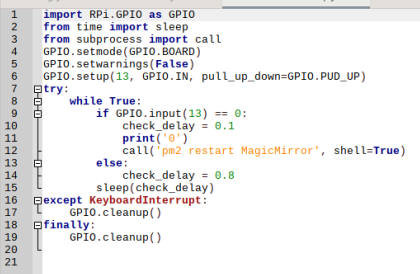
          @sdetweil To update the calendar after hanging, I used just a raspberry reboot. Then my friend helped me make a script to reboot only the mirror software itself.
          And I connected the button to the GPIO raspberry.
          The script is like this -
          a8b38506-bc3e-4f76-9b13-dd520aba9f0a-image.png

          S 1 Reply Last reply Reply Quote 0
          • S Offline
            sdetweil @Laz
            last edited by

            @Laz so you are using pm2

            Sam

            How to add modules

            learning how to use browser developers window for css changes

            1 Reply Last reply Reply Quote 0
            • L Offline
              Laz @sdetweil
              last edited by

              @sdetweil I set it according to this instruction -

              https://github.com/sdetweil/MagicMirror_scripts

              S 1 Reply Last reply Reply Quote 0
              • S Offline
                sdetweil @Laz
                last edited by

                @Laz yes, that is my set of scripts…

                anyhow, pm2’s job is to keep MM (or any other app it manages) running…

                but it also collects the output from those apps…

                SO you can use the pm2 command to print out the content it has already saved

                pm2 --help
                shows you all the things the command can do .

                pm2 logs

                will dump out the info saved
                the --lines=nn parameter will control how many lines of output to display… the default is just 15… so you may have to increase the number to get more of the output

                pm2 logs --lines=50 or --lines=100

                Sam

                How to add modules

                learning how to use browser developers window for css changes

                L 2 Replies Last reply Reply Quote 0
                • L Offline
                  Laz @sdetweil
                  last edited by

                  @sdetweil Thanks a lot!!!
                  Not everything is clear (Google translator…;))))))))))))))))
                  But I will try today or over the weekend to do everything you wrote and show you the results.

                  1 Reply Last reply Reply Quote 0
                  • L Offline
                    Laz @sdetweil
                    last edited by

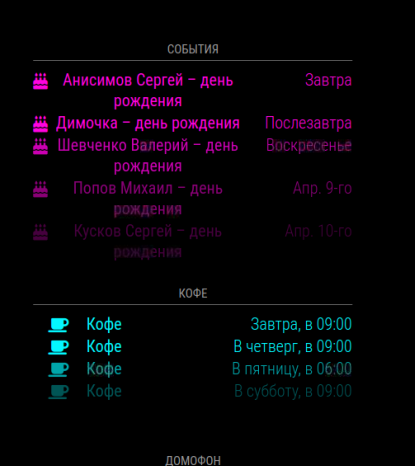
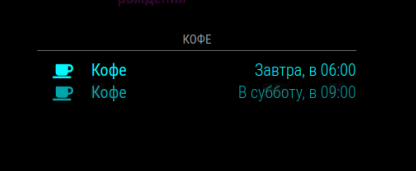
                    @sdetweil But I am afraid that the log file may not show an error at a particular moment. Because the hanging events of the blue calendar occur chaotically, not every day…
                    The pink calendar barely freezes in event updates.
                    I changed the arrangement of these calendars (one above the other), but it didn’t help for the blue calendar.

                    S 1 Reply Last reply Reply Quote 0
                    • S Offline
                      sdetweil @Laz
                      last edited by

                      @Laz the info, if any, will be in the log

                      you can also see the files holding the log info

                      in the ~/.pm2/logs folder (note the . in front of pm2 here)

                      Sam

                      How to add modules

                      learning how to use browser developers window for css changes

                      L 1 Reply Last reply Reply Quote 0
                      • L Offline
                        Laz @sdetweil
                        last edited by

                        @sdetweil Good afternoon!
                        I did not succeed in doing everything on your advice.
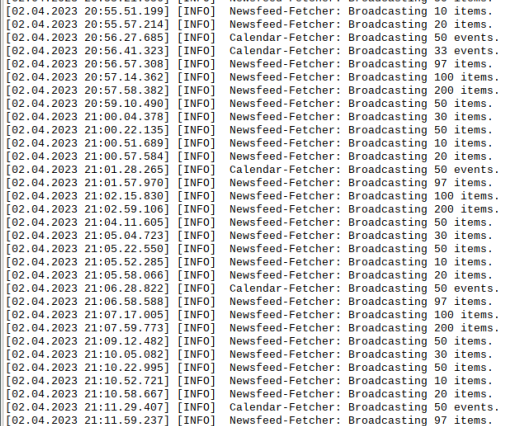
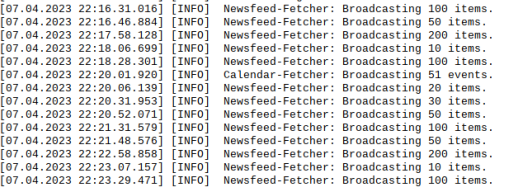
                        But I noticed that the blue calendar had not been updated for several days. And I looked at the log file.
                        It shows that until April 2, two calendars are being updated to 20.56.41. And after 21.01.28, only one calendar began to be updated. And so it was until I overloaded the mirror today.
                        I attach screenshots from the log file.
                        Screenshot_12.png

                        Screenshot_13.png

                        Screenshot_14.png

                        S 1 Reply Last reply Reply Quote 0
                        • S Offline
                          sdetweil @Laz
                          last edited by sdetweil

                          @Laz thanks. that’s the good info. how about the error log? I’m pretty sure there was a timeout error, and once errored, it never recovers.

                          but you should see the timeout error reported on the error log

                          Sam

                          How to add modules

                          learning how to use browser developers window for css changes

                          L 1 Reply Last reply Reply Quote 0
                          • L Offline
                            Laz @sdetweil
                            last edited by

                            @sdetweil

                            Good afternoon!
                            I couldn’t find any calendar related errors.
                            I can’t insert a txt file here. Changing the extension to a picture also does not go away.

                            S 1 Reply Last reply Reply Quote 0
                            • S Offline
                              sdetweil @Laz
                              last edited by

                              @Laz pic post is the image 3rd from the right on the ioc list above the reply editor

                              u can paste the text

                              please use code blocks around
                              paste
                              select all the text you just pasted
                              press the </> button

                              Sam

                              How to add modules

                              learning how to use browser developers window for css changes

                              L 1 Reply Last reply Reply Quote 0
                              • L Offline
                                Laz @sdetweil
                                last edited by

                                @sdetweil I wanted to insert the file. I copied a large piece from the error file into a separate file. It turned out 311 KB.
                                If you insert this here by copying, then there will be a lot.

                                S 1 Reply Last reply Reply Quote 0
                                • S Offline
                                  sdetweil @Laz
                                  last edited by

                                  @Laz yeh. forum is a pain some times…

                                  email to me, same userid at gmail

                                  Sam

                                  How to add modules

                                  learning how to use browser developers window for css changes

                                  L 1 Reply Last reply Reply Quote 0
                                  • L Offline
                                    Laz @sdetweil
                                    last edited by

                                    @sdetweil Yes, OK )

                                    S 1 Reply Last reply Reply Quote 0
                                    • S Offline
                                      sdetweil @Laz
                                      last edited by

                                      @Laz got it…

                                      there is the error

                                      [04.04.2023 20:12.18.185] [ERROR] Calendar Error. Could not fetch calendar:  https://calendar.google.com/calendar/ical/.....
                                      internal server error
                                      

                                      something happened at google…

                                      and more importantly

                                      [04.04.2023 20:06.53.607] [ERROR] Calendar Error. Could not fetch calendar:  https://calendar.google.com/calendar/ical/....
                                      ...
                                      failed, reason: getaddrinfo EAI_AGAIN calendar.google.com
                                          at ClientRequest.<anonymous> (/home/vova/MagicMirror/node_modules/node-fetch/lib/index.js:1491:11)
                                          at ClientRequest.emit (node:events:513:28)
                                          at TLSSocket.socketErrorListener (node:_http_client:481:9)
                                          at TLSSocket.emit (node:events:513:28)
                                          at emitErrorNT (node:internal/streams/destroy:157:8)
                                          at emitErrorCloseNT (node:internal/streams/destroy:122:3)
                                          at process.processTicksAndRejections (node:internal/process/task_queues:83:21) {
                                        type: 'system',
                                        errno: 'EAI_AGAIN',
                                        code: 'EAI_AGAIN'
                                      

                                      we can’t find a path to the server for this…
                                      all outside the pi… so no idea we can’t fix it…
                                      but we keep trying (so that is good)

                                      do you run a pihole ad blocker system? seen this a lot when pihole has a problem

                                      Sam

                                      How to add modules

                                      learning how to use browser developers window for css changes

                                      L 1 Reply Last reply Reply Quote 0
                                      • L Offline
                                        Laz @sdetweil
                                        last edited by

                                        @sdetweil Yes, I see mistakes now… (
                                        They last more than an hour in the records and then apparently the requests stop.
                                        There is no ad blocker on raspberries. There is just a standard image and then a mirror is installed with a minimum of additional modules.
                                        I noticed in the errors that there is an error of my two calendars. Perhaps at some point really Google becomes unavailable…
                                        Of course, I don’t turn to the calendar so often on my phone and computer.
                                        But today, before loading the mirror, I noticed that the blue calendar has not been updated since April 4. Just the errors are dated April 4th. It turns out that when there are many errors, the module stops accessing the calendar? After all, it cannot be that Google was not available for so many days…

                                        S 1 Reply Last reply Reply Quote 0
                                        • S Offline
                                          sdetweil @Laz
                                          last edited by

                                          @Laz the EAI_AGAIN error is a networking error…

                                          the library we use does the work , nothing in our code…
                                          the code needs to get the IP address of the server to connect
                                          it looks up the name to get the address
                                          this failed… name not found

                                          thats all we got… “we can’t look this up now, please try again”
                                          no idea where in the network from the pi outward what error caused the failure

                                          Sam

                                          How to add modules

                                          learning how to use browser developers window for css changes

                                          L 5 Replies Last reply Reply Quote 0
                                          • L Offline
                                            Laz @sdetweil
                                            last edited by

                                            @sdetweil I will try to make ping permanent to these addresses (if Google allows ping) or contact the Internet provider.

                                            1 Reply Last reply Reply Quote 0

                                            Hello! It looks like you're interested in this conversation, but you don't have an account yet.

                                            Getting fed up of having to scroll through the same posts each visit? When you register for an account, you'll always come back to exactly where you were before, and choose to be notified of new replies (either via email, or push notification). You'll also be able to save bookmarks and upvote posts to show your appreciation to other community members.

                                            With your input, this post could be even better 💗

                                            Register Login

                                            • 1
                                            • 2
                                            • 1 / 2
                                            • First post
                                              Last post
                                            Enjoying MagicMirror? Please consider a donation!
                                            MagicMirror created by Michael Teeuw.
                                            Forum managed by Sam, technical setup by Karsten.
                                            This forum is using NodeBB as its core | Contributors
                                            Contact | Privacy Policy