MagicMirror Forum
    • Recent
    • Tags
    • Unsolved
    • Solved
    • MagicMirror² Repository
    • Documentation
    • 3rd-Party-Modules
    • Donate
    • Discord
    • Register
    • Login
    A New Chapter for MagicMirror: The Community Takes the Lead
    Read the statement by Michael Teeuw here.

    Raspberry Pi Zero W for Magic Mirror

    Scheduled Pinned Locked Moved Hardware
    79 Posts 10 Posters 57.7k Views 11 Watching
    Loading More Posts
    • Oldest to Newest
    • Newest to Oldest
    • Most Votes
    Reply
    • Reply as topic
    Log in to reply
    This topic has been deleted. Only users with topic management privileges can see it.
    • A Offline
      Arno123 @sdetweil
      last edited by

      @sdetweil This works an absolute treat, thank you!

      S 1 Reply Last reply Reply Quote 1
      • S Offline
        sdetweil @Arno123
        last edited by

        @Arno123 awesome!

        Sam

        How to add modules

        learning how to use browser developers window for css changes

        1 Reply Last reply Reply Quote 0
        • mariosgourosM Offline
          mariosgouros
          last edited by

          Mine works with a pi zero w 2 and I am very satisfied with the way it performs. I followed the official procedure as described in the forums and got it working on buster os desktop which is essential for some modules. Used to run the project on pi zero w with buster os lite and for basic and simple stuff the project used to run fine minus some lags when refreshing modules but nothing special.
          As I decided to run more demanding modules running pi zero w 2 was the only solution to keep the project small and low cost. For the modules I am using I’m for than satisfied with the way it performs.
          Anyway, all I can confirm is that magic mirror on pi zero w 2 with buster os desktop can perform nice.

          1 Reply Last reply Reply Quote 0
          • JakobudJ Offline
            Jakobud
            last edited by

            I recently got a RPi Zero 2W and installed Raspberry Pi OS (latest legacy version from the RPi Imager) and then installed MM2 using the script (which worked really well). But Chromium will not run for me. Everything I read says that Chromium will not work on the RPi Zero 2 because it’s not fast enough or doesn’t have enough memory. Chromium absolutely will not start on mine. What am I missing here?

            S 1 Reply Last reply Reply Quote 0
            • S Offline
              sdetweil @Jakobud
              last edited by

              @Jakobud hm… try the not legacy image, runs great on my pi02w

              legacy really for armv6l

              are you using the full image?

              Sam

              How to add modules

              learning how to use browser developers window for css changes

              JakobudJ 1 Reply Last reply Reply Quote 0
              • JakobudJ Offline
                Jakobud @sdetweil
                last edited by

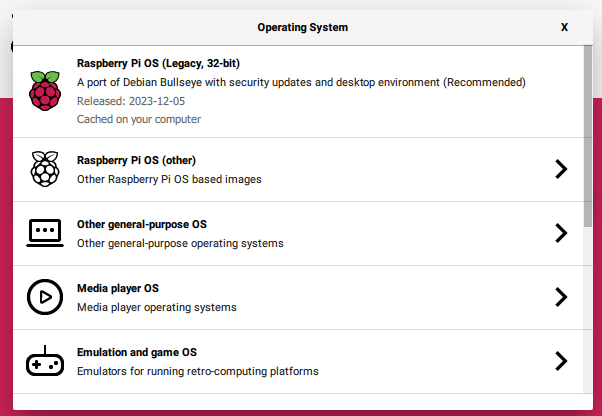
                After choosing RPi Zero 2 W it recommends this one to me, which is what I used. What version should I be using instead exactly?
                d03f256d-fde0-46b6-beed-5fb6dc9dcec7-image.png

                S 1 Reply Last reply Reply Quote 0
                • S Offline
                  sdetweil @Jakobud
                  last edited by

                  @Jakobud I don’t use the raspberry imager cause of problems and this filtering

                  I use the list and then image myself
                  https://www.raspberrypi.com/software/operating-systems/#raspberry-pi-os-64-bit

                  Sam

                  How to add modules

                  learning how to use browser developers window for css changes

                  JakobudJ 1 Reply Last reply Reply Quote 0
                  • JakobudJ Offline
                    Jakobud @sdetweil
                    last edited by

                    @sdetweil Okay which one do you use specifically?

                    S 1 Reply Last reply Reply Quote 0
                    • S Offline
                      sdetweil @Jakobud
                      last edited by

                      @Jakobud the top one on that page

                      Sam

                      How to add modules

                      learning how to use browser developers window for css changes

                      D 1 Reply Last reply Reply Quote 0
                      • D Offline
                        davidgagne @sdetweil
                        last edited by

                        @sdetweil I am ripping my hair out trying to get MM running on a Pi Zero W. I’ve followed all of your (super helpful) suggestions across multiple posts, but no matter what I do, I keep getting:

                        [PM2][ERROR] File ecosystem.config.js not found
                        

                        any time I try to execute pm2 start.

                        I’ve run your upgrade / update scripts from github, I’ve removed Chromium and replaced it with Firefox, I’ve uninstalled and reinstalled ten different flavors of the PiOS, I’ve tried the MagicMirrorOS that someone else posted, etc. All with no luck.

                        Do you have any ideas what could be the problem here?

                        Thanks in advance,
                        dvg

                        S 1 Reply Last reply Reply Quote 0
                        • S Offline
                          sdetweil @davidgagne
                          last edited by

                          @davidgagne said in Raspberry Pi Zero 2 W for Magic Mirror:

                          File ecosystem.config.js no found

                          well, I haven’t seen that…, BUT it sounds like from a google search thgat you have the wrong node js version installed…

                          but

                          flash the sd card… its a pi02W, a 3 in pi0 form factor

                          then run my install script. don’t dop anything else first

                          you can try to see if you can fixup pm2 first…

                          pm2 stop all
                          pm2 status
                          this will display a line

                          pi@raspberrypi42:~ $ pm2 status
                          ┌────┬────────────────────┬──────────┬──────┬───────────┬──────────┬──────────┐
                          │ id │ name               │ mode     │ ↺    │ status    │ cpu      │ memory   │
                          ├────┼────────────────────┼──────────┼──────┼───────────┼──────────┼──────────┤
                          │ 0  │ MagicMirror        │ fork     │ 0    │ online    │ 0%       │ 2.7mb    │
                          └────┴────────────────────┴──────────┴──────┴───────────┴──────────┴──────────┘
                          

                          you can use the name or number on any line

                          pm2 delete 0
                          pm2 save -f
                          then run
                          bash -c “$(curl -sL https://raw.githubusercontent.com/sdetweil/MagicMirror_scripts/master/fixuppm2.sh)”

                          to recreate the app in pm2.

                          lets see…

                          else redo the install as above

                          Sam

                          How to add modules

                          learning how to use browser developers window for css changes

                          D 1 Reply Last reply Reply Quote 1
                          • D Offline
                            davidgagne @sdetweil
                            last edited by

                            @sdetweil said in Raspberry Pi Zero 2 W for Magic Mirror:

                            flash the sd card… its a pi02W, a 3 in pi0 form factor

                            I’m sorry but I don’t understand what this means. Which PiOS should I flash? I have been trying with the Legacy, 32-bit.

                            (If it makes a difference, I actually have a Raspberry Pi Zero W Rev 1.1. I don’t think it’s a 2.)

                            Thank you!

                            S 1 Reply Last reply Reply Quote 0
                            • S Offline
                              sdetweil @davidgagne
                              last edited by

                              @davidgagne ok, if it IS a pi0W, then 32 bit legacy image

                              flash sd card, boot to the desktop, use terminal window or ssh

                              then my install script.

                              they have removed the chromium browser, for armv6l, so you will have to use firefox or one of the others… midori or surf

                              so YOU MUST use the environment variable in
                              ~/MagicMirror/installers/mm.sh to set the browser to use ( all have to be installed manually)

                              Sam

                              How to add modules

                              learning how to use browser developers window for css changes

                              D 1 Reply Last reply Reply Quote 0
                              • D Offline
                                davidgagne @sdetweil
                                last edited by

                                @sdetweil Okay. I’m doing this right now.

                                1. Flashed card with Legacy 32-bit.
                                2. Connected via ssh to run your script.
                                  bash -c  "$(curl -sL https://raw.githubusercontent.com/sdetweil/MagicMirror_scripts/master/raspberry.sh)"
                                  

                                  Answered yes to disable screen saver and use pm2 questions.

                                3. Removed chromium with:
                                  sudo apt-get remove chromium-browser
                                  sudo apt autoremove
                                  
                                4. Added Firefox with:
                                  sudo apt-get update
                                  sudo apt-get install firefox-esr
                                  
                                5. Enabled VNC using sudo raspi-config GUI
                                6. Connect via TigerVNC
                                7. Edit mm.sh via VNC in Pi's baked-in text editor by adding:
                                  cd ~/MagicMirror
                                  export external_browser=firefox
                                  DISPLAY=:0 npm start
                                  
                                8. sudo reboot

                                9. Connect via ssh
                                10. cd MagicMirror
                                  pm2 start MagicMirror
                                  
                                11. And now -- finally! -- some progress:
                                  [PM2] Spawning PM2 daemon with pm2_home=/home/dvg/.pm2
                                  [PM2] PM2 Successfully daemonized
                                  [PM2][ERROR] Script not found: /home/dvg/MagicMirror/MagicMirror
                                  

                                So … now what have I done wrong? What script is missing?

                                S 1 Reply Last reply Reply Quote 0
                                • S Offline
                                  sdetweil @davidgagne
                                  last edited by

                                  @davidgagne well…

                                  it seems the pm2 setup failed for some reason

                                  can you send me the ~/install.log

                                  my same userid at Gmail.

                                  you didn’t have to vnc to edit, nano works over ssh.

                                  because the pm2 setup was not completed,
                                  when you did pm2 start from the MagicMirror folder, it was trying to create the app MagicMirror command
                                  /home/username/MagicMirror/MagicMirror

                                  can you try to run the fixuppm2 script from my scripts page

                                  Sam

                                  How to add modules

                                  learning how to use browser developers window for css changes

                                  D 1 Reply Last reply Reply Quote 0
                                  • D Offline
                                    davidgagne @sdetweil
                                    last edited by

                                    @sdetweil Here’s what I got after running your fixup script:

                                    [PM2] Applying action restartProcessId on app [MagicMirror](ids: [ 0 ])
                                    [PM2] [MagicMirror](0) ✓
                                    ┌────┬────────────────┬─────────────┬─────────┬─────────┬──────────┬────────┬──────┬───────────┬──────────┬──────────┬──────────┬──────────┐
                                    │ id │ name           │ namespace   │ version │ mode    │ pid      │ uptime │ ↺    │ status    │ cpu      │ mem      │ user     │ watching │
                                    ├────┼────────────────┼─────────────┼─────────┼─────────┼──────────┼────────┼──────┼───────────┼──────────┼──────────┼──────────┼──────────┤
                                    │ 0  │ MagicMirror    │ default     │ 2.27.0  │ fork    │ 27952    │ 0s     │ 1    │ online    │ 0%       │ 2.5mb    │ dvg      │ enabled  │
                                    └────┴────────────────┴─────────────┴─────────┴─────────┴──────────┴────────┴──────┴───────────┴──────────┴──────────┴──────────┴──────────┘
                                    [PM2] Saving current process list...
                                    [PM2] Successfully saved in /home/dvg/.pm2/dump.pm2
                                    

                                    I’ll email install.log to you as soon as I can figure out how to … find and copy the install log.

                                    S 2 Replies Last reply Reply Quote 0
                                    • S Offline
                                      sdetweil @davidgagne
                                      last edited by

                                      @davidgagne and MagicMirror should have come up using firefox

                                      Sam

                                      How to add modules

                                      learning how to use browser developers window for css changes

                                      D 1 Reply Last reply Reply Quote 0
                                      • S Offline
                                        sdetweil @davidgagne
                                        last edited by sdetweil

                                        @davidgagne said in Raspberry Pi Zero 2 W for Magic Mirror:

                                        I’ll email install.log to you as soon as I can figure out how to … find and copy the install log.

                                        you should install one of the windows ssh clients tools. Winscp or Bitvise ssh clients.
                                        they provide the typical ssh terminal AND also a windows file manager view of the remote system.
                                        so you can double click to edit on windows and automatically save the file back.

                                        bitvise also provides drag and drop file copy support to/from the remote system… for logs and credential files

                                        I use notepad++ or visual studio code to edit on windows.

                                        such a time saver!!

                                        Sam

                                        How to add modules

                                        learning how to use browser developers window for css changes

                                        D 1 Reply Last reply Reply Quote 0
                                        • D Offline
                                          davidgagne @sdetweil
                                          last edited by

                                          @sdetweil I am not going to bother sending you the install log because it worked!

                                          It took a long time to launch, but now I can see MagicMirror running when I VNC into the Pi.

                                          After running your fixuppm2 script I executed pm2 start MagicMirror and got this:

                                          [PM2] Applying action restartProcessId on app [MagicMirror](ids: [ 0 ])
                                          [PM2] [MagicMirror](0) ✓
                                          [PM2] Process successfully started
                                          ┌────┬────────────────┬─────────────┬─────────┬─────────┬──────────┬────────┬──────┬───────────┬──────────┬──────────┬──────────┬──────────┐
                                          │ id │ name           │ namespace   │ version │ mode    │ pid      │ uptime │ ↺    │ status    │ cpu      │ mem      │ user     │ watching │
                                          ├────┼────────────────┼─────────────┼─────────┼─────────┼──────────┼────────┼──────┼───────────┼──────────┼──────────┼──────────┼──────────┤
                                          │ 0  │ MagicMirror    │ default     │ 2.27.0  │ fork    │ 28553    │ 0s     │ 2    │ online    │ 0%       │ 2.5mb    │ dvg      │ disabled │
                                          └────┴────────────────┴─────────────┴─────────┴─────────┴──────────┴────────┴──────┴───────────┴──────────┴──────────┴──────────┴──────────┘
                                          

                                          Now when I VNC into the Pi I see it running! So far the date and time is the only thing correctly displaying, but at least now MagicMirror is running. Thank you!

                                          S 2 Replies Last reply Reply Quote 0
                                          • S Offline
                                            sdetweil @davidgagne
                                            last edited by

                                            @davidgagne I am interested in the log to see why the inline pm2 setup failed.

                                            yes, pi0w is not fast.

                                            the default calendar and weather take configuration before they produce output.

                                            Sam

                                            How to add modules

                                            learning how to use browser developers window for css changes

                                            D 1 Reply Last reply Reply Quote 0

                                            Hello! It looks like you're interested in this conversation, but you don't have an account yet.

                                            Getting fed up of having to scroll through the same posts each visit? When you register for an account, you'll always come back to exactly where you were before, and choose to be notified of new replies (either via email, or push notification). You'll also be able to save bookmarks and upvote posts to show your appreciation to other community members.

                                            With your input, this post could be even better 💗

                                            Register Login

                                            • 1
                                            • 2
                                            • 3
                                            • 4
                                            • 1 / 4
                                            • First post
                                              Last post
                                            Enjoying MagicMirror? Please consider a donation!
                                            MagicMirror created by Michael Teeuw.
                                            Forum managed by Sam, technical setup by Karsten.
                                            This forum is using NodeBB as its core | Contributors
                                            Contact | Privacy Policy