Read the statement by Michael Teeuw here.
Raspberry Pi Zero W for Magic Mirror
-
@funkdafied I cannot recreate this…
try this to increase the timeout
You can extend timeout with those two commands:

npm config set fetch-retry-maxtimeout 6000000
npm config set fetch-retry-mintimeout 1000000
enter image description here

Source: https://docs.npmjs.com/cli/v9/using-npm/config#fetch-retry-maxtimeout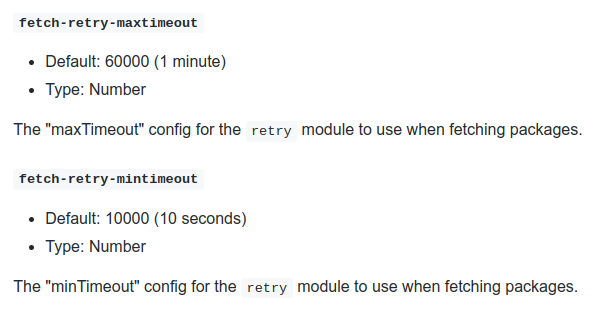
-
@sdetweil Thank you that did the trick. Only issue I see to be running into at the moment is Midori telling me it can’t find the page it is looking for.
-
@funkdafied ok,
when you run on a device that doesn’t have electron support, it doesn’t get installed via MM as expected…
then my install script changes the startup to use my run-start.sh script
which launches MagicMirror in server mode
and waits for the ready message>>> Ready to go! Please point your browser to: http://0.0.0.0:8080 <<<and then launches midori like this (with whatever the port number is in the message)
midori http://localhost:8080 -e Fullscreen -e Navigationbarjust for grins can you do
cd ~/MagicMirror
npm start server
to see if that message appears
-
@funkdafied I think we solved this on discord
-
S schris88 referenced this topic on
-
I made a magic mirror in my college time using Raspberry pi 3b+
Integrated google assistant with youtube play also in it.
Now i am graduated and doing job from past 2 years, i am thinking to build one for my home.
Raspberry pi 4 and 5 are expensive, does raspberry pi zero works?
Will google assistant work on it? And youtube also will work on it?
If not youtube, will spotify work on it using pi zero
Which raspberry pi zero will you recommend me
-
@Mayank-Arora you need the pi0-2w at minimum and a fast sd card
The google assistant module is no longer available
Most of the MagicMirror modules for Spotify are display only,
You need the raspotify system service to play ON the PI
YouTube might work, but you have no voice control without GA -
Hi,
i’m new to magicmirror,but i’m not able to install it on my raspberry pi zero 2w.
What i did:
-Flashed sd with raspberry pi image, choosing the desktop 64 bit version of raspberry pi os
-Inserted sd to raspberry pi zero 2w
-Installed dphys-swapfile to increase swap to 1 gb
-rebooted raspberry pi zero 2w
-Without any apt-update, i just ran the raspberry.sh script from sdetweil repo here
https://github.com/sdetweil/MagicMirror_scriptsUnfortunately,it tooks lot of time installing dependencies,more or less 1 hour, this sometimes cause my wifi connection to drop also, due to high i/o.
Is this a normal scenario?could be this due to a bad sd card?
thanks! -
@roberto84 I do not know. I just installed 64 bit on 02w last week. It is fragile due to the low memory and increased swapping
I can get the surf browser up, but it doesn’t update clock tick on seconds
So I think the 32bit image is the only choice, maybe back to legacy
-
@sdetweil thanks for reply!
So at the end ,retrying several times,I was able to install everything with your script.
I installed pm2 also when asked,then I was able to see the default magic mirror display with calendar and so on.
Unfortunately this occurred only first time,then at first reboot ,I see from pm2 logs that everything starts,but what I obtain its only a black screen with no modules loaded…
Those are some error logs on ps2 when I run ps2 Magic mirror start[4086:0104/075509.190939:ERROR:content/browser/network_service_instance_impl.cc:613] Network service crashed, restarting service.
[4086:0104/075554.525130:ERROR:content/browser/network_service_instance_impl.cc:613] Network service crashed, restarting service.
[1381:0104/082529.351804:ERROR:content/browser/network_service_instance_impl.cc:613] Network service crashed, restarting service.
[1381:0104/082634.504111:ERROR:content/browser/network_service_instance_impl.cc:613] Network service crashed, restarting service.But at the end it starts as you can notice from out logs
[2026-01-04 08:24:33.145] [LOG] [app] Sockets connected & modules started …
[2026-01-04 08:24:39.175] [LOG] [electron] Launching application.
[2026-01-04 08:26:37.186] [INFO] [utils]System Information
- SYSTEM: manufacturer: Raspberry Pi Foundation; model: Raspberry Pi Zero 2 W Rev 1.0; virtual: false; MM: 2.34.0
- OS: platform: linux; distro: Debian GNU/Linux; release: 13; arch: arm64; kernel: 6.12.47+rpt-rpi-v8
- VERSIONS: electron: 39.2.7; used node: 22.21.1; installed node: 22.21.1; npm: 10.9.4; pm2: 6.0.14
- ENV: XDG_SESSION_TYPE: tty; MM_CONFIG_FILE: undefined
WAYLAND_DISPLAY: wayland-0; DISPLAY: undefined; ELECTRON_ENABLE_GPU: undefined - RAM: total: 416.15 MB; free: 173.97 MB; used: 242.18 MB
- OTHERS: uptime: 4 minutes; timeZone: Europe/Rome
this is output of pm2 show MagicMirror
Divergent env variables from local env
┌────────────────┬────────────────────────────────────┐
│ PWD │ /home/pi │
│ SSH_CONNECTION │ 192.168.1.14 47702 192.168.1.27 22 │
│ TERM │ screen.xterm-256color │
│ SHLVL │ 3 │
│ XDG_SESSION_ID │ 16 │
│ SSH_CLIENT │ 192.168.1.14 47702 22 │
└────────────────┴────────────────────────────────────┘Also ps2 status report MagicMirror online.
One important thing is that I can see MagicMirror contents correctly via the IP on Port 8080
What else can I try?
I also run your fixuppm.sh script ,but nothing changed.
Thanks in advance! -
The fixuppm2 script just adds pm2 to start if you didn’t do it at install time
as I said it fragile.
I think you have to try using s smaller browser
Like surfSee the section of the readme at the bottom
But I think the only solution is going back to the 32 bit pi os image
